

在 Startup ConfigureServices 注册本地化所需要的服务AddLocalization和 Configure<RequestLocalizationOptions>
public void ConfigureServices(IServiceCollection services)
{
    services.AddLocalization();
    services.Configure<RequestLocalizationOptions>(options =>
    {
        var supportedCultures = new List<CultureInfo>
        {
            new CultureInfo("en-us"),
            new CultureInfo("zh-cn")
        };

        options.DefaultRequestCulture = new RequestCulture(culture: "en-us", uiCulture: "en-us");
        options.SupportedCultures = supportedCultures;
        options.SupportedUICultures = supportedCultures;
        options.RequestCultureProviders = new IRequestCultureProvider[] { new RouteDataRequestCultureProvider { IndexOfCulture = 1, IndexofUiCulture = 1 } };
    });
    services.Configure<RouteOptions>(options =>
    {
        options.ConstraintMap.Add("culture", typeof(LanguageRouteConstraint));
    });
    services.AddControllers();
}
在 Startup.cs 类的 Configure 方法中添加请求本地化中间件。
var localizeOptions = app.ApplicationServices.GetService<IOptions<RequestLocalizationOptions>>();
            app.UseRequestLocalization(localizeOptions.Value);
RequestCultureProvider 它使用简单的委托来确定当前的本地化区域性,当然我们还可以通过RequestCultureProvider自定义源的请求区域信息比如说配置文件或者数据库都是可以的.或者说我们可以选用默认的一些方式让我们去获取到当前区域.
ASP.NET Core 本地化默认向我们提供了四个方式,可用于确定正在执行的请求的当前区域性:
- QueryStringRequestCultureProvider
- CookieRequestCultureProvider
- AcceptLanguageHeaderRequestCultureProvider
- CustomRequestCultureProvider
如下所示我将通过路由的方式,去确定当前区域
public class RouteDataRequestCultureProvider : RequestCultureProvider
{
    public int IndexOfCulture;
    public int IndexofUiCulture;

    public override Task<ProviderCultureResult> DetermineProviderCultureResult(HttpContext httpContext)
    {
        if (httpContext == null)
            throw new ArgumentNullException(nameof(httpContext));
        string uiCulture;

        string culture = uiCulture = httpContext.Request.Path.Value.Split('/')[IndexOfCulture];

        var providerResultCulture = new ProviderCultureResult(culture, uiCulture);

        return Task.FromResult(providerResultCulture);
    }
}
通过如下代码片段实现 IRouteConstraint 对路由做相应的约束
public class LanguageRouteConstraint : IRouteConstraint
{
    public bool Match(HttpContext httpContext, IRouter route, string routeKey, RouteValueDictionary values, RouteDirection routeDirection)
    {

        if (!values.ContainsKey("culture"))
            return false;

        var culture = values["culture"].ToString();
        return culture == "en-us" || culture == "zh-cn";
    }
}
添加区域资源文件

[Route("{culture:culture}/[controller]")]
[ApiController]
public class HomeController : ControllerBase
{
    private readonly IStringLocalizer<Resource> localizer;
    public HomeController(IStringLocalizer<Resource> localizer)
    {
        this.localizer = localizer;
    }
    public string Get()
    {
        return localizer["Home"];
    }
}
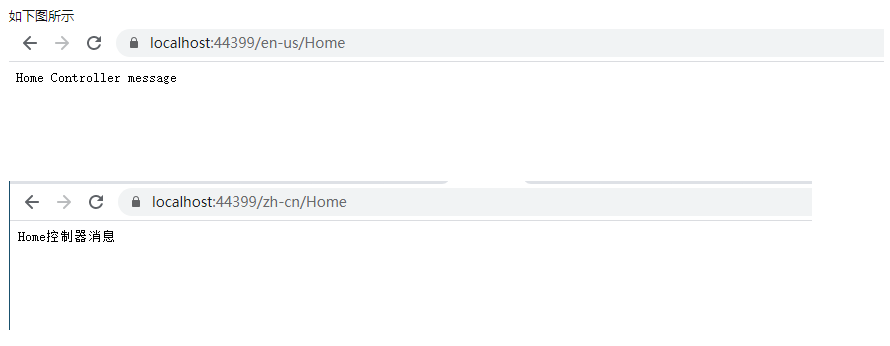
Reference:https://github.com/hueifeng/BlogSample/tree/master/src/LocalizationSingleResx