

前言
从 2017 年 11 月 11 号在 GitHub 创建EasyCaching这个仓库,到现在也已经将近一年半的时间了,基本都是在下班之后和假期在完善这个项目。
由于 EasyCaching 目前只有英文的文档托管在 Read the Docs 上面,当初选的 MkDocs 现在还不支持多语言,所以这个中文的要等它支持之后才会有计划。
之前在群里有看到过有人说没找到 EasyCaching 的相关介绍,这也是为什么要写这篇博客的原因。
下面就先简单介绍一下 EasyCaching。
什么是 EasyCaching

EasyCaching,这个名字就很大程度上解释了它是做什么的,easy 和 caching 放在一起,其最终的目的就是为了让我们大家在操作缓存的时候更加的方便。
它的发展大概经历了这几个比较重要的时间节点:
- 18 年 3 月,在茶叔的帮助下进入了 NCC
- 19 年 1 月,镇汐提了很多改进意见
- 19 年 3 月,NopCommerce 引入 EasyCaching (可以看这个 commit 记录)
- 19 年 4 月,列入awesome-dotnet-core(自己提 pr 过去的,有点小自恋。。)
在 EasyCaching 出来之前,大部分人应该会对CacheManager比较熟悉,因为两者的定位和功能都差不多,所以偶尔会听到有朋友拿这两个去对比。
为了大家可以更好的进行对比,下面就重点介绍 EasyCaching 现有的功能了。
EasyCaching 的主要功能
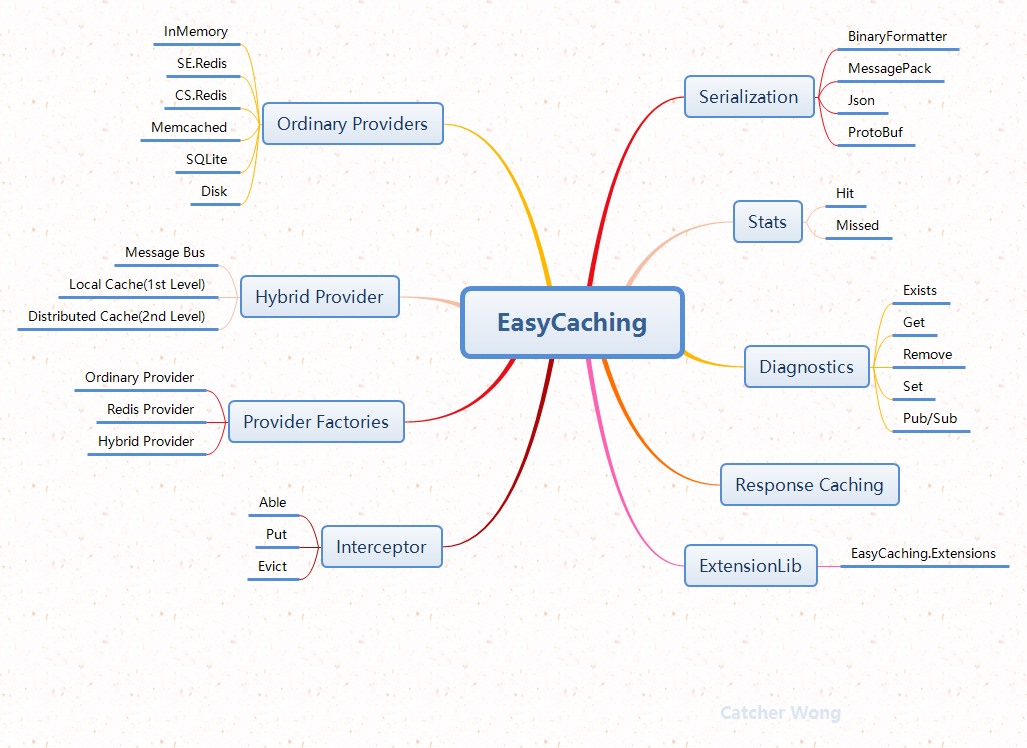
EasyCaching 主要提供了下面的几个功能
- 统一的抽象缓存接口
- 多种常用的缓存 Provider(InMemory,Redis,Memcached,SQLite)
- 为分布式缓存的数据序列化提供了多种选择
- 二级缓存
- 缓存的 AOP 操作(able, put,evict)
- 多实例支持
- 支持 Diagnostics
- Redis 的特殊 Provider
当然除了这 8 个还有一些比较小的就不在这里列出来说明了。
下面就分别来介绍一下上面的这 8 个功能。
统一的抽象缓存接口
缓存,本身也可以算作是一个数据源,也是包含了一堆 CURD 的操作,所以会有一个统一的抽象接口。面向接口编程,虽然 EasyCaching 提供了一些简单的实现,不一定能满足您的需要,但是呢,只要你愿意,完全可以一言不合就实现自己的 provider。
对于缓存操作,目前提供了下面几个,基本都会有同步和异步的操作。
- TrySet/TrySetAsync
- Set/SetAsync
- SetAll/SetAllAsync
- Get/GetAsync(with data retriever)
- Get/GetAsync(without data retriever)
- GetByPrefix/GetByPrefixAsync
- GetAll/GetAllAsync
- Remove/RemoveAsync
- RemoveByPrefix/RemoveByPrefixAsync
- RemoveAll/RemoveAllAsync
- Flush/FlushAsync
- GetCount
- GetExpiration/GetExpirationAsync
- Refresh/RefreshAsync(这个后面会被废弃,直接用 set 就可以了)
从名字的定义,应该就可以知道它们做了什么,这里就不继续展开了。
多种常用的缓存 Provider
我们会把这些 provider 分为两大类,一类是本地缓存,一类是分布式缓存。
目前的实现有下面五个
- 本地缓存,InMemory,SQLite
- 分布式缓存,StackExchange.Redis,csredis,EnyimMemcachedCore
它们的用法都是十分简单的。下面以 InMemory 这个 Provider 为例来说明。
首先是通过 nuget 安装对应的包。
dotnet add package EasyCaching.InMemory
其次是添加配置
public void ConfigureServices(IServiceCollection services)
{
    // 添加EasyCaching
    services.AddEasyCaching(option =>
    {
        // 使用InMemory最简单的配置
        option.UseInMemory("default");

        //// 使用InMemory自定义的配置
        //option.UseInMemory(options =>
        //{
        //     // DBConfig这个是每种Provider的特有配置
        //     options.DBConfig = new InMemoryCachingOptions
        //     {
        //         // InMemory的过期扫描频率,默认值是60秒
        //         ExpirationScanFrequency = 60,
        //         // InMemory的最大缓存数量, 默认值是10000
        //         SizeLimit = 100
        //     };
        //     // 预防缓存在同一时间全部失效,可以为每个key的过期时间添加一个随机的秒数,默认值是120秒
        //     options.MaxRdSecond = 120;
        //     // 是否开启日志,默认值是false
        //     options.EnableLogging = false;
        //     // 互斥锁的存活时间, 默认值是5000毫秒
        //     options.LockMs = 5000;
        //     // 没有获取到互斥锁时的休眠时间,默认值是300毫秒
        //     options.SleepMs = 300;
        // }, "m2");

        //// 读取配置文件
        //option.UseInMemory(Configuration, "m3");
    });
}

public void Configure(IApplicationBuilder app, IHostingEnvironment env, ILoggerFactory loggerFactory)
{
    // 如果使用的是Memcached或SQLite,还需要下面这个做一些初始化的操作
    app.UseEasyCaching();
}
配置文件的示例
"easycaching": {
    "inmemory": {
        "MaxRdSecond": 120,
        "EnableLogging": false,
        "LockMs": 5000,
        "SleepMs": 300,
        "DBConfig":{
            "SizeLimit": 10000,
            "ExpirationScanFrequency": 60
        }
    }
}
关于配置,这里有必要说明一点,那就是
MaxRdSecond的值,因为这个把老猫子大哥坑了一次,所以要拎出来特别说一下,这个值的作用是预防在同一时刻出现大批量缓存同时失效,为每个 key 原有的过期时间上面加了一个随机的秒数,尽可能的分散它们的过期时间,如果您的应用场景不需要这个,可以将其设置为 0。
最后的话就是使用了。
[Route("api/[controller]")]
public class ValuesController : Controller
{
    // 单个provider的时候可以直接用IEasyCachingProvider
    private readonly IEasyCachingProvider _provider;

    public ValuesController(IEasyCachingProvider provider)
    {
        this._provider = provider;
    }

    // GET api/values/sync
    [HttpGet]
    [Route("sync")]
    public string Get()
    {
        var res1 = _provider.Get("demo", () => "456", TimeSpan.FromMinutes(1));
        var res2 = _provider.Get<string>("demo");

        _provider.Set("demo", "123", TimeSpan.FromMinutes(1));

        _provider.Remove("demo");

        // others..
        return "sync";
    }

    // GET api/values/async
    [HttpGet]
    [Route("async")]
    public async Task<string> GetAsync(string str)
    {
        var res1 = await _provider.GetAsync("demo", async () => await Task.FromResult("456"), TimeSpan.FromMinutes(1));
        var res2 = await _provider.GetAsync<string>("demo");

        await _provider.SetAsync("demo", "123", TimeSpan.FromMinutes(1));

        await _provider.RemoveAsync("demo");

        // others..
        return "async";
    }
}
还有一个要注意的地方是,如果用的 get 方法是带有查询的,它在没有命中缓存的情况下去数据库查询前,会有一个加锁操作,避免一个 key 在同一时刻去查了 n 次数据库,这个锁的生存时间和休眠时间是由配置中的LockMs和SleepMs决定的。
分布式缓存的序列化选择
对于分布式缓存的操作,我们不可避免的会遇到序列化的问题.
目前这个主要是针对 redis 和 memcached 的。当然,对于序列化,都会有一个默认的实现是基于BinaryFormatter,因为这个不依赖于第三方的类库,如果没有指定其他的,就会使用这个去进行序列化的操作了。
除了这个默认的实现,还提供了三种额外的选择。Newtonsoft.Json,MessagePack 和 Protobuf。下面以在 Redis 的 provider 使用 MessagePack 为例,来看看它的用法。
services.AddEasyCaching(option=>
{
    // 使用redis
    option.UseRedis(config =>
    {
        config.DBConfig.Endpoints.Add(new ServerEndPoint("127.0.0.1", 6379));
    }, "redis1")
    // 使用MessagePack替换BinaryFormatter
    .WithMessagePack()
    //// 使用Newtonsoft.Json替换BinaryFormatter
    //.WithJson()
    //// 使用Protobuf替换BinaryFormatter
    //.WithProtobuf()
    ;
});
不过这里需要注意的是,目前这些 Serializer 并不会跟着 Provider 走,意思就是不能说这个 provider 用 messagepack,那个 provider 用 json,只能有一种 Serializer,可能这一个后面需要加强。
多实例支持
可能有人会问多实例是什么意思,这里的多实例主要是指,在同一个项目中,同时使用多个 provider,包括多个同一类型的 provider 或着是不同类型的 provider。
这样说可能不太清晰,再来举一个虚构的小例子,可能大家就会更清晰了。
现在我们的商品缓存在 redis 集群一中,用户信息在 redis 集群二中,商品评论缓存在 mecached 集群中,一些简单的配置信息在应用服务器的本地缓存中。
在这种情况下,我们想简单的通过IEasyCachingProvider来直接操作这么多不同的缓存,显然是没办法做到的!
这个时候想同时操作这么多不同的缓存,就要借助IEasyCachingProviderFactory来指定使用那个 provider。
这个工厂是通过 provider 的名字来获取要使用的 provider。
下面来看个例子。
我们先添加两个不同名字的 InMemory 缓存
services.AddEasyCaching(option =>
{
    // 指定当前provider的名字为m1
    option.UseInMemory("m1");

    // 指定当前provider的名字为m2
    config.UseInMemory(options =>
    {
        options.DBConfig = new InMemoryCachingOptions
        {
            SizeLimit = 100
        };
    }, "m2");
});
使用的时候
[Route("api/[controller]")]
public class ValuesController : Controller
{
    private readonly IEasyCachingProviderFactory _factory;

    public ValuesController(IEasyCachingProviderFactory factory)
    {
        this._factory = factory;
    }

    // GET api/values
    [HttpGet]
    [Route("")]
    public string Get()
    {
        // 获取名字为m1的provider
        var provider_1 = _factory.GetCachingProvider("m1");
        // 获取名字为m2的provider
        var provider_2 = _factory.GetCachingProvider("m2");

        // provider_1.xxx
        // provider_2.xxx

        return $"multi instances";
    }
}
上面这个例子中,provider_1 和 provider_2 是不会互相干扰对方的,因为它们是不同的 provider!
直观感觉,有点类似区域(region)的概念,可以这样去理解,但是严格意义上它并不是区域。
缓存的 AOP 操作
说起 AOP,可能大家第一印象会是记录日志操作,把参数打一下,结果打一下。
其实这个在缓存操作中同样有简化的作用。
一般情况下,我们可能是这样操作缓存的。
public async Task<Product> GetProductAsync(int id)
{
    string cacheKey = $"product:{id}";

    var val = await _cache.GetAsync<Product>(cacheKey);

    if(val.HasValue)
        return val.Value;

    var product = await _db.GetProductAsync(id);

    if(product != null)
        _cache.Set<Product>(cacheKey, product, expiration);

    return val;
}
如果使用缓存的地方很多,那么我们可能就会觉得烦锁。
我们同样可以使用 AOP 来简化这一操作。
public interface IProductService
{
    [EasyCachingAble(Expiration = 10)]
    Task<Product> GetProductAsync(int id);
}

public class ProductService : IProductService
{
    public Task<Product> GetProductAsync(int id)
    {
        return Task.FromResult(new Product { ... });
    }
}
可以看到,我们只要在接口的定义上面加上一个 Attribute 标识一下就可以了。
当然,只加 Attribute,不加配置,它也是不会生效的。下面以EasyCaching.Interceptor.AspectCore为例,添加相应的配置。
public IServiceProvider ConfigureServices(IServiceCollection services)
{
    services.AddScoped<IProductService, ProductService>();

    services.AddEasyCaching(options =>
    {
        options.UseInMemory("m1");
    });

    return services.ConfigureAspectCoreInterceptor(options =>
    {
        // 可以在这里指定你要用那个provider
        // 或者在Attribute上面指定
        options.CacheProviderName = "m1";
    });
}
这两步就可以让你在调用方法的时候优先取缓存,没有缓存的时候会去执行方法。
下面再来说一下三个 Attribute 的一些参数。
首先是三个通用配置
| 配置名 | 说明 |
|---|---|
| CacheKeyPrefix | 指定生成缓存键的前缀,正常情况下是用在修改和删除的缓存上 |
| CacheProviderName | 可以指定特殊的 provider 名字 |
| IsHightAvailability | 缓存相关操作出现异常时,是否还能继续执行业务方法 |
EasyCachingAble 和 EasyCachingPut 还有一个同名的配置。
| 配置名 | 说明 |
|---|---|
| Expiration | key 的过期时间,单位是秒 |
EasyCachingEvict 有两个特殊的配置。
| 配置名 | 说明 |
|---|---|
| IsAll | 这个要搭配 CacheKeyPrefix 来用,就是删除这个前缀的所有 key |
| IsBefore | 在业务方法执行之前删除缓存还是执行之后 |
支持 Diagnostics
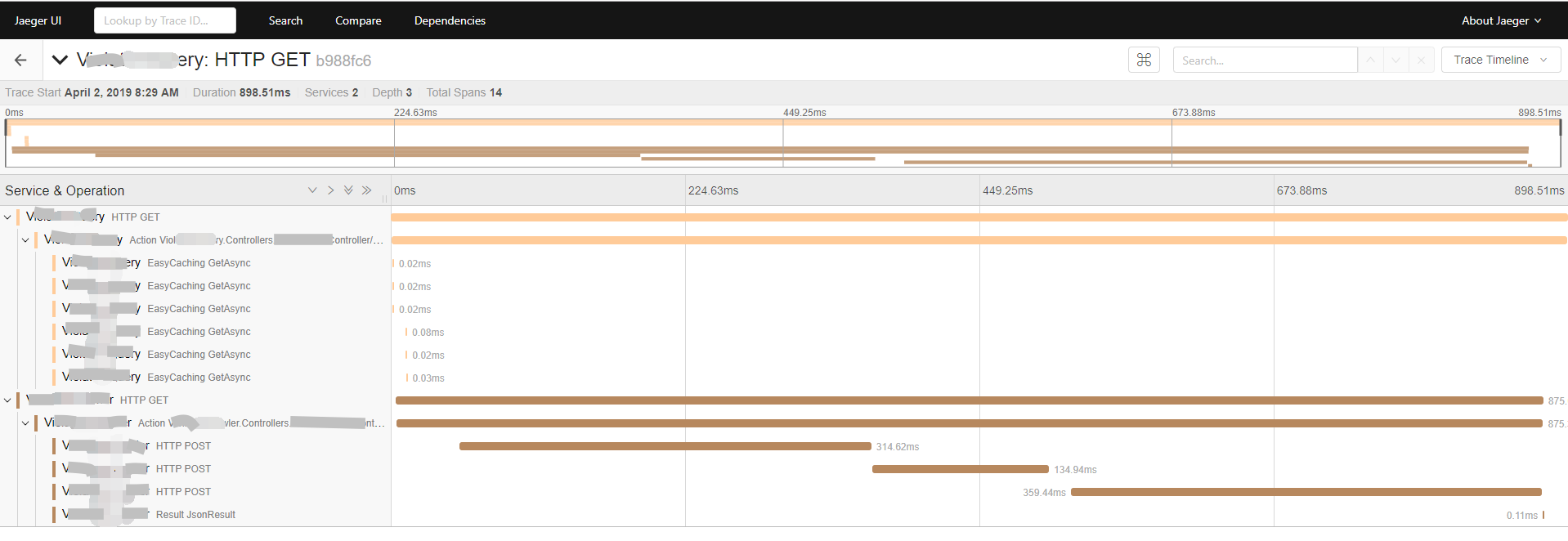
为了方便接入第三方的 APM,提供了 Diagnostics 的支持,便于实现追踪。
下图是我司接入 Jaeger 的一个案例。
二级缓存
二级缓存,多级缓存,其实在缓存的小世界中还算是一个比较重要的东西!
一个最为头疼的问题就是不同级的缓存如何做到近似实时的同步。
在 EasyCaching 中,二级缓存的实现逻辑大致就是下面的这张图。
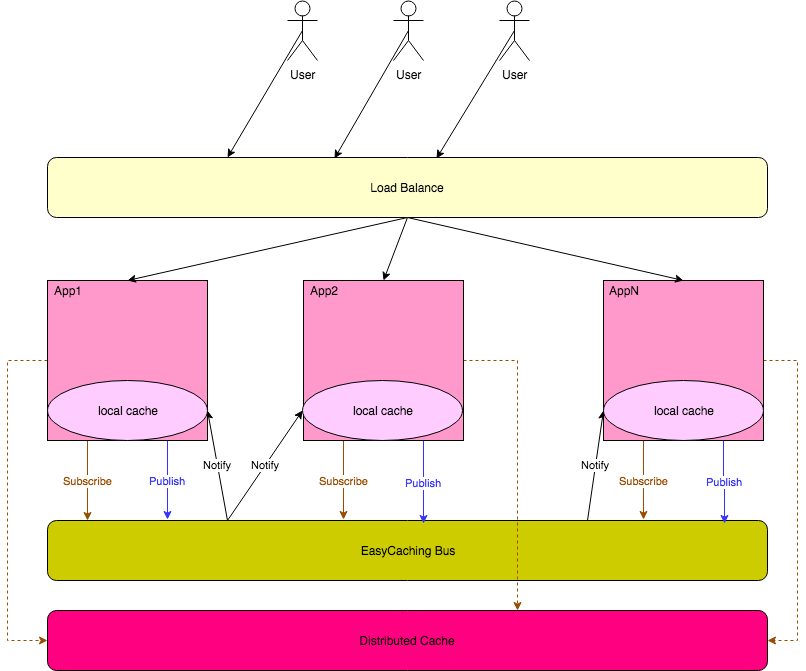
如果某个服务器上面的本地缓存被修改了,就会通过缓存总线去通知其他服务器把对应的本地缓存移除掉。
下面来看一个简单的使用例子。
首先是添加 nuget 包。
dotnet add package EasyCaching.InMemory
dotnet add package EasyCaching.Redis
dotnet add package EasyCaching.HybridCache
dotnet add package EasyCaching.Bus.Redis
其次是添加配置。
services.AddEasyCaching(option =>
{
    // 添加两个基本的provider
    option.UseInMemory("m1");
    option.UseRedis(config =>
    {
        config.DBConfig.Endpoints.Add(new Core.Configurations.ServerEndPoint("127.0.0.1", 6379));
        config.DBConfig.Database = 5;
    }, "myredis");

    //  使用hybird
    option.UseHybrid(config =>
    {
        config.EnableLogging = false;
        // 缓存总线的订阅主题
        config.TopicName = "test_topic";
        // 本地缓存的名字
        config.LocalCacheProviderName = "m1";
        // 分布式缓存的名字
        config.DistributedCacheProviderName = "myredis";
    });

    // 使用redis作为缓存总线
    option.WithRedisBus(config =>
    {
        config.Endpoints.Add(new Core.Configurations.ServerEndPoint("127.0.0.1", 6379));
        config.Database = 6;
    });
});
最后就是使用了。
[Route("api/[controller]")]
public class ValuesController : Controller
{
    private readonly IHybridCachingProvider _provider;

    public ValuesController(IHybridCachingProvider provider)
    {
        this._provider = provider;
    }

    // GET api/values
    [HttpGet]
    [Route("")]
    public string Get()
    {
        _provider.Set(cacheKey, "val", TimeSpan.FromSeconds(30));

        return $"hybrid";
    }
}
如果觉得不清楚,可以再看看这个完整的例子EasyCachingHybridDemo。
Redis 的特殊 Provider
大家都知道 redis 支持多种数据结构,还有一些原子递增递减的操作等等。为了支持这些操作,EasyCaching 提供了一个独立的接口,IRedisCachingProvider。
这个接口,目前也只支持了百分之六七十常用的一些操作,还有一些可能用的少的就没加进去。
同样的,这个接口也是支持多实例的,也可以通过IEasyCachingProviderFactory来获取不同的 provider 实例。
在注入的时候,不需要额外的操作,和添加 Redis 是一样的。不同的是,在使用的时候,不再是用IEasyCachingProvider,而是要用IRedisCachingProvider。
下面是一个简单的使用例子。
[Route("api/mredis")]
public class MultiRedisController : Controller
{
    private readonly IRedisCachingProvider _redis1;
    private readonly IRedisCachingProvider _redis2;

    public MultiRedisController(IEasyCachingProviderFactory factory)
    {
        this._redis1 = factory.GetRedisProvider("redis1");
        this._redis2 = factory.GetRedisProvider("redis2");
    }

    // GET api/mredis
    [HttpGet]
    public string Get()
    {
        _redis1.StringSet("keyredis1", "val");

        var res1 = _redis1.StringGet("keyredis1");
        var res2 = _redis2.StringGet("keyredis1");

        return $"redis1 cached value: {res1}, redis2 cached value : {res2}";
    }
}
除了这些基础功能,还有一些扩展性的功能,在这里要非常感谢yrinleung,他把 EasyCaching 和 WebApiClient,CAP 等项目结合起来了。感兴趣的可以看看这个项目EasyCaching.Extensions。
写在最后
以上就是 EasyCaching 目前支持的一些功能特性,如果大家在使用的过程中有遇到问题的话,希望可以积极的反馈,帮助 EasyCaching 变得越来越好。
如果您对这个项目有兴趣,可以在 GitHub 上点个 Star,也可以加入我们一起进行开发和维护。
前段时间开了一个Issue用来记录正在使用 EasyCaching 的相关用户和案例,如果您正在使用 EasyCaching,并且不介意透露您的相关信息,可以在这个 Issue 上面回复。

如果您认为这篇文章还不错或者有所收获,可以点击右下角的**【推荐】**按钮,因为你的支持是我继续写作,分享的最大动力!
来源:http://catcher1994.cnblogs.com/
声明: 本文版权归作者和博客园共有,欢迎转载,但未经作者同意必须保留此段声明,且在文章页面明显位置给出原文连接,否则保留追究法律责任的权利。如果您发现博客中出现了错误,或者有更好的建议、想法,请及时与我联系!!如果想找我私下交流,可以私信或者加我微信。