

最近,博主为 FakeRPC 增加了 WebSocket 协议的支持。这意味着,我们可以借助其全双工通信的特性,在一个连接请求内发送多条数据。FakeRPC 目前最大的遗憾是,建立在 HTTP 协议上而不是 TCP/IP 协议上。因此,考虑 WebSocket 协议,更多的是为了验证 JSON-RPC 的可行性,以及为接下来的要支持的 TCP/IP 协议铺路。也许,你从未意识到这些概念间千丝万缕的联系,可如果我们把每一次 RPC 调用都理解为一组消息,你是不是就能更加深刻地理解 RPC 这个稍显古老的事物了呢?在编写 FakeRPC 的过程中,我使用了 .NET 中的全新数据结构 Channel 来实现消息的转发。以服务端为例,每一个 RPC 请求经过 CallInvoker 处理以后,作为 RPC 响应的结果其实并不是立即发回给客户端,而是通过一个后台线程从 Channel 取出消息再发回客户端。 那么,博主为什么要舍近求远呢?我希望,这篇文章可以告诉你答案。
Channel 入门
Channel 是微软在 .NET Core 3.0 以后推出的新的集合类型,该类型位于 System.Threading.Channels 命名空间下,具有异步 API 、高性能、线程安全等等的特点。目前,Channel 最主要的应用场景是生产者-消费者模型。如下图所示,生产者负责向队列中写入数据,消费者负责从队列中读出数据。在此基础上,通过增加生产者或者消费者的数目,对这个模型做进一步的扩展。我们平时使用到的 RabbitMQ 或者 Kafka,都可以认为是生产者-消费者模型在特定领域内的一种应用,甚至于我们还能从中读出一点广义上的读写分离的味道。
 生产者-消费者模型示意图
罗曼·罗兰曾说过,世界上只有一种真正的英雄主义,那就是在认清生活的真相后,依然热爱生活。此时此刻,看着眼前的这幅示意图若有所思,你也许会想到下面的做法:
class Producer<T>
{
    private readonly Queue<T> _queue;
    public Producer(Queue<T> queue) { _queue = queue; }
}

class Consumer<T>
{
    private readonly Queue<T> _queue;
    public Consumer(Queue<T> queue) { _queue = queue; }
}
我承认,这个思路理论上是没有问题的,可惜实际操作起来槽点满满。譬如,生产者应该只负责写,消费者应该只负责读,可当你亲手把一个队列传递给它们的时候,想要保持这种职责上的纯粹属实是件困难的事情,更不必说,在使用队列的过程中,生产者会有队列“满”的忧虑,消费者会有队列“空”的烦恼,如果再考虑多个生产者、多个消费者、多线程/锁等等的因素,显然,这并不是一个简单的问题。为了解决这个问题,微软先后增加了 BlockingCollection 和 BufferBlock 两种数据结构,这里以前者为例,下面是一个典型的生产者-消费者模型:
var bc = new BlockingCollection<int>();

// 生产者
var producer = Task.Run(() => {
    for (var i = 0; i < Count; i++) {
        bc.Add(i);
        Console.WriteLine("Producer Write Item: {0}", i);
    }
    bc.CompleteAdding();
});

// 消费者
var consumer = Task.Run(() => {
    while (!bc.IsCompleted) {
        if (bc.TryTake(out var item)) {
            Console.WriteLine("Consumer Read Item: {0}", item);
        }
    }
});

await Task.WhenAll(producer, consumer);
可以注意到,现在我们再去实现一个生产者-消费者模型,其难度基本为零。与此同时,BlockingCollection<T> 和 BufferBlock<T> 都是线程安全的集合,这可以让我们在多线程环境下更加得心应手。回想我过去的种种经历,每当我需要使用那些线程信号量进行线程同步的时候,我都不得不小心翼翼地在 Bug 边缘游走。那么,你也许会问,既然我们已经有 BlockingCollection<T> 和 BufferBlock<T> 这样的数据结构,为什么我们还需要 Channel 呢?作为一名最普通不过的程序员,有无数多个 Bug 随着时间的推移都慢慢消失了,而那些曾经令我们殚精竭虑的问题,同样在被不停地刷新着答案。
 BlockingCollection、BufferBlock、Channel 的性能对比
如图所示,我们测试了读写 10000 条数据的场景下,三种数据结构各自的性能表现,显而易见 Channel 的性能是最好的,所以,你告诉我,这到底算不算一个理由,难道还有什么东西比性能更令人兴奋的吗?当你的电脑显卡不能带你领略刺客信条的“神话三部曲”,甚至连在本机部署 Stable Diffusion 都变成一种奢望的时候,你不得不承认,这一点点微不足道的性能优化,是这个预言摩尔定律将会失效的时代里,所剩无几的匠心独运。
// 创建一个有限容量的 Channel
var boundedChannel = Channel.CreateBounded<int>(100);

// 创建一个无限容量的 Channel
var unboundedChannel = Channel.CreateUnbounded<string>();
好了,对于 Channel 我们该从哪里开始说起呢? 可以注意到,创建一个 Channel 是非常简单的,除非你打算创建的是一个有限容量的 Channel。还记得我们一开始提出的问题吗?在生产者-消费者模型中,一个容量有限的固定,一定会无可避免地出现队列“满”的情形,此时,我们就需要制定某种策略或者机制来完善整个模型。对于这个问题,Channel 的解决方案是 BoundedChannelFullMode :
var boundedChannel = Channel.CreateBounded<string>(
    new BoundedChannelOptions(100) {
        FullMode = BoundedChannelFullMode.Wait
});
注意到,这是一个枚举类型,事实上,它共有 Wait、DropNewest、DropOldest、DropWrite 四个取值,默认为 Wait。其中:
- Wait:当队列已满时,写入数据时会返回
false,直到队列内有空间时可以继续写入。 - DropNewest:移除最新的数据,即从队列尾部开始移除元素。
- DropOldest:移除最旧的数据,即从队列头部开始移除元素。
- DropWrite:可以写入数据,但是数据会被立即丢弃。
除了队列“满”或者队列“空”的问题,我们还考虑过多线程环境下的生产者-消费者模型可能会遇到的问题。值得庆幸的是, Channel 天生就支持多线程,我们可以通过 ChannelOptions 的 SingleWriter 和 SingleReader 来指定 Channel 是否是单一的消费者或者生产者,默认情况下,这两个值都是 false :
var boundedChannel = Channel.CreateBounded<string>(
    new BoundedChannelOptions(100) {
        SingleWriter = true,
        SingleReader = false,
        FullMode = BoundedChannelFullMode.Wait
});
例如,通过以上代码片段,我们就可以创建出一个单生产者、多消费者的 Channel ,对于 Channel 而言,其最重要的两个成员分别是 Writer 和 Reader , 前者对应生产者,类型定义为:ChannelWriter<T>;后者对应消费者,类型定义为:ChannelReader<T>,这一次,我们做到了真正意义上的读写分离:
// 生产者生产数据
channel.Writer.TryWrite("大漠孤烟直,长河落日圆。");

// 消费者消费数据
// 模式一:一次读一个
while (await channel.Reader.WaitToReadAsync())
{
    while (channel.Reader.TryRead(out var item))
    {
        // 在这里写具体的处理逻辑
    }
}

// 模式二:一次全部读出来
while (await channel.Reader.WaitToReadAsync())
{
    await foreach (var item in channel.Reader.ReadAllAsync())
    {
        // 在这里写具体的处理逻辑
    }
}
也许,你对这个话题意犹未尽,可我不得不非常遗憾的告诉你,这就是 Channel 最为核心的用法了。怎么样,是不是感觉非常简单?这的确符合微软一贯的作风,即:让一个复杂的东西变得简单好用。关于 Channel 更多的细节,这里不再赘述,大家可以去阅读官方文档。我发誓,MSDN 和 MDN 是我见过写得最好的文档。
Channel 应用
OK,在对 Channel 有了一个基本的印象后,我们来看看它在具体场景中的应用。回到本文一开始作为引子出场的 FakeRPC,当我考虑为其添加 WebSocket 协议的支持时,我首当其冲要面对的问题是:如何把对一个方法的调用映射到 WebSocket 通信上面。对于普通的 HTTP 协议而言,因为它遵循的是请求-响应模型,所以,它可以自然而然地和一个方法的调用产生联系。可当我们的视角切换到一个双工通信的 WebSocket 协议上时,这个问题就突然变得有趣起来。众所周知,对于 WebSocket 来说,第一次连接是常规的 HTTP 协议,而一旦连接建立就不再需要 HTTP 协议。此时,双方的交流将会是有来有回。最终,FakeRPC 采用了下面的方案来提供 WebSocket 协议的支持:
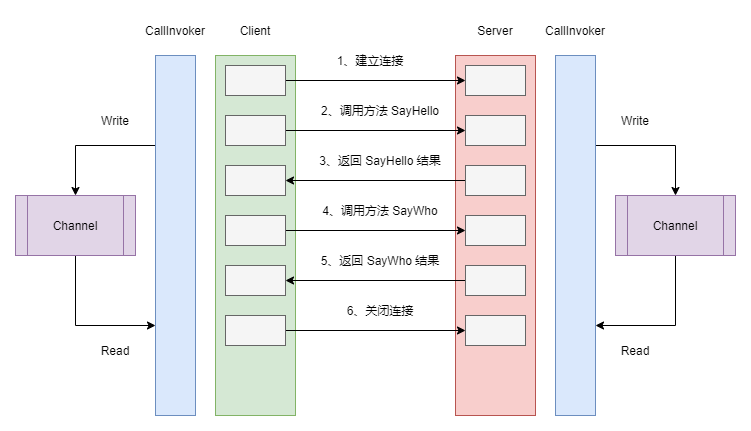 FakeRPC 如何支持 WebSocket 协议
在这个方案中,CallInvoker 是真正负责处理请求的核心组件,对于客户端来说,这个工作主要是按照请求的方法和参数组装为 FakeRpcRequest,然后再调用 ClientWebSocket 实例的 SendAsync() 方法发送消息给服务器端。除此之外,它还需要从服务器端接收消息,因为每一条消息都携带着 Id ,因此,我们可以非常容易地分辨出哪一条消息是回复给自己的。在此基础上,博主使用了一个后台线程从 Channel 中读取消息,这样,发送消息和接收消息实际上是工作在两个不同的线程上。对于服务器端来说,在消息的处理上是相似的,不同的是,服务器端从 Channel 中读取消息是为了发送给客户端,而客户端从 Channel 读取消息则是为了传递结果给代理类。下面的代码,展示了上面提到的一部分客户端的实现细节:
// 客户端发送消息
private async Task SendMessage(FakeRpcRequest request) {
    var payload = await _messageSerializer.SerializeAsync<FakeRpcRequest>(request);
    await _webSocket.SendAsync(new ArraySegment<byte>(payload), WebSocketMessageType.Binary, true, CancellationToken.None);
    OnMessageSent?.Invoke(_webSocket, request);
}

// 客户端从 Channel  中读取消息
private async Task ReadMessagesFromQueue() {
    try {
        while (await _messagesToReadQueue.Reader.WaitToReadAsync()) {
            while (_messagesToReadQueue.Reader.TryRead(out var message)) {
                try {
                    var response = await _messageSerializer.DeserializeAsync<FakeRpcResponse>(message.Array);
                    OnMessageReceived?.Invoke(_webSocket, response);
                } catch (Exception e) {
                    _logger.LogError(e, $"Failed to send message due to {e.Message}");
                }
            }
        }
    }
    catch (TaskCanceledException) { }
    catch (OperationCanceledException) { }
    catch (Exception e) {
        _logger.LogError(e, $"Restart listen message queue due to {e.Message}");
        ListenMessageQueue();
    }
}
当然,ClientWebSocket 实例在收到消息的时候,实际上是将消息写入 Channel,某种意义上你可以理解为,CallInvoker 同时承担着生产者和消费者的角色,并且生产者和消费者运行在两个不同的线程上:
var bytes = stream.ToArray();
var response = await _messageSerializer.DeserializeAsync<FakeRpcResponse>(bytes);
_logger?.LogInformation("Send response to {0}/{1}, payload:{3}", request.ServiceName, request.MethodName, response.Result);
_messagesToReadQueue.Writer.TryWrite(new ArraySegment<byte>(bytes));
此时,借助于动态代理,我们可以非常轻松地调用一个 RPC 接口,并且它是以长连接的形式运行在 WebSocket 协议上:
var _clientFactory = serviceProvider.GetService<FakeRpcClientFactory>();

// 调用 GreetService
var greetProxy = _clientFactory.Create<IGreetService>(new Uri("ws://localhost:5000"), FakeRpcTransportProtocols.WebSocket, FakeRpcMediaTypes.Default);
var reply = await greetProxy.SayHello(new HelloRequest() { Name = "张三" });
reply = await greetProxy.SayWho();

// 调用 ICalculatorService
var calculatorProxy = _clientFactory.Create<ICalculatorService>(new Uri("ws://localhost:5000"), FakeRpcTransportProtocols.WebSocket, FakeRpcMediaTypes.Default);
var result = calculatorProxy.Random();
可以注意到,我们不仅在传输协议上实现了抽象,而且在消息协议上实现了抽象,你可以像以前一样自由地使用 MessagePack 或者 Protobuf ,为了证明 Channel 真的对性能提升有用,这里我放一张 FakeRPC 的 brenchmark 测试结果:
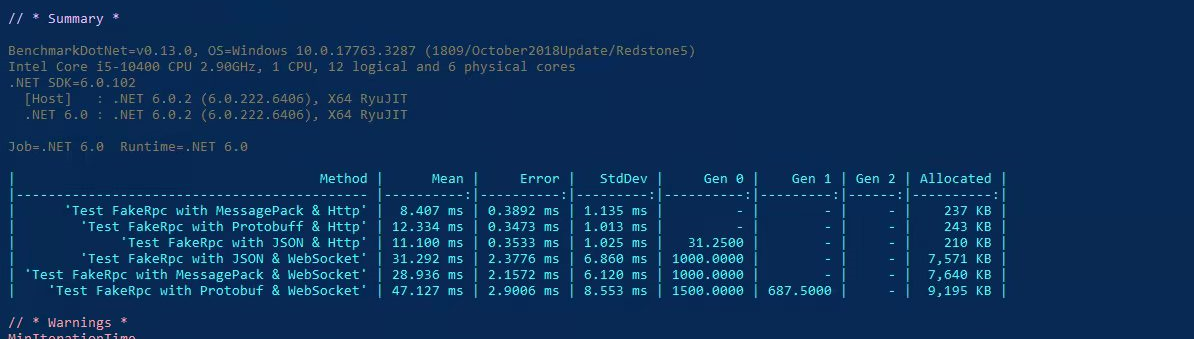 FakeRPC 不同通讯协议、消息协议性能对比
我们可以看到,MessagePack 不论是在 HTTP 协议下还是 WebSocket 协议下,始终都有着不俗的表现,这让我开始期待,它能否在 TCP/IP 协议上继续书写这个传奇,就在几天前,我刚刚完成了 TCP/IP 协议下的二进制消息定义,自从序列化和反序列化被抽象到 IMessageSerializer 接口以后,我们将会有更多的机会去支持更多的消息协议,随着育碧官方官宣了新作,刺客信条:幻景,我对 FakeRPC 的这个名字的理解,已经延续到了刺客兄弟会的理念,即:Nothing is true,或者说,万物皆虚。因为,从某种意义上来讲,RPC 不过是隐藏了那些蜿蜒曲折的中间过程,让你产生了可以像调用本地方法一样调用远程方法的错觉,甚至在设计二进制消息协议的时候,我突然意识到,我不过是再一次发明了 HTTP 协议。那么,这一切还有意义吗?当然有!做人嘛,开心就好了呀!
var buffer = new BufferBlock<int>();

// Producer
async static Task Producer(IEnumerable<int> values) {
    foreach (var value in values) {
        await buffer.SendAsync(value);
    }

    buffer.Complete();
}

// Consumer
async static Task Consumer(Action<int> process) {
    while (await buffer.OutputAvailableAsync()) {
        process?.Invoke(await buffer.ReceiveAsync());
    }
}

var range = Enumerable.Range(0, 100);
await Task.WhenAll(Producer(range), Consumer(n => Console.WriteLine(n)));
BufferBlock 是微软 TPL DataFlow 中的重要组件之一,其基本思想是:数据流是由一个又一个的数据块组成,一个块处理完毕后将会链接到下一个块上。每一个块以消息的形式接收和缓存来自一个或多个源的数据,当一个块接收到信息时,该块会对输入做出反应,与此同时,该块的输出将传递到下一个块中。总而言之,除了 BufferBlock 以外,还有 ActionBlock、TransformBlock、BroadcastBlock 等等的块,这里我们会提到 BufferBlock,最大的原因是它采用了生产者-消费者模型,并且 BlockingCollection 、 BufferBlock 、Channel 其实代表了 .NET 的不同阶段,而回想起不同阶段时的你,这注定是一个令人唏嘘的故事啦!沿用这种思想,我们就找到了 Channel 的新玩法:
// GetFiles
Task<Channel<string>> GetFiles(string root) {
    var filePathChannel = Channel.CreateUnbounded<string>();
    var directoryInfo = new DirectoryInfo(root);

    foreach (var file in directoryInfo.EnumerateFileSystemInfos()) {
        filePathChannel.Writer.TryWrite(file.FullName);
    }

    filePathChannel.Writer.Complete();
    return Task.FromResult(filePathChannel);
}

// Analyse
async Task<Channel<string>[]> Analyse(Channel<string> rootChannel) {
    var counterChannel = Channel.CreateUnbounded<string>();
    var errorsChannel = Channel.CreateUnbounded<string>();

    while (await rootChannel.Reader.WaitToReadAsync()) {
        await foreach (var filePath in rootChannel.Reader.ReadAllAsync()) {
            var fileInfo = new FileInfo(filePath);
            if (fileInfo.Extension == ".md") {
                var totalWords = File.ReadAllText(filePath).Length;
                counterChannel.Writer.TryWrite($"文章 [{fileInfo.Name}] 共 {totalWords} 个字符.");
            } else {
                errorsChannel.Writer.TryWrite($"路径 [{filePath}] 是文件夹或者格式不正确.");
            }
        }
    }

    counterChannel.Writer.Complete();
    errorsChannel.Writer.Complete();

    return new Channel<string>[] { counterChannel, errorsChannel };
}

// Merge
async Task<Channel<string>> Merge(params Channel<string>[] channels) {
    var mergeTasks = new List<Task>();
    var outputChannel = Channel.CreateUnbounded<string>();

    foreach (var channel in channels) {
        var thisChannel = channel;
        var mergeTask = Task.Run(async () => {
            while (await thisChannel.Reader.WaitToReadAsync()) {
                await foreach (var item in thisChannel.Reader.ReadAllAsync()) {
                    outputChannel.Writer.TryWrite(item);
                }
            }
        });

        mergeTasks.Add(mergeTask);
    }

    await Task.WhenAll(mergeTasks);
    outputChannel.Writer.Complete();

    return outputChannel;
}

// Run
var filePathChannel = await GetFiles(@"/hugo-blog/content/posts/");
var analysedChannels = await Analyse(filePathChannel);
var mergedChannel = await Merge(analysedChannels);
while (await mergedChannel.Reader.WaitToReadAsync()) {
    await foreach (var item in mergedChannel.Reader.ReadAllAsync()) {
        Console.WriteLine(item);
    }
}
OK,这三个方法做了一件什么样的事情呢?我个人以为,这其实就是我们上面提到的数据流,首先,我们通过 GetFiles() 方法获得指定目录内的文件信息;然后,这些信息交给 Analyse() 方法去做处理,这里做的事情是统计出 markdown 格式文件的字符串,以及筛选出那些非 markdown 格式的文件或者子目录;最后,通过 Merge() 函数,我们将上一步的结果进行汇总输出。如果用一幅图来表示的话,它应该是下面这样的流程:
 利用 Channel 实现数据流模式
从某种意义上来讲,这是一种“分治”策略,即:把一个大任务分解为若干个小任务,再将这些小任务的结果合并起来。很多年前,我曾在一本讲并行编程的书上见过类似的代码片段,那个时候我已经对 Google 的 MapReduce 略有耳闻,后来又接触到了 Parallel ,我突然意识到,如果 Map() 和 Reduce() 两个函数运行在一台远程服务器上,那么这个过程可以认为是 RPC,而运行在远程服务器上的这些函数,其实是在并行地执行着某种运算,那么这个过程可以认为是并行计算。当这些并行计算,使用的是世界各地的可伸缩计算资源时,那么这个过程其实就是云计算。所以说,写作这个过程还是挺有意思的,对不对?
本文小结
很多年前,Wesley 老大哥聊起怎么把日志写到数据库的话题,那个时候,我们都还没有听说过 Elasticsearch 这个词汇。所以,我们当时能想到的方案,是打算用 BlockingCollection 来做一个阻塞式的队列,换句话讲,就是从 NLog 或者 Log4Net中拿到日志以后,将这些日志全部放在 BlockingCollection 里面,然后再考虑将其写入到数据库或者某种输出源。后来,我陆陆续续地接触了 NLog 里的 Target,Serilog 里的 Sink,大概知道了这一切是如何运作的,甚至这些日志组件都可以支持把日志输出到不同的地方。从某种意义上看,这种认知上的变化,或许宣告着过去那种不成熟思维的过时,可恰恰是因为这些不成熟的思维,会不断督促你刷新对一件事物的认知,换句话讲,我们的人生其实就是由无数个过去串联起来的,无论曾经的你有多糗多颓多丧,它们都在不遗余力地告诉你,我曾经真的在这个世界上存在过,就像今天有了更好用的 Channel , 并不意味着我们过去的思考没有意义,至少当我们提到生产者-消费者模型的时候,我会想起 Wesley 老大哥、想起 BlockingCollection。说不定啊,这就是时光对我这个记性太好的人的一种回应:你可以怀念过去,但请不要期待一切都能保持如初,在这个世界上,你只能做自己能做到的事情。