
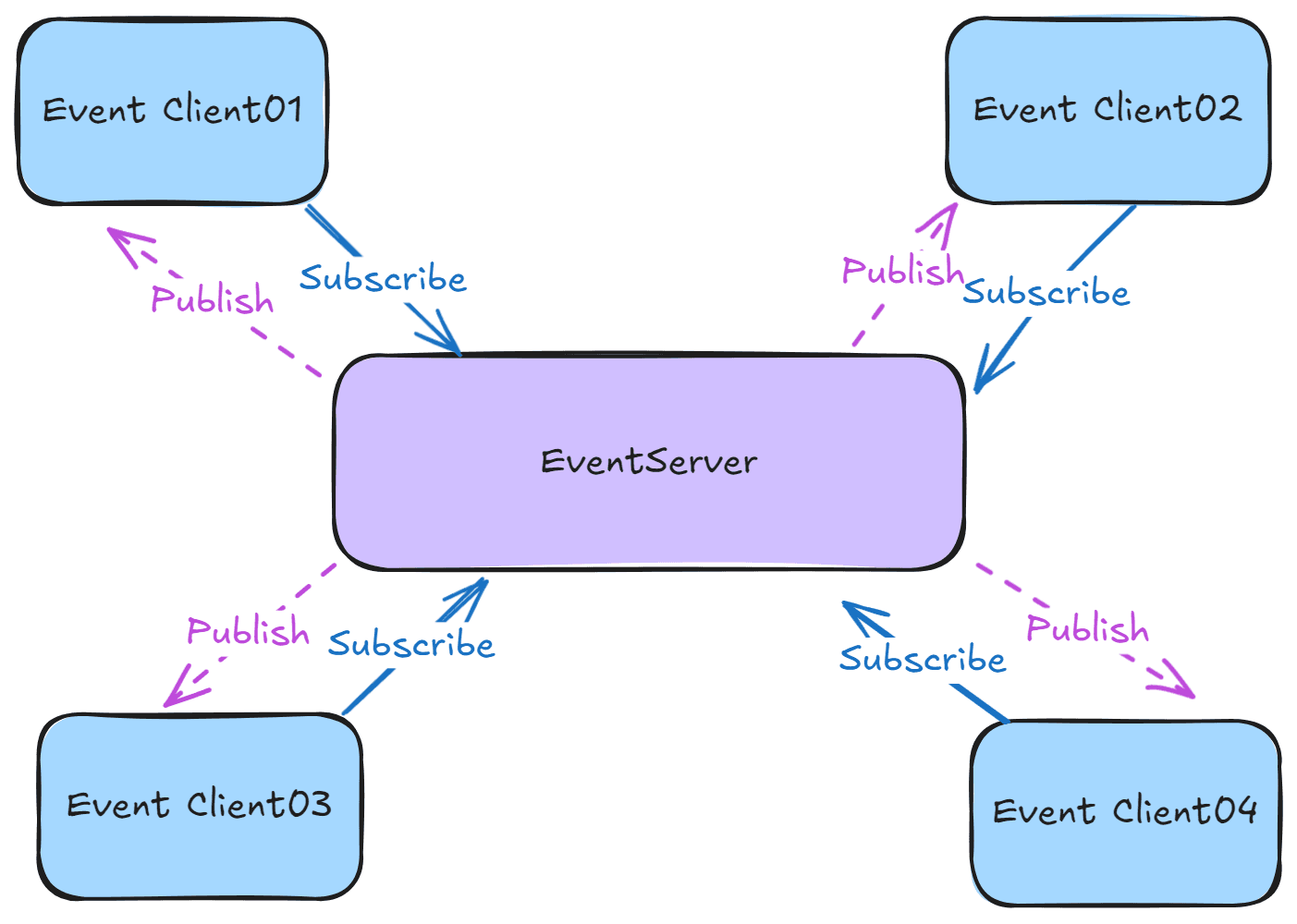
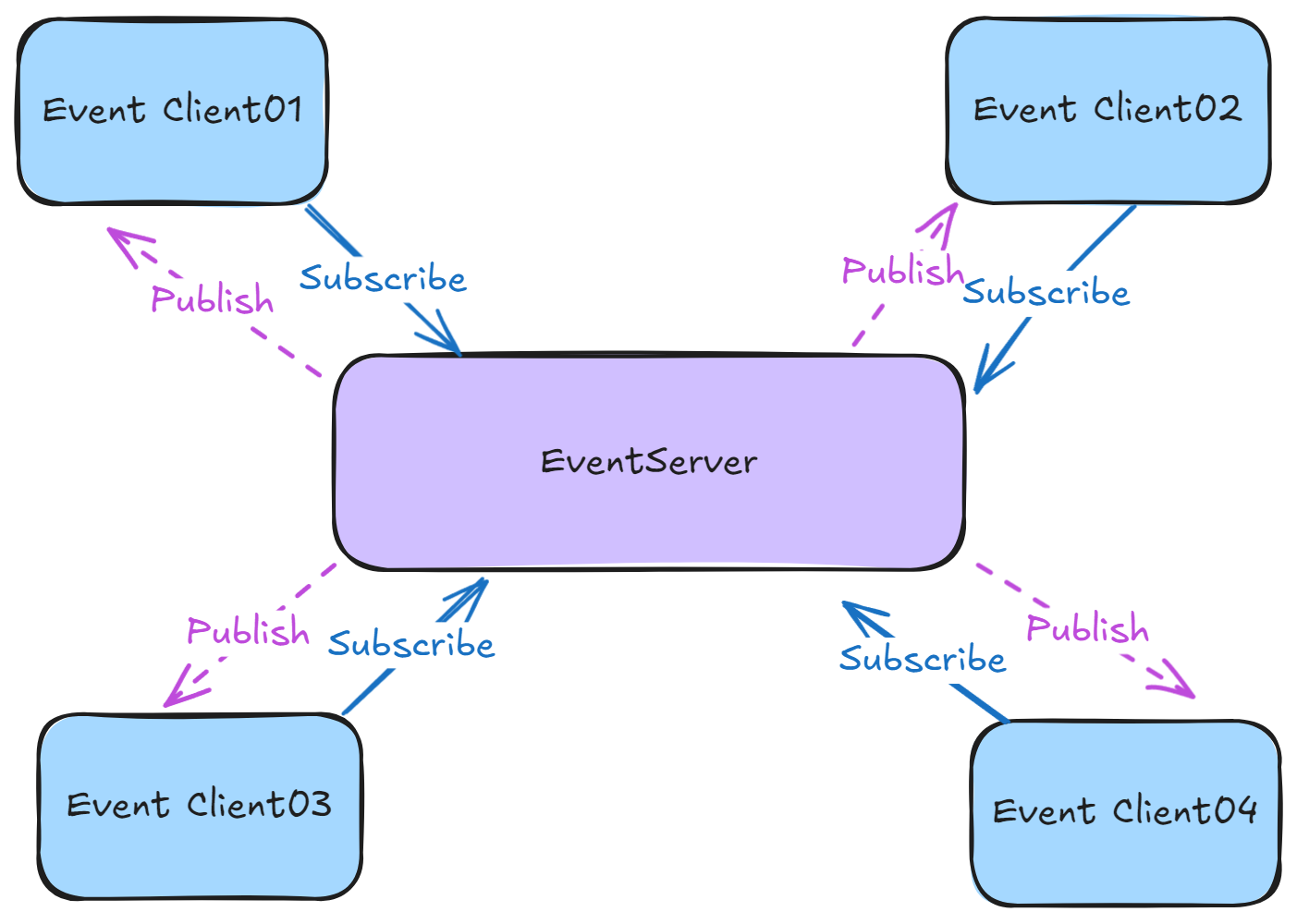
使用 Socket 实现的分布式事件总线,支持 CQRS,不依赖第三方 MQ。
CodeWF.EventBus.Socket 是一个轻量级的、基于 Socket 的分布式事件总线系统,旨在简化分布式架构中的事件通信。它允许进程之间通过发布/订阅模式进行通信,无需依赖外部消息队列服务。
Command
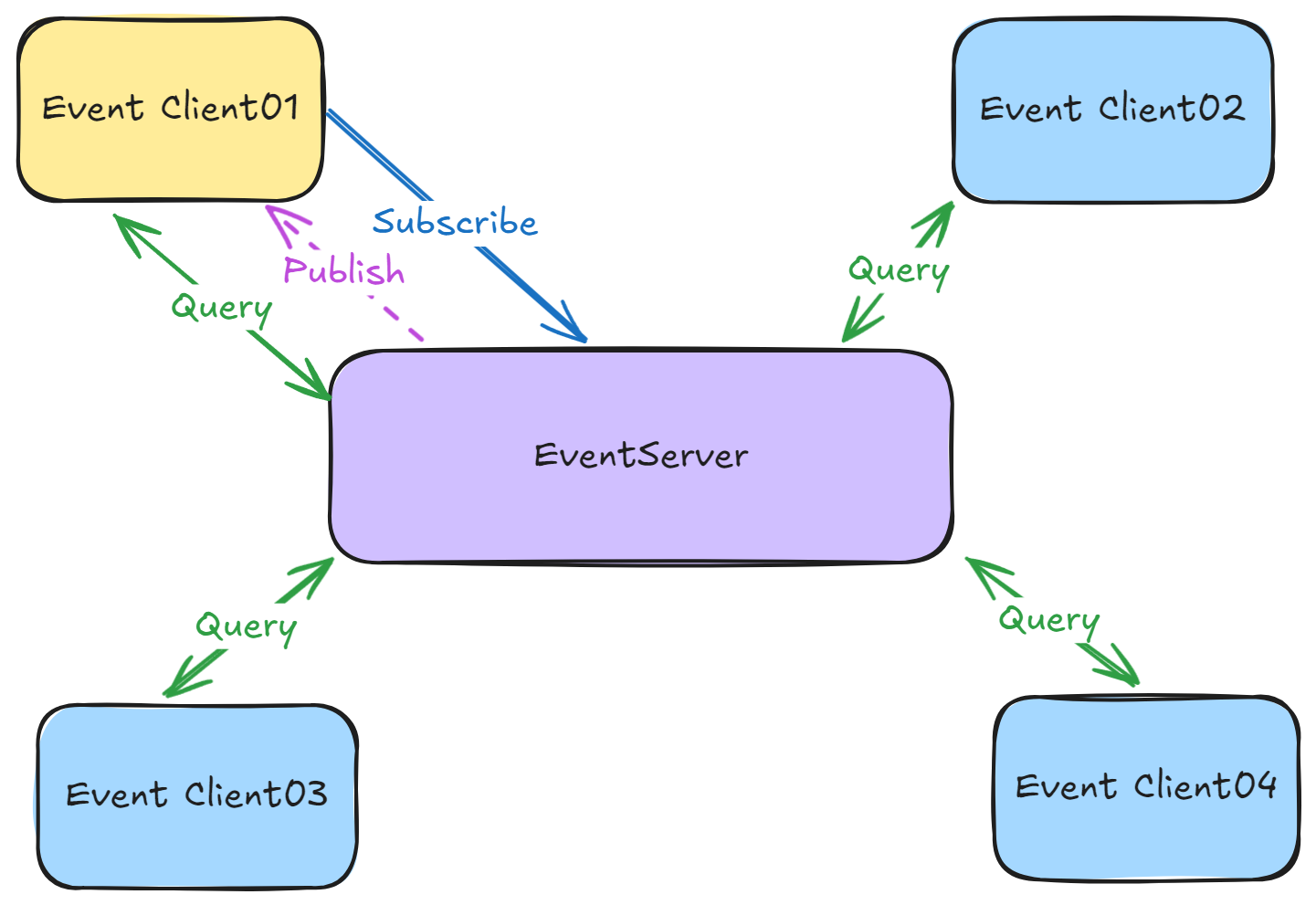
Query
特性
轻量级:不依赖任何外部 MQ 服务,减少了系统复杂性和依赖。
高性能:基于 Socket 的直接通信,提供低延迟、高吞吐量的消息传递。
灵活性:支持自定义事件类型和消息处理器,易于集成到现有系统中。
可扩展性:支持多客户端连接,适用于分布式系统环境。
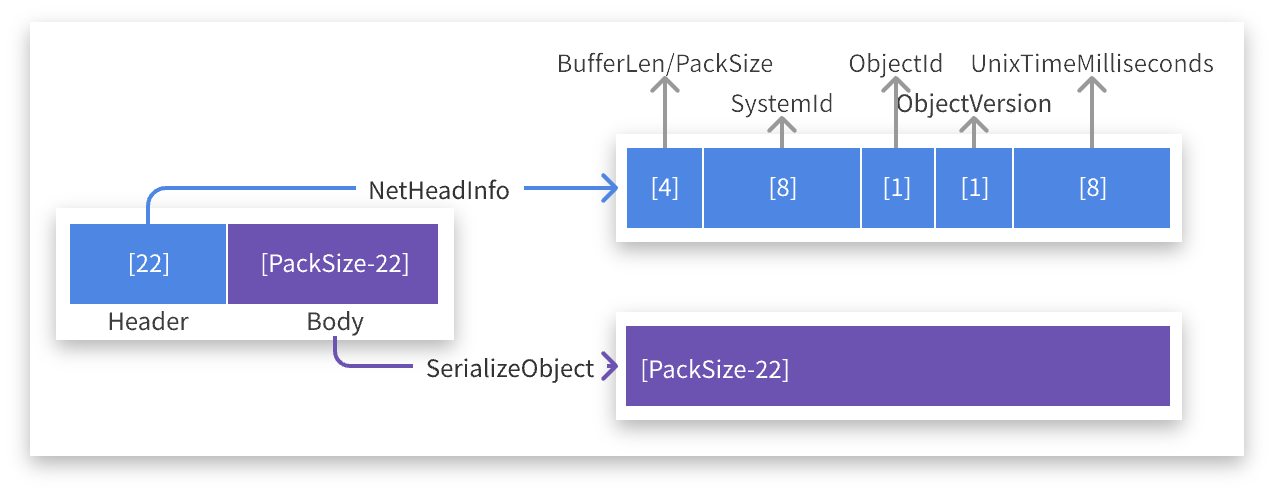
通信协议
通过 TCP 协议进行数据交互,协议包结构如下:
安装
通过NuGet包管理器安装CodeWF.EventBus.Socket:
Install-Package CodeWF.EventBus.Socket
服务端使用
运行事件服务
在服务端代码中,创建并启动EventServer实例以监听客户端连接和事件:
using CodeWF.EventBus.Socket;

// 创建事件服务器实例
IEventServer eventServer = new EventServer();

// 启动事件服务器,监听指定IP和端口
eventServer.Start("127.0.0.1", 9100);
停止事件服务
当不再需要事件服务时,调用Stop方法以优雅地关闭服务器:
eventServer.Stop();
客户端使用
连接事件服务
在客户端代码中,创建EventClient实例并连接到事件服务器:
using CodeWF.EventBus.Socket;

// 创建事件客户端实例
IEventClient eventClient = new EventClient();

// 连接到事件服务器,使用eventClient.ConnectStatus检查连接状态
eventClient.Connect("127.0.0.1", 9100));
订阅事件
订阅特定类型的事件,并指定事件处理函数:
eventClient.Subscribe<NewEmailCommand>("event.email.new", ReceiveNewEmailCommand);

private void ReceiveNewEmail(NewEmailCommand command)
{
    // 处理新邮件通知
    Console.WriteLine($"收到新邮件,主题是{message.Subject}");
}
发布命令(Command)
发布事件到指定的主题,供已订阅的客户端处理:
// 发布新邮件通知事件
eventClient.Publish("event.email.new", new NewEmailCommand { Subject = "恭喜您中GitHub一等奖", Content = "我们很开心,您在2024年7月...", SendTime = new DateTime(2024, 7, 27) });
查询(Query)
查询指定主题,需要有接收查询端订阅相同的主题(即生产者),收到请求后,再以相同的主题发布查询结果:
eventClient.Subscribe<EmailQuery>("event.email.query", ReceiveEmailQuery);

private void ReceiveEmailQuery(EmailQuery query)
{
    // 执行查询请求,准备查询结果
    var response = new EmailQueryResponse { Emails = EmailManager.QueryEmail(request.Subject) };

    // 以相同的主题,发布查询结果
    if (_eventClient!.Publish("event.email.query", response,
        out var errorMessage))
    {
        Logger.Info($"Response query result: {response}");
    }
    else
    {
        Logger.Error($"Response query failed: {errorMessage}");
    }
}
其他端可使用相同的主题查询(即消费者):
var response = _eventClient!.Query<EmailQuery, EmailQueryResponse>("event.email.query",
    new EmailQuery() { Subject = "Account" },
    out var errorMessage);
if (string.IsNullOrWhiteSpace(errorMessage) && response != null)
{
    Logger.Info($"Query event.email.query, result: {response}");
}
else
{
    Logger.Error(
        $"Query event.email.query failed: [{errorMessage}]");
}
取消订阅事件
不再需要接收某类事件时,可以取消订阅:
eventClient.Unsubscribe<NewEmailNotification>("event.email.new", ReceiveNewEmail);
断开事件服务
完成事件处理或需要断开与服务器的连接时,调用Disconnect方法:
eventClient.Disconnect();
Console.WriteLine("断开与事件服务的连接");
注意事项
- 确保服务端和客户端使用的地址和端口号一致,并且端口未被其他服务占用。
- 在生产环境中,服务端应配置为监听公共 IP 地址或适当的网络接口。
- 考虑到网络异常和服务重启等情况,客户端可能需要实现重连逻辑。
- 根据实际需求,可以扩展
EventServer和EventClient类以支持更复杂的功能,如消息加密、认证授权等。