Quickly Add a Tray Menu to a WPF Program

Quickly Add a Tray Menu to a WPF Program

Common tray effects should be satisfied, right? And the code we need to write to achieve these effects is really not much.

Last updated 4/25/2020 1:45 PM
沙漠尽头的狼
3 min read
Category
WPF
Tags
.NET WPF Tray Menu

1 Simple Requirements

  • Use open-source control library
  • Declare tray menu in XAML, just like adding a ContextMenu to a control
  • Encapsulates commonly used commands, such as: open main window, exit application, etc.

I added a tray menu in TerminalMACS, and the final effect is:

2 How to do it?

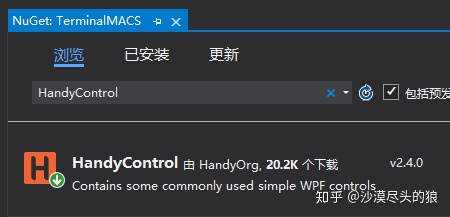
【Step 1】In an existing WPF project, add the HandyControl library and install it:

You ask why use the HC control library? First, take a look at the demo effects:

Common tray effects should be sufficient, right? And to achieve these effects, the code we need to write is really minimal because HC has already encapsulated them, we can just use them directly.

【Step 2】Add the HandyControl namespace in the window

xmlns:hc="https://handyorg.github.io/handycontrol"

【Step 3】Declare the key 19 lines of code for the tray menu

<hc:NotifyIcon x:Name="NotifyIconContextContent"
            Text="{markup:I18n {x:Static i18NResources:Language.AppTitle}}"
            Visibility="Visible"
            Icon="/Images/logo.ico">
    <hc:NotifyIcon.ContextMenu>
        <ContextMenu>
            <MenuItem Command="hc:ControlCommands.PushMainWindow2Top" Header="{markup:I18n {x:Static i18NResources:Language.PushMainWindow2Top}}"/>
            <MenuItem Command="hc:ControlCommands.ShutdownApp" Header="{markup:I18n {x:Static i18NResources:Language.Exit}}"/>
        </ContextMenu>
    </hc:NotifyIcon.ContextMenu>
    <hc:Interaction.Triggers>
        <hc:EventTrigger EventName="Click">
            <hc:EventToCommand Command="hc:ControlCommands.PushMainWindow2Top"/>
        </hc:EventTrigger>
    </hc:Interaction.Triggers>
</hc:NotifyIcon>

The code above essentially completes a tray menu. Let me briefly explain:

  • NotifyIcon is the tray menu control, Text displays the tray menu name, hovering over the tray icon shows this string as ToolTip, usually the application name, as shown below:

  • hc:NotifyIcon.ContextMenu is used to declare menu items. Currently, this project has added two menus: open main window and exit application. The corresponding commands for these two menus have been encapsulated by HC, making them easy to use.
  • Additionally, clicking the tray menu can also bring up the main application window.

【Step 4】Hide the main window instead of exiting when manually closing it

After adding the tray menu, when closing the main window, the OnClosing event should be overridden to hide the main window instead of directly closing it.

protected override void OnClosing(CancelEventArgs e)
{
    this.Hide();
    e.Cancel = true;
}

3 More References

For more demo source code, please refer to HandyControl

The source code for this article is at TerminalMACS

Keep Exploring

Related Reading

More Articles
Same category / Same tag 9/13/2025

Migration Series from WPF to Avalonia: Why I Must Migrate My WPF Application to Avalonia

In the past few years, our host computer software has mainly been developed using WPF and WinForm . These technologies work well on the Windows platform and have accompanied us from small-scale trial production to the current stage of large-scale delivery. However, with business development and changes in customer requirements, the single Windows technology stack has gradually become a hurdle we must overcome.

Continue Reading
Same category / Same tag 1/26/2025

Implementing Internationalization in WPF Using Custom XML Files

This article details the method of implementing internationalization in WPF applications using custom XML files, including installing the necessary NuGet packages, dynamically retrieving the language list, dynamically switching languages, using translated strings in code and XAML interfaces, and provides a source code link to help developers easily achieve internationalization in WPF applications.

Continue Reading