1. Introduction
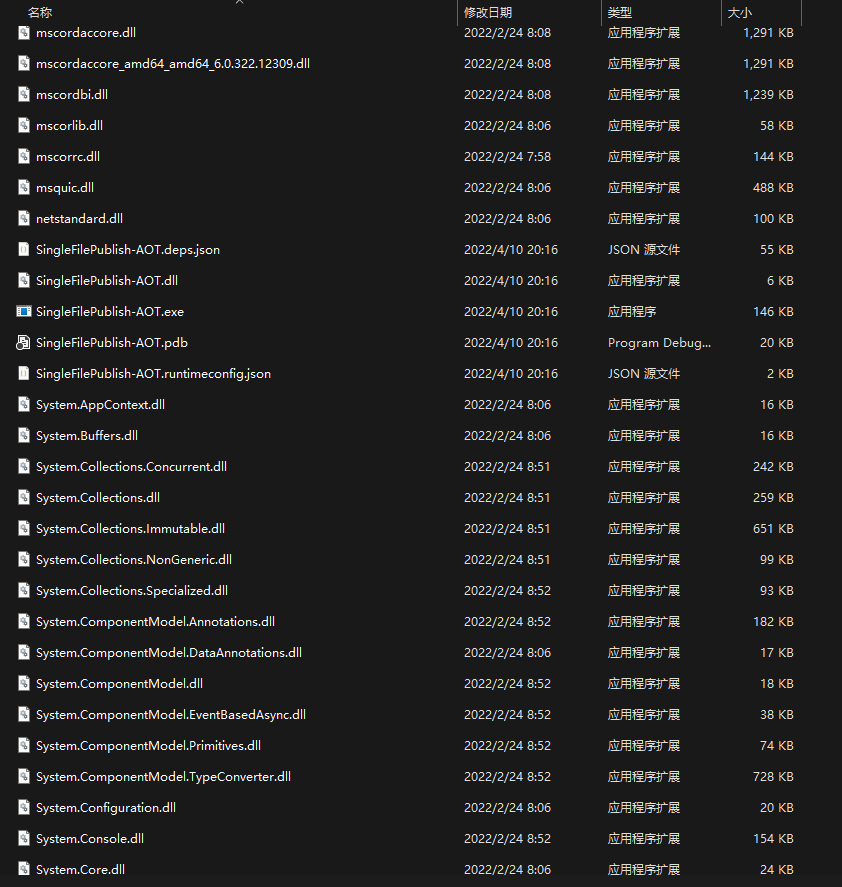
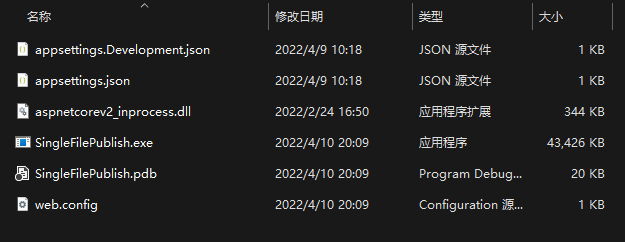
Let me first introduce some history of .NET releases. The original .NET Framework did not natively support single-file publishing of the final build (it required third-party tools). I created a simple ASP.NET Core project here, and after publishing, the directory looks like the image below, containing many *.dll files and various other files.

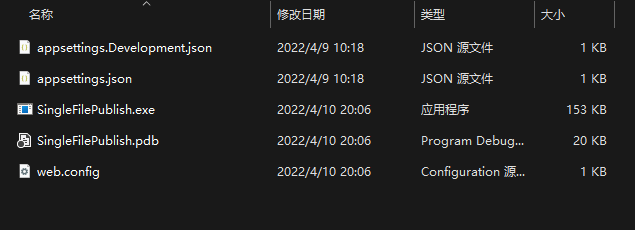
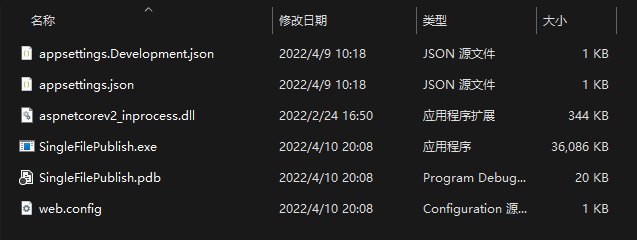
In the .NET Core 2.1 era, single-file publishing was introduced. Simply add the -p:PublishSingleFile=true parameter to the publish command to use it. From then on, the published folder no longer had so many files—only one *.exe file, corresponding configuration files, and the *.pdb file for debugging, as shown below:

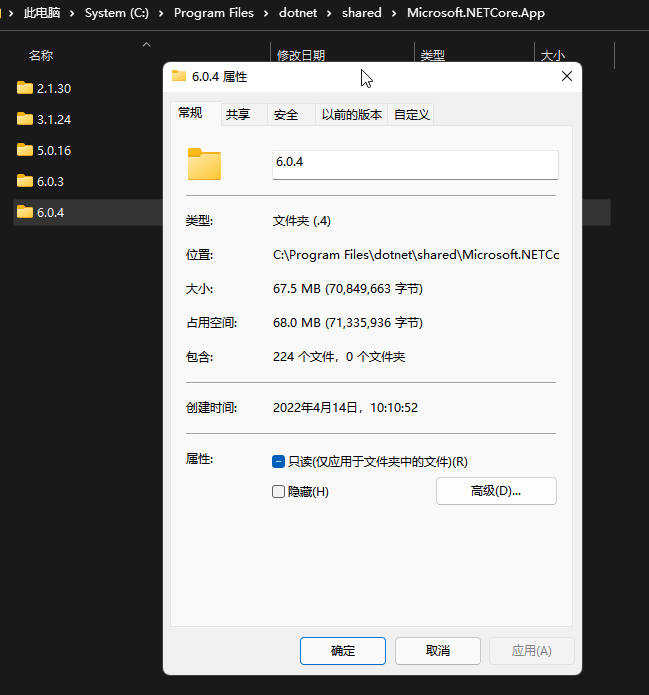
However, at that time .NET still required a .NET Runtime of about 50–130 MB to be installed to run. This was not ideal for distributing programs in client scenarios. Many of you may recall having to install .NET Framework before installing certain software.

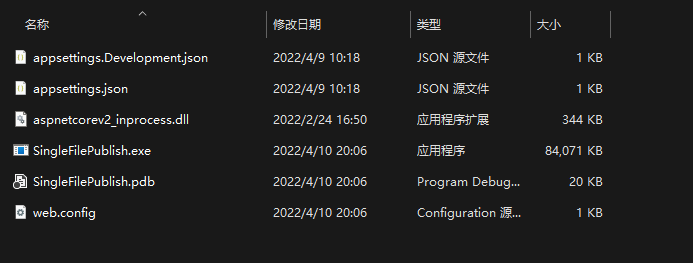
At the same time single-file publishing was introduced, you could also include the runtime in the published file using the --self-contained true parameter, eliminating the need to install the .NET Runtime on the target machine. However, because it includes the runtime, the entire publish folder becomes very large—even larger than installing the .NET Runtime itself (a full 82.4 MB).

Since the program is essentially files, we can also compress it to reduce its size. Simply add the -p:EnableCompressionInSingleFile=true parameter to compress the 80 MB program down to about 44 MB.

The reason single-file publishing is large is that it includes all dependencies that might be used at runtime. However, many dependencies are not used in our program. By adding the -p:PublishTrimmed=true parameter during publishing, unused dependencies are removed, which can significantly reduce the size (from 44 MB to 35 MB).

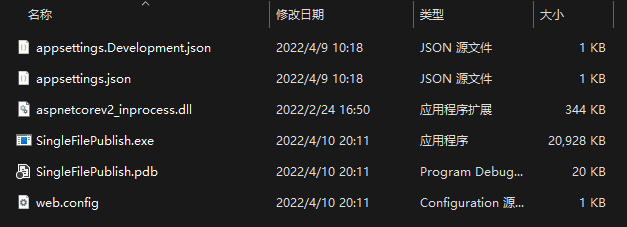
Of course, removing unused dependencies and compression can be used together, making the published size even smaller—only about 20 MB.

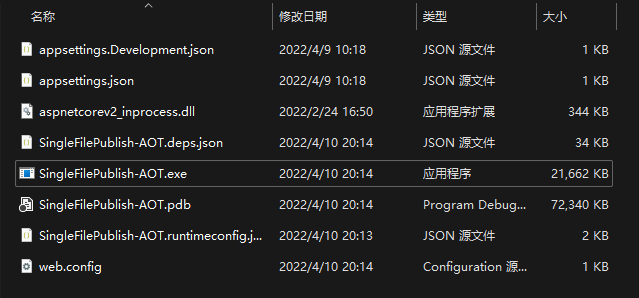
At this point, .NET still requires a bundled runtime to run. JIT is involved when running .NET programs, which takes some time at startup to compile MSIL into platform-specific machine code. Later, .NET introduced a preview version of Native-AOT, which compiles code directly into platform-specific machine code at compile time, speeding up startup. Additionally, because it no longer needs a bundled runtime, its overall size becomes very small.

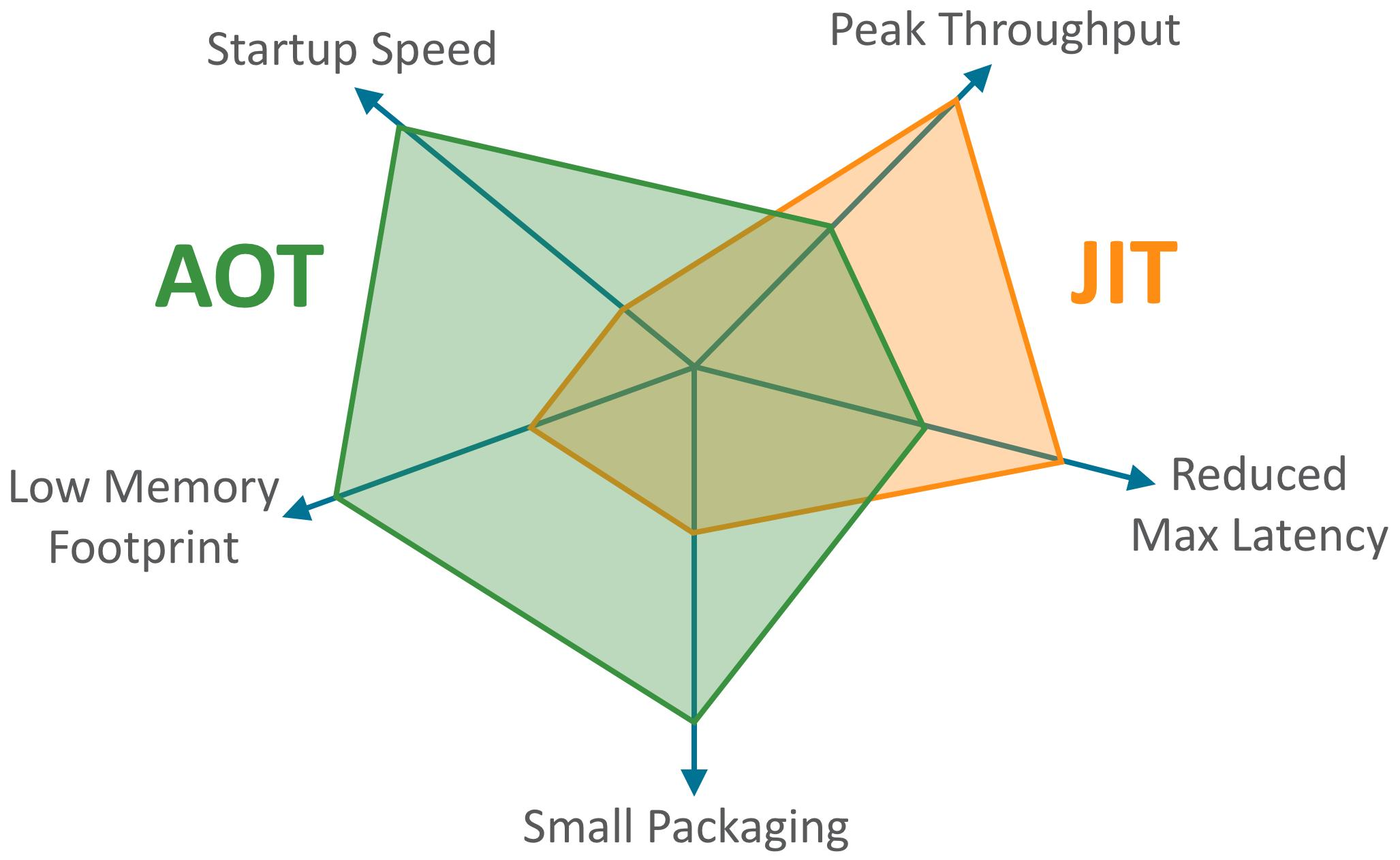
The pdb file used for debugging becomes very large, but it's not needed for actual distribution and can be discarded. After AOT, the size is around 20 MB. However, AOT is not a silver bullet. Without JIT, many compile-time optimizations cannot be performed. When Java's GraalVM was released, it presented a pentagon diagram that clearly illustrates the trade-offs between JIT and AOT.

AOT offers faster startup, lower memory usage, and smaller program size. However, its throughput and maximum latency are not as good (and it also loses many dynamic features, reducing programming efficiency).
One might wonder: does this publishing method affect program performance? It is said that AOT speeds up program startup, but by how much?
2. Evaluation Results
I decided to spend some time researching this. Over the weekend, I designed a set of tests based on the above questions. Of course, due to time constraints, there are many imperfections—let's take it as a light-hearted test. I hope you can point out issues and bear with me. A total of 12 groups were designed, mainly comparing single-file publishing, AOT publishing, and normal publishing. I also added JIT parameters such as PGO, TC, OSR, and OSA to see the effects of different JIT parameters.
PGO: Profile Guided Optimization—uses runtime information to guide JIT optimization, enabling more optimizations that were previously difficult without PGO. See hez's blog (link) and other link1, link2, link3.
TC: Tiered Compilation—a runtime optimization technique where each C# function is compiled to machine code by JIT. To get methods running quickly, JIT initially compiles them roughly (not optimal, low efficiency). TC was introduced so that when a method is called frequently, JIT compiles a more optimized version, making subsequent calls more efficient. For more on .NET tiered compilation, click this link.
OSR: On-Stack Replacement—a technique to replace the stack frame of a running function/method at runtime. This was introduced for tiered compilation because sometimes methods run in infinite loops (e.g.,
while(true)), giving no opportunity to replace low-optimization code with high-optimization code. OSR allows replacement while the method is running. link1, link2.
OSA: Object Stack Allocation—in .NET, reference objects are allocated on the heap by default, requiring garbage collector intervention. Also, memory must be initialized (zeroed). If the object's lifetime is controllable, it can be allocated on the stack. This reduces GC pressure (the object is automatically released when the method stack ends) and improves performance (scalar replacement allows faster access). link1.
The naming and parameters for each group are as follows.
| Project | Notes |
|---|---|
| Normal | Normal publish, control group |
| Normal-WksGC | Normal mode, using WorkStationGC |
| Normal_PGO | Normal publish, using PGO |
| Normal_PGO_OSR | Normal publish, using PGO+OSR |
| Normal_PGO_OSR_OSA | Normal publish, using PGO+OSR+OSA |
| SingleFilePublish | Regular single-file publish |
| SingleFilePublish-SelfContained | Single-file publish including runtime |
| SingleFilePublish-SelfContained-Trim | Single-file publish including runtime + trimming |
| SingleFilePublish-SelfContained-Compress | Single-file publish including runtime + compression |
| SingleFilePublish-SelfContained-Trim-Compress | Single-file publish including runtime + trim + compress |
| AOT-Size | AOT compile, Size mode |
| AOT-Speed | AOT compile, Speed mode |
The subheadings below describe the evaluation method and results. Each item is run 5 times and the average is taken.
2.1 Publishing Related
In this section, compilation parameters for the Normal groups are the same, so results are nearly identical—no need to pay much attention; just ignore.
2.1.1 Publishing Time
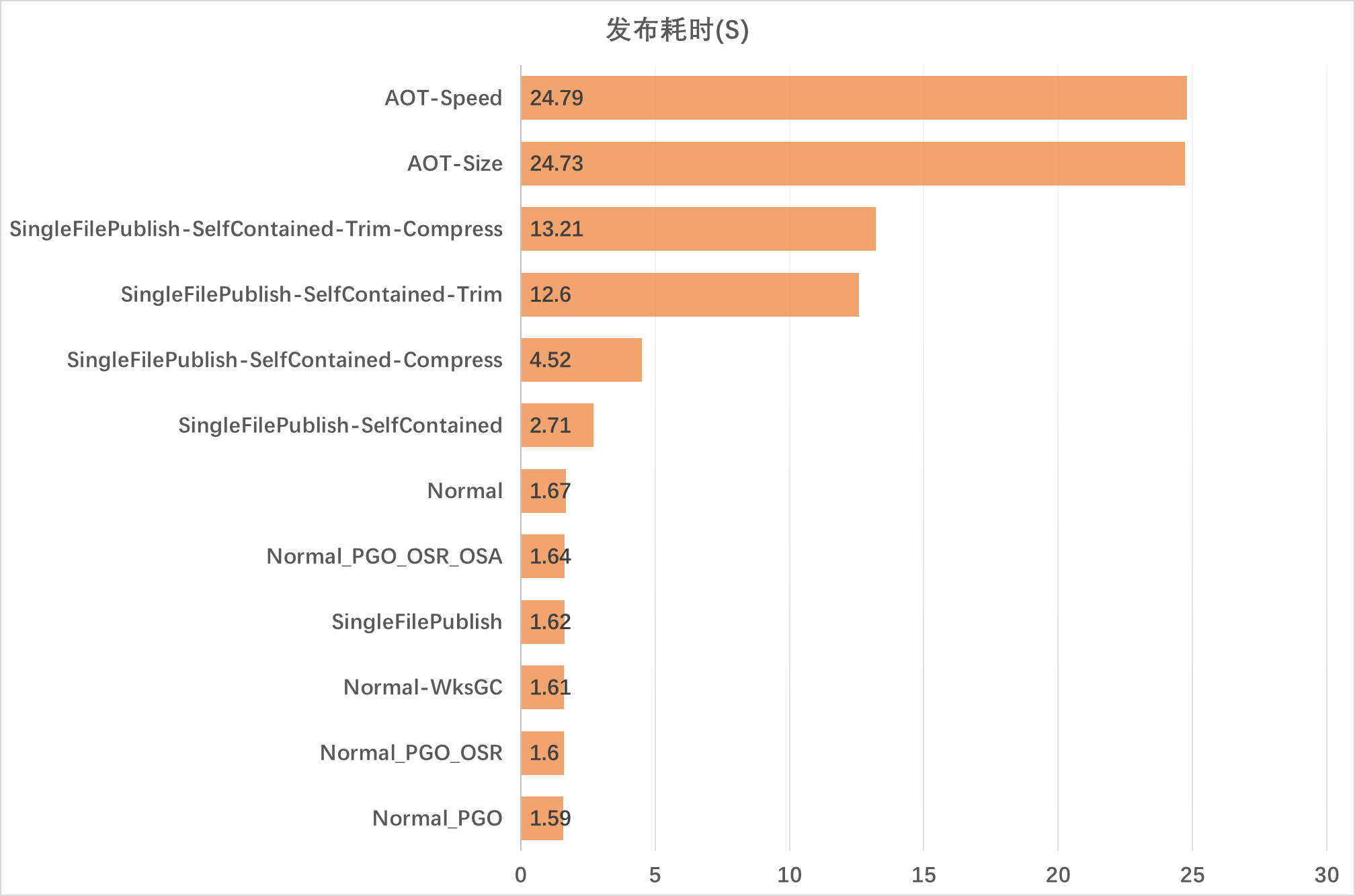
Publishing time records the duration of dotnet publish. The /bin, /obj etc. folders are cleaned before each run to avoid cache effects.

It can be seen that single-file publishing and AOT publishing are relatively heavy on performance. Especially for AOT, a simple ASP.NET Core project takes nearly 30 seconds to publish—comparable to some Rust or C++ projects. Larger projects would take even longer. Normal publishing is still fast, completed within a couple of seconds.
2.1.2 Directory Size
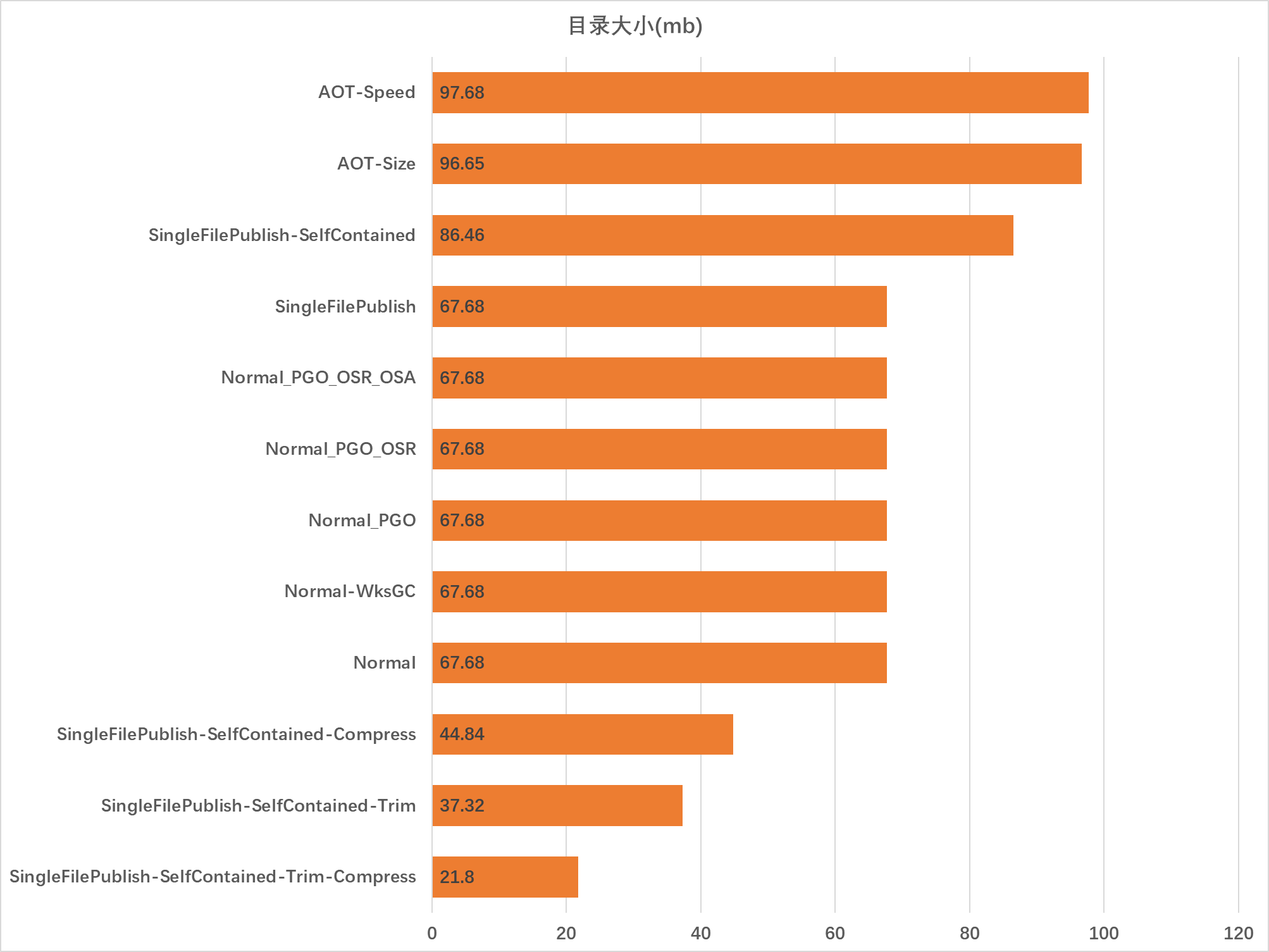
Directory size measures the hard disk space occupied by the published directory. Note: Normal publishing includes 67.5 MB of .NET Runtime space.

Why is the AOT directory size so large? Mainly because the pdb file for debugging becomes very large, as AOT loses much debugging data from the program itself and stores it in the pdb file. This doesn't affect usage; you can use -p:DebugType=false and -p:DebugSymbols=false during publishing to avoid generating the pdb file.
2.1.3 Program Size
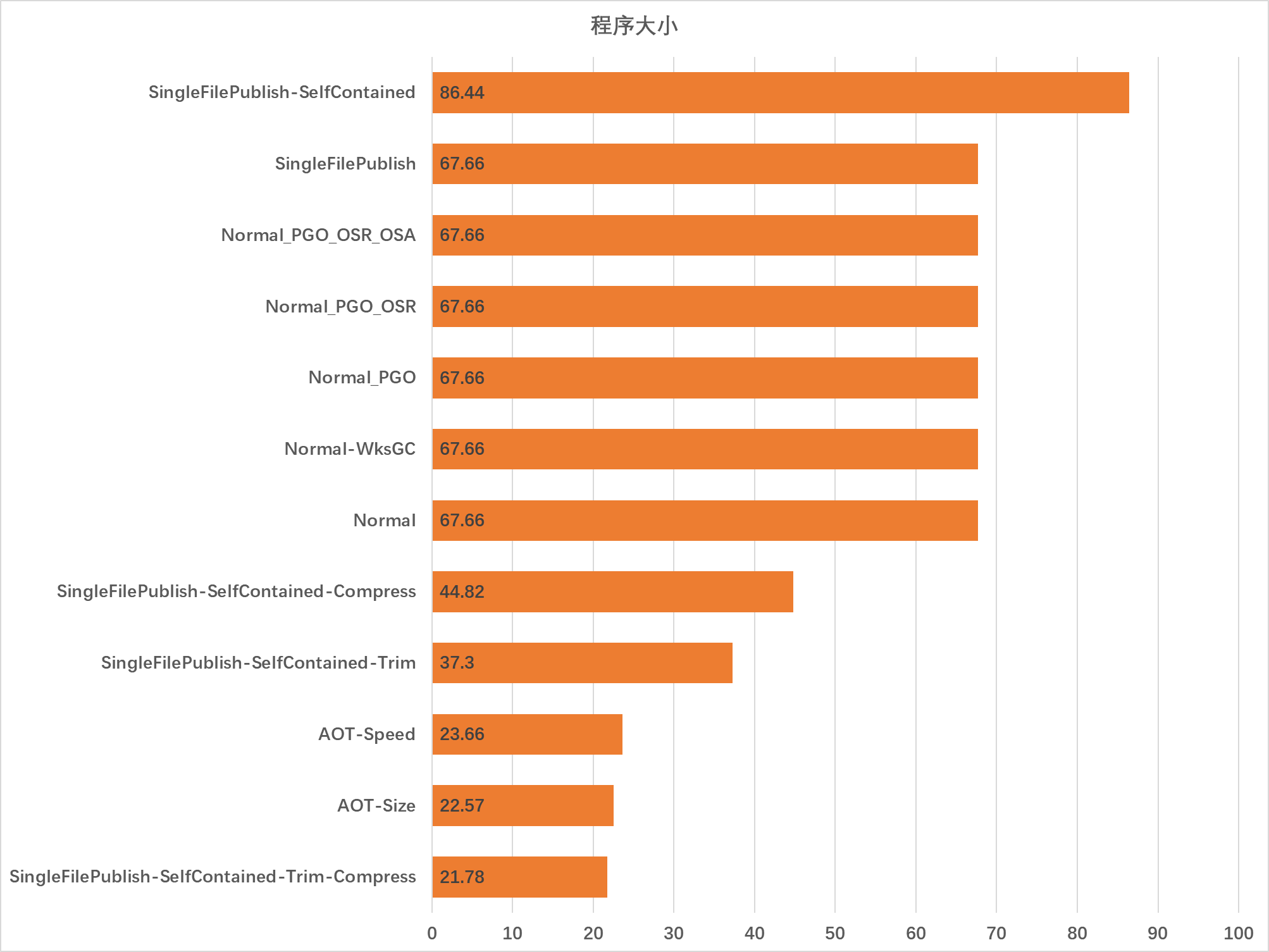
Program size only counts the size of files needed to run the program, which is directly related to distribution—smaller program size means easier distribution. Note: Normal publishing includes 67.5 MB of .NET Runtime space.

If the target platform already has .NET Runtime installed, normal publishing is most efficient—only a few hundred KB. Next is single-file + self-contained + trimming + compression, around 20 MB, also convenient for distribution. AOT also performs well.
2.2 Program Runtime Related
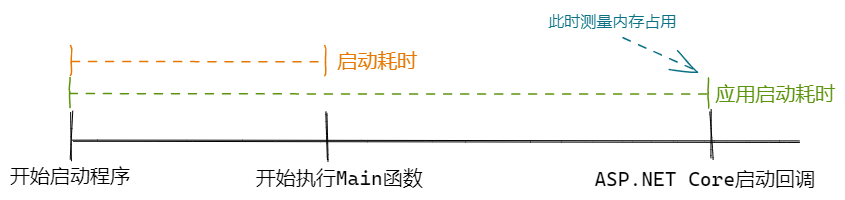
There are three metrics for program runtime: startup time, application startup time, and memory usage. CPU-related metrics are not included because CPU is almost 0 during startup and not very meaningful. The flowchart below shows when these metrics are collected.

2.2.1 Startup Time
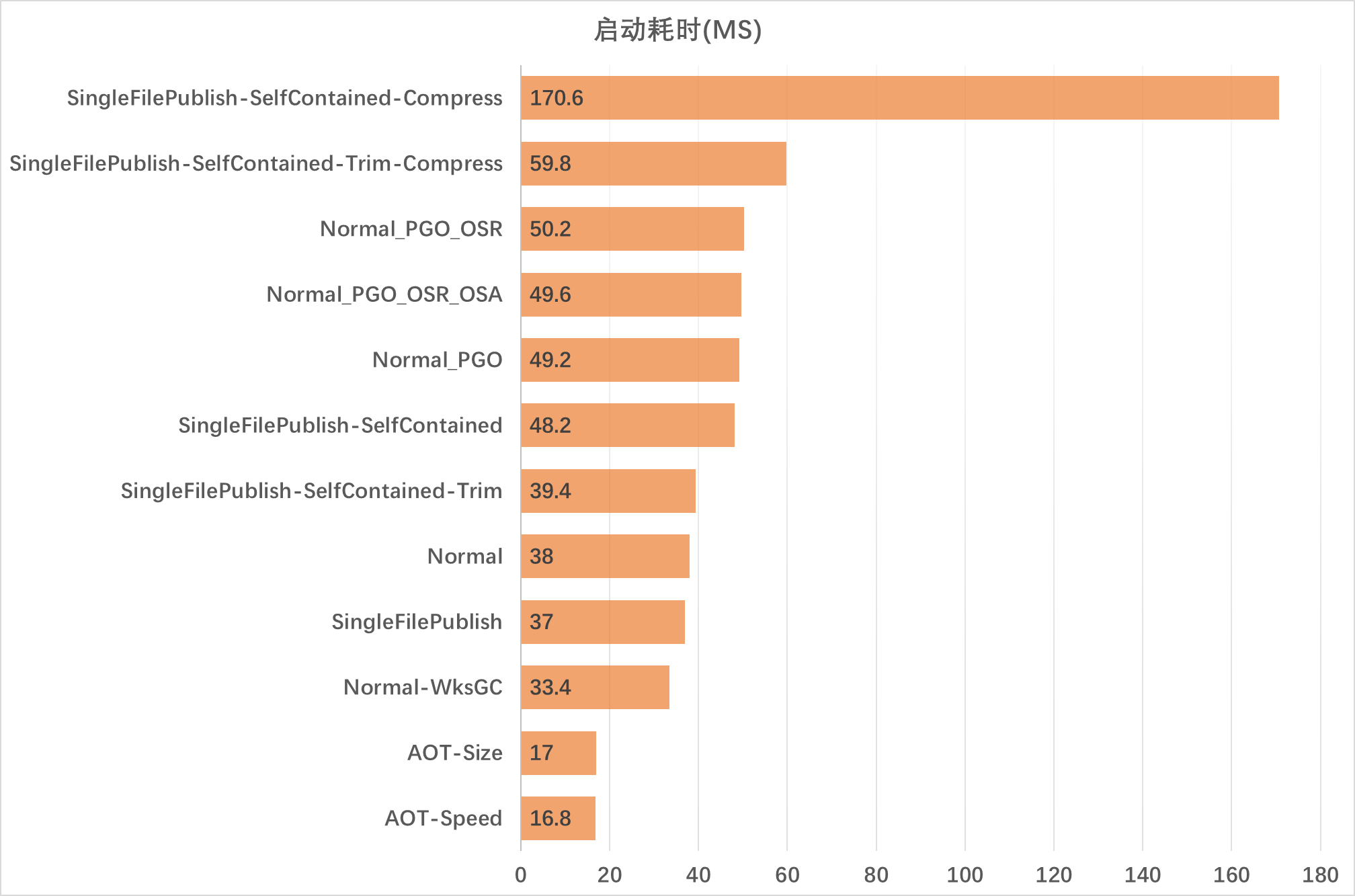
The program startup time results are shown below.

We can see two extremes. The largest is single-file + self-contained + compression, with startup time up to 170 ms. Because the program assemblies are not trimmed, decompressing the large number of dependencies takes longer. The smallest is AOT-Speed mode, which starts in only 16.8 ms—clearly, without JIT compilation and assembly loading, startup is much faster.
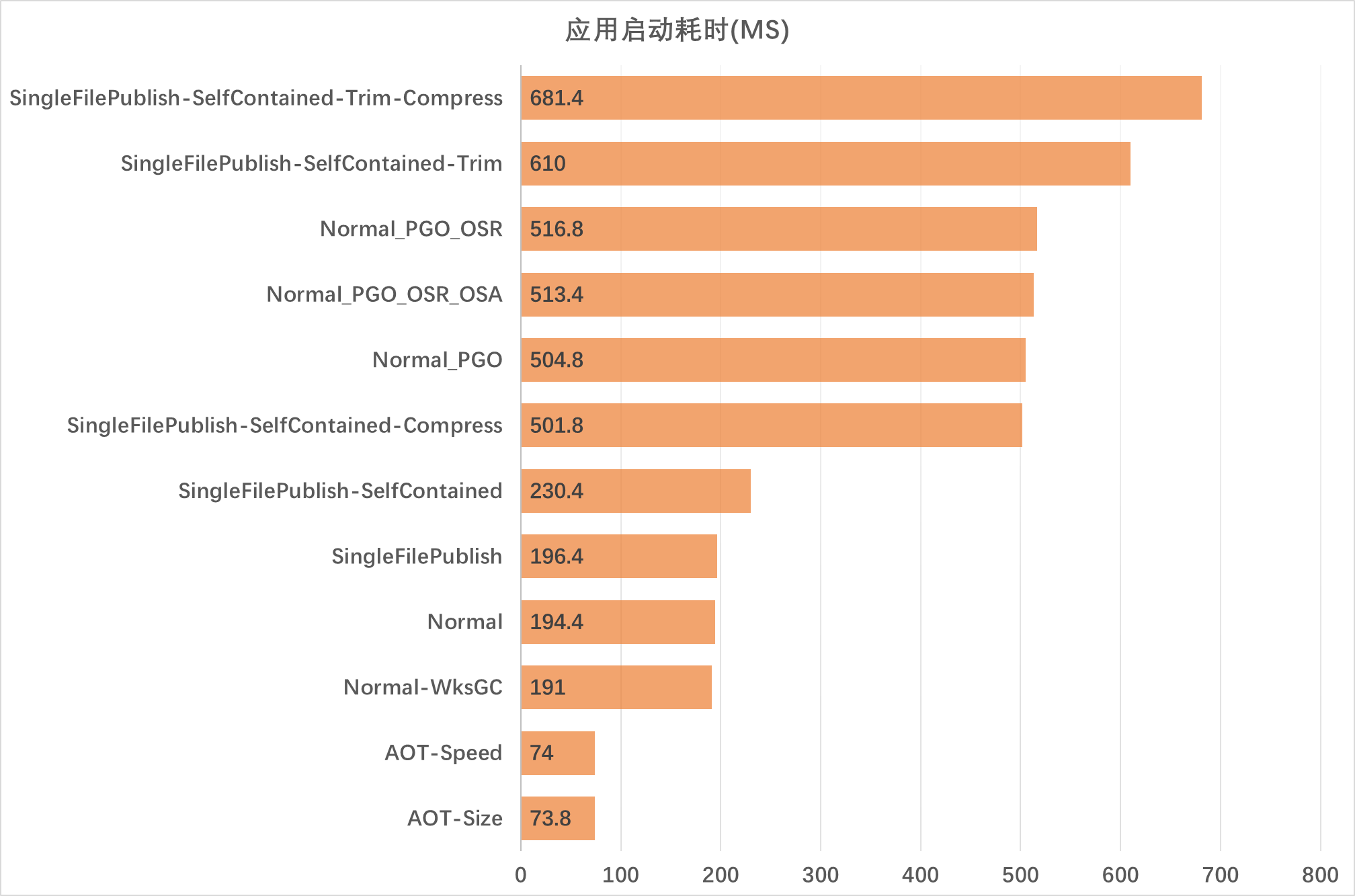
2.2.2 Application Startup Time

Application startup time is generally consistent with program startup time. Single-file + self-contained + compression takes over 0.5 s to start, while AOT mode takes only 70 ms—a difference of 7-8 times. Normal publishing is also fast, under 200 ms.
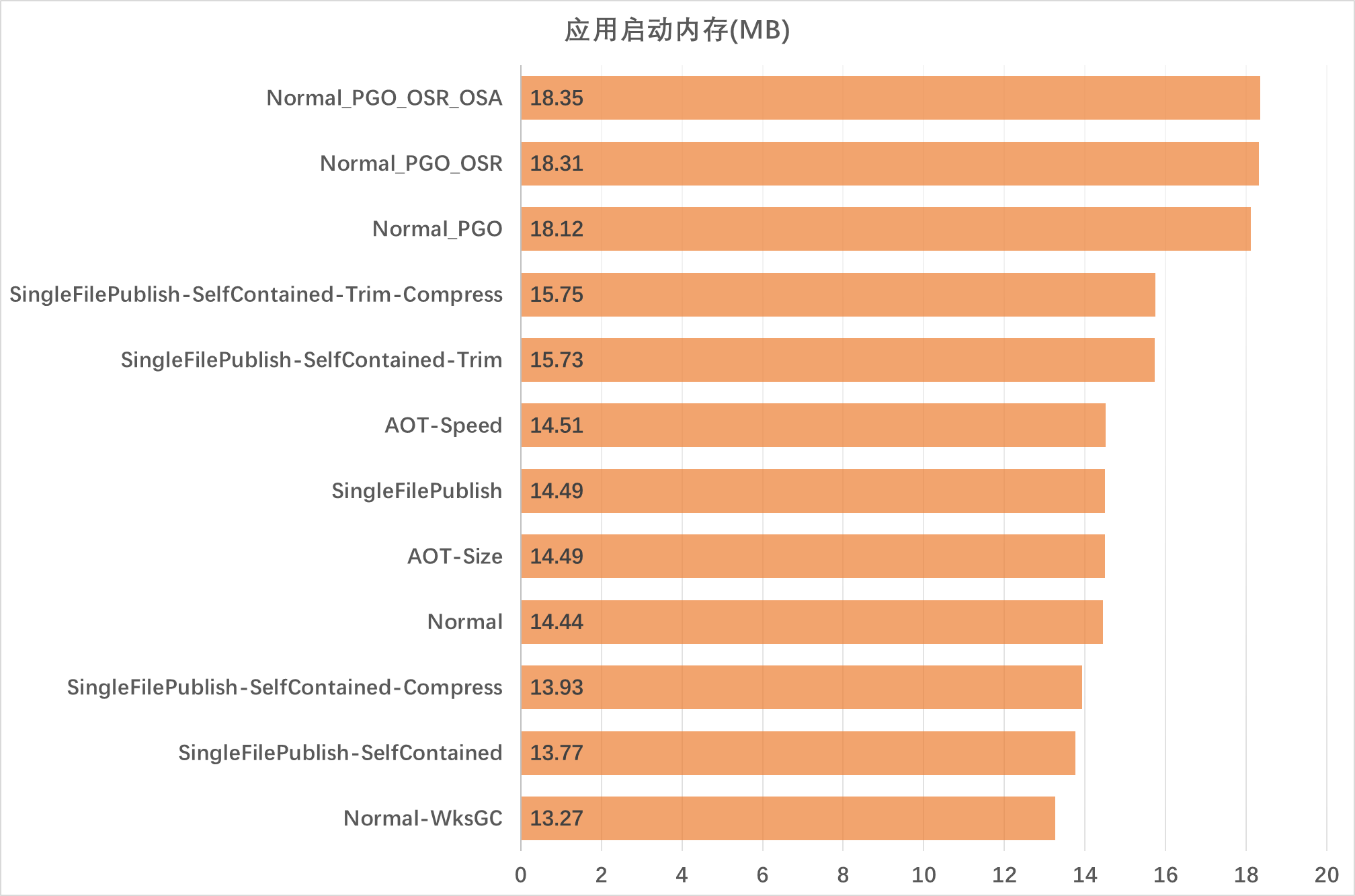
2.2.3 Memory Usage

Memory usage is similar across methods, but it reminds us that if we want lower memory usage, WorkstationGC mode can be used. Enabling JIT enhancements like dynamic PGO increases memory usage accordingly.
2.3 Performance Stress Test
Machine configuration:
CPU: I7 8750H (hyper-threading disabled)
RAM: 48 GB
Client: CPU affinity set to 3 cores
Server: CPU affinity set to 2 cores
Due to limited machine resources, no environment isolation between Client and Server was done—only simple CPU core pinning. Therefore, data is for reference only.
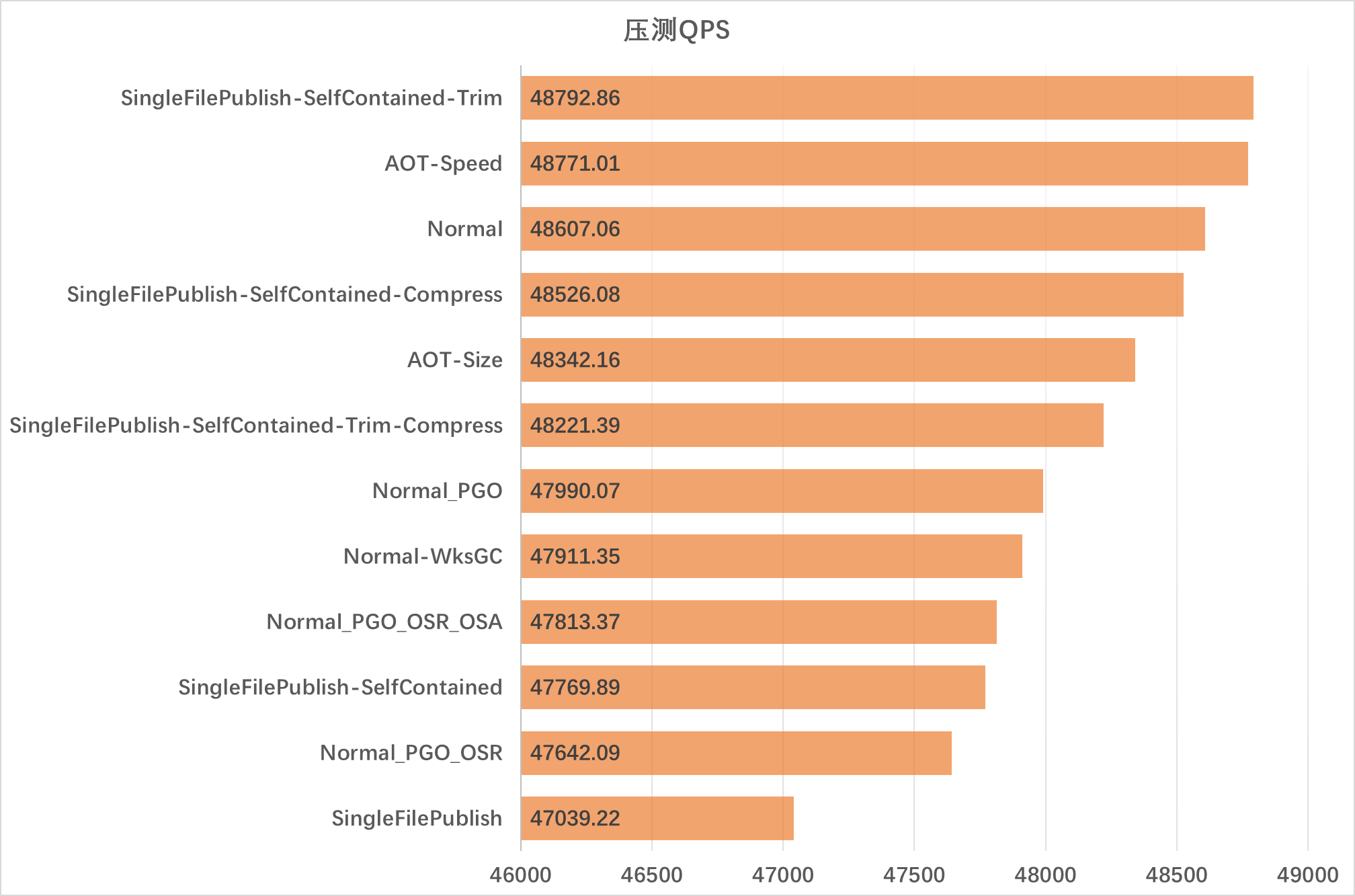
2.3.1 Stress Test QPS

It can be seen that the differences are not significant—all achieved above 4.7W qps, with max and min within 4%. Since this is an IO-bound task, the advantages of JIT and PGO are not apparent. A compute-intensive task could be tried later, or refer to hez's blog linked earlier.
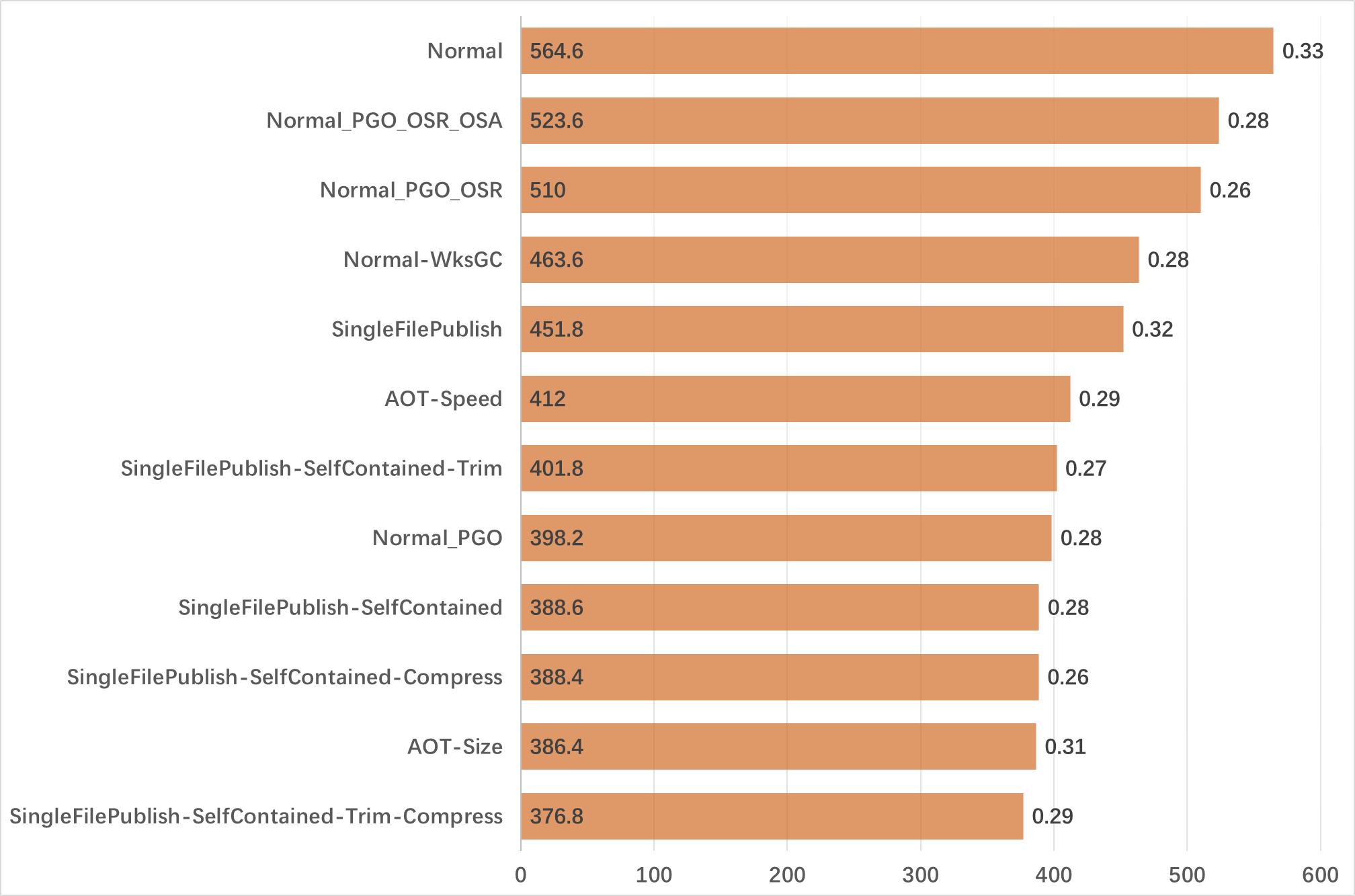
2.3.2 Single Request Latency
In the chart below, the larger value inside the bar is Single Request Latency (MAX), and the 0.x outside is Single Request Latency (AVG). Unit: ms.

We see average latency is around 0.3 ms. AOT and single-file + self-contained + trim + compression perform well, around 370 ms.
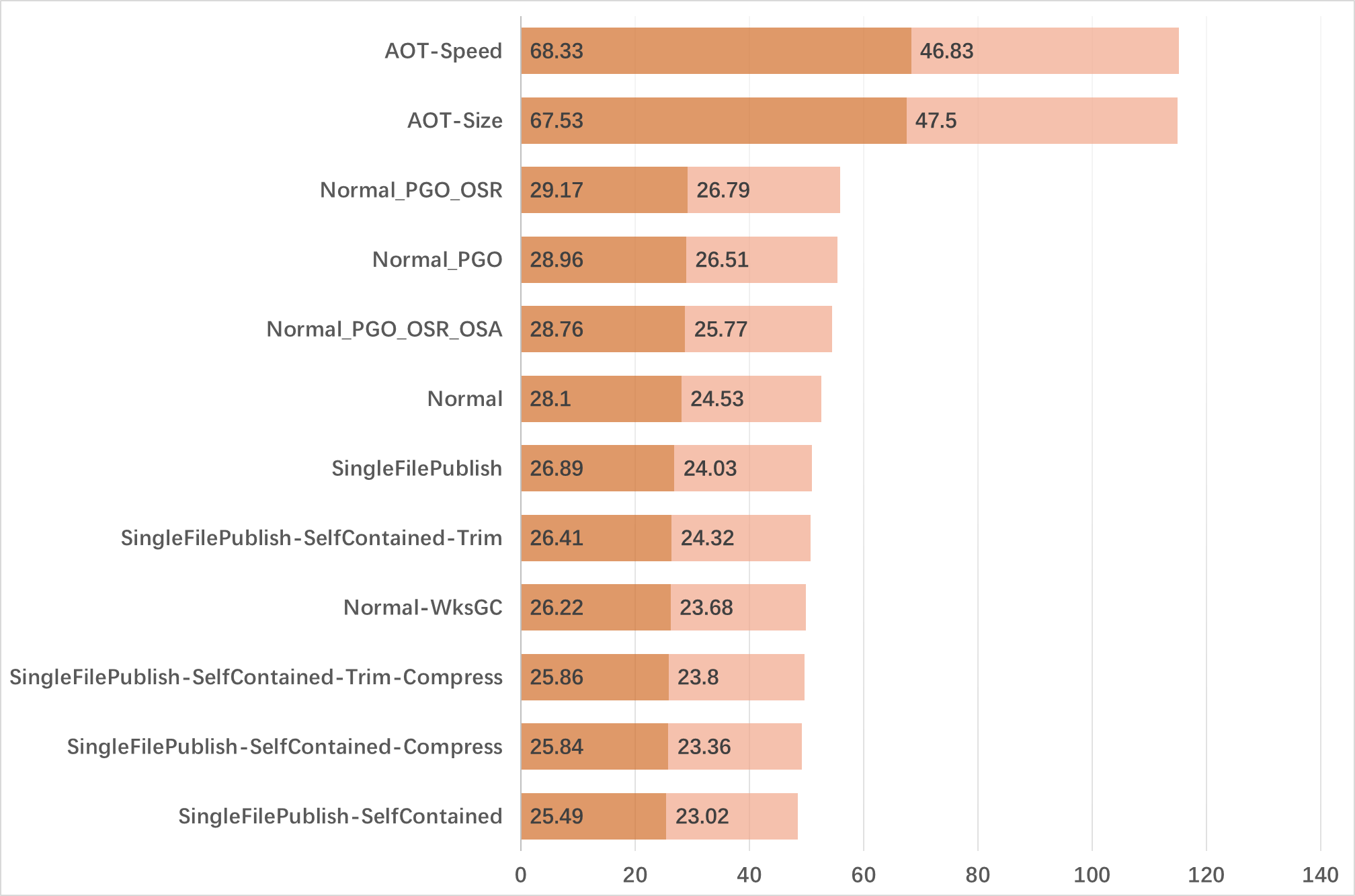
2.3.3 Stress Test Memory Usage
In the chart below, dark color represents Memory (MAX) and light color represents Memory (AVG). Unit: MB.

Except for AOT, memory usage is similar—around 25 MB at 4.7W qps, which is quite good. Similar numbers can be considered noise. Enabling JIT features increases memory usage. AOT uses more memory, perhaps because the GC algorithm optimization for AOT environments is still insufficient.
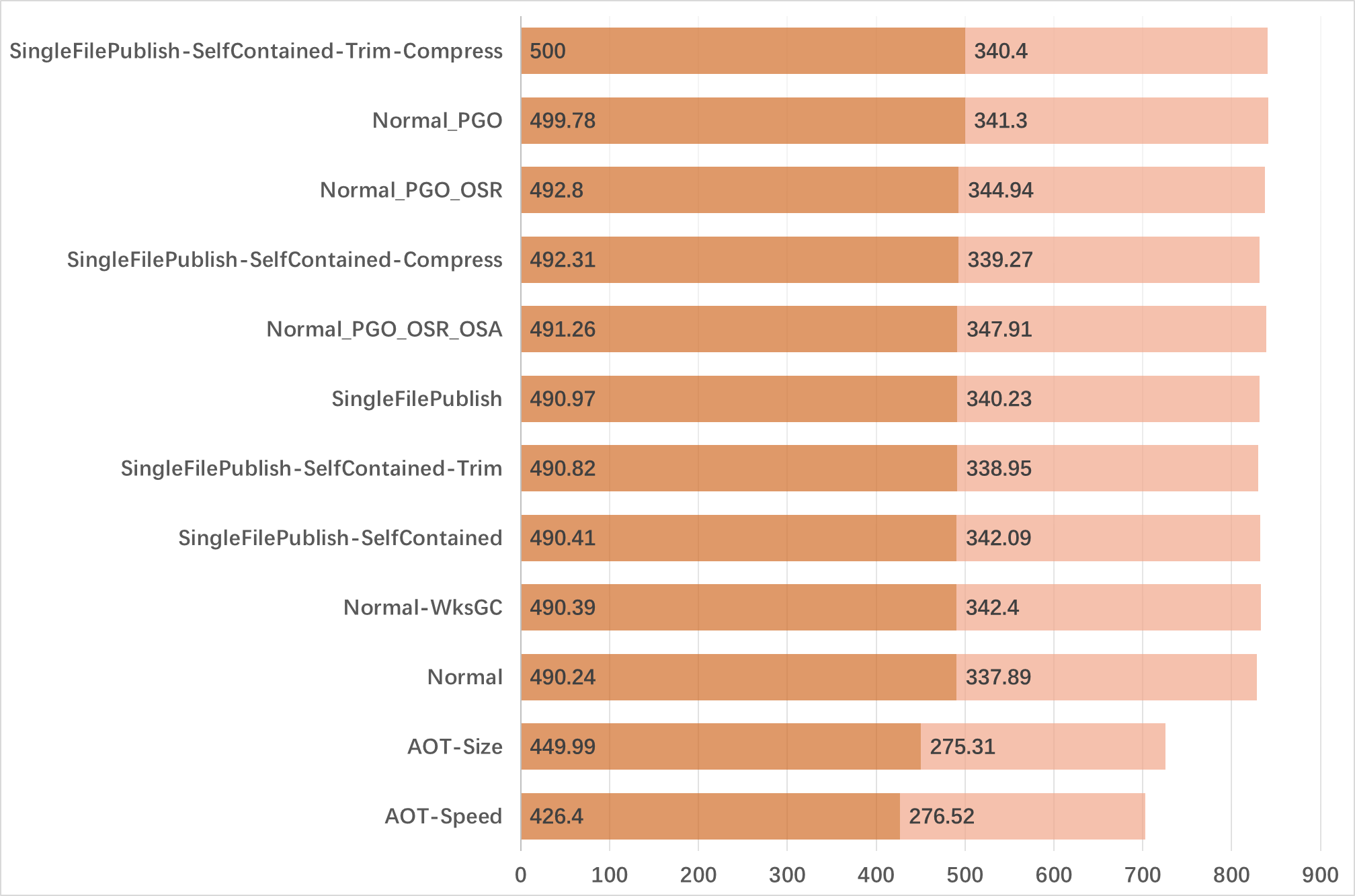
2.3.4 Stress Test CPU Usage
In the chart below, dark color represents CPU Usage (MAX) and light color represents CPU Usage (AVG). Unit: percentage; 1 CPU core is 100%, and 5 CPU cores would be 500%.

There is almost no difference, but AOT has significantly lower CPU usage since there is no JIT step.
3. Summary
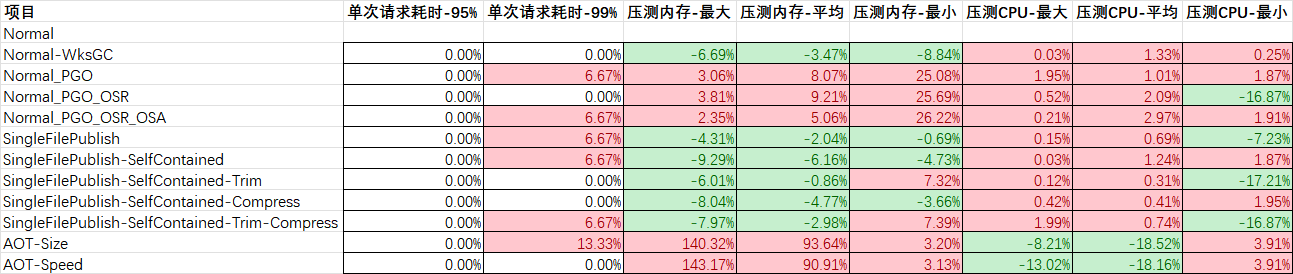
This conclusion is for entertainment only, as AOT is not yet officially released (it has been merged into the main branch and will be released in .NET 7) and still has much room for optimization. Features like OSR and OSA are also not fully finalized. Below are some percentage comparisons with the control group. Raw data and test code can be found on GitHub. I'll try running again after .NET 7 is officially released.


To answer the question posed at the beginning: overall, AOT greatly reduces software size and improves application startup speed, but currently requires a long publish time and more memory.
Additionally, JIT features like PGO require more memory than normal, and their performance advantage is not well demonstrated in this IO-bound scenario.
Finally, let me add a few more words. I've always felt that C# is a great language and .NET is a great platform. Since 2002, this is the 20th year of .NET. Many new features have been added, and performance is now in the top tier. I hope it continues to grow.
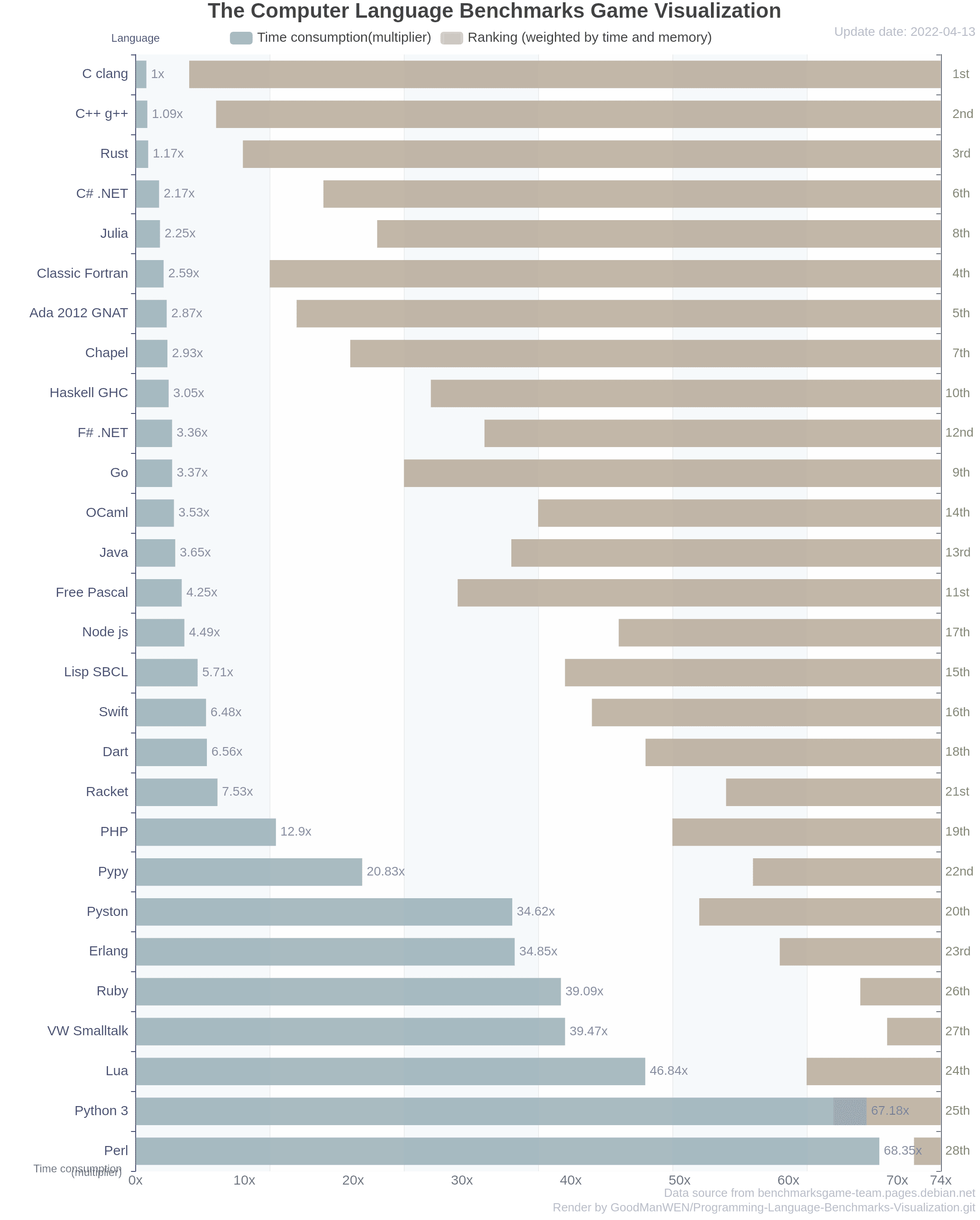
PS: In the recently updated Benchmarks Game data, C# .NET is the fastest among JIT languages, second only to compiled languages like C, C++, and Rust. See link1 and link2.

Original author: InCerry
Original title: The Impact of Single-File Publishing on Program Performance
Original link: https://www.cnblogs.com/InCerry/p/Single-File-And-AOT-Publish.html