19 MySQL Optimizations Commonly Used in Projects

19 MySQL Optimizations Commonly Used in Projects

Note that the optimization solutions are based on Mysql-Index-BTree type

Last updated 5/2/2022 5:33 PM
anchovy
9 min read
Category
MySQL
Tags
MySQL

Before writing this article, I would like to thank Mr. Lu from Variflight for providing the documentation.

Disclaimer: The optimization schemes below are all based on "MySQL Index - BTree Type"

I. EXPLAIN

When optimizing MySQL, we should make good use of EXPLAIN to view SQL execution plans.

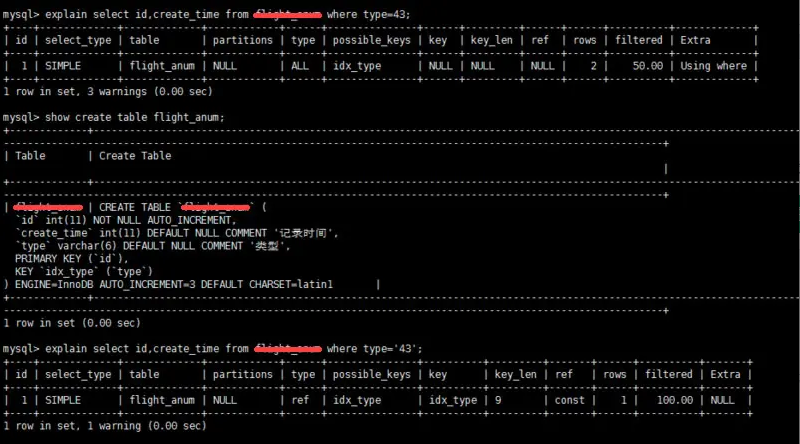
Here is a simple example, with annotations (1,2,3,4,5) indicating the data we need to focus on.

  1. type column: connection type. A good SQL statement should at least reach the range level. Avoid the all level at all costs.
  2. key column: the index used. If no index is selected, the value is NULL. You can force an index usage.
  3. key_len column: index length.
  4. rows column: the number of scanned rows. This value is an estimate.
  5. extra column: detailed description. Common unfavorable values include: Using filesort, Using temporary.

II. The value list in IN should not be too long

MySQL optimizes IN by storing all constants in an array and sorting it. However, if there are many values, the overhead can be significant. For example: select id from table_name where num in(1,2,3). For consecutive values, prefer between over in. Alternatively, use a join to replace it.

III. Always specify column names in SELECT statements

SELECT * adds unnecessary overhead (CPU, IO, memory, network bandwidth). It also reduces the possibility of using covering indexes. When the table structure changes, the front-end needs updates as well. Therefore, directly list the field names after SELECT.

IV. Use LIMIT 1 when only one row is needed

This helps achieve the const type in the type column of EXPLAIN.

V. Avoid sorting if the sort field is not indexed

VI. Avoid OR when other conditions are not indexed

If at least one field on either side of OR is not indexed, and other conditions are also not indexed, the query may not use an index. In many cases, using UNION ALL or UNION (when necessary) instead of OR yields better results.

VII. Prefer UNION ALL over UNION

The main difference between UNION and UNION ALL is that UNION performs a unique filtering operation after merging result sets, which involves sorting, significantly increasing CPU usage, resource consumption, and latency. Of course, the prerequisite for UNION ALL is that there are no duplicate rows in the two result sets.

VIII. Do not use ORDER BY RAND()

select id from `table_name` order by rand() limit 1000;

The above SQL can be optimized to:

select id from `table_name` t1 join (select rand() * (select max(id) from `table_name`) as nid) t2 on t1.id > t2.nid limit 1000;

IX. Differentiate between IN and EXISTS, NOT IN and NOT EXISTS

select * from TableA where id in (select id from TableB)

The above SQL is equivalent to:

select * from TableA where exists(select * from TableB where TableB.id=TableA.id)

The main difference between IN and EXISTS is the change in driving order (key to performance). With EXISTS, the outer table is the driver and is accessed first. With IN, the subquery is executed first. Therefore, IN is suitable when the outer table is large and the inner table is small; EXISTS is suitable when the outer table is small and the inner table is large.

Regarding NOT IN and NOT EXISTS, it is recommended to use NOT EXISTS, not only for efficiency but also because NOT IN may have logic issues. How to efficiently write a SQL statement that replaces NOT EXISTS?

Original SQL:

select colname … from TableA where a.id not in (select b.id from TableB)

Efficient SQL:

select colname … from TableA Left join TableB on a.id = b.id where b.id is null

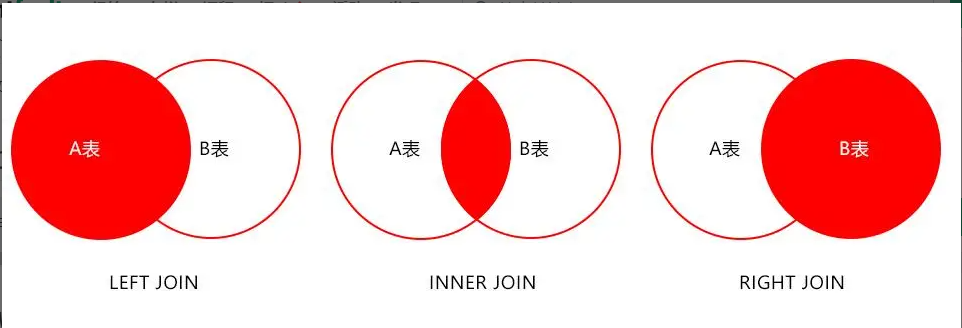
The result set represents data in TableA that is not in TableB, as shown in the diagram below:

X. Use reasonable pagination to improve efficiency

select id,name from table_name limit 866613, 20

When using the above SQL for pagination, you may notice that as the table data grows, direct LIMIT pagination becomes slower.

Optimization: Retrieve the maximum id from the previous page and use it as the starting point for the next page. For example, if the maximum id on the previous page is 866612, the SQL can be:

select id,name from table_name where id > 866612 limit 20

XI. Segment queries

In some user selection pages, the time range chosen may be too large, causing slow queries. The main reason is scanning too many rows. In such cases, you can perform segmented queries programmatically, loop through them, and merge the results for display.

As shown in the SQL below, when the number of scanned rows reaches millions, segmented queries can be used.

XII. Avoid NULL value checks on fields in WHERE clauses

Checking for NULL can cause the engine to abandon the index and perform a full table scan.

XIII. Avoid using leading wildcard LIKE queries

For example, LIKE "%name" or LIKE "%name%" causes index invalidation and full table scans. However, LIKE "name%" can still use the index.

How to query %name%?

As shown below, although an index is added to the secret field, it is not used in the EXPLAIN result.

How to solve this? Answer: Use full-text indexes.

In queries, we often use select id,fnum,fdst from table_name where user_name like '%zhangsan%';. Regular indexes cannot meet this requirement. Fortunately, MySQL provides full-text indexes.

SQL to create a full-text index:

ALTER TABLE `table_name` ADD FULLTEXT INDEX `idx_user_name` (`user_name`);

SQL using a full-text index:

select id,fnum,fdst from table_name where match(user_name) against('zhangsan' in boolean mode);

Note: Before creating a full-text index, contact the DBA to confirm it is feasible. Also note the difference in query syntax compared to regular indexes.

XIV. Avoid expression operations on fields in WHERE clauses

For example:

select user_id,user_project from table_name where age*2=36;

Arithmetic operations on fields cause the engine to abandon the index. It is recommended to change it to:

select user_id,user_project from table_name where age=36/2;

XV. Avoid implicit type conversion

When the column type in the WHERE clause does not match the parameter type, type conversion occurs. It is recommended to confirm the parameter type in WHERE.

XVI. For composite indexes, follow the leftmost prefix rule

For example, an index contains fields id, name, school. You can use the id field alone, or id, name in that order, but name;school alone cannot use this index. When creating a composite index, pay attention to the order of fields; put the most frequently queried field first.

XVII. Use FORCE INDEX when necessary to force a specific index

Sometimes the MySQL optimizer chooses an index it thinks is appropriate, but it may not be the one we want. In such cases, use FORCE INDEX to force the optimizer to use the specified index.

XVIII. Be aware of range query statements

For composite indexes, if a range query exists, such as between, >, <, etc., the subsequent index fields may become invalid.

XIX. JOIN optimization

  • LEFT JOIN: Table A is the driving table.
  • INNER JOIN: MySQL automatically determines the table with fewer rows as the driving table.
  • RIGHT JOIN: Table B is the driving table.

Note: MySQL does not support FULL JOIN. It can be simulated as follows:

select * from A left join B on B.name = A.name
where B.name is null
union all
select * from B;

Prefer INNER JOIN over LEFT JOIN whenever possible.

Queries involving joins usually have at least two tables with size differences. With INNER JOIN, MySQL automatically selects the smaller table as the driving table (if no other filters are applied). However, with LEFT JOIN, the left table is always the driving table.

Use indexes wisely.

The indexed field on the driven table should be used as the ON condition.

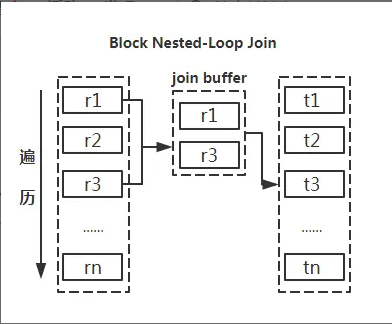
Use small tables to drive large tables.

The diagram clearly shows that reducing the driving table reduces the number of cycles in nested loops, thereby decreasing total IO and CPU operations.

Use STRAIGHT_JOIN skillfully.

INNER JOIN lets MySQL choose the driving table, but in special cases (e.g., with GROUP BY, ORDER BY that cause "Using filesort" or "Using temporary"), you may want to specify a different driving table. STRAIGHT_JOIN forces the join order: the table on the left is the driving table, and the one on the right is the driven table. This is only applicable to inner joins. Using STRAIGHT_JOIN with other joins may produce incorrect results.

This approach can sometimes reduce execution time by a factor of three.

The above are just some optimization techniques; there are many others to explore. Thank you for your attention.

Finally, welcome to: http://fenxianglu.cn/

Keep Exploring

Related Reading

More Articles