10 Ways to Ensure API Data Security

10 Ways to Ensure API Data Security

In our daily development, how can we ensure the security of API data?

Last updated 7/16/2022 2:04 PM
捡田螺的小男孩
13 min read
Category
Sharing
Tags
Architecture Design Security

Preface

Hello everyone, I'm Snail Boy.

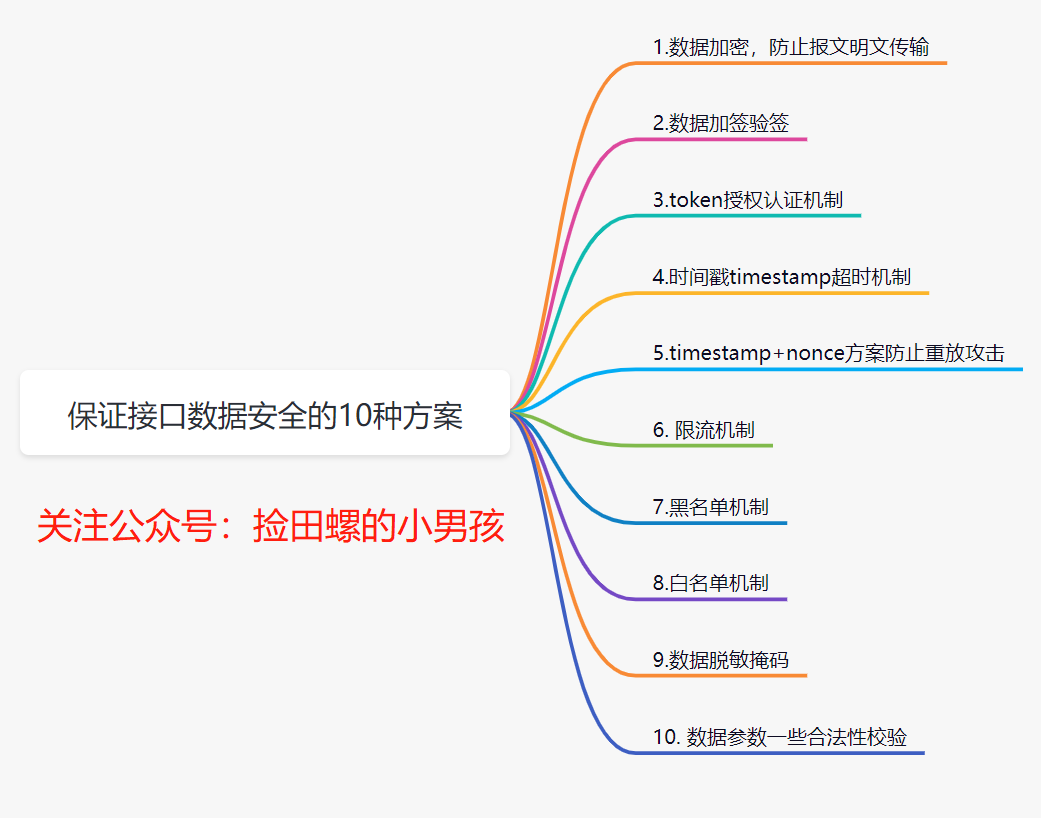
In our daily development, how do we ensure the security of interface data? Personally, I think the process of ensuring interface data security is mainly reflected in these aspects: one is security during data transmission, another is how to identify data when it arrives at the server, and the last is the security of data storage. Today, I'll discuss 10 solutions for ensuring interface data security.

1. Data Encryption to Prevent Plaintext Transmission

We all know that data is easily intercepted during network transmission. If the HTTP protocol is used, since it transmits in plaintext, users' data can be easily obtained by others. Therefore, data encryption is necessary.

1.1 How to encrypt data?

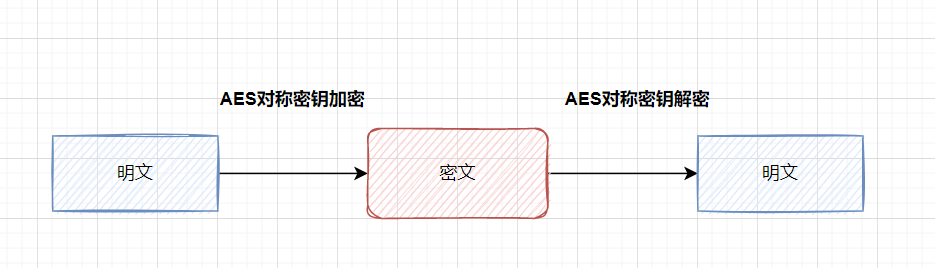
The common approach is to encrypt key fields. For example, for a login interface, you can encrypt the password. What encryption algorithms are commonly used? You can use symmetric encryption algorithms (e.g., AES) for encryption and decryption, or hash algorithms (e.g., MD5).

What is symmetric encryption: an encryption algorithm that uses the same key for encryption and decryption.

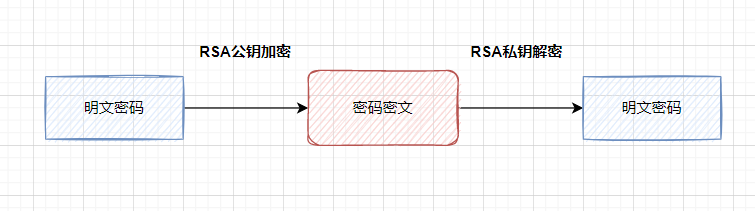
Asymmetric encryption: asymmetric encryption algorithms require two keys (a public key and a private key). The public and private keys are paired. If data is encrypted with the public key, only the corresponding private key can decrypt it.

A more secure approach is to use asymmetric encryption algorithms (such as RSA or SM2), with public key encryption and private key decryption.

If you want to encrypt all fields, it is generally recommended to use the HTTPS protocol. HTTPS actually adds an encryption layer SSL between HTTP and TCP.

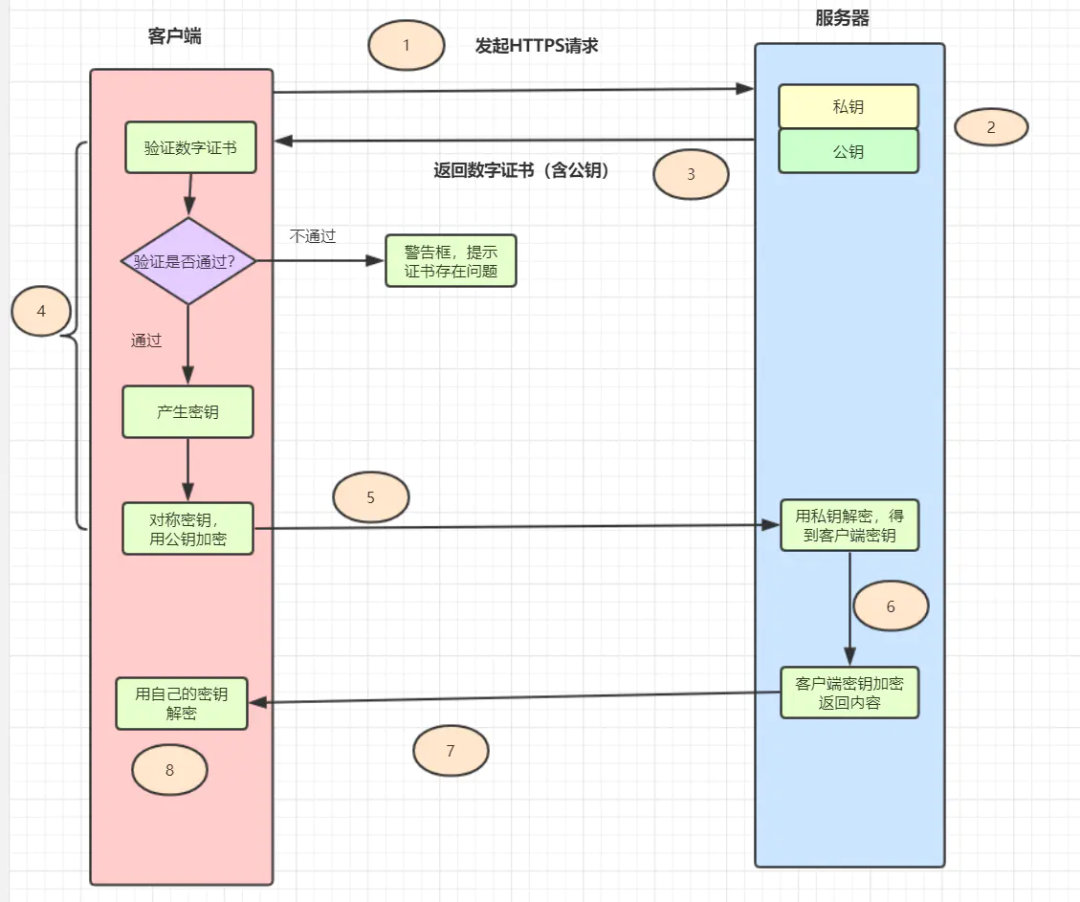
1.2 Do you still remember the principle of HTTPS?

It's also commonly asked in interviews, as follows:

  1. The client initiates an HTTPS request, connecting to the server's port 443.
  2. The server must have a set of digital certificates (the certificate contains the public key, certificate authority, expiration date, etc.).
  3. The server sends its digital certificate to the client (the public key is in the certificate, and the private key is held by the server).
  4. After receiving the digital certificate, the client verifies its validity. If the certificate passes verification, it generates a random symmetric key and encrypts it with the public key from the certificate.
  5. The client sends the public-key-encrypted key to the server.
  6. After receiving the encrypted key from the client, the server decrypts it asymmetrically using its retained private key, obtaining the client's key. Then it uses the client's key to symmetrically encrypt the returned data, so the transmitted data is all ciphertext.
  7. The server returns the encrypted ciphertext to the client.
  8. After receiving it, the client uses its key to symmetrically decrypt it and obtains the data returned by the server.

For daily business, using HTTPS is sufficient for data transmission encryption. If higher security is required, such as for login/registration where passwords need to be transmitted, you can use asymmetric encryption algorithms like RSA to encrypt the password. If your business requires very high security, you can simulate the HTTPS process and perform additional encryption and decryption on the message.

2. Data Signing and Signature Verification

Data message signing and signature verification are common means to ensure data transmission security, ensuring that data is not tampered with during transmission. The enterprise transfer system I used to work on implemented signing and signature verification.

2.1 What is signing and signature verification?

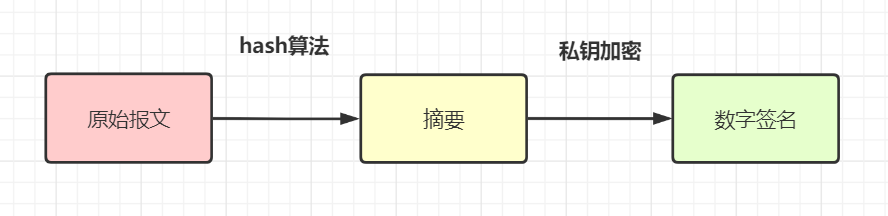
  • Data signing: Use a hash algorithm (e.g., MD5 or SHA-256) to generate a message digest from the original request parameters, then encrypt this digest with a private key to obtain the digital signature sign for the message (this process is signing). Generally, the requester sends the digital signature together with the original message to the receiver.

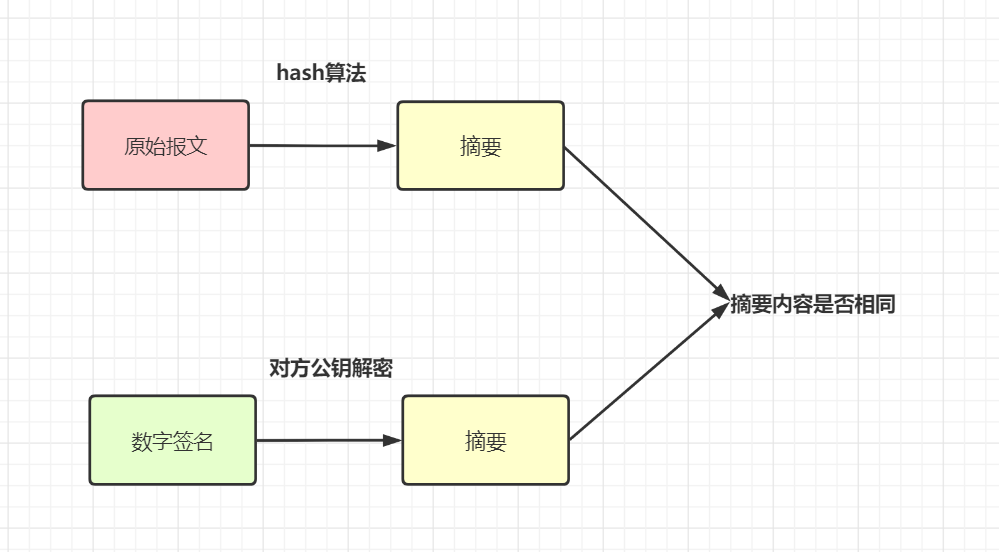
  • Signature verification: After receiving the original message and the digital signature (sign), the receiver generates digest A from the message using the same hash algorithm (e.g., both using MD5). Additionally, it decrypts the digital signature using the provided public key to get digest B, then compares A and B to determine if the message has been tampered with.

In my understanding, signing means processing the request parameters according to certain rules, using a hash algorithm + encryption algorithm to generate a unique label sign. Signature verification means processing the request parameters with the same rules, using the same hash algorithm and corresponding key decryption processing to compare whether the signatures are consistent.

For another example, some implement it like this: sort all non-empty parameters (including a AccessKey, a unique developer identifier) in ascending order, then concatenate a SecretKey (only used locally for encryption, not transmitted over the network, only used in the signature), get a stringSignTemp value, and finally use MD5 to compute sign.

After receiving the message, the server verifies that only requests with a valid identity AccessKey and correct signature Sign are allowed through. This solves the problem of identity verification and parameter tampering. If the request parameters are intercepted, since the interceptor cannot obtain the SecretKey (only used locally, not transmitted), they cannot forge a legitimate request.

2.2 Why is signing/signature verification needed when there is HTTPS encryption?

Some may wonder: signing/signature verification mainly prevents data from being tampered with during transmission. If HTTPS protocol already encrypts data, why would it still be tampered with? Why is signing/signature verification still needed?

Data is encrypted during transmission, so theoretically, even if intercepted, data cannot be tampered with. However, HTTPS is not absolutely secure. You can read this article: Terrible, HTTPS is also useless. Another point: HTTPS encryption only applies to external networks, and many services jump between internal networks. Signing can also prevent tampering by intermediaries in these cases. Therefore, for high-security requirements like transfer interfaces, signing and signature verification are generally required.

3. Token Authorization Mechanism

In daily development, our websites or apps usually require user login. For non-login interfaces, how do we ensure security and confirm user identity? We can use a token authorization mechanism.

3.1 Token Authorization Scheme

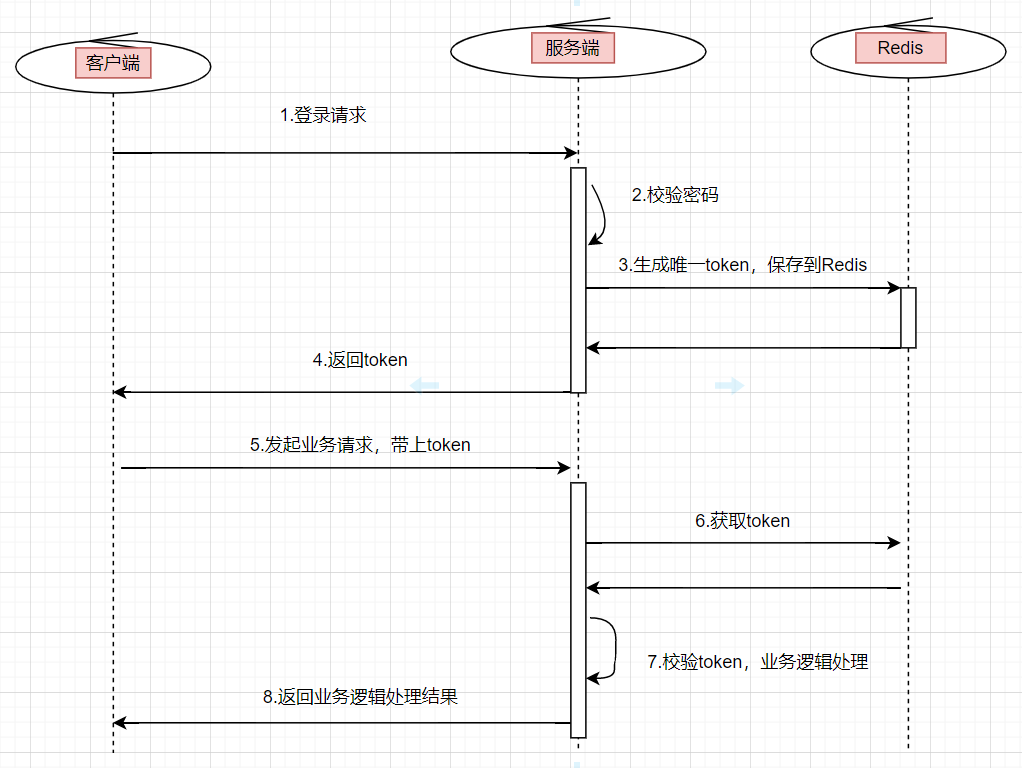
Token authorization scheme: The user enters their username and password on the client and clicks login. After the server verifies the password successfully, it returns a unique value token to the client and stores the token as a key-value pair in the cache (usually Redis). For all subsequent operations on authorized modules, the client must carry this token. When the server receives the request, it first verifies the token. If the token exists, the request is considered legitimate.

Token login authorization flow chart:

  1. The user enters their username and password and initiates a login request.
  2. The server verifies the password. If verification passes, it generates a globally unique token.
  3. Store the token in redis, where the key is the token and the value is the userId or user information, setting an expiration time.
  4. Return this token to the client.
  5. When the user initiates other business requests, they need to carry this token.
  6. The backend service uniformly intercepts interface requests, verifies the token's validity, and retrieves user information for subsequent business logic. If the token does not exist, the request is considered invalid.

3.2 How to ensure token security? What if the token is hijacked?

How do we ensure the security of the token?

For example, if I get the token, can I call any interface on the server? Consider these aspects:

  • Set a reasonable expiration time for the token.
  • Use the HTTPS protocol.
  • The token can be further encrypted.
  • If accessing sensitive information, a simple token is not enough; a whitelist is often configured.

Speaking of tokens, some may recall JWT (JSON Web Token), which is also a type of token. Interested parties can learn more about it.

4. Timestamp Expiration Mechanism

Data can be easily intercepted. Suppose we use HTTPS and signing, even if an intermediary captures the data packet, they cannot see the real data. However, some attackers don't care about the real data; they directly use the captured data packets for malicious requests (e.g., DOS attacks) to bring down your system.

We can introduce a timestamp expiration mechanism to ensure interface security. Specifically: each request from the user carries the current timestamp timestamp. After receiving the timestamp, the server decrypts and verifies the signature. If the signature passes, it compares the timestamp with the server's current time. If the time difference exceeds a certain limit (e.g., 3 minutes), the request is considered invalid.

5. timestamp+nonce Scheme to Prevent Replay Attacks

The timestamp expiration mechanism also has vulnerabilities. If a hacker performs a replay attack within the time difference, it won't work. You can use the timestamp+nonce scheme.

nonce refers to a unique random string used to identify each signed request. We can store the nonce parameter of each request in a "set collection", or store it in JSON format in a database or cache. When processing each HTTP request, first determine whether the nonce parameter is in the "set". If it exists, the request is considered illegal.

However, permanently storing nonce on the server is very costly. You can combine it with timestamp for optimization. Since requests exceeding 3min are considered invalid, you only need to store the nonce parameter "set" for 3min.

6. Rate Limiting Mechanism

What if the user is a legitimate user but maliciously calls the interface frequently to bring down your system? In this case, rate limiting is needed.

Common rate-limiting algorithms include the token bucket and leaky bucket algorithms. You can refer to my article: Interview Essentials: Explanation of 4 Classic Rate-Limiting Algorithms

You can use Guava's RateLimiter for single-machine rate limiting, or Redis for distributed rate limiting, or Alibaba's open-source component Sentinel for rate limiting. For example, how many requests can be accepted per minute.

7. Blacklist Mechanism

If you discover that a legitimate user is making malicious requests, you can implement a blacklist mechanism to block that user. Generally, there will be competitors or malicious users trying to break your system. Therefore, to ensure security, our business systems generally need a blacklist mechanism. For requests from blacklisted users, simply return an error code.

8. Whitelist Mechanism

With a blacklist mechanism, you can also implement a whitelist mechanism. Previously, when I was responsible for an enterprise transfer system, external merchants needed to apply for a network whitelist in advance to access our system. At that time, operations would apply for an IP network whitelist, and only requests from the whitelist could access our transfer system.

9. Data Masking/Desensitization

For sensitive information such as passwords, phone numbers, or ID numbers, they generally need to be masked/desensitized before display. If it's a password, it also needs to be encrypted before being saved to the database.

For phone numbers and ID information, in daily development, during log troubleshooting, they should be masked. The purpose is to minimize the leakage of this user information. Although only developers and operations can view the logs, it is still necessary to take precautions and apply masking.

For passwords saved to the database, we certainly cannot store them in plaintext. At the very least, they need to be processed with MD5 before saving. BCryptPasswordEncoder in Spring Security is also an option; it uses SHA-256 + random salt + key to encrypt passwords. SHA and MD series are both hash digest algorithms.

10. Data Parameter Validity Checks

Ensuring interface data security also requires our system to have data validity checks, simply put, parameter validation. For example, checking the length of an ID number, the length of a phone number, whether it is numeric, etc.

Summary

This article introduced 10 solutions for ensuring interface data security. If you have other solutions, feel free to comment below to exchange and learn together.

Keep Exploring

Related Reading

More Articles
Recent update 5/18/2026

枝见 Zhijian: A Markdown Mind Map Editor Built with Avalonia

This article introduces Zhijian, a local mind map editor based on Avalonia, supporting blank creation, folder loading, precise onboarding guidance, macOS shortcut adaptation, outline/Markdown/mind map synchronization, node notes, thumbnails, zoom, canvas dragging, and Markdown/OPML/XMind file exchange.

Continue Reading