Preface
Hello everyone, I'm the little boy who picks up snails. As a back-end developer, no matter the language—Java, Go, or C++—the underlying back-end concepts are similar. I plan to release a technical column on back-end design later, mainly covering some back-end designs or back-end standards, hoping it will be helpful for everyone's daily work.
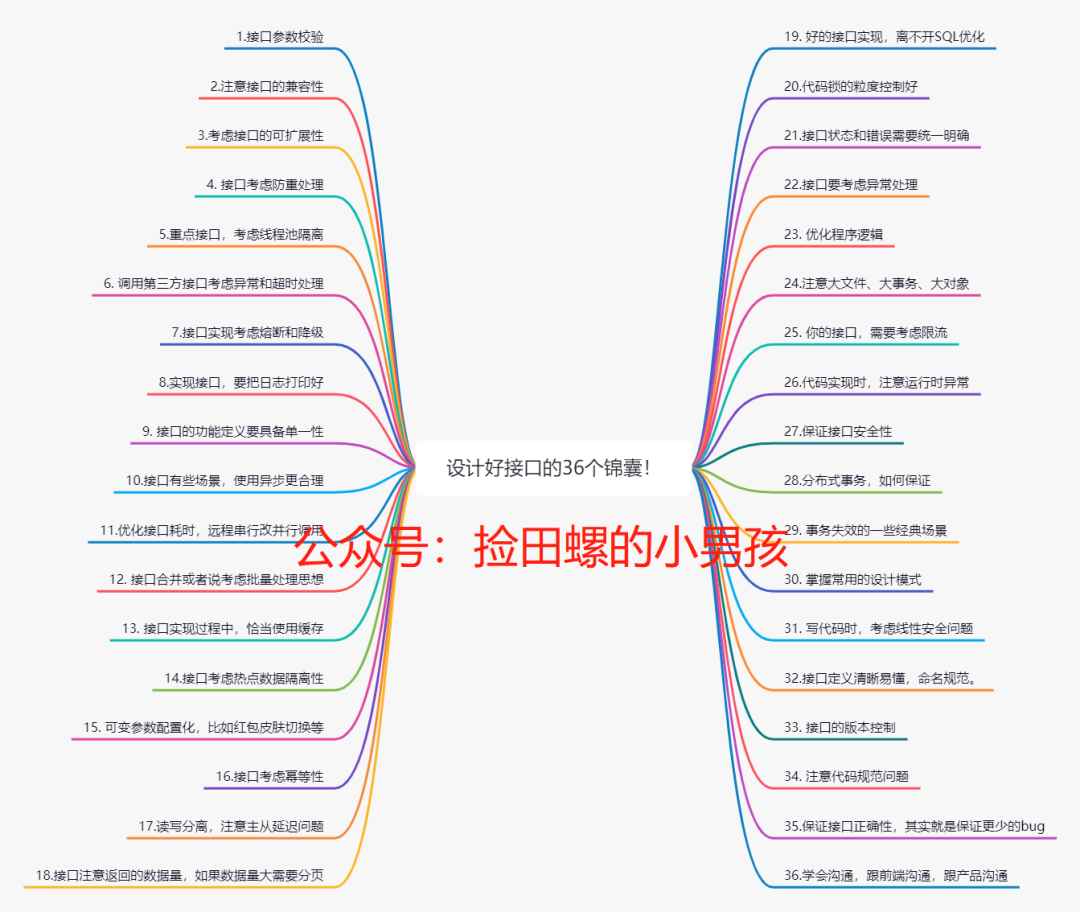
As back-end development engineers, our main job is: how to design a good interface. So today, I'll introduce 36 tips for designing great interfaces. This article is the first in the back-end thinking column.

1. Interface Parameter Validation
Validating input and output parameters is a basic quality that every programmer must have. The interface you design must first validate parameters. For example, whether parameters can be null, and whether the length of input parameters meets your expected length. Develop this habit—many low-level bugs in daily development are caused by not validating parameters.
For instance, if your database table field is set to
varchar(16)and the other party passes a 32-bit string, and you don't validate the parameter, it will directly throw an exception when inserted into the database.
Also for output, for example, if your defined interface message says a parameter is not null, but your interface returns a null value directly due to some program reasons...

2. When Modifying an Old Interface, Pay Attention to Compatibility
Many bugs are caused by modifying an old external interface without considering compatibility. This problem is often serious and may directly cause a system release to fail. Novice programmers are prone to this mistake~

Therefore, if your requirement modifies an existing interface, especially if this interface provides external services, you must consider interface compatibility. For example, a dubbo interface originally only accepted parameters A and B; now you add parameter C. You can handle it like this:
// Old interface
void oldService(A,B){
// Compatibility with new interface: pass null for C
newService(A,B,null);
}
// New interface, cannot delete old interface temporarily, need compatibility.
void newService(A,B,C){
...
}
3. Fully Consider Interface Extensibility When Designing
Design interfaces based on actual business scenarios, fully considering extensibility.
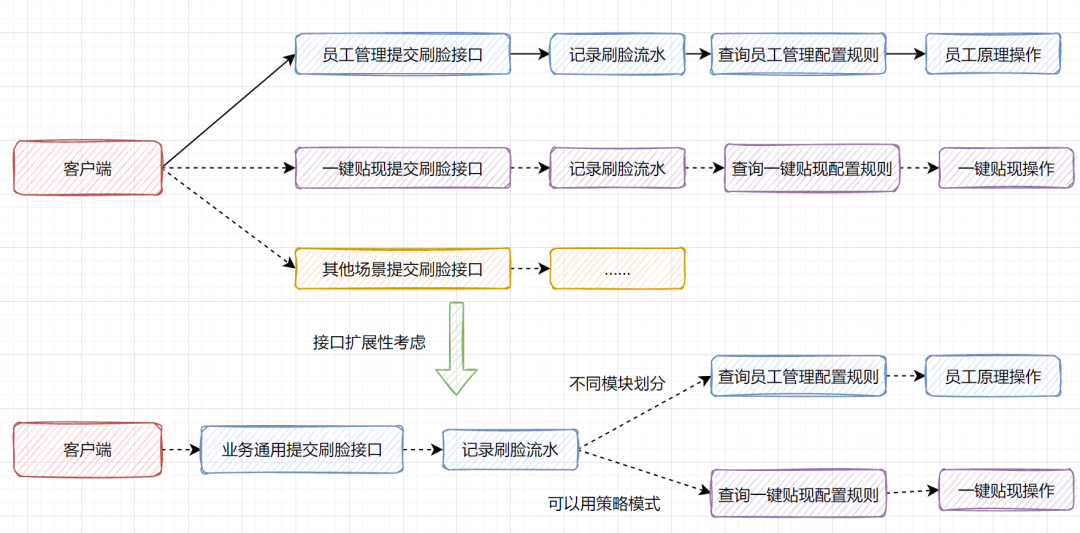
For example, you receive a requirement: when adding or modifying an employee, facial recognition is needed. Do you simply provide an employee management interface that submits facial recognition information? Or do you first think: is facial recognition a general process? For example, if transfers or one-click withdrawals need facial recognition, do you need to implement another interface? Or should you divide modules by business type and reuse the same interface, preserving extensibility?
If divided by modules, when other scenarios like one-click withdrawal need facial recognition in the future, you won't need to create a new set of interfaces. You can just add an enum and reuse the facial recognition process interface, implementing the differences for one-click withdrawal.

4. Consider Whether the Interface Needs Idempotency
If the front end sends duplicate requests, how should your logic handle it? Should you consider deduplication?
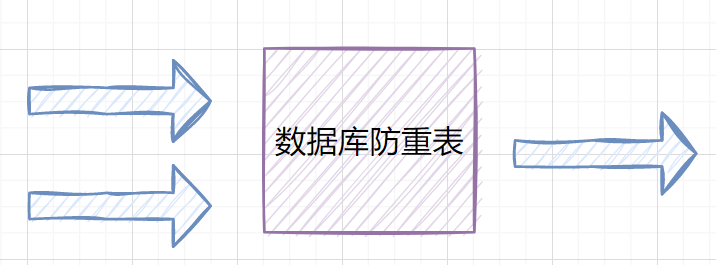
Of course, for query requests, deduplication is usually unnecessary. For update/modify requests, especially financial transfer ones, you should filter duplicate requests. A simple way is to use Redis to prevent duplicate requests: for the same requester, within a certain time interval, consider filtering identical requests. However, for transfer interfaces with low concurrency, it is recommended to use a database deduplication table, using a unique transaction ID as the primary key or unique index.

5. For Critical Interfaces, Consider Thread Pool Isolation
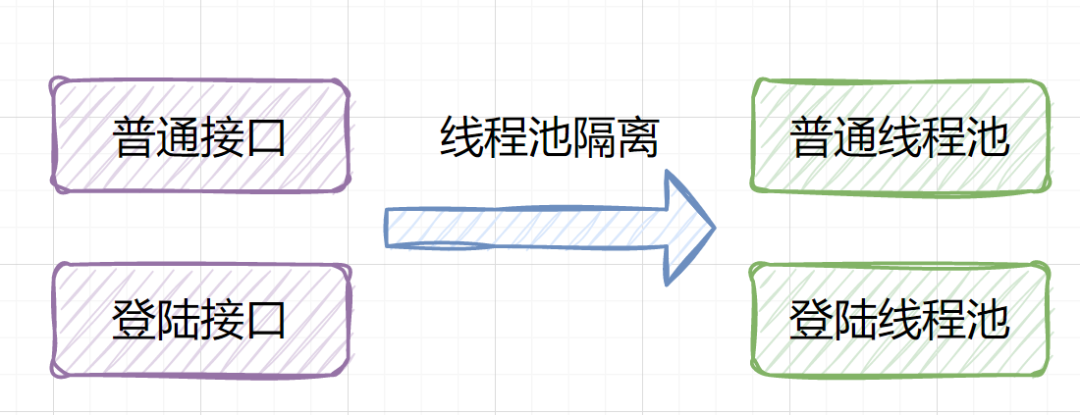
For important interfaces like login, transfer, and order placement, consider thread pool isolation. If all your business shares one thread pool, and a bug in one business causes the thread pool to block and fill up, it's a disaster — all businesses will be affected. Therefore, isolate thread pools, allocate more core threads to critical business, and better protect important services.

6. When Calling Third-party Interfaces, Consider Exception and Timeout Handling
If you call a third-party interface or a distributed remote service, you need to consider:
- Exception handling
For example, if the other party's interface throws an exception, how will you handle it? Retry, treat it as a failure, or raise an alert?
- Interface timeout
Since you can't predict how long the other party's interface will take to return, generally set a timeout to disconnect, protecting your interface. I once encountered a production issue where an HTTP call didn't set a timeout, the responding process became dead, and requests kept occupying threads without release, eventually exhausting the thread pool.
- Retry count
If your interface call fails, should you retry? How many times? You need to consider this from a business perspective.

7. Consider Circuit Breaking and Degradation in Interface Implementation
Current internet systems are generally deployed in a distributed manner. In distributed systems, it's common for a basic service to become unavailable, ultimately causing the entire system to be unavailable. This phenomenon is called the service avalanche effect.
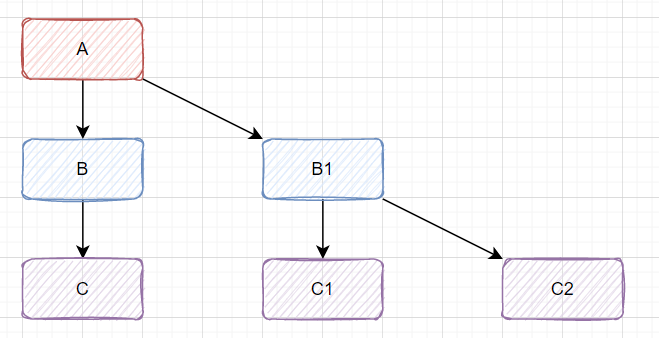
For example, distributed call chain A->B->C..., as shown below:

If service C has a problem, such as slow calls due to a slow SQL query, it will cause B to also be delayed, and then A. The blocked A requests consume the system's threads, IO, and other resources. As more requests come to A, more computer resources are occupied, eventually leading to system bottlenecks, causing other requests to also become unavailable, and finally causing the business system to crash.
To deal with service avalanches, common practices are circuit breaking and degradation. The simplest way is to add a switch: when the downstream system has problems, degrade by not calling the downstream system. You can also use the open-source component Hystrix.
8. Log Well: Key Code of the Interface Needs Log Support
Critical business code, no matter where it is, should have sufficient logs. For example, when implementing a transfer of several million, if the transfer fails and the customer complains, and you haven't printed logs, imagine the dire situation with no way to solve it...
So, what log information does your transfer business need? At least, before the method call, print the input parameters; after the interface call, catch exceptions and print relevant exception logs, as follows:
public void transfer(TransferDTO transferDTO){
log.info("invoke transfer begin");
// Print input parameters
log.info("invoke transfer, parameters: {}", transferDTO);
try {
res = transferService.transfer(transferDTO);
} catch(Exception e){
log.error("transfer fail, account: {}", transferDTO.getAccount());
log.error("transfer fail, exception: {}", e);
}
log.info("invoke transfer end");
}
I previously wrote an article with 15 suggestions for logging. You can check it out: Summary! 15 Suggestions for Log Printing
9. The Function Definition of an Interface Should Be Single
Single means the interface does one thing specifically. For example, a login interface should only verify account and password, then return login success and userId. But if you put registration, configuration queries, etc., all into the login interface to reduce interactions, that's not appropriate.
This is also part of microservices philosophy: interface functions are single and clear. For example, order service, points service, and product information interfaces are separated. If you later split into microservices, it'll be much easier.
10. In Some Scenarios, Using Asynchrony Is More Reasonable
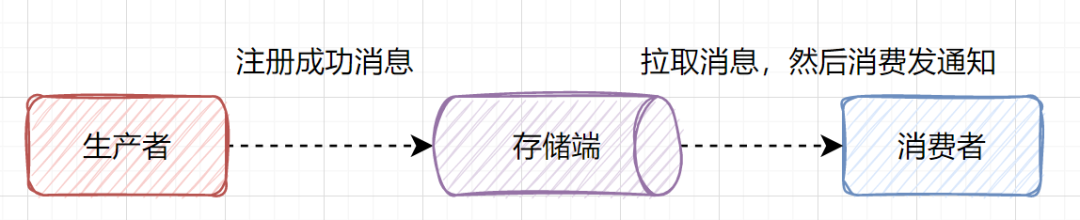
Take a simple example: implementing a user registration interface. When a user registers successfully, send an email or SMS to notify them. This email or SMS is better handled asynchronously, because a notification failure should not cause the registration to fail.
For asynchrony, the simplest way is using a thread pool. You can also use message queues: after user registration succeeds, the producer generates a registration success message, and the consumer, upon receiving it, sends the notification.

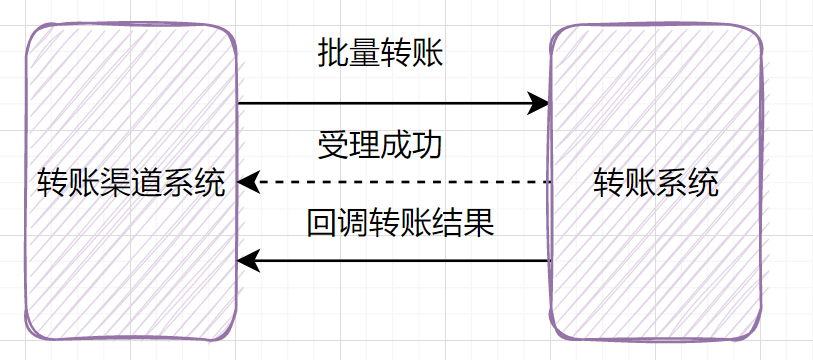
Not all interfaces are suitable for synchronous design. For example, if you implement a transfer function, for single transfers, you can make the interface synchronous. When a user initiates a transfer, the client waits for the result. For batch transfers—thousands or even tens of thousands of transactions—you can design the interface as asynchronous. When a user initiates a batch transfer, persist it successfully, return "accepted", then let the user query the result after ten or fifteen minutes. Alternatively, call back to the upstream system after the batch transfer succeeds.

11. Optimize Interface Response Time: Consider Changing Remote Serial Calls to Parallel
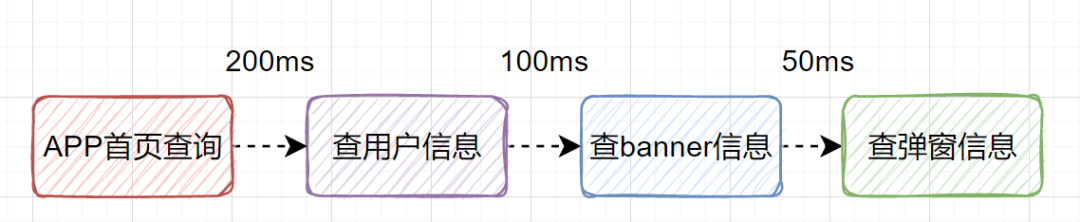
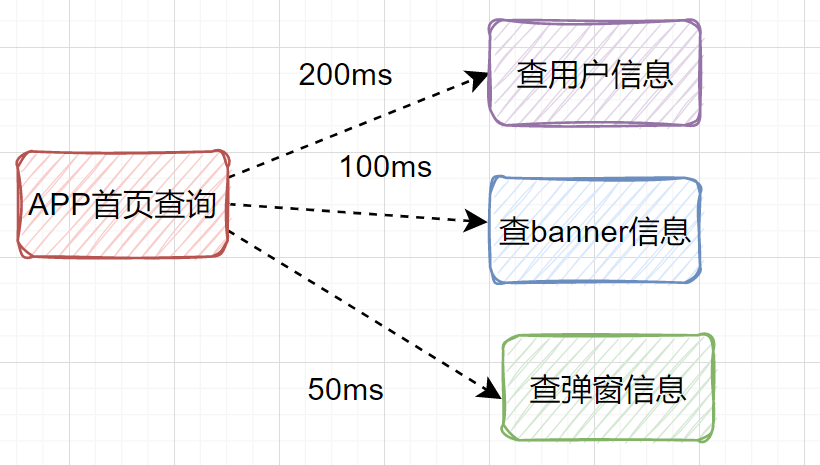
Suppose we design an interface for the APP home page. It needs to query user information, banner information, pop-up information, etc. Should you call these interfaces serially or in parallel?

If you query serially one by one, e.g., user info takes 200ms, banner info 100ms, pop-up info 50ms, then total time is 350ms. If you query more, the delay becomes even larger. This scenario can be changed to parallel calls. That is, query user info, banner info, and pop-up info simultaneously.

In Java, there is a powerful asynchronous programming tool: CompletableFuture, which can achieve this well. If you're interested, check out my previous article: CompletableFuture Detailed Explanation
12. Consider Batch Processing or Interface Merging
For database operations or remote calls, if batch operations are possible, don't call them in a for loop.

A simple example: when inserting a list of detail data into the database, do not insert one by one in a for loop. It is recommended to insert in batches of a few hundred records. Similarly for remote calls: for example, when querying whether marketing tags are hit, you can query one tag at a time or multiple tags at once. Batch querying is more efficient.
// Anti-pattern
for(int i=0;i<n;i++){
remoteSingleQuery(param)
}
// Good pattern
remoteBatchQuery(param);
Have you ever wondered why Kafka is so fast? One reason is that Kafka uses batch messages to improve server processing capacity.
13. Use Caching Appropriately in Interface Implementation
Which scenarios are suitable for caching? Scenarios with more reads than writes and low data timeliness requirements.
Good use of caching can handle more requests, improve query efficiency, and reduce database pressure.
For example, product information that changes infrequently or almost never can be placed in the cache. When a request comes, first query the cache; if not found, query the database and update the cache with the database data. However, using caching introduces considerations: how to ensure cache and database consistency, cluster issues, cache breakdown, cache avalanche, cache penetration, etc.
- Ensure database and cache consistency: delayed double deletion, retry mechanism for cache deletion, asynchronous cache deletion by reading binlog
- Cache breakdown: set data to never expire
- Cache avalanche: Redis cluster high availability, evenly set expiration times
- Cache penetration: validate at interface layer, set a default null marker for empty results, bloom filter
Generally use Redis distributed cache, but sometimes you can also consider local cache like Guava Cache, Caffeine. Local cache has some drawbacks: cannot store large amounts of data, and cache will be invalidated when the application process restarts.
14. Consider Hot Data Isolation for the Interface
Instant high concurrency may bring down your system. You can isolate hot data through business isolation, system isolation, user isolation, data isolation, etc.
- Business isolation: e.g., time-based ticket selling in 12306, distributing hot data to reduce system load.
- System isolation: e.g., dividing the system into user, product, and community modules, each using different domain names, servers, and databases, achieving full isolation from the access layer to the application layer to the data layer.
- User isolation: route important users to better-configured machines.
- Data isolation: use separate cache clusters or databases for hot data.
15. Make Variable Parameters Configurable, e.g., Red Envelope Skin Switching
Suppose a product manager proposes a red envelope requirement: at Christmas, the red envelope skin should be Christmas-themed; at Spring Festival, it should be Spring Festival themed, etc.
If hardcoded in the code, you might have code like:
if(duringChristmas){
img = redPacketChristmasSkin;
}else if(duringSpringFestival){
img = redSpringFestivalSkin;
}
If around the Lantern Festival, the operations team suddenly wants a lantern-themed red envelope skin, do you need to modify the code and redeploy?
From the start of interface design, you can create a configuration table for red envelope skins, making them configurable. Changing the skin only requires updating the table data.
Of course, there are other scenarios suitable for configurable parameters: page size control, time-to-expiry for grabbing red envelopes, etc., can all be placed in a parameter configuration table. This is also a manifestation of extensibility thinking.
16. Consider Interface Idempotency
Interfaces need to consider idempotency, especially for important ones like grabbing red envelopes and transfers. The most intuitive business scenario is a user clicking twice in a row: can your interface handle it? Or if message queues have duplicate consumption, how do you control the business logic?
Recall: What is idempotency?
In computer science, idempotence means that one request or multiple requests for a resource should have the same side effect. In other words, the impact of multiple requests is the same as that of a single request.
Don't confuse deduplication with idempotency design. Deduplication aims to prevent duplicate data by intercepting duplicate requests. Idempotency design, in addition to intercepting already processed requests, also requires that each identical request returns the same result. However, in many cases, their processing flows and solutions are similar.

There are mainly 8 solutions for interface idempotency:
- select+insert+primary key/unique index conflict
- direct insert + primary key/unique index conflict
- state machine idempotency
- deduplication table
- token
- pessimistic lock
- optimistic lock
- distributed lock
You can read my article: Talking about Idempotent Design
17. Read-Write Separation: Prefer Reading from Replicas, But Be Aware of Master-Slave Replication Delay
Our databases are usually deployed in clusters with master and replica databases. Currently, read-write separation is common. For example, write data to the master, but for data that doesn't require high real-time accuracy, prefer reading from a replica to share the master's load.
If reading from a replica, you need to consider the master-slave replication delay issue.
18. Pay Attention to the Amount of Data Returned by the Interface; Paginate If Necessary
An interface response message should not contain too much data. Too much data complicates processing and imposes heavy transmission pressure. If the data volume is large, return in pages. If it's irrelevant data, consider splitting the interface.
19. A Good Interface Implementation Is Inseparable from SQL Optimization
As a back-end developer, writing a good interface cannot be separated from SQL optimization.
Consider SQL optimization from these dimensions:
- Use
EXPLAINto analyze SQL execution plan (focus on type, extra, filtered columns) - Use
SHOW PROFILEto understand the thread status and time consumed by SQL execution - Index optimization (covering index, leftmost prefix, implicit conversion, optimization of
ORDER BYandGROUP BY, JOIN optimization) - Large page problem optimization (deferred join, record max ID from previous page)
- Data volume too large (sharding, sync to Elasticsearch for query)
20. Control the Granularity of Code Locks
What is lock granularity?
It refers to the scope you lock. For example, when you use the bathroom at home, you only need to lock the bathroom door, not the whole house. The bathroom is your lock granularity.
When writing code, if shared resources are not involved, there's no need to lock. It's like using the bathroom: you don't lock the whole house, only the bathroom door.
For instance, in business code, there is an ArrayList that requires locking due to multi-threading. Suppose there is also a time-consuming operation (slowNotShare method) that does not involve thread safety. How would you lock?
Anti-pattern:
// Slow method not involving shared resources
private void slowNotShare() {
try {
TimeUnit.MILLISECONDS.sleep(100);
} catch (InterruptedException e) {
}
}
// Wrong locking method
public int wrong() {
long beginTime = System.currentTimeMillis();
IntStream.rangeClosed(1, 10000).parallel().forEach(i -> {
// Lock granularity too coarse; slowNotShare does not involve shared resources
synchronized (this) {
slowNotShare();
data.add(i);
}
});
log.info("cosume time:{}", System.currentTimeMillis() - beginTime);
return data.size();
}
Correct:
public int right() {
long beginTime = System.currentTimeMillis();
IntStream.rangeClosed(1, 10000).parallel().forEach(i -> {
slowNotShare(); // No need to lock
// Only lock the List part
synchronized (data) {
data.add(i);
}
});
log.info("cosume time:{}", System.currentTimeMillis() - beginTime);
return data.size();
}
21. Interface Status and Errors Should Be Unified and Clear
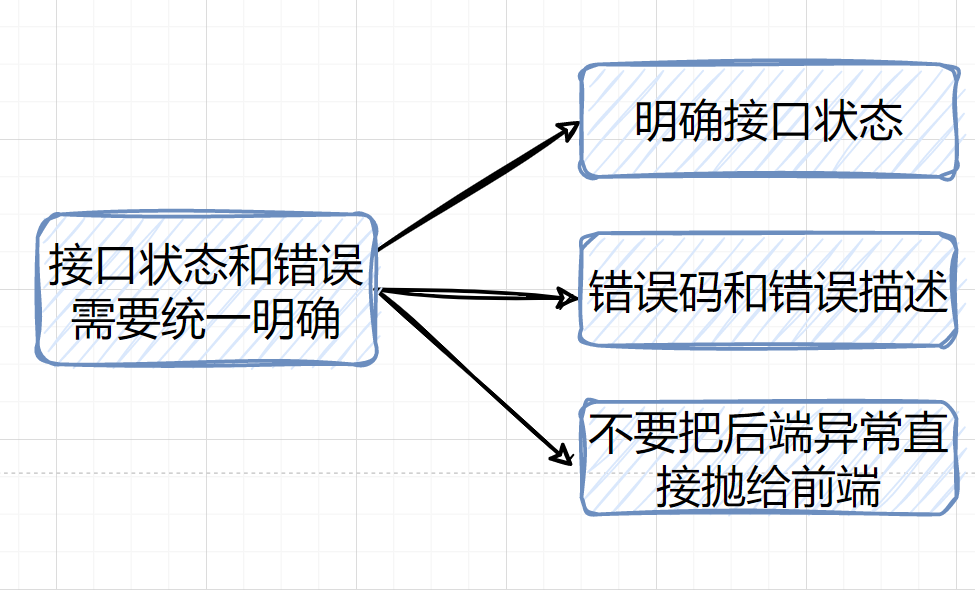
Provide necessary interface call status information. For example, whether a transfer interface call is successful, failed, processing, or accepted — the client should be clearly informed. If it fails, what is the specific reason? All this necessary information must be told to the client. Therefore, define clear error codes and corresponding descriptions. Also, try to wrap error messages; don't expose the back-end exception details directly to the client.

22. Consider Exception Handling in Interfaces
Implementing a good interface requires elegant exception handling. Here are ten tips for exception handling:
- Try not to use
e.printStackTrace(), useloginstead, becausee.printStackTrace()may fill up memory. - When catching an exception, print the specific
exceptiondetails to better locate the problem. - Don't catch all possible exceptions with a generic
Exception. - Remember to close stream resources in
finallyor use try-with-resources. - The caught exception must exactly match the thrown exception, or the caught exception is a parent class of the thrown exception.
- Do not ignore caught exceptions; at least log them.
- Be aware of the contamination of exceptions on your code hierarchy.
- When customizing exceptions, don't discard the original exception's
Throwable cause. RuntimeExceptionshould not be caught; use pre-checking instead, e.g.,NullPointerExceptionhandling.- Pay attention to the order of exception matching; catch specific exceptions first.
If interested, check out my article: Ten Suggestions for Java Exception Handling
23. Optimize Program Logic
Optimizing program logic is quite important. If your business code is complex, it's recommended to write clear comments. Also, keep code logic as clear and efficient as possible.
For example, you need to use user information attributes. You have already obtained
userIdfrom a session, queried the user information from the database, and used it. Later you may need the user info again. Some developers might not think twice and passuserIdagain, querying the database once more... I've seen this in projects. Why not just pass the user object?
Anti-pattern pseudo-code:
public Response test(Session session){
UserInfo user = UserDao.queryByUserId(session.getUserId());
if(user==null){
return new Response();
}
return do(session.getUserId());
}
public Response do(String UserId){
// Another database query
UserInfo user = UserDao.queryByUserId(session.getUserId());
......
return new Response();
}
Correct:
public Response test(Session session){
UserInfo user = UserDao.queryByUserId(session.getUserId());
if(user==null){
return new Response();
}
return do(user); // Pass UserInfo directly
}
public Response do(UserInfo user){
......
return new Response();
}
Of course, this is just a small example. Many similar cases require you to think more during development.
24. Be Aware of Large Files, Large Transactions, and Large Objects During Implementation
- When reading large files, don't use
Files.readAllBytesto read into memory; this can cause OOM. UseBufferedReaderto read line by line. - Large transactions can cause deadlocks, long rollback times, master-slave delay, etc. Avoid them in development.
- Be careful with large objects; they go directly to the old generation and may trigger full GC.
25. Your Interface Needs to Consider Rate Limiting
If your system can handle 1000 requests per second, what happens if 100,000 requests come in one second? In other words, when the traffic spike exceeds the system's capacity, what do you do?
If no measures are taken, all requests come in, CPU, memory, and load soar, and finally requests cannot be processed normally.
For such scenarios, we can adopt rate limiting. The purpose is to protect the system: discard excess requests.
Rate limiting definition:
In computer networks, rate limiting controls the rate of sending or receiving requests on a network interface. It can prevent DoS attacks and restrict web crawlers. Rate limiting, also called flow control, refers to limiting new requests to the system when it faces high concurrency or high traffic, ensuring system stability.
You can use Guava's RateLimiter for single-node rate limiting, Redis for distributed rate limiting, or the Alibaba open-source component Sentinel.
Check out my previous article: 4 Classic Rate Limiting Algorithms Explained
26. Be Aware of Runtime Exceptions (e.g., NullPointer, IndexOutOfBounds) in Code
In daily development, we need to take measures to avoid array bounds, division by zero, null pointers, etc. Similar code is common:
String name = list.get(1).getName(); // list may be out of bounds because there may not be two elements
Take measures to prevent array bounds. Correct example:
if(CollectionsUtil.isNotEmpty(list) && list.size() > 1){
String name = list.get(1).getName();
}

27. Ensure Interface Security
If your API interface is external, you need to ensure its security. Common methods include token mechanism and interface signing.
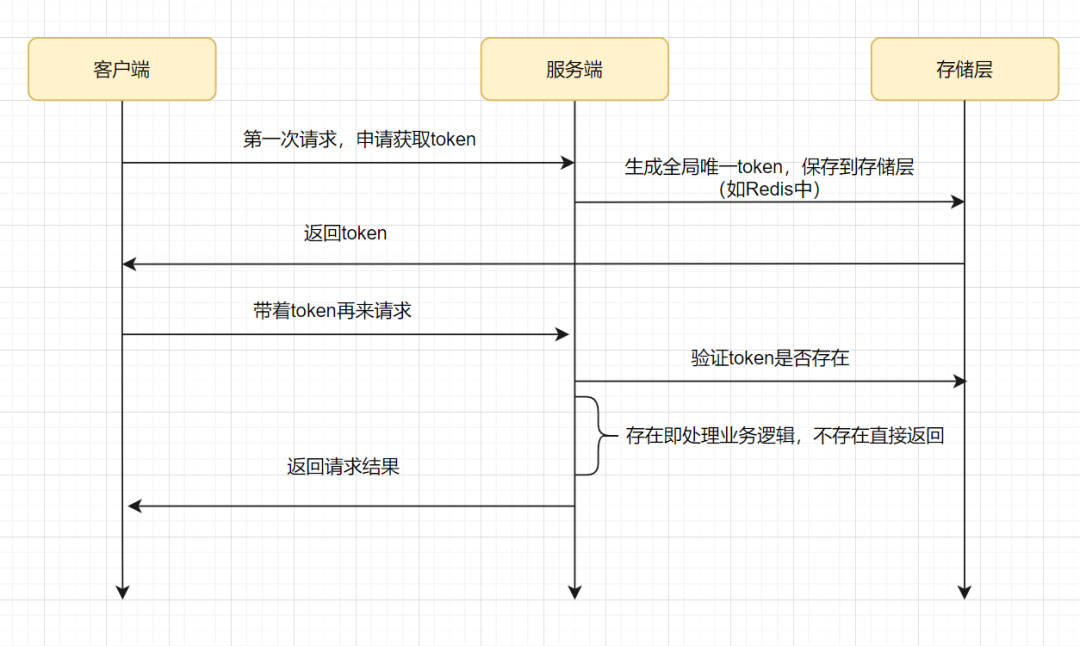
Token-based authentication is relatively simple:

- The client initiates a request to get a token.
- The server generates a globally unique token, saves it to Redis (usually with an expiration time), and returns it to the client.
- The client sends a request with the token.
- The server checks whether the token exists in Redis, usually using
redis.del(token). If deletion succeeds, the token is valid and business logic is processed. If deletion fails, the token is invalid and a result is returned directly.
Interface signing: The client signs the request information (including request payload, timestamp, version, appid, etc.) with its private key. The server verifies the signature using the corresponding public key. Only if verification passes is the request considered legitimate and unmodified.
For more on signing and verification, check out my article: Essential Basics for Programmers: Signing and Verification
In addition to signing and token mechanisms, interface messages should generally be encrypted. Of course, using HTTPS encrypts messages. But at the service layer, how to encrypt/decrypt?
You can refer to the HTTPS principle: the server sends its public key to the client; the client generates a symmetric key; the client encrypts the symmetric key with the server's public key and sends it to the server; the server decrypts with its private key to get the symmetric key. Then they can securely transfer messages: the client encrypts the request with the symmetric key, and the server decrypts with the same key.
Sometimes interface security also includes masking sensitive data such as phone numbers and ID numbers. That is, user private data should not be exposed casually.
28. How to Ensure Distributed Transactions
A distributed transaction involves participants, transaction-supporting servers, resource servers, and transaction managers that are located on different nodes of a distributed system. Simply put, a distributed transaction exists to ensure data consistency across different database nodes.
Several solutions for distributed transactions:
- 2PC (two-phase commit) / 3PC
- TCC (Try, Confirm, Cancel)
- Local message table
- Best effort notification
- Seata
Check out this article: Understand at a Glance: Detailed Explanation of Distributed Transactions
29. Classic Scenarios Where Transactions Fail
During interface development, we often use transactions. So you need to avoid these classic failure scenarios:
- Access level must be
public; other levels likeprivatecause transaction failure. - Method is defined as
final, transaction fails. - Direct internal method calls within the same class cause transaction failure.
- If a method is not managed by Spring, no Spring transaction is generated.
- Multi-threading: two methods not in the same thread get different database connections.
- The table's storage engine does not support transactions.
- If you
try...catchand accidentally swallow the exception, transaction fails. - Wrong propagation behavior.
I recommend this article: 12 Scenarios Where Spring Transactions Fail, Very Pitiful
30. Master Commonly Used Design Patterns
Writing good code requires proficiency in common design patterns, such as strategy, factory, template method, observer, etc. Design patterns are summaries of code design experience. Using them improves code reusability, readability, and reliability.
I've written a summary article of design patterns commonly used in work, which is quite good: Practical! Which Design Patterns Are Commonly Used at Work?
31. Consider Thread Safety When Writing Code
In high concurrency, HashMap can cause infinite loops because it's not thread-safe. Use ConcurrentHashMap instead. Develop the habit; don't always start with new HashMap().
- Hashmap, ArrayList, LinkedList, TreeMap, etc., are not thread-safe.
- Vector, Hashtable, ConcurrentHashMap, etc., are thread-safe.

32. Interface Definitions Should Be Clear and Understandable, with Proper Naming Conventions
We write code not only to implement current functionality but also to facilitate future maintenance. Code is written for others, not just yourself. So interface definitions should be clear, understandable, and follow naming conventions.
33. Version Control for Interfaces
Interfaces should have version control. That is, the base request message should include a version field for future compatibility. This is also a reflection of extensibility.
For example, when a client APP feature is optimized, old and new versions coexist. The version field comes in handy: upgrade version and properly control versioning.
34. Pay Attention to Code Quality
Be aware of common code smells:
- Large amount of duplicate code (extract common methods, use design patterns)
- Too many method parameters (encapsulate into a DTO)
- Method too long (extract small functions)
- Too many conditions (optimize
if...else) - Keep unused code
- Neglect code formatting
- Avoid over-design
I summarized code smells here: 25 Code Smells Summary + Optimization Examples
35. Ensuring Interface Correctness Means Fewer Bugs
Ensuring interface correctness means fewer bugs, or even no bugs. So after developing an interface, you generally need to self-test. Also, correctness is reflected in ensuring data correctness under multi-threading concurrency, etc. For example, when making a transfer, deducting balance correctly using CAS optimistic locking.
If you implement a flash sale interface, you must prevent overselling. You can use Redis distributed locks. There are several points to note, as I discussed in: Seven Solutions! Discussing Proper Use of Redis Distributed Locks
36. Learn to Communicate: Communicate with Front-End and Product Managers
I put this point last. Learning to communicate is very important. For example, when you define an interface, don't just work on it alone. Align with the client first. When encountering difficulties, align with your tech lead on the solution. When implementing requirements, communicate with the product manager about any issues.
In summary, communicate well during interface development~
Final (Please Follow, Don't Just Lurk)
If this article was helpful or inspiring to you, please give it a triple: like, share, and watch. Your support is the greatest motivation for me to keep writing.