
简介
缓存是指可以进行高速数据交换的存储器,它先于内存与 CPU 交换数据,因此速率很快。由于 CPU 从内存中读取数据的速度比从磁盘读取快几个数量级,并且存在内存中,减小了数据库访问的压力, 所以缓存几乎每个项目都会用到。一般常用的有 MemoryCache、Redis, 今天就给大家带来 MemoryCache 的使用介绍!
类别
内存缓存过期时间有 4 种
- 永不过期
- 绝对过期时间
- 相对现在的过期时间
- 滑动过期时间
当然也可以通过这三种过期时间衍生出 滑动窗口+绝对过期时间等等
官网地址
我们也可以查看官方文档 来详细了解 MemoryCache, 这里就不做过多解读了
- MemoryCache 地址: https://docs.microsoft.com/zh-cn/dotnet/api/system.runtime.caching.memorycache?redirectedfrom=MSDN&view=dotnet-plat-ext-6.0
使用
回到刚才的问题 我们来介绍怎么设置过期时间!
永不过期
就是在我程序发布后只要我们不去清理该缓存,该缓存会一直有效!
 /// <summary>
 /// 永不过期时间
 /// </summary>
static void NeverExpire()
{
    _cache.Set("NeverExpire", "1");
}
绝对过期时间
用的是绝对时间点 可以理解成"截止日期"
static void AbsoluteExpiration()
 {
  DateTime time = new DateTime(2022, 04, 01, 23, 59, 59);
   _cache.Set("AbsoluteExpiration", "20220401235959", time);
}
相对现在的过期时间
相对现在的过期时间,就比如说我们设置缓存后的一分钟内有效,可以参考我们常见的 短信登录,后端随机生成一个验证码并存入 redis,并且设置该 key 的过期时间,然后就是校验了,发送手机号码和验证码到后台, 从 redis 中取出对应的验证码就行校验,如果正确就把该验证码删掉,防止可以验证多次
static void ExpirationTimeRelativeToThePresent()
{
    _cache.Set("AbsoluteExpiration", "123456", new TimeSpan(0, 0, 60));
}
滑动过期时间
缓存在设定的时间内没有被使用,则失效,使用后缓存的过期时间重新被刷新
static void SlidingExpirationTime()
{
    _cache.Set("SlidingExpirationTime", "3", new MemoryCacheEntryOptions()
    {
            SlidingExpiration = new TimeSpan(0, 0, 2),
            AbsoluteExpiration = DateTimeOffset.Now.AddMilliseconds(1000)
    });
}
我们来看看官网的定义如图所示 !
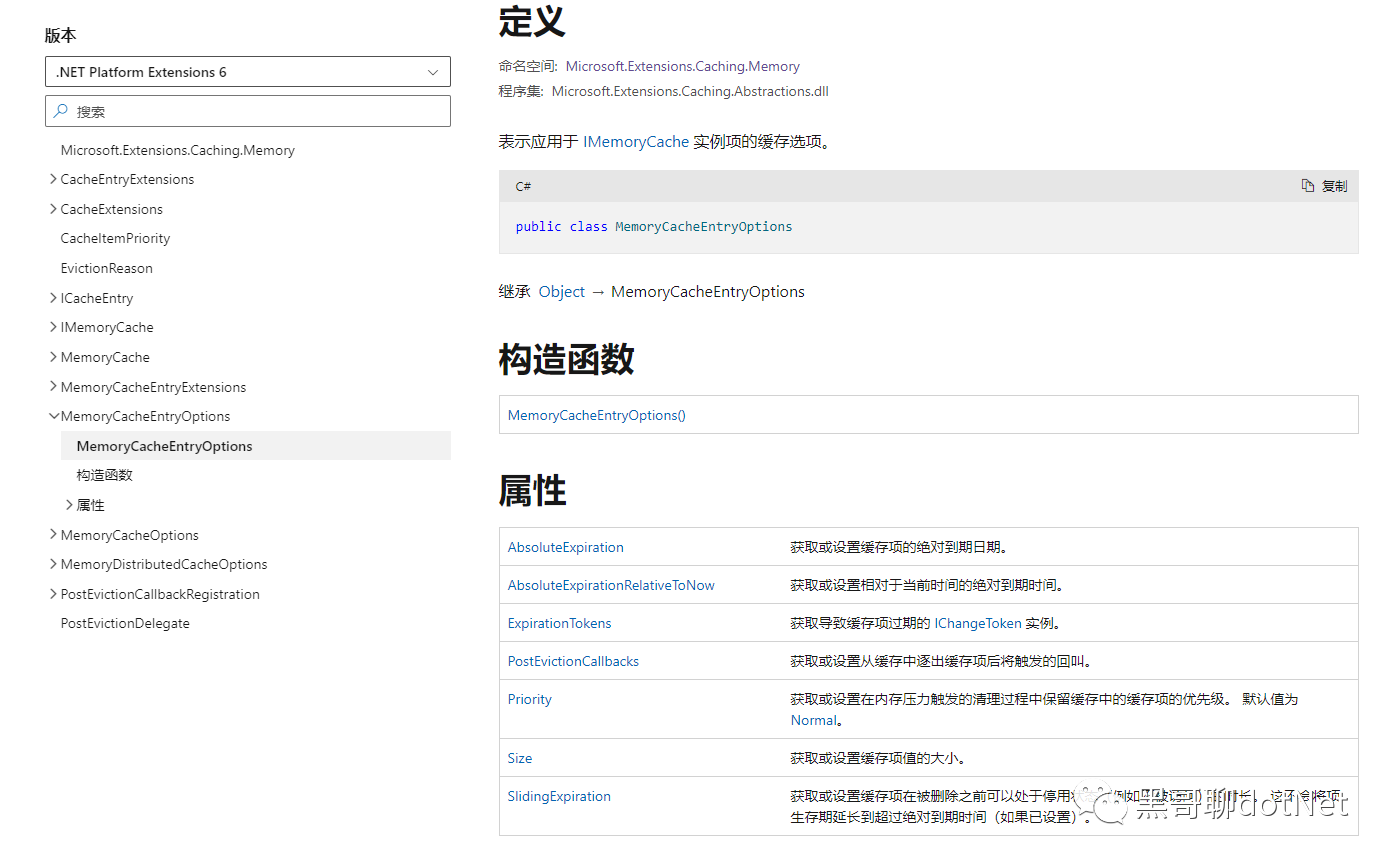
然后再来解释第二个参数 MemoryCacheEntryOptions, 设置缓存项的绝对到期日期: 是当前缓存设置后的 1000 秒(或许应该是分钟?开玩笑,正常场景一般 5 分钟、10 分钟之类的,看实际业务设计)。像我们经常玩的英雄联盟手游 ,我们一天不登录,缓存的 token 失效, 就要重新登录获取 token,我们每天都在玩触发了滑动过期时间,就不需要每次启动 app 时登录账号,但是 玩了一段时间后,发现我们还是需要重新登录我们的账号这个就是滑动过期时间中绝对过期时间!
获取缓存值
ConcurrentDictionary<object, CacheEntry> _entries:一个多线程安全的字典类型, 其实缓存的本质就是这个字典,将所有缓存都放入这个字典中,然后通过字典的 key(字典的 key 其实和缓存实体 CacheEntry 的 key 值一样)获取 CacheEntry 实体(CacheEntry 实体包含 key 和 value, 也就是我们代码中设置的 key 和 value)。
 static void GetCache()
 {
  //方式一
  _cache.Get("NeverExpire").ToString();
  //方式二
   string value = "";
  if (!_cache.TryGetValue("NeverExpire", out value))
   {
  throw new Exception("不存在该缓存或者已过期");
  }
}
清除缓存值
static void GetCache()
{
    string value = "";
    if (_cache.TryGetValue("NeverExpire", out value))
    {
        _cache.Remove("NeverExpire");
    }
}
可能大家发现了,我们在移除时根本就不需要 value 值,再去使用临时变量,是不是有点痛苦!
其实 C#也考虑到了这个问题,那么 C#从 7.0 开始支持弃元,弃元不只是书写和语义上的提升,它还可以减少内存分配。
将上面代码进行一个简化
static void GetCache()
{
    if (_cache.TryGetValue("NeverExpire", out _))
    {
        _cache.Remove("NeverExpire");
    }
}
完整代码
class Program
{
    public static IMemoryCache _cache = new MemoryCache(new MemoryCacheOptions());
    static void Main(string[] args)
    {
        _cache.Get("NeverExpire").ToString();
        string value = "";
        if (!_cache.TryGetValue("NeverExpire", out value))
        {
            throw new Exception("不存在该缓存或者已过期");
        }
        if (_cache.TryGetValue("NeverExpire", out value))
        {
            _cache.Remove("NeverExpire");
        }
        if (_cache.TryGetValue("NeverExpire", out _))
        {
            _cache.Remove("NeverExpire");
        }
    }

    /// <summary>
    /// 永不过期时间
    /// </summary>
    static void NeverExpire()
    {
        _cache.Set("NeverExpire", "1");
    }
    /// <summary>
    /// 绝对过期时间
    /// </summary>
    static void AbsoluteExpiration()
    {
        DateTime time = new DateTime(2022, 04, 01, 23, 59, 59);
        _cache.Set("AbsoluteExpiration", "20220401235959", time);
    }
    /// <summary>
    /// 相对现在的过期时间
    /// </summary>
    ///
    static void ExpirationTimeRelativeToThePresent()
    {
        _cache.Set("AbsoluteExpiration", "123456", new TimeSpan(0, 0, 60));
    }
    /// <summary>
    /// 滑动过期时间
    /// </summary>
    static void SlidingExpirationTime()
    {
        _cache.Set("key3", "3", new MemoryCacheEntryOptions()
        {
            SlidingExpiration = new TimeSpan(0, 0, 2),
            AbsoluteExpiration = DateTimeOffset.Now.AddMilliseconds(1000)
        });
    }
}
最后大家如果喜欢我的文章,还麻烦给个关注并点个赞, 希望 net 生态圈越来越好!