本文由网友投稿。
作者:傲慢与偏见
原文标题:使用 C#简单制作一个看门狗程序
原文链接:https://www.cnblogs.com/chonglu/p/16913746.html
首先谢谢网友的支持:

欢迎网友们投稿技术类文章,题材不限,没有稿费的哈...

摘要
在有些特殊项目中,软件可能是无人值守的,如果程序莫名其妙挂了或者进程被干掉了等等,这时开发一个看门狗程序是非常有必要的,它就像一只打不死的小强,只要程序非正常退出,它就能立即再次将被看护的程序启动起来。
代码实现
Tips:文末有完整源代码,就不一步一步写了
1、创建一个 Dog 类,主要用于间隔性扫描被看护程序是否还在运行
开了个定时器,每 5 秒去检查 1 次,如果没有找到进程则使用Process启动程序
public class Dog
{
    private Timer timer = new Timer();
    private string processName ;
    private string filePath;//要监控的程序的路径
    public Dog()
    {
        timer.Interval = 5000;
        timer.Tick += timer_Tick;
    }

    public void Start(string filePath)
    {
        this.filePath = filePath;
        this.processName = Path.GetFileNameWithoutExtension(filePath);
        timer.Enabled = true;
    }

    /// <summary>
    /// 定时检测系统是否在运行
    /// </summary>
    /// <param name="sender"></param>
    /// <param name="e"></param>
    private void timer_Tick(object sender, EventArgs e)
    {
        try
        {
            Process[] myproc = Process.GetProcessesByName(processName);
            if (myproc.Length == 0)
            {
                Log.Info("检测到看护程序已退出,开始重新激活程序,程序路径:{0}",filePath);
                ProcessStartInfo info = new ProcessStartInfo
                {
                    WorkingDirectory = Path.GetDirectoryName(filePath),
                    FileName = filePath,
                    UseShellExecute = true
                };
                Process.Start(info);
                Log.Info("看护程序已启动");
            }
        }
        catch (Exception)
        {

        }

    }
}
2、在程序入口接收被看护程序的路径,启动Dog扫描
static class Program
{
    static NotifyIcon icon = new NotifyIcon();
    private static Dog dog = new Dog();
    /// <summary>
    /// 应用程序的主入口点。
    /// </summary>
    [STAThread]
    static void Main(string[] args)
    {
        if (args == null || args.Length == 0)
        {
            MessageBox.Show("启动参数异常", "提示", MessageBoxButtons.OK, MessageBoxIcon.Error);
            return;
        }

        string filePath = args[0];
        if(!File.Exists(filePath))
        {
            MessageBox.Show("启动参数异常", "提示", MessageBoxButtons.OK, MessageBoxIcon.Error);
            return;
        }
        Process current = Process.GetCurrentProcess();
        Process[] processes = Process.GetProcessesByName(current.ProcessName);
        //遍历与当前进程名称相同的进程列表
        foreach (Process process in processes)
        {
            //如果实例已经存在则忽略当前进程
            if (process.Id != current.Id)
            {
                //保证要打开的进程同已经存在的进程来自同一文件路径
                if (process.MainModule.FileName.Equals(current.MainModule.FileName))
                {
                    //已经存在的进程
                    return;
                }
                else
                {
                    process.Kill();
                    process.WaitForExit(3000);
                }
            }
        }
        icon.Text = "看门狗";
        icon.Visible = true;
        Log.Info("启动看门狗,看护程序:{0}",filePath);
        dog.Start(filePath);
        Application.Run();
    }

}
3、简单实现个日志记录器(使用第三方库也行,建议看护程序最好不要有任何依赖),也可直接使用我下面这个,很简单,无任何依赖
public class Log
{
    //读写锁,当资源处于写入模式时,其他线程写入需要等待本次写入结束之后才能继续写入
    private static ReaderWriterLockSlim LogWriteLock = new ReaderWriterLockSlim();
    //日志文件路径
    public static string logPath = "logs\\dog.txt";

    //静态方法todo:在处理话类型之前自动调用,去检查日志文件是否存在
    static Log()
    {
        //创建文件夹
        if (!Directory.Exists("logs"))
        {
            Directory.CreateDirectory("logs");
        }
    }

    /// <summary>
    /// 写入日志.
    /// </summary>
    public static void Info(string format, params object[] args)
    {
        try
        {
            LogWriteLock.EnterWriteLock();
            string msg = args.Length > 0 ? string.Format(format, args) : format;
            using (FileStream stream = new FileStream(logPath, FileMode.Append))
            {
                StreamWriter write = new StreamWriter(stream);
                string content = String.Format("{0} {1}",DateTime.Now.ToString("yyyy-MM-dd HH:mm:ss"),msg);
                write.WriteLine(content);
                //关闭并销毁流写入文件
                write.Close();
                write.Dispose();
            }
        }
        catch (Exception e)
        {

        }
        finally
        {
            LogWriteLock.ExitWriteLock();
        }
    }
}
至此,看护程序已经搞定。接着在主程序(被看护程序)封装一个启停类
4、主程序封装看门狗启停类
 public static class WatchDog
{
    private static string processName = "WatchDog";  //看护程序进程名(注意这里不是被看护程序名,你可以试一下换成主程序名字会使什么效果)
    private static string appPath = AppDomain.CurrentDomain.BaseDirectory;	//系统启动目录
    /// <summary>
    /// 启动看门狗
    /// </summary>
    public static void Start()
    {
        try
        {
            string program = string.Format("{0}{1}.exe", appPath, processName);
            ProcessStartInfo info = new ProcessStartInfo
            {
                WorkingDirectory = appPath,
                FileName = program,
                CreateNoWindow = true,
                UseShellExecute = true,
                Arguments = Process.GetCurrentProcess().MainModule.FileName  //被看护程序的完整路径
            };
            Process.Start(info);
        }
        catch (Exception)
        {
        }
    }

    /// <summary>
    /// 停用看门狗
    /// </summary>
    public static void Stop()
    {
        Process[] myproc = Process.GetProcessesByName(processName);
        foreach (Process pro in myproc)
        {
            pro.Kill();
            pro.WaitForExit(3000);
        }
    }
}
原理也很简单,其中有两点需要注意:
processName字段表示看护程序,不是被看护程序,如果写反了,嗯...(你可以试下效果)Arguments参数是被看护程序的完整路径,因为一般情况下,是由被看护程序启动看护程序,所以我们可以直接使用Process.GetCurrentProcess().MainModule.FileName获取到被看护程序的完整路径
5、在主程序入口点启动看门狗
public partial class App : Application
{
    [STAThread]
    static void Main()
    {
        //程序启动前调用看护程序
        WatchDog.Start();
        Application app = new Application();
        MainWindow mainWindow = new MainWindow();
        app.Run(mainWindow);
    }
}
Winform、普通 WPF、Prism 等入口点都不太一样,根据项目实际情况灵活处理即可
最后在需要正常退出程序的地方(也就是主程序关闭按钮或其他想要正常退出程序的地方)停止看门狗程序
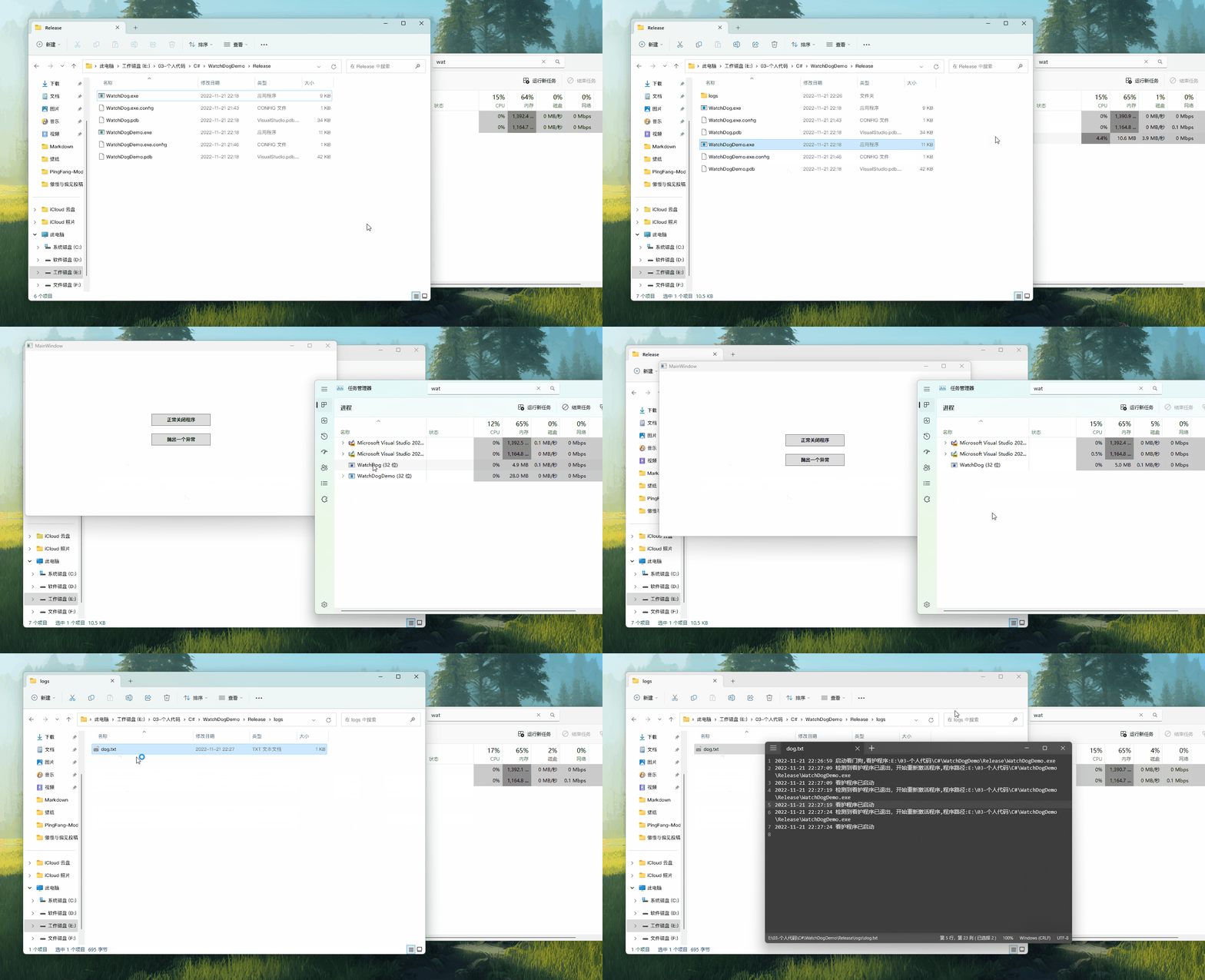
效果