

本文来自转载
原文作者:RyzenAdorer
原文标题:.NET Core 3 WPF MVVM 框架 Prism 系列之区域管理器
原文链接:https://www.cnblogs.com/ryzen/p/12605347.html
本文将介绍如何在.NET Core3 环境下使用 MVVM 框架 Prism 的使用区域管理器对于 View 的管理
1. 区域管理器
我们在之前的 Prism 系列构建了一个标准式 Prism 项目,这篇文章将会讲解之前项目中用到的利用区域管理器更好的对我们的 View 进行管理,同样的我们来看看官方给出的模型图:
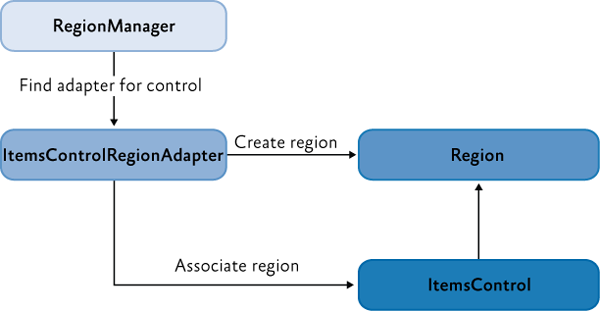
现在我们可以知道的是,大致一个区域管理器 RegionMannager 对一个控件创建区域的要点:
- 创建 Region 的控件必须包含一个 RegionAdapter 适配器
- region 是依赖在具有 RegionAdapter 控件身上的
其实后来我去看了下官方的介绍和源码,默认 RegionAdapter 是有三个,且还支持自定义 RegionAdapter,因此在官方的模型图之间我做了点补充:

2. 区域创建与视图的注入
我们先来看看我们之前项目的区域的划分,以及如何创建区域并且把 View 注入到区域中:

我们把整个主窗体划分了四个区域:
- ShowSearchPatientRegion:注入了 ShowSearchPatient 视图
- PatientListRegion:注入了 PatientList 视图
- FlyoutRegion:注入了 PatientDetail 和 SearchMedicine 视图
- ShowSearchPatientRegion:注入了 ShowSearchPatient 视图
在 Prism 中,我们有两种方式去实现区域创建和视图注入:
- ViewDiscovery
- ViewInjection
2.1. ViewDiscovery
我们截取其中 PatientListRegion 的创建和视图注入的代码(更仔细的可以去观看 demo 源码):
MainWindow.xaml:
<ContentControl
  Grid.Row="2"
  prism:RegionManager.RegionName="PatientListRegion"
  Margin="10"
/>
这里相当于在后台 MainWindow.cs:
RegionManager.SetRegionName(ContentControl, "PatientListRegion");
PatientModule.cs:
public class PatientModule : IModule
 {
    public void OnInitialized(IContainerProvider containerProvider)
    {
         var regionManager = containerProvider.Resolve<IRegionManager>();
         //PatientList
         regionManager.RegisterViewWithRegion(RegionNames.PatientListRegion, typeof(PatientList));
         //PatientDetail-Flyout
         regionManager.RegisterViewWithRegion(RegionNames.FlyoutRegion, typeof(PatientDetail));

     }

    public void RegisterTypes(IContainerRegistry containerRegistry)
    {

    }
 }
2.2. ViewInjection
我们在 MainWindow 窗体的 Loaded 事件中使用 ViewInjection 方式注入视图 PatientList
MainWindow.xaml:
<i:Interaction.Triggers>      <i:EventTrigger EventName="Loaded">
          <i:InvokeCommandAction Command="{Binding LoadingCommand}"/>
       /i:EventTrigger>
  </i:Interaction.Triggers>
MainWindowViewModel.cs:
private IRegionManager _regionManager;
private IRegion _paientListRegion;
private PatientList _patientListView;

private DelegateCommand _loadingCommand;
public DelegateCommand LoadingCommand =>
     _loadingCommand ?? (_loadingCommand = new DelegateCommand(ExecuteLoadingCommand));

void ExecuteLoadingCommand()
{
     _regionManager = CommonServiceLocator.ServiceLocator.Current.GetInstance<IRegionManager>();
     _paientListRegion = _regionManager.Regions[RegionNames.PatientListRegion];
     _patientListView = CommonServiceLocator.ServiceLocator.Current.GetInstance<PatientList>();
     _paientListRegion.Add(_patientListView);

 }
我们可以明显的感觉到两种方式的不同,ViewDiscovery 方式是自动地实例化视图并且加载出来,而 ViewInjection 方式则是可以手动控制注入视图和加载视图的时机(上述例子是通过 Loaded 事件),官方对于两者的推荐使用场景如下:
ViewDiscovery:
- 需要或要求自动加载视图
- 视图的单个实例将加载到该区域中
ViewInjection:
- 需要显式或编程控制何时创建和显示视图,或者您需要从区域中删除视图
- 需要在区域中显示相同视图的多个实例,其中每个视图实例都绑定到不同的数据
- 需要控制添加视图的区域的哪个实例
- 应用程序使用导航 API(后面会讲到)
3. 激活与失效视图
3.1. Activate 和 Deactivate
首先我们需要控制 PatientList 和 MedicineMainContent 两个视图的激活情况,上代码:
MainWindow.xaml:
<StackPanel Grid.Row="1">
  <button
    Content="Load MedicineModule"
    FontSize="25"
    Margin="5"
    Command="{Binding LoadMedicineModuleCommand}"
  />
  <UniformGrid Margin="5">
    <button
      Content="ActivePaientList"
      Margin="5"
      Command="{Binding ActivePaientListCommand}"
    />
    <button
      Content="DeactivePaientList"
      Margin="5"
      Command="{Binding DeactivePaientListCommand}"
    />
    <button
      Content="ActiveMedicineList"
      Margin="5"
      Command="{Binding ActiveMedicineListCommand}"
    />
    <button
      Content="DeactiveMedicineList"
      Margin="5"
      Command="{Binding DeactiveMedicineListCommand}"
    />
  </UniformGrid>
</StackPanel>

<ContentControl
  Grid.Row="2"
  prism:RegionManager.RegionName="PatientListRegion"
  Margin="10"
/>
<ContentControl
  Grid.Row="3"
  prism:RegionManager.RegionName="MedicineMainContentRegion"
/>
MainWindowViewModel.cs:
  private IRegionManager _regionManager;
  private IRegion _paientListRegion;
  private IRegion _medicineListRegion;
  private PatientList _patientListView;
  private MedicineMainContent _medicineMainContentView;

  private bool _isCanExcute = false;
  public bool IsCanExcute
  {
     get { return _isCanExcute; }
     set { SetProperty(ref _isCanExcute, value); }
  }

  private DelegateCommand _loadingCommand;
  public DelegateCommand LoadingCommand =>
      _loadingCommand ?? (_loadingCommand = new DelegateCommand(ExecuteLoadingCommand));

  private DelegateCommand _activePaientListCommand;
  public DelegateCommand ActivePaientListCommand =>
      _activePaientListCommand ?? (_activePaientListCommand = new DelegateCommand(ExecuteActivePaientListCommand));

  private DelegateCommand _deactivePaientListCommand;
  public DelegateCommand DeactivePaientListCommand =>
      _deactivePaientListCommand ?? (_deactivePaientListCommand = new DelegateCommand(ExecuteDeactivePaientListCommand));

   private DelegateCommand _activeMedicineListCommand;
   public DelegateCommand ActiveMedicineListCommand =>
      _activeMedicineListCommand ?? (_activeMedicineListCommand = new DelegateCommand(ExecuteActiveMedicineListCommand)
      .ObservesCanExecute(() => IsCanExcute));

   private DelegateCommand _deactiveMedicineListCommand;
   public DelegateCommand DeactiveMedicineListCommand =>
       _deactiveMedicineListCommand ?? (_deactiveMedicineListCommand = new DelegateCommand(ExecuteDeactiveMedicineListCommand)
      .ObservesCanExecute(() => IsCanExcute));

   private DelegateCommand _loadMedicineModuleCommand;
   public DelegateCommand LoadMedicineModuleCommand =>
       _loadMedicineModuleCommand ?? (_loadMedicineModuleCommand = new DelegateCommand(ExecuteLoadMedicineModuleCommand));

 /// <summary>
 /// 窗体加载事件
 /// </summary>
 void ExecuteLoadingCommand()
 {
      _regionManager = CommonServiceLocator.ServiceLocator.Current.GetInstance<IRegionManager>();
      _paientListRegion = _regionManager.Regions[RegionNames.PatientListRegion];
      _patientListView = CommonServiceLocator.ServiceLocator.Current.GetInstance<PatientList>();
      _paientListRegion.Add(_patientListView);
      _medicineListRegion = _regionManager.Regions[RegionNames.MedicineMainContentRegion];
 }

  /// <summary>
  /// 失效medicineMainContent视图
  /// </summary>
  void ExecuteDeactiveMedicineListCommand()
  {
      _medicineListRegion.Deactivate(_medicineMainContentView);
  }

  /// <summary>
  /// 激活medicineMainContent视图
  /// </summary>
  void ExecuteActiveMedicineListCommand()
  {
      _medicineListRegion.Activate(_medicineMainContentView);
  }

  /// <summary>
  /// 失效patientList视图
  /// </summary>
  void ExecuteDeactivePaientListCommand()
  {
       _paientListRegion.Deactivate(_patientListView);
  }

  /// <summary>
  /// 激活patientList视图
  /// </summary>
  void ExecuteActivePaientListCommand()
  {
       _paientListRegion.Activate(_patientListView);
  }

  /// <summary>
  /// 加载MedicineModule
  /// </summary>
  void ExecuteLoadMedicineModuleCommand()
  {
       _moduleManager.LoadModule("MedicineModule");
       _medicineMainContentView = (MedicineMainContent)_medicineListRegion.Views
            .Where(t => t.GetType() == typeof(MedicineMainContent)).FirstOrDefault();
       this.IsCanExcute = true;
   }
效果如下:

3.2. 监控视图激活状态
Prism 其中还支持监控视图的激活状态,是通过在 View 中继承 IActiveAware 来实现的,我们以监控其中 MedicineMainContent 视图的激活状态为例子:
MedicineMainContentViewModel.cs:
public class MedicineMainContentViewModel : BindableBase,IActiveAware
 {
     public event EventHandler IsActiveChanged;

     bool _isActive;
     public bool IsActive
     {
         get { return _isActive; }
         set
         {
             _isActive = value;
             if (_isActive)
             {
                 MessageBox.Show("视图被激活了");
             }
             else
             {
                 MessageBox.Show("视图失效了");
             }
             IsActiveChanged?.Invoke(this, new EventArgs());
          }
      }

  }

3.3. Add 和 Remove
上述例子用的是 ContentControl,我们再用一个 ItemsControl 的例子,代码如下:
MainWindow.xaml:
<metro:MetroWindow.RightWindowCommands>
  <metro:WindowCommands x:Name="rightWindowCommandsRegion" />
</metro:MetroWindow.RightWindowCommands>
MainWindow.cs:
public MainWindow()
 {
    InitializeComponent();
    var regionManager= ServiceLocator.Current.GetInstance<IRegionManager>();
    if (regionManager != null)
    {
       SetRegionManager(regionManager, this.flyoutsControlRegion, RegionNames.FlyoutRegion);
       //创建WindowCommands控件区域
       SetRegionManager(regionManager, this.rightWindowCommandsRegion, RegionNames.ShowSearchPatientRegion);
    }
 }

 void SetRegionManager(IRegionManager regionManager, DependencyObject regionTarget, string regionName)
 {
     RegionManager.SetRegionName(regionTarget, regionName);
     RegionManager.SetRegionManager(regionTarget, regionManager);
 }
ShowSearchPatient.xaml:
<StackPanel
  x:Class="PrismMetroSample.MedicineModule.Views.ShowSearchPatient"
  xmlns="http://schemas.microsoft.com/winfx/2006/xaml/presentation"
  xmlns:x="http://schemas.microsoft.com/winfx/2006/xaml"
  xmlns:prism="http://prismlibrary.com/"
  xmlns:const="clr-namespace:PrismMetroSample.Infrastructure.Constants;assembly=PrismMetroSample.Infrastructure"
  Orientation="Horizontal"
  xmlns:i="http://schemas.microsoft.com/expression/2010/interactivity"
  prism:ViewModelLocator.AutoWireViewModel="True"
>
  <i:Interaction.Triggers>
    <i:EventTrigger EventName="Loaded">
      <i:InvokeCommandAction Command="{Binding ShowSearchLoadingCommand}" />
    </i:EventTrigger>
  </i:Interaction.Triggers>
  <CheckBox IsChecked="{Binding IsShow}" />
  <button
    Command="{Binding ApplicationCommands.ShowCommand}"
    CommandParameter="{x:Static const:FlyoutNames.SearchMedicineFlyout}"
  >
    <StackPanel Orientation="Horizontal">
      <image
        Height="20"
        Source="pack://application:,,,/PrismMetroSample.Infrastructure;Component/Assets/Photos/按钮.png"
      />
      <TextBlock
        Text="Show"
        FontWeight="Bold"
        FontSize="15"
        VerticalAlignment="Center"
      />
    </StackPanel>
  </button>
</StackPanel>
ShowSearchPatientViewModel.cs:
 private IApplicationCommands _applicationCommands;
 private readonly IRegionManager _regionManager;
 private ShowSearchPatient _showSearchPatientView;
 private IRegion _region;

 public IApplicationCommands ApplicationCommands
 {
      get { return _applicationCommands; }
      set { SetProperty(ref _applicationCommands, value); }
 }

 private bool _isShow=true;
 public bool IsShow
 {
      get { return _isShow=true; }
      set
      {
          SetProperty(ref _isShow, value);
          if (_isShow)
          {
               ActiveShowSearchPatient();
          }
          else
          {
               DeactiveShowSearchPaitent();
          }
      }
 }

 private DelegateCommand _showSearchLoadingCommand;
 public DelegateCommand ShowSearchLoadingCommand =>
         _showSearchLoadingCommand ?? (_showSearchLoadingCommand = new DelegateCommand(ExecuteShowSearchLoadingCommand));

 void ExecuteShowSearchLoadingCommand()
 {
        _region = _regionManager.Regions[RegionNames.ShowSearchPatientRegion];
        _showSearchPatientView = (ShowSearchPatient)_region.Views
            .Where(t => t.GetType() == typeof(ShowSearchPatient)).FirstOrDefault();
 }


  public ShowSearchPatientViewModel(IApplicationCommands applicationCommands,IRegionManager regionManager)
  {
        this.ApplicationCommands = applicationCommands;
        _regionManager = regionManager;
  }

  /// <summary>
  /// 激活视图
  /// </summary>
  private void ActiveShowSearchPatient()
  {
       if (!_region.ActiveViews.Contains(_showSearchPatientView))
       {
           _region.Add(_showSearchPatientView);
       }
  }

  /// <summary>
  /// 失效视图
  /// </summary>
   private async void DeactiveShowSearchPaitent()
   {
        _region.Remove(_showSearchPatientView);
        await Task.Delay(2000);
        IsShow = true;
   }
效果如下:
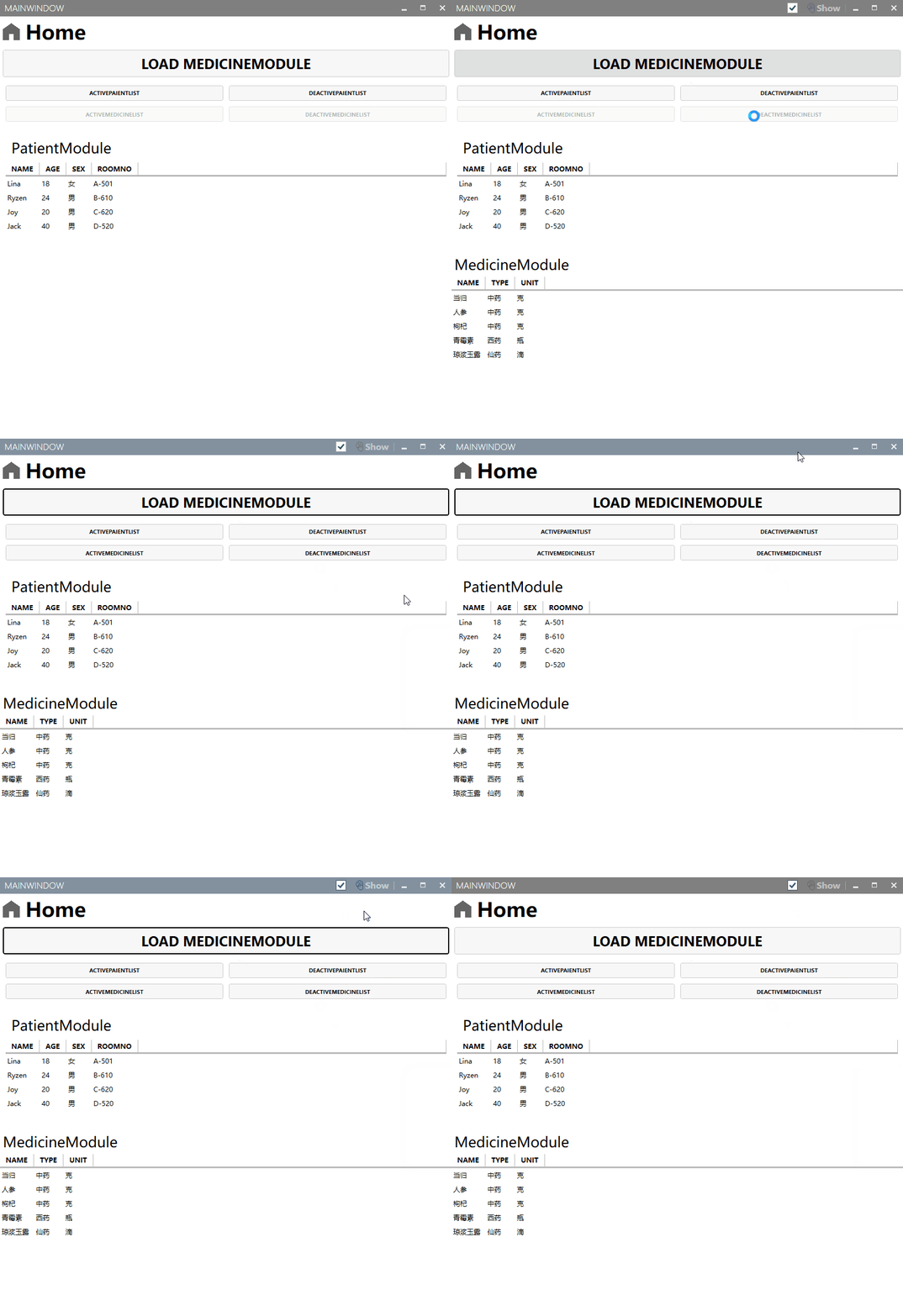
这里的 WindowCommands 的继承链为:WindowCommands <-- ToolBar <-- HeaderedItemsControl <--ItemsControl,因此由于 Prism 默认的适配器有 ItemsControlRegionAdapter,因此其子类也继承了其行为
这里重点归纳一下:
- 当进行模块化时,加载完模块才会去注入视图到区域(可参考 MedicineModule 视图加载顺序)
- ContentControl 控件由于 Content 只能显示一个,在其区域中可以通过 Activate 和 Deactivate 方法来控制显示哪个视图,其行为是由 ContentControlRegionAdapter 适配器控制
- ItemsControl 控件及其子控件由于显示一个集合视图,默认全部集合视图是激活的,这时候不能通过 Activate 和 Deactivate 方式来控制(会报错),通过 Add 和 Remove 来控制要显示哪些视图,其行为是由 ItemsControlRegionAdapter 适配器控制
- 这里没讲到 Selector 控件,因为也是继承自 ItemsControl,因此其 SelectorRegionAdapter 适配器和 ItemsControlRegionAdapter 适配器异曲同工
- 可以通过继承 IActiveAware 接口来监控视图激活状态
4. 自定义区域适配器
我们在介绍整个区域管理器模型图中说过,Prism 有三个默认的区域适配器:ItemsControlRegionAdapter,ContentControlRegionAdapter,SelectorRegionAdapter,且支持自定义区域适配器,现在我们来自定义一下适配器
4.1. 创建自定义适配器
新建类 UniformGridRegionAdapter.cs:
public class UniformGridRegionAdapter : RegionAdapterBase<UniformGrid>
{
    public UniformGridRegionAdapter(IRegionBehaviorFactory regionBehaviorFactory) : base(regionBehaviorFactory)
    {

    }

    protected override void Adapt(IRegion region, UniformGrid regionTarget)
    {
        region.Views.CollectionChanged += (s, e) =>
        {
          if (e.Action==System.Collections.Specialized.NotifyCollectionChangedAction.Add)
          {
              foreach (FrameworkElement element in e.NewItems)
              {
                   regionTarget.Children.Add(element);
              }
          }
        };
    }

    protected override IRegion CreateRegion()
    {
        return new AllActiveRegion();
    }
 }
4.2. 注册映射
App.cs:
protected override void ConfigureRegionAdapterMappings(RegionAdapterMappings regionAdapterMappings)
{
    base.ConfigureRegionAdapterMappings(regionAdapterMappings);
    //为UniformGrid控件注册适配器映射
    regionAdapterMappings.RegisterMapping(typeof(UniformGrid),Container.Resolve<UniformGridRegionAdapter>());
}
4.3. 为控件创建区域
MainWindow.xaml:
<UniformGrid
  Margin="5"
  prism:RegionManager.RegionName="UniformContentRegion"
  Columns="2"
>
  <button
    Content="ActivePaientList"
    Margin="5"
    Command="{Binding ActivePaientListCommand}"
  />
  <button
    Content="DeactivePaientList"
    Margin="5"
    Command="{Binding DeactivePaientListCommand}"
  />
  <button
    Content="ActiveMedicineList"
    Margin="5"
    Command="{Binding ActiveMedicineListCommand}"
  />
  <button
    Content="DeactiveMedicineList"
    Margin="5"
    Command="{Binding DeactiveMedicineListCommand}"
  />
</UniformGrid>
4.4. 为区域注入视图
这里用的是 ViewInjection 方式:
MainWindowViewModel.cs
void ExecuteLoadingCommand()
  {
         _regionManager = CommonServiceLocator.ServiceLocator.Current.GetInstance<IRegionManager>();

         var uniformContentRegion = _regionManager.Regions["UniformContentRegion"];
         var regionAdapterView1 = CommonServiceLocator.ServiceLocator.Current.GetInstance<RegionAdapterView1>();
         uniformContentRegion.Add(regionAdapterView1);
         var regionAdapterView2 = CommonServiceLocator.ServiceLocator.Current.GetInstance<RegionAdapterView2>();
         uniformContentRegion.Add(regionAdapterView2);
  }
效果如图:

我们可以看到我们为 UniformGrid 创建区域适配器,并且注册后,也能够为 UniformGrid 控件创建区域,并且注入视图显示,如果没有该区域适配器,则是会报错,下一篇我们将会讲解基于区域 Region 的 prism 导航系统。
5. 源码
最后,附上整个 demo 的源代码:PrismDemo 源码