High-value Content! Understand Docker and K8S in 10 Minutes

High-value Content! Understand Docker and K8S in 10 Minutes

In 2010, several young IT professionals founded a company called 'dotCloud' in San Francisco, USA.

Last updated 8/15/2023 9:49 PM
多多宜睡
12 min read
Category
Docker
Tags
Docker

This article comes from the WeChat account: Fresh Jujube Classroom

In 2010, a few young IT professionals founded a company called "dotCloud" in San Francisco, USA.

The company mainly provided PaaS-based cloud computing technology services. Specifically, it involved container technology related to LXC.

LXC stands for Linux Container virtualization technology.

Later, dotCloud simplified and standardized its container technology, naming it Docker.

After Docker technology was born, it did not attract industry attention. As a small startup, dotCloud struggled under fierce competition.

Just when they were about to give up, the idea of "open source" came to mind.

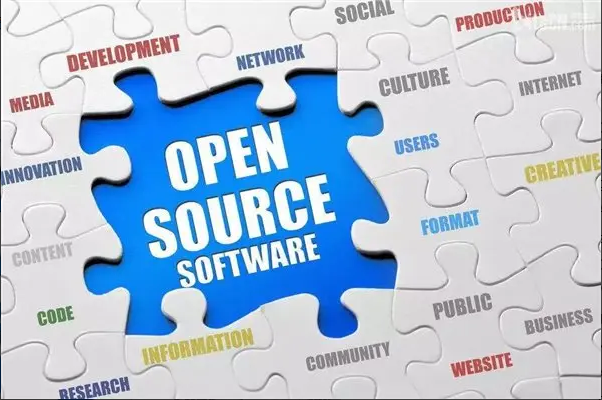
What is "open source"? Open source means making the originally proprietary source code available to everyone, allowing them to contribute code and ideas.

Open Source,开源

Some software is open sourced from the beginning. Others open source because they can't sustain themselves, and the creators don't want to give up—like relying on "community support" when you can't survive alone.

In March 2013, one of dotCloud's founders, the father of Docker, 28-year-old Solomon Hykes, officially decided to open source the Docker project.

Solomon Hykes(recently left Docker)

Once open sourced, it took off.

More and more IT engineers discovered Docker's advantages and flocked to join the Docker open source community.

Docker's popularity skyrocketed at an astonishing speed.

In the same month it was open sourced, Docker version 0.1 was released. Thereafter, Docker released a new version every month. By June 9, 2014, Docker 1.0 was officially released.

At that point, Docker had become the hottest open source technology in the industry, without rival. Even giants like Google, Microsoft, Amazon, and VMware favored it and pledged full support.

After Docker became a hit, dotCloud renamed itself Docker Inc.

Why did Docker and container technology become so popular? Simply put, because it is "lightweight".

Before container technology, the industry's darling was virtual machines. The representatives of virtual machine technology were VMWare and OpenStack.

Many people have used virtual machines. A virtual machine allows you to install software within your operating system and then simulate one or even multiple "sub-computers" through that software.

A virtual machine is like a "sub-computer".

Inside the "sub-computer", you can run programs just like on a normal computer, e.g., open QQ. If you wish, you can create several "sub-computers", each running QQ. The "sub-computers" are isolated from each other and do not affect one another.

Virtual machines belong to virtualization technology. Container technology like Docker is also a virtualization technology, but it is "lightweight virtualization".

Although virtual machines can isolate many "sub-computers", they take up more space, start slower, and the virtualization software may cost money (e.g., VMWare).

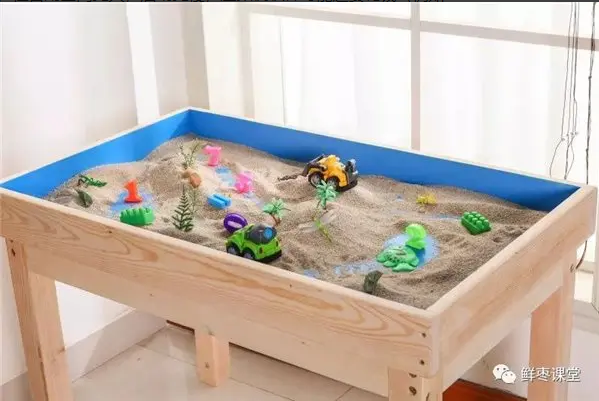
Container technology avoids these drawbacks. It does not require virtualizing the entire operating system, only a small-scale environment (similar to a "sandbox").

沙箱

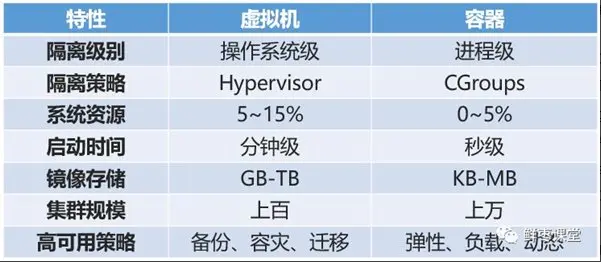
It starts very quickly, in just a few seconds. It also has high resource utilization (a single host can run thousands of Docker containers simultaneously). Moreover, it occupies very little space; virtual machines typically require several GB to tens of GB, while containers only need MB or even KB.

容器和虚拟机的对比

Because of this, container technology has been warmly welcomed and has developed rapidly.

Let's take a closer look at Docker.

Note that Docker itself is not a container; it is a tool for creating containers, an application container engine.

To understand Docker, you only need to look at its two slogans.

The first slogan is "Build, Ship and Run".

That is, "Build, ship, run" — three steps.

For example:

I arrive at an empty lot and want to build a house. So I move stones, cut wood, draw plans, and after a lot of work, the house is built.

After living there for a while, I want to move to another empty lot. In the past, I would have to move stones, cut wood, draw plans, and build the house again.

But then an old witch comes and teaches me a spell.

This spell can copy my built house into an "image" and put it in my backpack.

When I get to the other empty lot, I use this "image" to replicate the house there and move in immediately.

Isn't that magical?

So Docker's second slogan is: "Build once, Run anywhere."

The three core concepts of Docker technology are:

  • Image
  • Container
  • Repository

In my example, the "image" in the backpack is a Docker image. My backpack is the Docker repository. The house I magically built on the empty lot is a Docker container.

In simple terms, a Docker image is a special file system. It provides the programs, libraries, resources, configuration files, etc., needed for the container to run, as well as some configuration parameters (e.g., environment variables) prepared for runtime. The image does not contain any dynamic data, and its content does not change after it is built.

That is, each time you conjure a house, the house is the same, but things like household items are not included; whoever lives there is responsible for them.

Each image can produce one type of house. You can have multiple images!

For instance, I built a European villa and generated an image. Another guy built a Chinese courtyard house and generated an image. Yet another guy built an African thatched hut and generated an image...

This way, we can exchange images—you use mine, I use yours—isn't that great?

So it becomes a large public repository.

The management of Docker images is handled by the Docker Registry service (like a warehouse manager).

Not any image built by anyone is valid. What if someone builds a problematic house?

Therefore, the Docker Registry service is very strict in managing images.

The most commonly used public Registry service is the official Docker Hub, which is also the default Registry and hosts a large number of high-quality official images.

OK, now let's turn our attention to K8S.

Just as Docker container technology was becoming popular, people realized that applying Docker to specific business implementations was challenging—especially in terms of orchestration, management, and scheduling. Thus, a management system was needed to handle Docker and containers at a higher, more flexible level.

That's when K8S appeared.

K8S is a container-based cluster management platform, its full name is Kubernetes.

The word Kubernetes comes from Greek, meaning helmsman or pilot. K8S is its abbreviation, using "8" to replace the 8 characters of "ubernete".

Unlike Docker, K8S was created by a well-known industry giant—Google.

However, K8S is not a brand-new invention. Its predecessor is Google's own Borg system, which had been developed over a decade.

K8S was officially announced and open sourced by Google in June 2014.

In July of the same year, Microsoft, Red Hat, IBM, Docker, CoreOS, Mesosphere, and Saltstack joined K8S.

Within the following year, VMware, HP, Intel, and others also joined.

In July 2015, Google officially joined the OpenStack Foundation. At the same time, Kubernetes v1.0 was officially released.

Currently, the Kubernetes version has evolved to V1.13.

The architecture of K8S is a bit complex, so let's take a brief look.

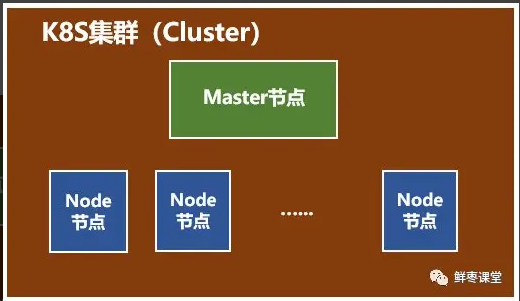
A K8S system is usually called a K8S cluster.

The cluster mainly consists of two parts:

  • A Master node
  • A group of Node nodes

It's easy to see: The Master node is responsible for management and control. The Node nodes are the workload nodes, containing the actual containers.

Let's dive deeper into these two types of nodes.

First, the Master node.

The Master node includes API Server, Scheduler, Controller manager, and etcd.

  • API Server is the external interface of the entire system, called by clients and other components, like a "business hall".
  • Scheduler is responsible for scheduling resources within the cluster, like a "control room".
  • Controller manager is responsible for managing controllers, like a "general manager".

Next, the Node node.

The Node node includes Docker, kubelet, kube-proxy, Fluentd, kube-dns (optional), and Pod.

Pod is the most basic operation unit in Kubernetes. A Pod represents a running process in the cluster, encapsulating one or more closely related containers. Besides Pods, K8S also has the concept of Service. A Service can be seen as the external access interface for a group of Pods providing the same service. This part is a bit hard to understand, so let's skip it.

  • Docker, needless to say, creates containers.
  • Kubelet is mainly responsible for monitoring Pods assigned to its Node, including creating, modifying, monitoring, and deleting them.
  • Kube-proxy is mainly responsible for providing proxy for Pod objects.
  • Fluentd is mainly responsible for log collection, storage, and querying.

A bit confused? Well, it's hard to explain in just a few words, so let's skip it.

We've introduced Docker and K8S, but the article isn't over yet.

The following part is written for core network engineers and even all communication engineers.

From 1G decades ago to today's 4G, and future 5G, mobile communications have undergone earth-shaking changes, and so has the core network.

But if you look closely, the essence of the core network hasn't really changed—it's just many servers. Different core network elements are different servers, different compute nodes.

What has changed is the form and interfaces of these "servers": form from rack-mounted boards to blade servers, from blade servers to X86 general-purpose blade servers; interfaces from trunk cables to network cables, from network cables to optical fibers.

No matter how they change, they are still servers, compute nodes, and CPUs.

Since they are servers, they will inevitably follow the path of virtualization, just like IT cloud computing. After all, virtualization has many advantages, such as low cost, high utilization, full flexibility, dynamic scheduling, etc.

A few years ago, people thought virtual machines were the ultimate form of the core network. But now, containerization seems more likely. The NFV (Network Functions Virtualization) we often talk about may become NFC (Network Functions Containerization).

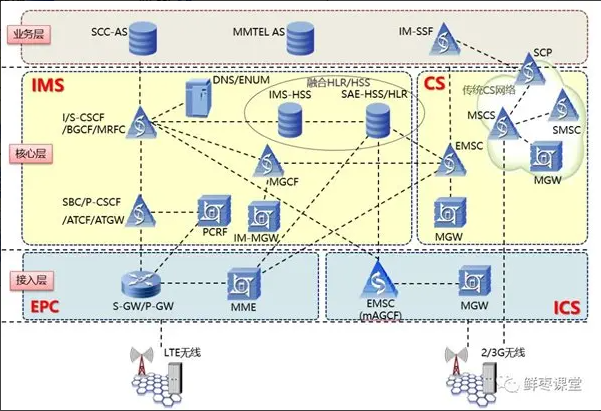
Take VoLTE as an example. In the old 2G/3G way, a large number of dedicated devices were needed to serve as different network elements of EPC and IMS.

VoLTE-related network elements

With containers, it's possible that only one server is needed, creating a dozen containers, each running the service program for different network elements.

These containers can be created and destroyed at any time. They can also be scaled up or down, strengthened or weakened, without downtime, achieving a dynamic balance between performance and power consumption.

Perfect!

In the 5G era, the core network adopts a microservices architecture, which is also a perfect match for containers—monolithic architecture becomes microservices, turning one all-rounder into multiple specialists. Each specialist is assigned to an isolated container, providing maximum flexibility.

Fine division of labor

According to this development trend, in mobile communication systems, everything except the antenna can be virtualized. The core network is the first, but not the last. After virtualization, the core network, while belonging to communications, is actually more like IT. The core network function becomes just an ordinary software function in a container.

As for the core network engineers present, congratulations—you are about to successfully transition!

Keep Exploring

Related Reading

More Articles
Same tag 2/25/2025

.NET 10 Preview 1 Released

Today .NET 10 Preview 1 was released. I downloaded it immediately, upgraded the Avalonia UI project and blog website. The former passed functional testing and AOT publishing successfully, the latter debugging went fine, but Docker has not been successful yet.

Continue Reading