
一、需求分析与方案设计
背景问题
在车水马龙的现代都市,停车难题如影随形,挪车也成为广大车主们日常面临的困扰之一。过去,为了方便他人联系挪车,大家常常会在车内显眼位置放置写有电话号码的纸条,或是摆放刻有手机号码的挪车摆件。这种传统方式看似简单直接,却藏着不少隐患。
首先是隐私泄露问题,如今个人信息安全至关重要,在公共场所随意暴露电话号码,就如同将自己的隐私大门敞开。不法分子会利用这些信息进行恶意骚扰,推销电话、诈骗短信接踵而至,让人不堪其扰。曾经就有新闻报道,某些"抄号族"穿梭于停车场,专门收集挪车电话,再将这些信息批量出售给营销公司或诈骗团伙,导致车主们的生活被各种垃圾信息充斥。
除了隐私泄露,挪车号码被滥用的情况也屡见不鲜。有时明明只是临时停车一小会儿,却频繁接到挪车电话,甚至还有人在非紧急情况下随意拨打,耽误车主时间。更严重的是,有心怀不轨之人可能利用挪车电话实施诈骗,以车辆违章、事故等虚假理由,诱导车主点击链接或转账,致使车主遭受财产损失。
解决方案
为了解决上述问题,我们开发了一个简单实用的挪车二维码生成工具,实现以下功能:
- 快速生成包含车主联系方式的二维码
- 通过扫码即可一键拨打车主电话
- 支持自定义挪车提示文本
- 手机号码经过加密处理,保护车主隐私
- 提供离线桌面版和在线网页版两种使用方式
与传统的直接展示电话号码不同,我们的挪车二维码工具采用了加密技术,确保车主的手机号不会直接暴露。同时,通过扫码跳转专门的挪车页面,不仅提升了使用体验,也降低了号码被滥用的风险。本文将详细介绍这两种实现方式:基于C#和Avalonia的桌面应用版本,以及基于Blazor前端和.NET Web API的在线网页版本。
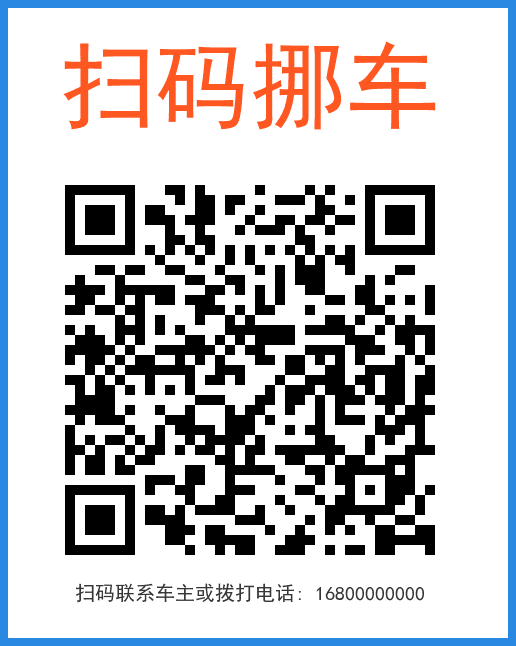
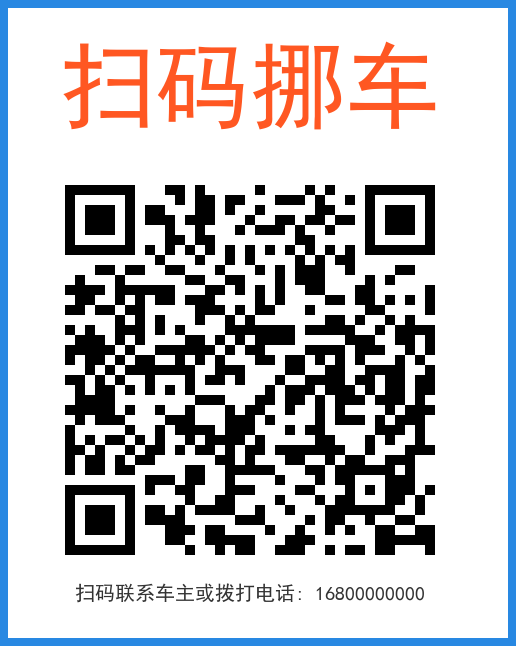
效果如下,微信扫码弹出详细页面:
 |
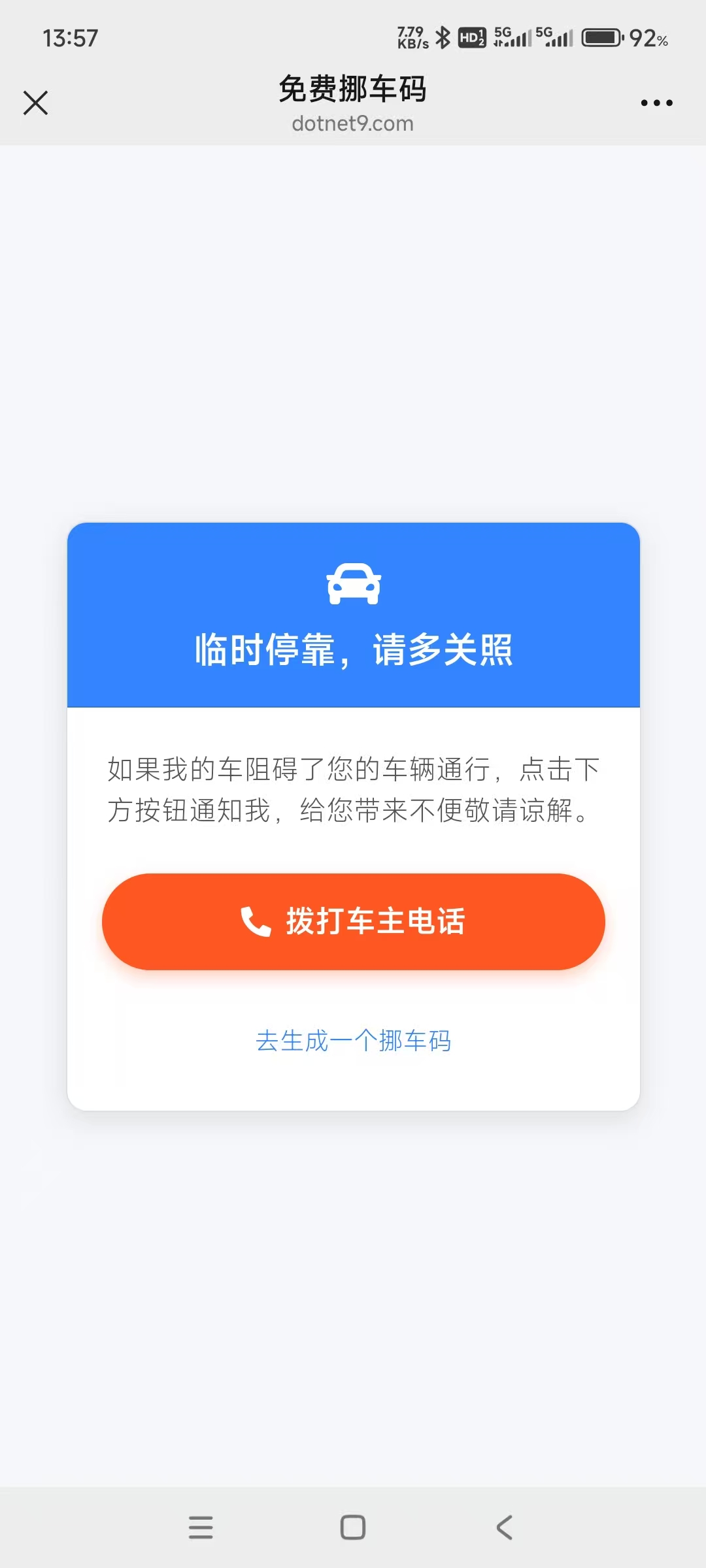 |
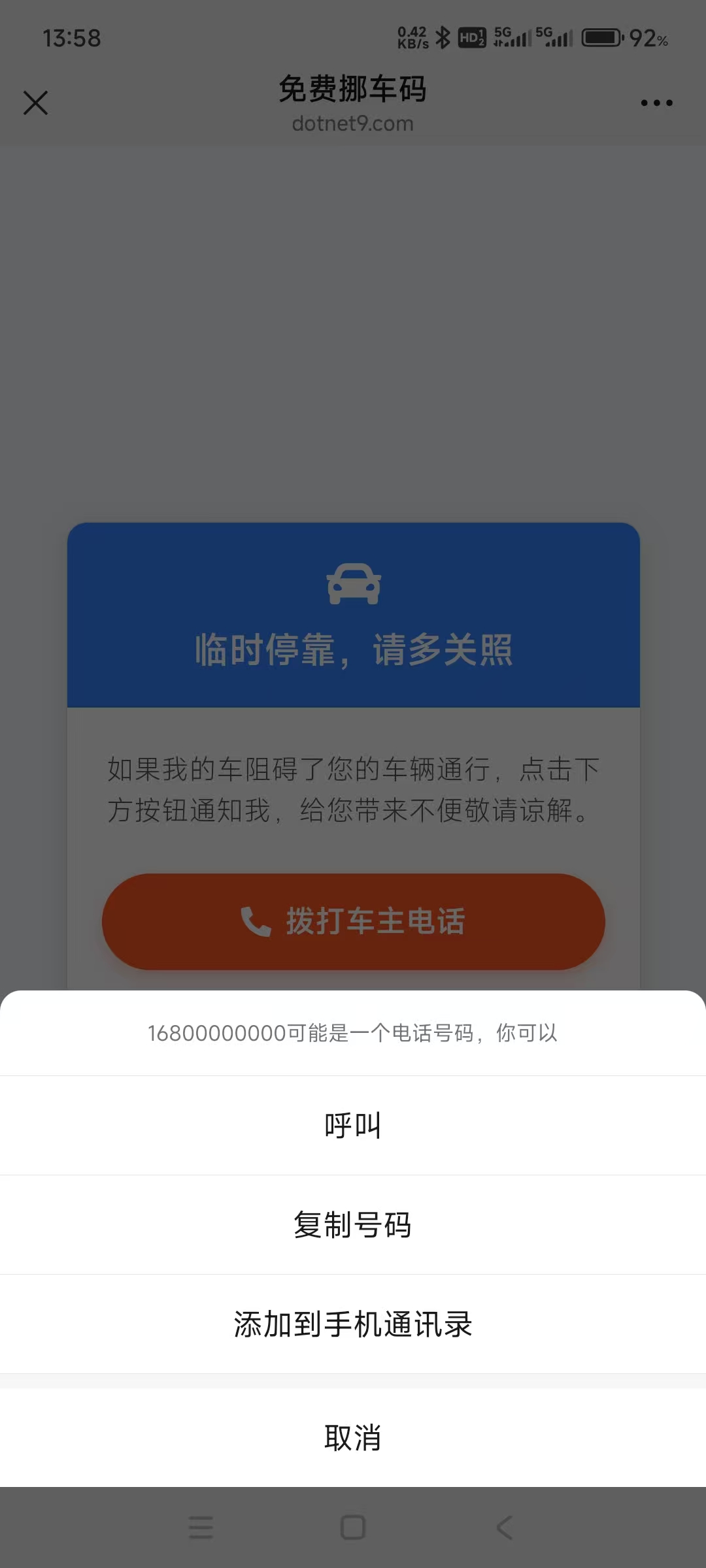
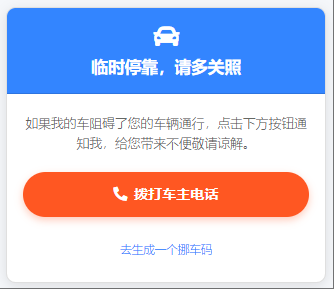
在详细页面,可点击拨打车主电话或点击绿色超链接去生成一个挪车码:
|
 |
 |
二、核心二维码生成代码
首先,让我们看一下核心的二维码生成逻辑。这部分代码封装在CodeWF.Tools项目的QrCodeGenerator类中:
using ImageMagick;
using ImageMagick.Drawing;
using ZXing;
using ZXing.QrCode;

namespace CodeWF.Tools.Image;

public static class QrCodeGenerator
{
    public static void GenerateQrCode(string title, string content, string imagePath, string? subTitle = "")
    {
        var qrCodeWriter = new BarcodeWriterPixelData
        {
            Format = BarcodeFormat.QR_CODE,
            Options = new QrCodeEncodingOptions
            {
                Width = 400,
                Height = 400,
                Margin = 1,
                ErrorCorrection = ZXing.QrCode.Internal.ErrorCorrectionLevel.H,
                CharacterSet = "UTF-8",
                DisableECI = true
            }
        };

        var pixelData = qrCodeWriter.Write(content);

        using var qrCodeImage = new MagickImage();
        var settings = new PixelReadSettings((uint)pixelData.Width, (uint)pixelData.Height, StorageType.Char, PixelMapping.RGBA);
        qrCodeImage.ReadPixels(pixelData.Pixels, settings);

        var backgroundHeight = string.IsNullOrWhiteSpace(subTitle) ? 600u : 630u;
        using var background = new MagickImage(MagickColors.White, 500, backgroundHeight);

        background.BorderColor = new MagickColor("#2888E2");
        background.Border(8);

        var titleText = new Drawables()
            .Font("SimHei")
            .FontPointSize(95)
            .FillColor(new MagickColor("#FF5722"))
            .TextAlignment(TextAlignment.Center)
            .Text(250, 120, title);
        background.Draw(titleText);

        background.Composite(qrCodeImage, 50, 170, CompositeOperator.Over);

        if (!string.IsNullOrWhiteSpace(subTitle))
        {
            var subTitleText = new Drawables()
                .Font("SimHei")
                .FontPointSize(20)
                .FillColor(new MagickColor("#333333"))
                .TextAlignment(TextAlignment.Center)
                .Text(250, 600, subTitle);
            background.Draw(subTitleText);
        }

        //using var logo = new MagickImage("logo.png");
        //logo.Resize(100, 100);
        //background.Composite(logo, 250, 250, CompositeOperator.Over);

        background.Quality = 100;
        background.Write(imagePath);
    }
}
上面代码使用了NuGet包:ZXing.Net.Bindings.Magick。ZXing.NET用于生成二维码矩阵数据,而Magick.NET则用于图像处理和合成,实现了以下功能:
- 创建高质量的QR码,设置了较高的纠错级别(H级别),即使二维码部分被遮挡也能正常识别
- 生成一个白底蓝边的背景图片
- 在顶部添加自定义的标题文本
- 将二维码图像合成到背景上
- 在二维码底部可添加自定义的小标题文本
- 保存为高质量PNG图像
这种设计让最终生成的挪车二维码既美观又实用。
三、离线桌面版实现
1. 用户界面设计
使用Avalonia框架设计用户界面,界面定义在NuoCheView.axaml文件中:
<UserControl xmlns="https://github.com/avaloniaui"
             xmlns:x="http://schemas.microsoft.com/winfx/2006/xaml"
             xmlns:d="http://schemas.microsoft.com/expression/blend/2008"
             xmlns:mc="http://schemas.openxmlformats.org/markup-compatibility/2006"
             xmlns:vm="clr-namespace:CodeWF.Modules.Converter.ViewModels"
             xmlns:prism="http://prismlibrary.com/"
             xmlns:u="https://irihi.tech/ursa"
             xmlns:i18n="https://codewf.com"
             xmlns:language="clr-namespace:Localization"
             prism:ViewModelLocator.AutoWireViewModel="True"
             x:CompileBindings="True"
             x:DataType="vm:NuoCheViewModel"
             d:DesignHeight="450"
             d:DesignWidth="800"
             x:Class="CodeWF.Modules.Converter.Views.NuoCheView"
             mc:Ignorable="d">
    <StackPanel Margin="10" HorizontalAlignment="Center">
        <u:Form LabelPosition="Left" LabelWidth="*">
            <TextBox Width="300" u:FormItem.Label="{i18n:I18n {x:Static language:NuoCheView.InputPhoneNumber}}"
                     u:FormItem.IsRequired="True" Text="{Binding PhoneNumber}" />
            <TextBox Width="300" u:FormItem.Label="{i18n:I18n {x:Static language:NuoCheView.InputTitle}}"
                     u:FormItem.IsRequired="True" Text="{Binding InputTitle}" />
            <StackPanel Orientation="Horizontal" u:FormItem.Label="{i18n:I18n {x:Static language:NuoCheView.EnableSubTitle}}">
                <CheckBox IsChecked="{Binding EnableSubTitle}" Command="{Binding EnableSubTitleHandler}" VerticalAlignment="Center" Content="显示" Margin="5 0" />
                <TextBox Width="300" Text="{Binding SubTitle}" IsEnabled="{Binding EnableSubTitle}" VerticalAlignment="Center" />
            </StackPanel>
        </u:Form>

        <StackPanel Orientation="Horizontal" Spacing="10" Margin="0,0,0,10">
            <Button Content="{i18n:I18n {x:Static language:NuoCheView.CreateButtonContent}}"
                    Command="{Binding GenerateQrCode}" />
            <Button Content="{i18n:I18n {x:Static language:NuoCheView.SaveQrCodeFileTitle}}"
                    Command="{Binding SaveQrCode}" />
            <HyperlinkButton Content="{i18n:I18n {x:Static language:NuoCheView.PreviewNuoCheUrl}}"
                             NavigateUri="{Binding GeneratedUrl}" Classes="WithIcon Underline"
                             VerticalAlignment="Center" />
        </StackPanel>

        <Image Source="{Binding QrCodeImage}" Width="340" Height="340" DragDrop.AllowDrop="True">
            <Interaction.Behaviors>
                <EventTriggerBehavior EventName="PointerPressed">
                    <InvokeCommandAction Command="{Binding RaisePointerPressed}" PassEventArgsToCommand="True" />
                </EventTriggerBehavior>
            </Interaction.Behaviors>
        </Image>
    </StackPanel>
</UserControl>
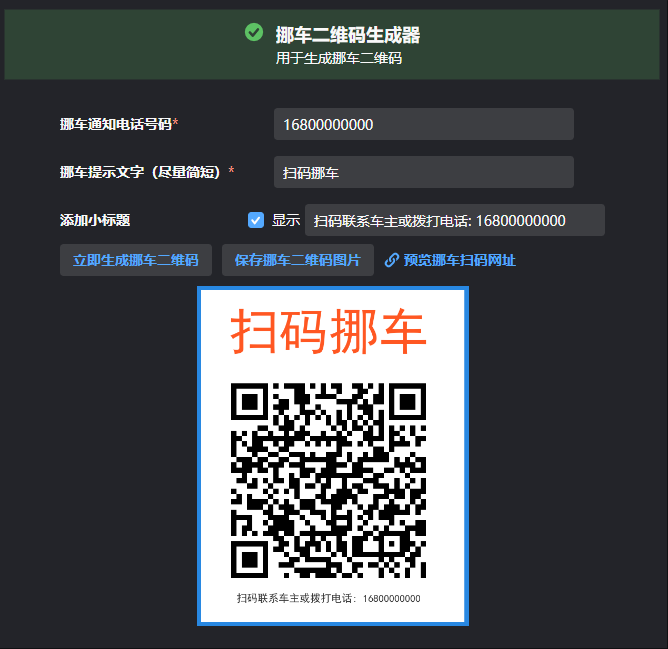
界面布局简洁明了,主要包括:
- 三个输入框:手机号码和二维码标题、可选二维码小标题
- 三个操作按钮:生成二维码、保存二维码和预览挪车页面
- 一个图像显示区域:展示生成的二维码,并支持拖拽操作
实现效果如下:
2. 视图模型实现
在NuoCheViewModel.cs中实现业务逻辑:
using Avalonia.Input;
using Avalonia.Media.Imaging;
using Avalonia.Platform.Storage;
using AvaloniaXmlTranslator;
using CodeWF.Core.IServices;
using CodeWF.LogViewer.Avalonia;
using CodeWF.Tools.Image;
using HashidsNet;
using ReactiveUI;

namespace CodeWF.Modules.Converter.ViewModels;

public class NuoCheViewModel : ReactiveObject
{
    private readonly INotificationService _notificationService;
    private readonly IFileChooserService _fileChooserService;
    private string _inputTitle;
    private long _phoneNumber;
    private Bitmap? _qrCodeImage;
    private string _qrCodeImagePath;
    private string _generatedUrl;
    private string _subTitle;
    private bool _enableSubTitle;

    public NuoCheViewModel(INotificationService notificationService, IFileChooserService fileChooserService)
    {
        _notificationService = notificationService;
        _fileChooserService = fileChooserService;

        InputTitle = I18nManager.Instance.GetResource(Localization.NuoCheView.DefaultInputTitle);
        PhoneNumber = 16899999999;
        SubTitle = $"{I18nManager.Instance.GetResource(Localization.NuoCheView.DefaultSubTitlePrefix)}: {PhoneNumber}";
        EnableSubTitle = false;
    }

    public string InputTitle
    {
        get => _inputTitle;
        set => this.RaiseAndSetIfChanged(ref _inputTitle, value);
    }

    public long PhoneNumber
    {
        get => _phoneNumber;
        set => this.RaiseAndSetIfChanged(ref _phoneNumber, value);
    }

    public Bitmap? QrCodeImage
    {
        get => _qrCodeImage;
        private set => this.RaiseAndSetIfChanged(ref _qrCodeImage, value);
    }

    public string QrCodeImagePath
    {
        get => _qrCodeImagePath;
        private set => this.RaiseAndSetIfChanged(ref _qrCodeImagePath, value);
    }

    public string GeneratedUrl
    {
        get => _generatedUrl;
        private set => this.RaiseAndSetIfChanged(ref _generatedUrl, value);
    }

    public string SubTitle
    {
        get => _subTitle;
        set => this.RaiseAndSetIfChanged(ref _subTitle, value);
    }

    public bool EnableSubTitle
    {
        get => _enableSubTitle;
        set => this.RaiseAndSetIfChanged(ref _enableSubTitle, value);
    }

    public void EnableSubTitleHandler()
    {
        SubTitle = $"{I18nManager.Instance.GetResource(Localization.NuoCheView.DefaultSubTitlePrefix)}: {PhoneNumber}";
    }

    public void GenerateQrCode()
    {
        if (string.IsNullOrWhiteSpace(InputTitle))
        {
            _notificationService.Show(I18nManager.Instance.GetResource(Localization.NuoCheView.Title),
                I18nManager.Instance.GetResource(Localization.NuoCheView.NeedInputTip));
            return;
        }

        try
        {
            var encodedPhone = new Hashids("codewf").EncodeLong(PhoneNumber);

            GeneratedUrl =
                $"https://codewf.com/nuoche?p={encodedPhone}";
            QrCodeImagePath = Path.Combine(Path.GetTempPath(), "nuoche.png");

            QrCodeGenerator.GenerateQrCode(InputTitle, GeneratedUrl, QrCodeImagePath,
                EnableSubTitle ? SubTitle : null);

            QrCodeImage = new Bitmap(QrCodeImagePath);
        }
        catch (Exception ex)
        {
            Logger.Error(I18nManager.Instance.GetResource(Localization.NuoCheView.CreateErrorMessage), ex);
            _notificationService.Show(I18nManager.Instance.GetResource(Localization.NuoCheView.Title),
                $"{I18nManager.Instance.GetResource(Localization.NuoCheView.CreateErrorMessage)}: {ex}");
        }
    }


    public async Task SaveQrCode()
    {
        if (QrCodeImage == null || string.IsNullOrEmpty(QrCodeImagePath))
        {
            _notificationService.Show(I18nManager.Instance.GetResource(Localization.NuoCheView.SaveNotificationTitle),
                I18nManager.Instance.GetResource(Localization.NuoCheView.SaveNoQrCodeMessage));
            return;
        }

        try
        {
            var file = await _fileChooserService.SaveFileAsync(
                I18nManager.Instance.GetResource(Localization.NuoCheView.SaveQrCodeFileTitle),
                new[]
                {
                    new FilePickerFileType(
                        I18nManager.Instance.GetResource(Localization.NuoCheView.SaveQrCodeFileFormat))
                    {
                        Patterns = new[] { "*.png" }
                    }
                }
            );

            if (file != null)
            {
                File.Copy(QrCodeImagePath, file, true);
                _notificationService.Show(
                    I18nManager.Instance.GetResource(Localization.NuoCheView.SaveQrCodeSuccessTitle),
                    I18nManager.Instance.GetResource(Localization.NuoCheView.SaveQrCodeSuccessMessage));
            }
        }
        catch (Exception ex)
        {
            _notificationService.Show(I18nManager.Instance.GetResource(Localization.NuoCheView.SaveNotificationTitle),
                $"{I18nManager.Instance.GetResource(Localization.NuoCheView.SaveQrCodeErrorMessage)}: {ex.Message}");
        }
    }

    public async Task RaisePointerPressed(PointerPressedEventArgs e)
    {
        if (string.IsNullOrWhiteSpace(QrCodeImagePath) || !File.Exists(QrCodeImagePath))
        {
            return;
        }

        var dragData = new DataObject();
        if (await _fileChooserService.StorageProvider.TryGetFileFromPathAsync(QrCodeImagePath) is { } storageFile)
        {
            dragData.Set(DataFormats.Files, new[] { storageFile });
        }

        await DragDrop.DoDragDrop(e, dragData, DragDropEffects.Copy);
    }
}
视图模型实现了以下功能:
- 数据绑定:管理用户输入和UI状态
- 二维码生成:调用核心生成逻辑并显示结果
- 文件保存:将生成的二维码保存到用户指定位置
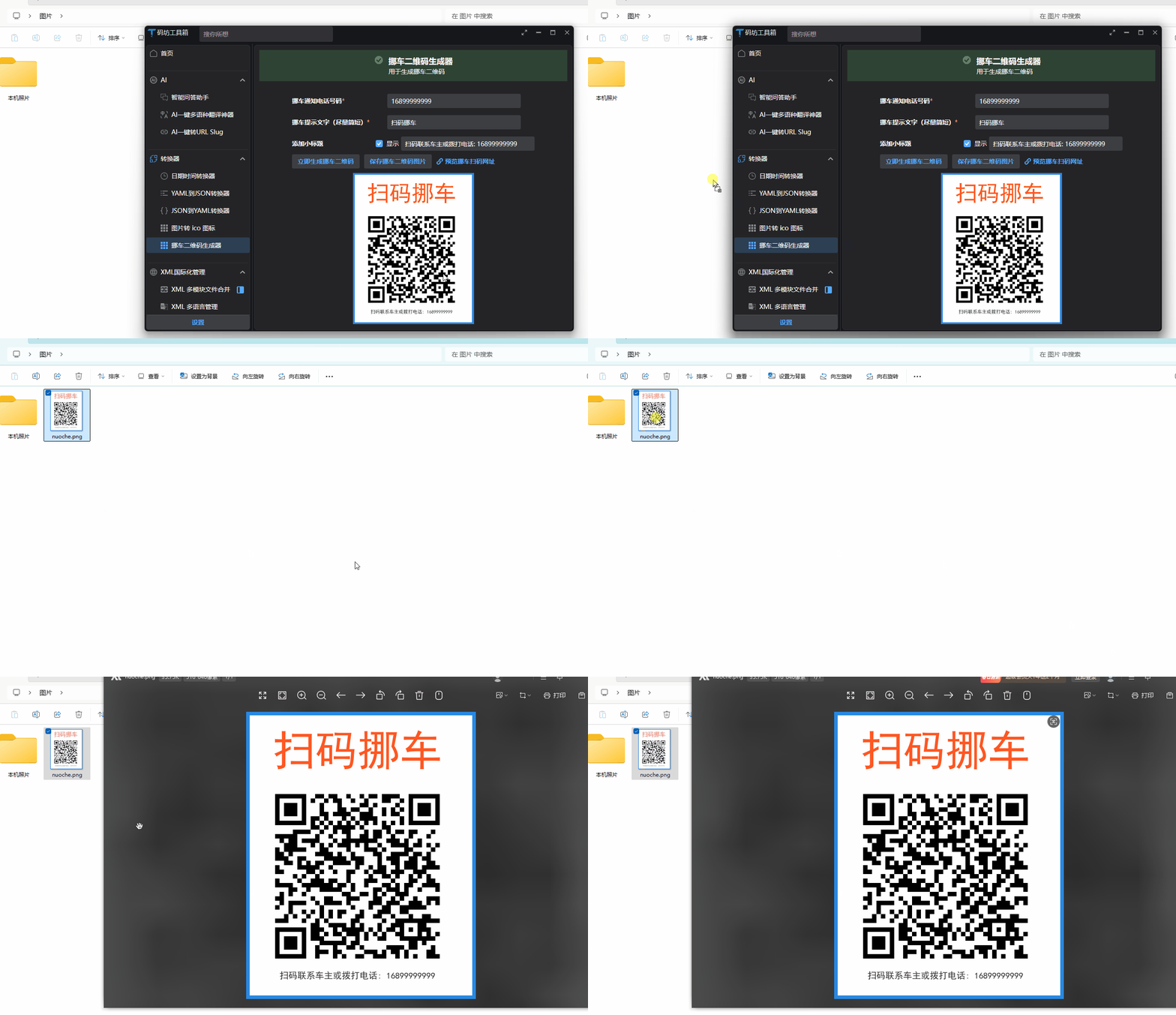
- 拖拽支持:允许用户直接拖拽二维码图像到其他应用
- 错误处理:提供友好的错误提示
值得一提的是,我们使用了Hashids库对手机号进行编码,提高了隐私保护。这样,即使二维码被公开展示,他人也无法直接获取车主的真实手机号(当然最后一步进入拨号界面时会显示真实手机号,这里可考虑使用虚拟号码屏蔽真实手机号)。
拖拽保存挪车二维码效果:
四、在线网页版实现
除了桌面应用版本外,我们还开发了一个基于Blazor的在线挪车二维码生成工具,方便用户无需安装软件即可使用。
在线访问地址:https://dotnet9.com/nuoche
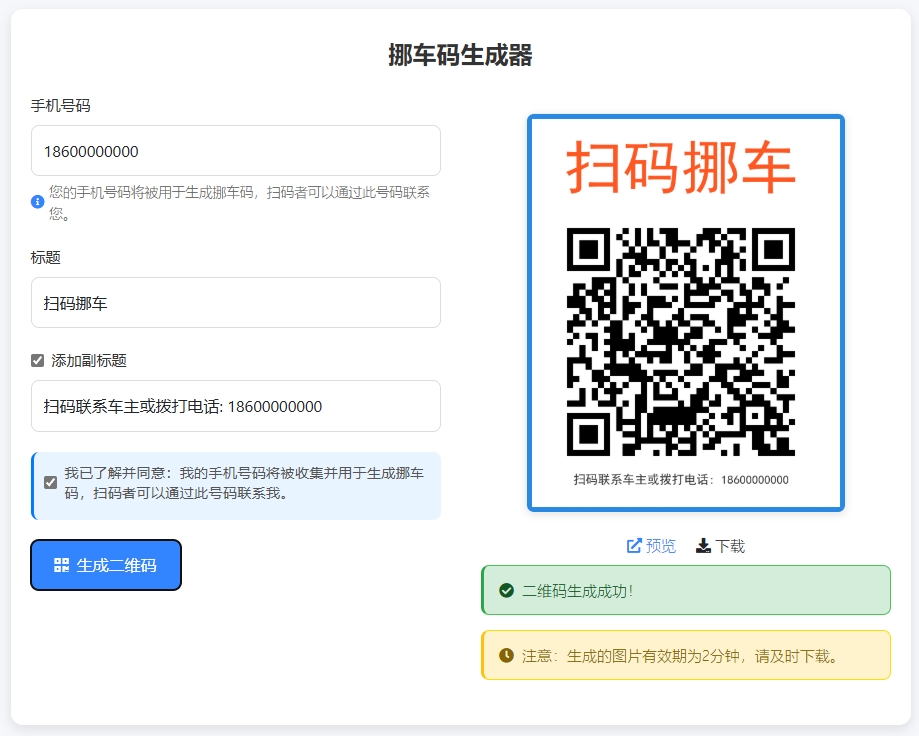
PC端创建挪车码:
手机端创建挪车码:
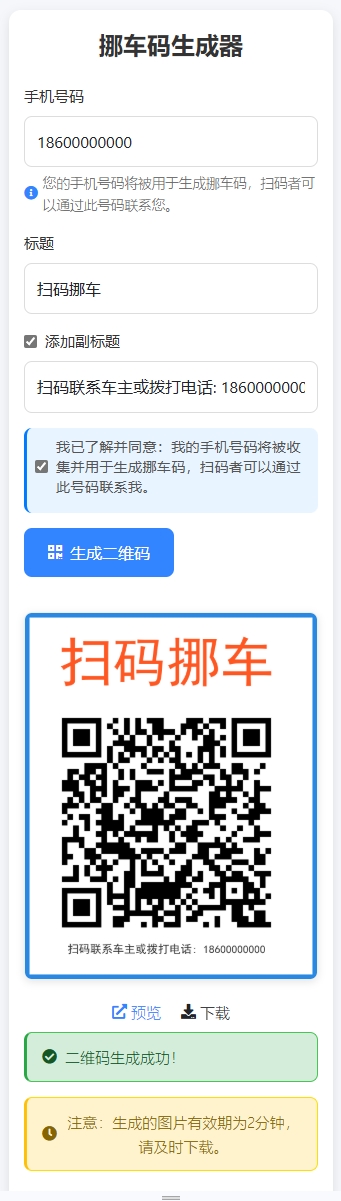
1. 在线生成挪车码特点
与桌面版相比,在线版本有以下特点:
- 无需安装:直接通过浏览器访问使用
- 双向功能:既可以生成二维码,也可以直接访问解析后的挪车页面
- 移动端友好:优化了移动设备上的显示和交互体验
- 优雅的UI设计:使用现代化的UI组件和交互效果
2. 实现方式
在线版本使用Blazor实现,核心代码结构如下:
@page "/NuoChe"
@using HashidsNet
@inject IOptions<SiteOption> SiteOption
@layout EmptyLayout

@code {
    [SupplyParameterFromQuery]
    public string? P { get; set; }

    public const string Slug = "nuoche";

    private long? _decodePhone;

    protected override void OnInitialized()
    {
        base.OnInitialized();
        if (!string.IsNullOrWhiteSpace(P))
        {
            _decodePhone = new Hashids("codewf").DecodeLong(P)[0];
        }
    }
}

<PageTitle>免费挪车码</PageTitle>

<div class="nuoche-container">
    @if (string.IsNullOrWhiteSpace(P))
    {
        <div class="generator-container">
            <h1 class="generator-title">挪车码在线生成器</h1>
            <div class="input-group">
                <label for="phoneNumber">手机号码</label>
                <input type="tel" id="phoneNumber" placeholder="请输入手机号码" />
            </div>
            <div class="input-group">
                <label for="title">标题</label>
                <input type="text" id="title" placeholder="扫码挪车" value="扫码挪车" />
            </div>
            <div class="input-group">
                <div class="checkbox-container">
                    <input type="checkbox" id="enableSubtitle" />
                    <label for="enableSubtitle">添加小标题</label>
                </div>
                <input type="text" id="subtitle" placeholder="扫码联系车主或拨打电话: 16800000000" disabled />
            </div>
            <div class="button-group">
                <button class="primary-button" onclick="generateQrCode()">
                    <i class="fas fa-qrcode"></i> 生成二维码
                </button>
            </div>
            <div class="qr-code-container" style="display: none">
                <img alt="挪车码" />
                <div class="action-buttons">
                    <a target="_blank" class="preview-link">
                        <i class="fas fa-external-link-alt"></i> 预览
                    </a>
                    <a class="download-link">
                        <i class="fas fa-download"></i> 下载
                    </a>
                </div>
                <div class="alert alert-warning mt-2">
                    <i class="fas fa-clock"></i> 请注意:生成的文件仅保留2分钟,请及时下载。
                </div>
            </div>
        </div>
    }
    else
    {
        <div class="card">
            <div class="card-header">
                <i class="fas fa-car"></i>
                <h1 class="title">临时停靠,请多关照</h1>
            </div>
            <div class="card-body">
                <p class="description">如果我的车阻碍了您的车辆通行,点击下方按钮通知我,给您带来不便敬请谅解。</p>
                <a class="phone-button" href="tel:@_decodePhone">
                    <i class="fas fa-phone-alt"></i> 拨打车主电话
                </a>
                <a class="generate-link" href="/nuoche">去生成一个挪车码</a>
            </div>
        </div>
    }
</div>
该实现有两个主要功能页面:
- 生成页面:当用户直接访问/nuoche时,显示二维码生成界面,允许输入手机号和标题
- 挪车页面:当用户通过二维码扫描访问(带有p参数)时,显示一键拨打车主电话的界面
通过这种设计,我们实现了二维码的完整生命周期:生成、扫描、联系,为用户提供了便捷的挪车解决方案。
前面截图扫码后显示详细信息页面:
3. 在线版本核心JavaScript交互
async function generateQrCode() {
    const title = document.getElementById('title').value;
    const phoneNumber = document.getElementById('phoneNumber').value;
    const enableSubtitle = document.getElementById('enableSubtitle').checked;
    let subtitle = null;

    if (enableSubtitle) {
        subtitle = document.getElementById('subtitle').value.trim();
        if (!subtitle) {
            subtitle = `扫码联系车主或拨打电话: ${phoneNumber || "16800000000"}`;
            document.getElementById('subtitle').value = subtitle;
        }
    }

    if (!title || !phoneNumber) {
        alert('请输入标题和手机号码');
        return;
    }

    try {
        const response = await fetch('/api/Image/nuoche', {
            method: 'POST',
            headers: {
                'Content-Type': 'application/json',
            },
            body: JSON.stringify({
                title: title,
                phoneNumber: phoneNumber,
                subtitle: subtitle
            })
        });

        const data = await response.json();
        if (data.success) {
            const qrCodeContainer = document.querySelector('.qr-code-container');
            const img = qrCodeContainer.querySelector('img');
            img.src = data.qrCodeUrl;
            qrCodeContainer.querySelector('.preview-link').href = data.generatedUrl;

            // 添加下载功能
            const downloadLink = qrCodeContainer.querySelector('.download-link');
            downloadLink.onclick = () => {
                const a = document.createElement('a');
                a.href = data.qrCodeUrl;
                a.download = '挪车码.png';
                document.body.appendChild(a);
                a.click();
                document.body.removeChild(a);
            };

            qrCodeContainer.style.display = 'block';
        } else {
            throw new Error(data.message);
        }
    } catch (error) {
        console.error('生成二维码失败:', error);
        alert('生成二维码失败,请稍后重试');
    }
}

// 添加小标题复选框的事件处理
document.addEventListener('DOMContentLoaded', function() {
    const enableSubtitleCheckbox = document.getElementById('enableSubtitle');
    const subtitleInput = document.getElementById('subtitle');
    const phoneInput = document.getElementById('phoneNumber');

    if (enableSubtitleCheckbox && subtitleInput) {
        enableSubtitleCheckbox.addEventListener('change', function() {
            subtitleInput.disabled = !this.checked;
            if (this.checked) {
                if (!subtitleInput.value.trim()) {
                    const phoneNumber = phoneInput.value.trim() || "16800000000";
                    subtitleInput.value = `扫码联系车主或拨打电话: ${phoneNumber}`;
                }
                subtitleInput.focus();
            }
        });

        // 当手机号码变化时,如果小标题已启用且使用的是默认格式,则更新小标题中的电话号码
        phoneInput.addEventListener('input', function() {
            if (enableSubtitleCheckbox.checked && subtitleInput.value.startsWith('扫码联系车主或拨打电话:')) {
                const phoneNumber = this.value.trim() || "16800000000";
                subtitleInput.value = `扫码联系车主或拨打电话: ${phoneNumber}`;
            }
        });
    }
});
在线版本的后端API实现与离线版类似,都是使用相同的核心二维码生成逻辑,但增加了文件上传处理、临时存储和清理等功能,这里不再细述,在线版源码戳这,挪车二维码接口定义如下:
[HttpPost("nuoche")]
[AllowAnonymous]
public async Task<IActionResult> NuoCheAsync([FromBody] NuoCheRequest request,
    [FromServices] IWebHostEnvironment env,
    [FromServices] IOptions<SiteOption> siteOption)
{
    try
    {
        if (string.IsNullOrWhiteSpace(request.Title) || string.IsNullOrWhiteSpace(request.PhoneNumber))
        {
            return BadRequest(new { success = false, message = "标题和手机号码不能为空" });
        }

        if (!long.TryParse(request.PhoneNumber, out long phoneNumberLong))
        {
            return BadRequest(new { success = false, message = "无效的手机号码" });
        }

        var encodedPhone = new Hashids("codewf").EncodeLong(phoneNumberLong);
        var generatedUrl = $"{siteOption.Value.Domain}/nuoche?p={encodedPhone}";

        var fileName = $"qrcode_{Guid.NewGuid():N}.png";
        var qrCodePath = Path.Combine(env.WebRootPath, IconFolder, fileName);

        Directory.CreateDirectory(Path.Combine(env.WebRootPath, IconFolder));

        QrCodeGenerator.GenerateQrCode(request.Title, generatedUrl, qrCodePath, request.SubTitle);

        var qrCodeUrl = $"/{IconFolder}/{fileName}";
        return Ok(new
        {
            success = true,
            qrCodeUrl,
            generatedUrl
        });
    }
    catch (Exception ex)
    {
        return BadRequest(new { success = false, message = ex.Message });
    }
}
五、功能对比与应用场景
离线桌面版和在线网页版各有优势,下面是它们的特点对比:
| 功能 | 离线版 | 在线版 |
|---|---|---|
| 安装需求 | 需要下载安装 | 无需安装,浏览器访问 |
| 平台支持 | Windows、macOS、Linux | 任何现代浏览器 |
| 网络依赖 | 仅初次生成URL需要网络 | 完全依赖网络 |
| 文件存储 | 本地永久保存 | 服务器临时保存 |
| UI体验 | 桌面应用风格 | 响应式网页设计 |
| 拖拽支持 | 支持拖拽二维码 | 不支持直接拖拽 |
| 隐私保护 | 高(本地处理) | 中(服务器处理) |
| 小标题功能 | 支持自定义小标题 | 支持自定义小标题 |
小标题功能的加入使二维码更加信息丰富,可以在二维码下方添加额外提示信息,如"扫码联系车主"或显示部分联系方式,增强了二维码的可识别性和使用便捷性。
六、总结与展望
通过本文,我们详细介绍了挪车二维码生成工具的开发过程,包括需求分析、核心代码实现、UI设计和多平台部署。这个工具不仅解决了传统挪车联系方式带来的隐私泄露和号码滥用问题,还通过现代技术提供了更安全、便捷的挪车体验。
这个工具在以下场景中特别有用:
- 临时停车:在小区、商场等地临时停车时提供联系方式
- 车展活动:展示车辆时放置便于联系的二维码
- 共享车位:在私人车位上提供临时联系方式
- 紧急情况:车辆因特殊情况需要紧急联系车主时
未来,我们计划进一步完善这个工具,可能的改进方向包括:
- 多语言支持:添加英语、日语等多语言界面,方便国际用户使用
- 更多自定义选项:支持自定义二维码颜色、样式和布局
- 统计功能:添加扫码次数统计,帮助用户了解二维码使用情况
- 企业版功能:为车队管理、停车场等企业用户提供批量生成功能
作为一个实用工具,挪车二维码生成器解决了现实生活中的实际问题,同时也展示了如何使用现代.NET技术栈构建跨平台应用。
希望本文对你有所帮助,如有问题欢迎在评论区留言讨论!
源码参考: