
在实际软件开发中,尤其是工业软件,每一款设备都有复杂的状态以及状态之间的切换的功能需求,在这种情况下,如何管理状态以及状态之间切换,和对应状态下的功能控制,成为非常重要的一个问题。如果处理不好,那这种繁复的状态将成为“像面条一样”缠绕耦合,一团乱麻,真的就是“剪不断,理还乱”。那如何解决这个问题呢?今天我们以一篇简单的小例子,简述如何通过Stateless组件,完成状态的管理和触发,仅供学习分享使用,如有不足之处,还请指正。
什么是状态模式?
关于状态模式和状态机,如下所示:
状态模式:"允许一个对象在其内部状态改变时改变它的行为。对象看起来似乎修改了它所属的类 "。(State Pattern: "Allow an object to alter its behavior when its internal state changes. The object will appear to change its class ".)。对于这个定义,有点抽象,变通理解一下可以这么理解:状态拥有者将变更行为委托给状态对象,状态拥有者本身只拥有状态(当然也可以抛弃状态对象),状态对象履行变更职责。
状态机:"依照指定的状态流程图,根据当前执行的动作,将当前状态按照预定的条件变更到新的状态 "。状态机有4个要素,即现态、条件、动作、次态。其中,现态和条件是“因”, 动作和次态是“果”。
- 现态 - 是指当前对象的状态
- 条件 - 当一个条件满足时,当前对象会触发一个动作
- 动作 - 条件满足之后,执行的动作
- 次态 - 条件满足之后,当前对象的新状态。次态是相对现态而言的,次态一旦触发,就变成了现态
状态迁移图:"在UML建模中,常常可见,用来描述一个特定的对象所有可能的状态,以及由于各种事件的发生而引起的状态之间的转移和变化,也是配置状态机按照何种行径的前提 "。
什么是Stateless?
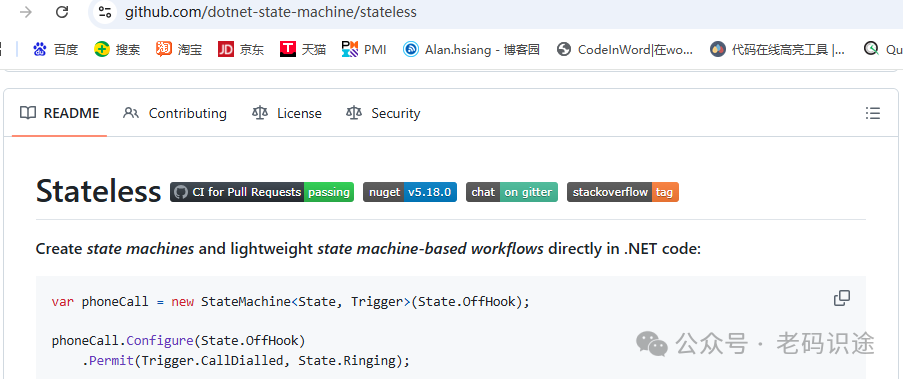
Stateless是一个轻量级、高性能的状态机库,它基于.Net Standard实现,在.NET Framework和.NET Core项目中都可以使用,能够轻松地帮助我们实现状态转换的逻辑。
- github:https://github.com/dotnet-state-machine/stateless
实例场景说明
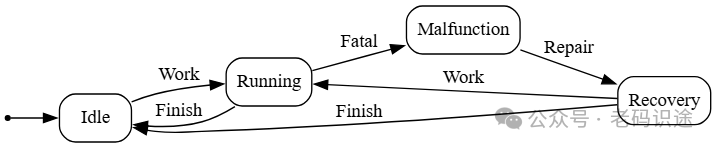
本文主要通过Stateless组件实现如下一个状态的管理和触发,当前有一个设备软件,它拥有如下几个状态(State):
- Idle状态,表示当前没有运行任务,处于空闲状态。
- Running状态,表示当前正在工作,处于运行状态。
- Malfunction状态,表示当前有异常,处于故障状态。
- Recovery状态,表示经过维修,从故障中恢复了,处于修复状态。
它拥有触发动作(Trigger):
- Work,表示当前开始工作,它可以由Idle状态进入,也可以从Recovery状态进入,程序会进入Running状态。
- Fatal,表示遇到异常,它只可以由Running状态进入,程序会进入Malfunction状态。
- Repair,表示修复异常,它只可以由Malfunction状态进入,程序会进入Recovery状态。
- Finish,表示完成,它可以由Running状态进入,也可以由Recovery状态进入,程序会进入Idle状态。
上述状态(State)和触发动作(Trigger)以及之间的流转,如下图所示:
创建项目
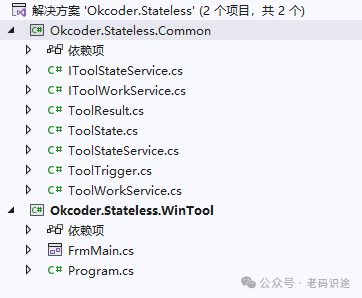
为了演示状态变化,我们创建一个WinForm应用程序“Okcoder.Stateless.WinTool”和一个公共库“Okcoder.Stateless.Common”,如下所示:
安装Stateless组件
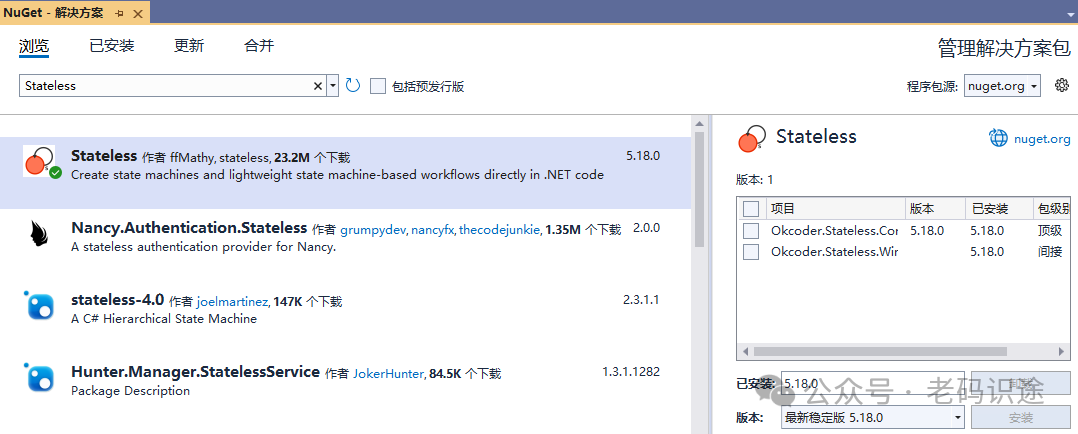
在Visual Studio 2022开发工具中,可以通过NuGet包管理器进行安装。在解决方案右键,打开右键菜单,然后点击“管理解决方案的NuGet程序包”在打开的NuGet包解决方案,搜索Stateless,然后安装即可。当前最新版本为v5.18.0,如下所示:
定义状态和触发器
状态机管理状态的变化和触发事件,所以定义状态和触发器,它们是枚举类型,根据实例场景说明进行定义ToolState如下所示:
namespace Okcoder.Stateless.Common
{
    /// <summary>
    /// 工具状态
    /// </summary>
    public enum ToolState
    {
        Idle=0, //空闲状态
        Running=1, //运行状态
        Malfunction = 2, // 故障状态
        Recovery=3, //已恢复状态
    }
}
ToolTrigger定义如下所示:
namespace Okcoder.Stateless.Common
{
    public enum ToolTrigger
    {
        Work = 0, // 开始运转
        Fatal = 1, // 出异常
        Finish = 2, // 完成
        Repair=3, //维修
    }
}
定义接口
定义IToolStateService接口,它表示状态机所具备的能力,如触发动作,状态判断,状态机导出DotGraph等,如下所示:
namespace Okcoder.Stateless.Common
{
    /// <summary>
    /// 状态机接口
    /// </summary>
    public interface IToolStateService
    {
        /// <summary>
        /// 初始化状态
        /// </summary>
        void Init();

        /// <summary>
        /// 开始工作
        /// </summary>
        /// <returns></returns>
        ToolResult Work();

        /// <summary>
        /// 遇到严重错误
        /// </summary>
        /// <returns></returns>
        ToolResult Fatal();

        /// <summary>
        /// 维修
        /// </summary>
        /// <returns></returns>
        ToolResult Repair();

        /// <summary>
        /// 完成
        /// </summary>
        /// <returns></returns>
        ToolResult Finish();

        /// <summary>
        /// 是否是Idle状态
        /// </summary>
        /// <returns></returns>
        bool IsIdleState();

        /// <summary>
        /// 是否运行状态
        /// </summary>
        /// <returns></returns>
        bool IsRunningState();

        /// <summary>
        /// 是否故障状态
        /// </summary>
        /// <returns></returns>
        bool IsMalfunctionState();

        /// <summary>
        /// 是否恢复状态
        /// </summary>
        /// <returns></returns>
        bool IsRecoveryState();

        /// <summary>
        /// 获取当前状态
        /// </summary>
        /// <returns></returns>
        ToolState GetToolState();

        /// <summary>
        /// 状态机导出DotGraph
        /// </summary>
        /// <param name="path"></param>
        void ExportDotGraph(string path);
    }
}
定义设备工作IToolWorkService接口,它表示设备运行工作,执行操作。如下所示:
namespace Okcoder.Stateless.Common
{
    /// <summary>
    /// 设备工作流程接口
    /// </summary>
    public interface IToolWorkService
    {
        /// <summary>
        /// 是否制造故障
        /// </summary>
        bool IsMakeFatal { get; set; }

        /// <summary>
        /// 开始工作
        /// </summary>
        void DoWork();

        /// <summary>
        /// 维修
        /// </summary>
        void Repair();
    }
}
实现服务
实现状态机服务ToolStateService,它主要应用Stateless组件实现状态的管理和触发动作切换状态,如下所示:
using Stateless;
using Stateless.Graph;
using System;
using System.IO;
using System.Text;

namespace Okcoder.Stateless.Common
{
    /// <summary>
    /// 状态机服务
    /// </summary>
    public class ToolStateService : IToolStateService
    {
        private Action<ToolState> toolAction;// 动作

        private StateMachine<ToolState, ToolTrigger> toolStateMachine;

        public ToolStateService(Action<ToolState> toolAction)
        {
            //定义状态机
            this.toolStateMachine = new StateMachine<ToolState, ToolTrigger>(ToolState.Idle);
            //配置每一个状态所允许的动作
            this.toolStateMachine.Configure(ToolState.Idle).Permit(ToolTrigger.Work, ToolState.Running);
            this.toolStateMachine.Configure(ToolState.Running).Permit(ToolTrigger.Fatal, ToolState.Malfunction).Permit(ToolTrigger.Finish, ToolState.Idle);
            this.toolStateMachine.Configure(ToolState.Malfunction).Permit(ToolTrigger.Repair, ToolState.Recovery);
            this.toolStateMachine.Configure(ToolState.Recovery).Permit(ToolTrigger.Work, ToolState.Running).Permit(ToolTrigger.Finish, ToolState.Idle);
            this.toolAction = toolAction;

        }

        /// <summary>
        /// 初始化状态
        /// </summary>
        public void Init()
        {
            this.toolAction(ToolState.Idle);
        }

        /// <summary>
        /// 响应触发动作
        /// </summary>
        /// <param name="trigger"></param>
        private ToolResult Fire(ToolTrigger trigger)
        {
            ToolResult toolResult = new ToolResult();
            try
            {
                if (!this.toolStateMachine.CanFire(trigger))
                {
                    toolResult.IsOk = false;
                    toolResult.Desc = $"当前状态是{this.toolStateMachine.State},不允许执行{trigger}操作";
                }
                else
                {
                    this.toolStateMachine.Fire(trigger);
                    toolResult.IsOk = true;
                    toolResult.Desc = "Ok";
                    DoAction();

                }
            }
            catch (InvalidOperationException ex)
            {
                toolResult.IsOk = false;
                toolResult.Desc = ex.Message;
            }
            return toolResult;
        }

        /// <summary>
        /// 判断是否在状态
        /// </summary>
        /// <param name="toolState"></param>
        /// <returns></returns>
        private bool IsInState(ToolState toolState)
        {
            return this.toolStateMachine.IsInState(toolState);
        }

        /// <summary>
        /// 事件通知
        /// </summary>
        private void DoAction()
        {
            if (this.toolAction != null)
            {
                this.toolAction(this.toolStateMachine.State);
            }
        }

        /// <summary>
        /// 开始工作
        /// </summary>
        public ToolResult Work()
        {
            return this.Fire(ToolTrigger.Work);
        }

        /// <summary>
        /// 遇到严重错误
        /// </summary>
        public ToolResult Fatal()
        {
            return this.Fire(ToolTrigger.Fatal);
        }

        /// <summary>
        /// 维修
        /// </summary>
        public ToolResult Repair()
        {
            return this.Fire(ToolTrigger.Repair);
        }

        /// <summary>
        /// 完成
        /// </summary>
        public ToolResult Finish()
        {
            return this.Fire(ToolTrigger.Finish);
        }

        /// <summary>
        /// 是否是Idle状态
        /// </summary>
        /// <returns></returns>
        public bool IsIdleState()
        {
            return this.IsInState(ToolState.Idle);
        }

        /// <summary>
        /// 是否运行状态
        /// </summary>
        /// <returns></returns>
        public bool IsRunningState()
        {
            return this.IsInState(ToolState.Running);
        }

        /// <summary>
        /// 是否故障状态
        /// </summary>
        /// <returns></returns>
        public bool IsMalfunctionState()
        {
            return this.IsInState(ToolState.Malfunction);
        }

        /// <summary>
        /// 是否恢复状态
        /// </summary>
        /// <returns></returns>
        public bool IsRecoveryState()
        {
            return this.IsInState(ToolState.Recovery);
        }

        public ToolState GetToolState()
        {
            return this.toolStateMachine.State;
        }

        /// <summary>
        /// 状态机导出DotGraph
        /// </summary>
        /// <param name="path"></param>
        public void ExportDotGraph(string path)
        {
            var info = this.toolStateMachine.GetInfo();
            string graph = UmlDotGraph.Format(info);
            using (FileStream stream = File.OpenWrite(path))
            {
                using (StreamWriter writer = new StreamWriter(stream))
                {
                    writer.Write(graph);
                    writer.Close();
                }
                stream.Close();
            }
        }

    }
}
其中StateMachine是状态机的核心类,它有两个泛型参数,分别表示ToolState和ToolTrigger,构造函数中传入初始状态,在本示例中,传入ToolStage.Idle即可。
StateMachine通过对象实例的Configure方法配置允许的状态及通过Permit方法配置当前状态允许通过Trigger转换的新的状态。
配置完成后,通过Fire方法响应触发动作,通过IsInState方法判断当前是否处于指定的状态。
在状态机服务类构造函数中,接收一个Action<string>的委托方法,用于输出状态到UI层,当然也可以采用其他事件订阅发布的解耦方法。
其中ToolResult返回值,表示状态机执行后返回的接口,它是一个类,如下所示:
namespace Okcoder.Stateless.Common
{
    /// <summary>
    /// 工具执行结果
    /// </summary>
    public class ToolResult
    {
        public bool IsOk { get; set; }

        public string Desc { get; set; }
    }
}
实现工作服务ToolWorkService,主要是模拟设备工具运行,当开始工作时,输出文本到UI页面上,如果有异常,则停止;若无异常,则运行完成,如下所示:
namespace Okcoder.Stateless.Common
{
    /// <summary>
    /// 设备工作服务
    /// </summary>
    public class ToolWorkService:IToolWorkService
    {
        private Action<string> _progress;

        private IToolStateService _toolStateService;

        private bool _isMakeFatal=false;

        public bool IsMakeFatal
        {
            get { return _isMakeFatal; }
            set { _isMakeFatal = value; }
        }

        public ToolWorkService(IToolStateService toolStateService, Action<string> progress,bool isMakeFatal=false)
        {
            _progress = progress;
            _toolStateService = toolStateService;
            _isMakeFatal = isMakeFatal;
        }

        public void DoWork()
        {
            BeginWork();
            Work();
            Finish();
        }

        public void Repair()
        {
            var result = this._toolStateService.Repair();
            if (result.IsOk)
            {
                OutPutInfo($"{DateTime.Now.ToString("yyyy-MM-dd HH:mm:ss")} 故障被修好了");
            }
            else
            {
                OutPutInfo($"{DateTime.Now.ToString("yyyy-MM-dd HH:mm:ss")} 故障没有被修好");
            }

        }

        /// <summary>
        /// 开始工作
        /// </summary>
        private void BeginWork()
        {
            var result = this._toolStateService.Work();
            if (result.IsOk)
            {
                OutPutInfo($"{DateTime.Now.ToString("yyyy-MM-dd HH:mm:ss")} 开始工作了");
            }
            else
            {
                OutPutInfo($"{DateTime.Now.ToString("yyyy-MM-dd HH:mm:ss")} 开始工作失败了");
            }

        }

        /// <summary>
        /// 工作过程
        /// </summary>
        private void Work()
        {
            for (int i = 0; i < 30; i++)
            {
                if (_isMakeFatal)
                {
                    if (i > 10)
                    {
                        MarkFatal();// 运行一段时间,报故障
                        break;
                    }
                }
                OutPutInfo($"{DateTime.Now.ToString("yyyy-MM-dd HH:mm:ss")} 当前正在工作 - {i}");
                Thread.Sleep(300);
            }
        }

        /// <summary>
        /// 完成工作
        /// </summary>
        private void Finish()
        {
            var result = this._toolStateService.Finish();
            if (result.IsOk)
            {
                OutPutInfo($"{DateTime.Now.ToString("yyyy-MM-dd HH:mm:ss")} 完成工作了");
            }
            else
            {
                OutPutInfo($"{DateTime.Now.ToString("yyyy-MM-dd HH:mm:ss")} {result.Desc}");
            }
        }

        private void MarkFatal()
        {
            var result = this._toolStateService.Fatal();
            if (result.IsOk)
            {
                OutPutInfo($"{DateTime.Now.ToString("yyyy-MM-dd HH:mm:ss")} 哎呀,出错了呢?");
            }
            else
            {
                OutPutInfo($"{DateTime.Now.ToString("yyyy-MM-dd HH:mm:ss")} 制造故障失败");
            }

        }

        /// <summary>
        /// 输出信息
        /// </summary>
        /// <param name="msg"></param>
        private void OutPutInfo(string msg)
        {
            if (_progress != null)
            {
                _progress(msg);
            }
        }
    }
}
其中构造函数接收一个Action<string>的委托,用于向UI输出信息,当然也可以是其他的形式。
UI调用
在Okcoder.Stateless.WinTool项目中,创建FrmMain页面,在构造函数中定义IToolStateService和IToolWorkService的对象实例,并且在Load方法中初始化。
当用户点击Work时,开始调用IToolWorkService的Work方法,在执行过程中,会输出信息到UI页面。
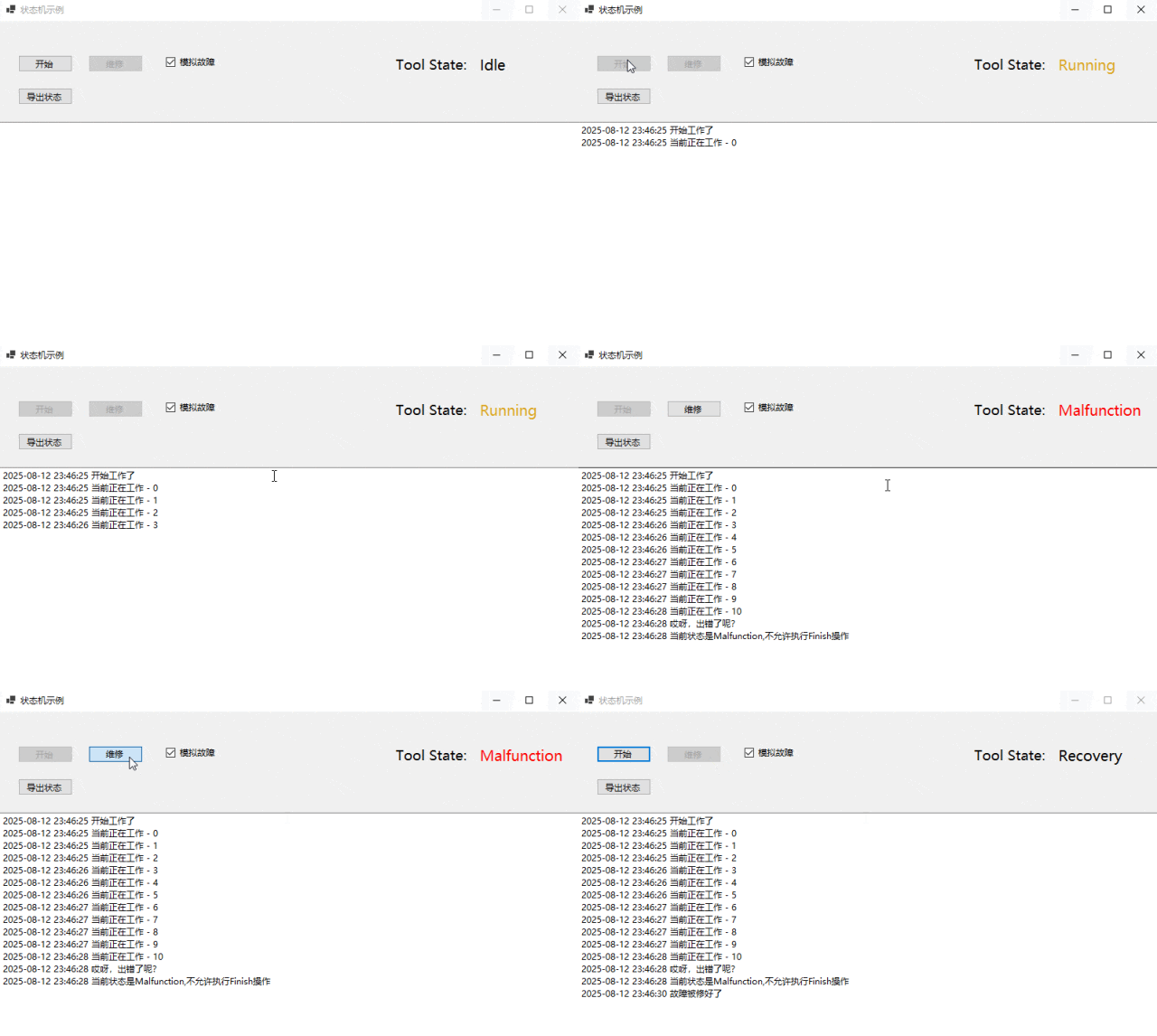
在UI页面有一个复选框,用于设置是否触发异常,可以模拟有异常的场景,如果出现异常,则点击Repair按钮进行修复。
在执行各个动作时,可以看到不同的状态变化。如下所示:
using Okcoder.Stateless.Common;

namespace Okcoder.Stateless.WinTool
{
    public partial class FrmMain : Form
    {
        private IToolStateService toolStateService;

        private IToolWorkService toolWorkService;

        public FrmMain()
        {
            InitializeComponent();
            this.toolStateService = new ToolStateService(ToolStateAction);
            this.toolWorkService = new ToolWorkService(toolStateService, ToolWorkProcessAction, this.chkFatal.Checked);
        }

        private void FrmMain_Load(object sender, EventArgs e)
        {
            this.toolStateService.Init();
        }

        /// <summary>
        /// 开始工作
        /// </summary>
        /// <param name="sender"></param>
        /// <param name="e"></param>
        private void btnWork_Click(object sender, EventArgs e)
        {
            this.txtInfo.Text = string.Empty;
            this.toolWorkService.IsMakeFatal = this.chkFatal.Checked;
            Task.Run(() =>
            {
                this.toolWorkService.DoWork();
            });
        }

        /// <summary>
        /// 维修
        /// </summary>
        /// <param name="sender"></param>
        /// <param name="e"></param>
        private void btnRepair_Click(object sender, EventArgs e)
        {
            this.toolWorkService.Repair();
        }

        /// <summary>
        /// 导出状态机DotGraph文件
        /// </summary>
        /// <param name="sender"></param>
        /// <param name="e"></param>
        private void btnExport_Click(object sender, EventArgs e)
        {
            SaveFileDialog saveFileDialog = new SaveFileDialog();
            saveFileDialog.DefaultExt = "txt";
            saveFileDialog.Filter = "txt文件|*.txt";
            saveFileDialog.FileName = "Okcoder.txt";
            if (saveFileDialog.ShowDialog() == DialogResult.OK)
            {
                var filePath = saveFileDialog.FileName;
                this.toolStateService.ExportDotGraph(filePath);
                MessageBox.Show("导出成功");
            }
        }

        private void ToolStateAction(ToolState toolState)
        {
            this.Invoke(() =>
            {
                this.lblState.Text = toolState.ToString();
                switch (toolState)
                {
                    case ToolState.Idle:
                    case ToolState.Recovery:
                        this.btnWork.Enabled = true;
                        this.btnRepair.Enabled = false;
                        this.lblState.ForeColor = Color.Black;
                        break;
                    case ToolState.Running:
                        this.btnWork.Enabled = false;
                        this.btnRepair.Enabled = false;
                        this.lblState.ForeColor = Color.Goldenrod;
                        break;
                    case ToolState.Malfunction:
                        this.btnWork.Enabled = false;
                        this.btnRepair.Enabled = true;
                        this.lblState.ForeColor = Color.Red;
                        break;
                }
                this.Refresh();
            });
        }

        private void ToolWorkProcessAction(string msg)
        {
            this.Invoke(() =>
            {
                this.txtInfo.AppendText(msg + "\r\n");
            });

        }
    }
}
实例演示
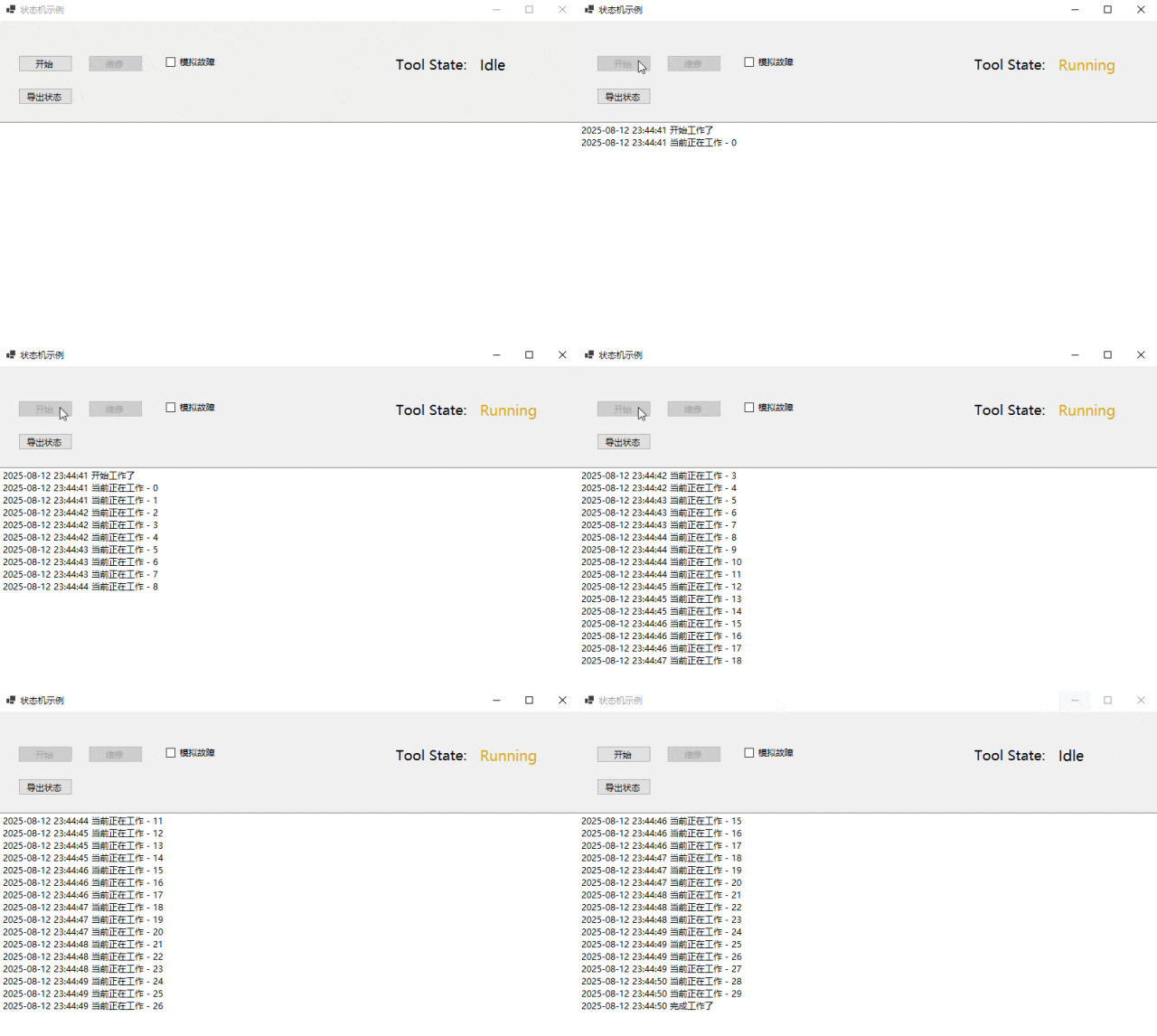
经过上述步骤,运行程序,然后点击Work按钮,默认无故障时如下所示:
当勾选故障,模拟出现故障时,如下所示:
以上就是《推荐一款高性能状态机管理解决方案》的全部内容,关于更多详细内容,可参考官方文档。希望能够一起学习,共同进步。
学习编程,从关注【老码识途】开始,为大家分享更多文章!!!