2025 Year-End Review for .NET Developers
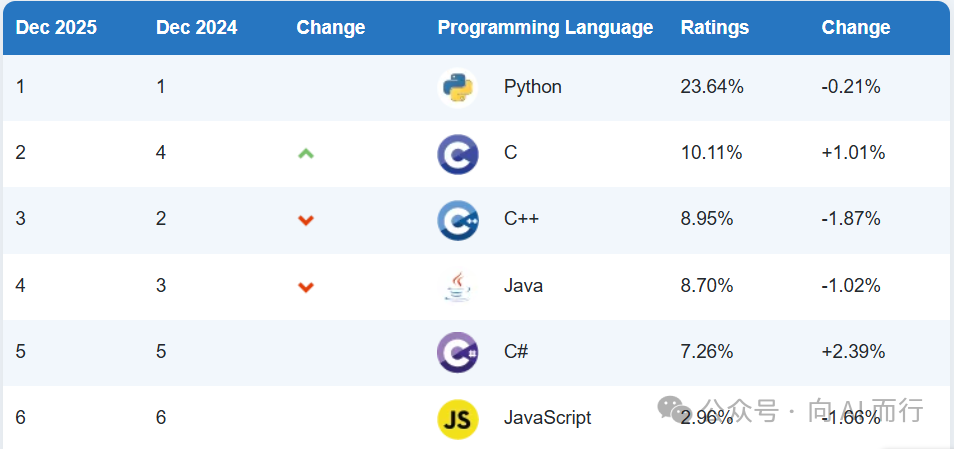
I'm sure you've seen plenty of articles this year titled "Sorry, C# Has Dropped Out of the Top Tier". How is the .NET ecosystem really doing? This article will systematically review the technical trends and major events that .NET developers should pay the most attention to in 2025, covering the latest developments and trends in AI, .NET evolution, and their integration, to help you find your bearings and meet future challenges and opportunities.
This article is originally written by me (Shengjie) and polished with AI assistance.
This article states facts and expresses personal opinions only. It does not promote anxiety, so feel free to read. The article is long, so it is recommended to like and bookmark it first.
Some content in this article references public materials such as Microsoft official blogs, .NET blogs, NuGet statistics, and the TIOBE programming language index. There may be omissions, and corrections are welcome.
🎯 My 2025?
Before we begin, take a few seconds to reflect on your 2025:
- 📚 Keeping up with trends, learning and applying — Learned a lot of new technologies, and used them at work
- 🚀 Embracing AI, doubling efficiency — Vibe Coding is awesome, can't live without AI assistants
- 🎉 Harvesting abundantly, reaching new heights — Promotion/salary raise/job change/project success
- 😰 AI anxiety, directionless — Worried about being replaced by AI, don't know what to learn
- 😩 Busy but stagnant — Busy with business, no time to learn new tech
- 🌱 Exploring transitions, gathering momentum — In the process of transitioning or exploring new directions
- 😎 Zen and laid-back — Stability is fine, don't want to burn out
No matter which category you fall into, I hope this article can bring you some inspiration and direction.
Feel free to share your 2025 insights and expectations for 2026 in the comments!
Preface
2025 is destined to be a landmark year in the history of technology. Looking back, AI Agents have swept the world, .NET and AI have deeply integrated, and developer tools have flourished. As a .NET developer, are you ready for this change?
If 2023 was the year of large models, and 2024 was the year of large model deployment, then 2025 is unquestionably the year of AI Agents. From simple code completion to intelligent agents capable of autonomous planning, reasoning, and tool calling, AI capabilities have taken a qualitative leap.
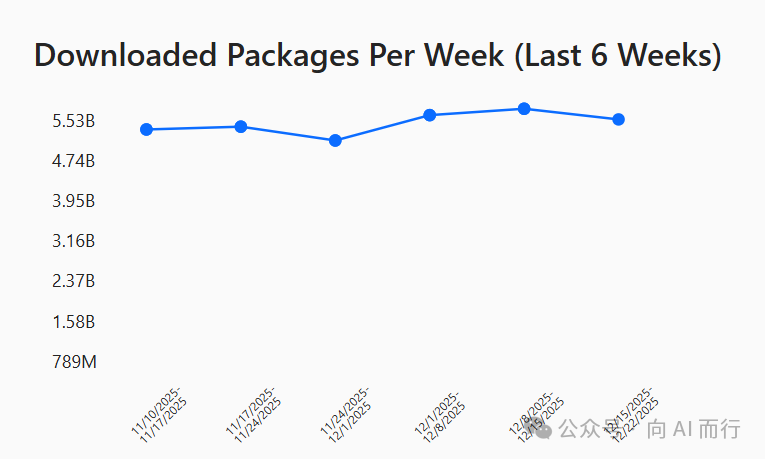
At the same time, the .NET ecosystem has reached important milestones—.NET 10 has been officially released, the C# language continues to climb in the TIOBE index, NuGet weekly downloads have exceeded 5.5 billion, and Visual Studio 2026 brings a brand-new experience. More excitingly, Microsoft continues to make strides in AI, with frameworks like Microsoft.Extensions.AI, Semantic Kernel, and Microsoft Agent Framework maturing, providing .NET developers with a complete toolchain for building AI applications.
This article will review the technical trends and major events of 2025 that .NET developers should focus on, from three dimensions: AI development, .NET evolution, and the integration of .NET + AI.
I. The Development of AI
1.1 The Most Powerful AI Models Continuously Refreshed

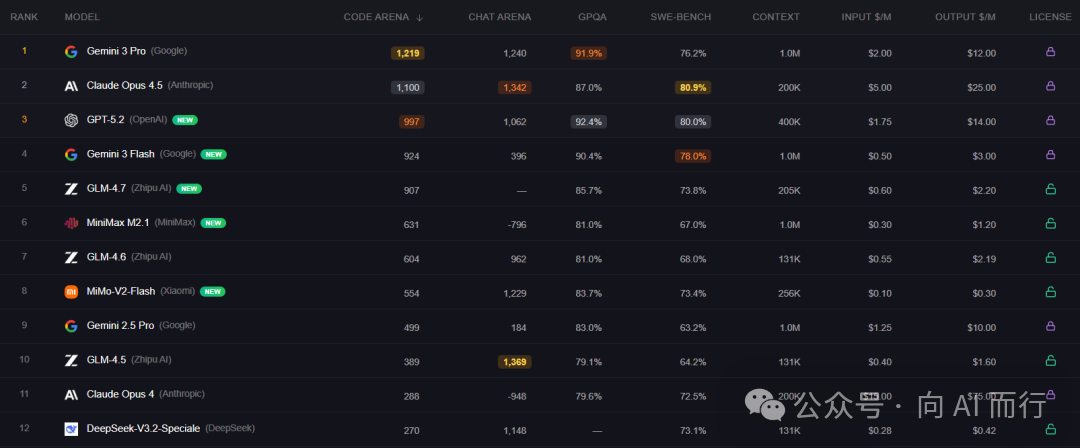
In 2025, AI model capabilities advanced by leaps and bounds, with major vendors chasing each other and constantly breaking performance records.
Overseas Models
| Vendor | Model | Highlights/Features |
|---|---|---|
| OpenAI | GPT-5.2 | Flagship general model, significantly improved reasoning and tool calling |
| Anthropic | Claude Opus 4.5 | Flagship, best for programming and Agents, high token efficiency |
| Gemini 3 Pro | Flagship model, enhanced Deep Research and Gemini App experience | |
| XAI | Grok 4.1 | Exceptional emotional intelligence |
Domestic Models
| Vendor | Model | Highlights/Features |
|---|---|---|
| Alibaba Cloud | Qwen3 | New flagship, supports 119 languages, greatly improved reasoning and Agent capabilities, open-source version leads domestic large model ecosystem |
| Zhipu AI | GLM-4.7 | New-generation flagship, comprehensive upgrade in programming/Agent/reasoning/conversation |
| DeepSeek | DeepSeek-V3.2 | Flagship model, enhanced Agent capabilities, cost-effective |
| Xiaomi | Mimo | New flagship model, code capability exceeds all open-source models |
Impact on Developers
Improvements in model capabilities directly benefit developers:
- Stronger code generation: More reliable complex refactoring, architecture design, and bug fixes
- Longer context: Handling large codebases and long documents is no longer an issue
- Better tool calling: Agent capabilities greatly enhanced, higher automation
- Lower costs: API call costs continue to drop for the same capability
1.2 The Era of Agents Arrives

In 2025, AI evolved from an "assistant" to an "agent".
Past AI assistants (like early Copilot) mainly played the role of "smart completion"—you write a line of code, it helps you complete the next. Today's AI Agents are completely different, possessing four core capabilities:
- Planning: Can break down complex tasks into multiple subtasks and create an execution plan
- Reasoning: Can perform logical reasoning based on context, make judgments and decisions
- Tool Use: Can call external APIs, execute code, and operate the file system
- Memory: Can remember historical conversations and operations, maintaining context in long-term tasks
This means AI is no longer just "answering questions" but "completing tasks". You can tell AI "help me refactor this module's code", and it will automatically analyze the code structure, identify issues, create a refactoring plan, execute modifications, run tests, and finally deliver a complete result.
GitHub Copilot's Agent mode is a typical example of this trend. When you use Agent mode in VS Code, Copilot no longer just completes code; it can understand your intent, actively search the codebase, modify multiple files, run commands, until the task is done.
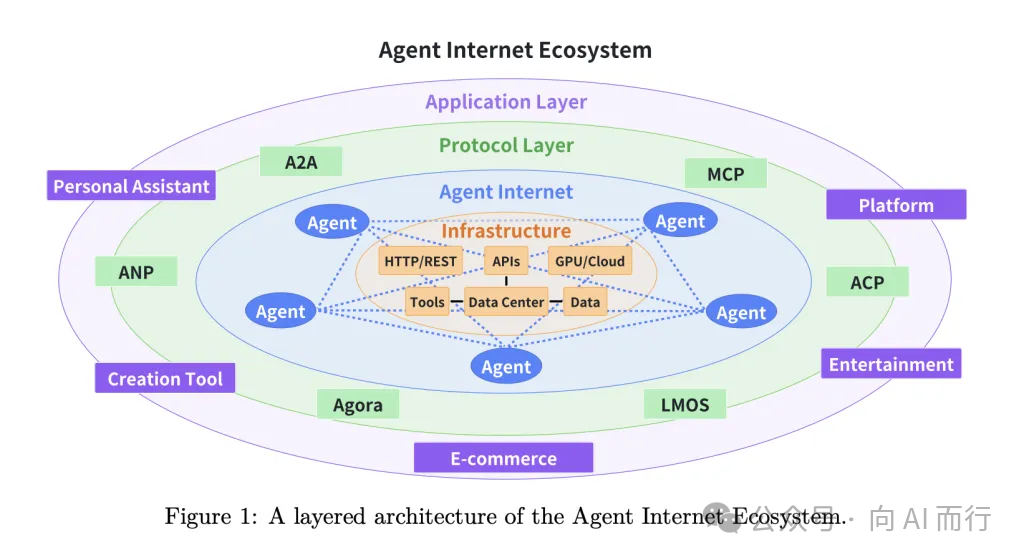
1.3 Protocol Development: Building AI Interoperability Standards

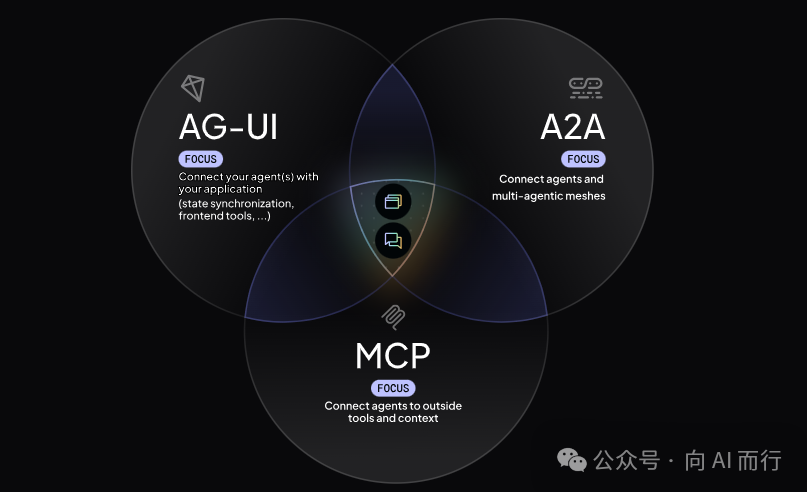
The explosion of Agent capabilities cannot be separated from the push of standardized protocols. In 2025, four major protocols jointly built the infrastructure for AI interoperability.
1. MCP Protocol (Model Context Protocol)
MCP, initiated by Anthropic, has become the de facto standard for AI tool calling.
Before MCP, each AI application needed to write specialized integration code for different tools. MCP unifies the interaction between AI models and external tools, defining:
- Resources: Resources AI can read (files, databases, API responses, etc.)
- Tools: Functions AI can call (search, calculation, operations, etc.)
- Prompts: Predefined prompt templates
With MCP, developers only need to write an MCP Server once, and all AI clients supporting MCP can use that tool. Currently, mainstream AI tools like Claude, VS Code Copilot, and Cursor all support the MCP protocol.
2. A2A (Agent-to-Agent)
A2A, initiated by Google, defines the communication standards between Agents.
In complex business scenarios, a single Agent often cannot complete all tasks. For example, a "Travel Planning Agent" might need to call a "Flight Booking Agent", "Hotel Booking Agent", "Itinerary Planning Agent" and other specialized Agents to work together.
The A2A protocol solves this problem. It defines:
- Agent Card: Describes the Agent's capabilities and interfaces
- Task: Task requests and responses passed between Agents
- Message: Communication message format between Agents
Through A2A, Agents developed by different teams can collaborate seamlessly to build more powerful multi-Agent systems.
3. AG-UI (Agent User Interaction Protocol)
AG-UI defines the interaction protocol between Agents and user interfaces.
Traditional AI applications often follow a "one question, one answer" mode. But when an Agent executes complex tasks, users need real-time progress updates, view intermediate results, and provide feedback. The AG-UI protocol supports:
- Streaming UI updates: Real-time display of the Agent's thought process and execution status
- Progress feedback: Show task completion percentage and estimated remaining time
- Interactive confirmation: Request user confirmation at key nodes before proceeding
Microsoft Agent Framework has built-in AG-UI support, allowing developers to easily build user-friendly Agent applications.
4. Agent Skills
Agent Skills is an open standard format initiated by Anthropic, used to give AI Agents new capabilities and domain expertise.
Unlike other protocols, Agent Skills is not a communication protocol but a knowledge packaging format. It allows Agents to load procedural knowledge and specific context (company-level, team-level, user-level) on demand, enabling more accurate and efficient task completion.
Agent Skills enables:
- Domain expertise: Package specialized knowledge as reusable instructions (e.g., legal review workflows, data analysis pipelines)
- New capabilities: Give Agents new abilities (e.g., creating PowerPoints, building MCP Servers, analyzing datasets)
- Repeatable workflows: Turn multi-step tasks into consistent and auditable workflows
- Interoperability: The same Skill can be reused across different Agent products
Currently, Agent Skills has been adopted by many mainstream AI tools, including: GitHub Copilot, VS Code, Claude Code, Cursor, OpenAI Codex, Amp, Goose, etc.
Notably, .NET 10's new ability to directly run .cs files makes writing scripts for Agent Skills even simpler—you can write tool scripts in C# without creating a full project.
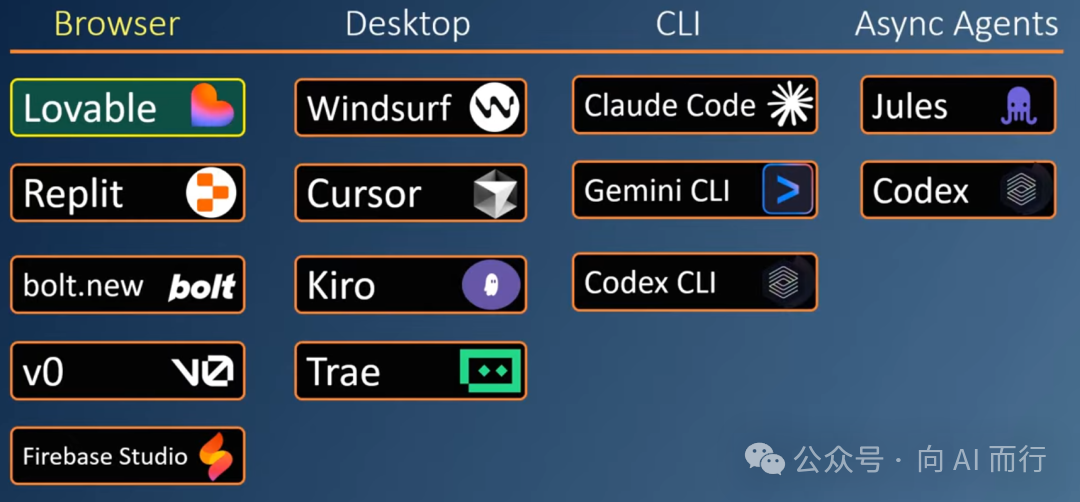
1.4 AI IDEs Proliferating

In 2025, competition among AI coding tools has become fierce. Have you already entered Vibe Coding mode?
Overseas Products
| Product | Vendor | Highlights/Features |
|---|---|---|
| GitHub Copilot | GitHub | Market leader, Agent mode supports autonomous tasks, deep integration with VS Code/VS |
| Claude Code | Anthropic | Terminal assistant, adept at handling large codebases, based on Claude model |
| Codex CLI | OpenAI | Command-line tool, lightweight and fast, suitable for terminal workflows |
| Cursor | Cursor | Representative of AI-first IDE, smooth experience, supports multi-model switching |
| Windsurf | Codeium | AI IDE, emphasizes "Flow" concept, highlights human-AI collaboration |
| Kiro | AWS | Deep integration with AWS, suitable for cloud-native development |
Domestic Products
Domestic vendors are not far behind, each launching their own AI coding tools:
| Product | Vendor | Highlights/Features |
|---|---|---|
| CodeBuddy | Tencent Cloud | Supports multiple languages and frameworks |
| TRAE | ByteDance | Based on the Doubao large model |
| Qoder | Alibaba | Deep integration with Alibaba Cloud |
For .NET developers, there are many choices, but among the numerous AI coding tools, GitHub Copilot remains the first choice—its integration with Visual Studio and VS Code is the most mature, and its support for C# is the best.
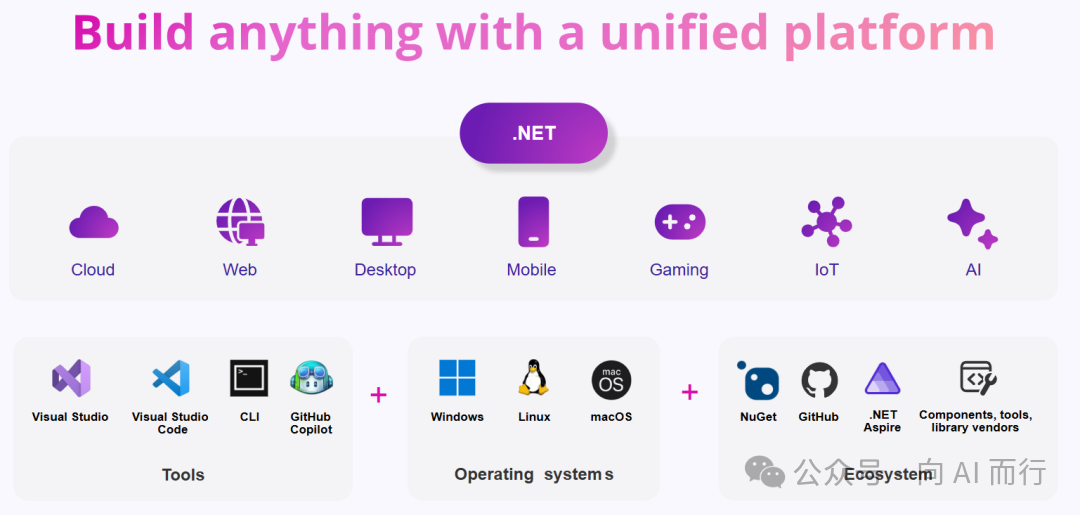
II. The Development of .NET
2.1 .NET 10 Major Release

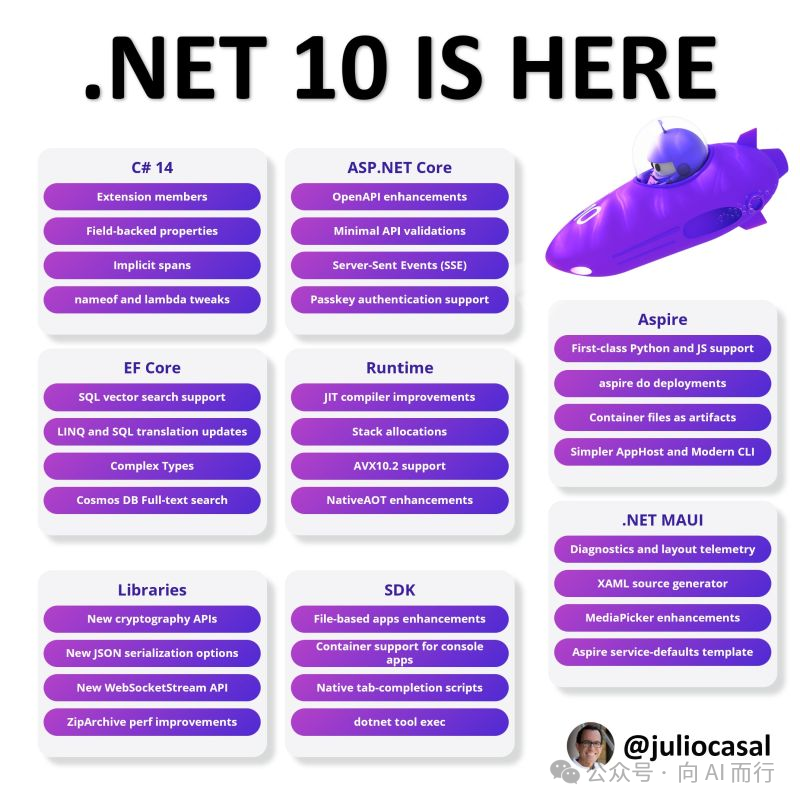
In November 2025, .NET 10 was officially released, another important milestone for the .NET platform.
C# Language Status Rising

According to the TIOBE programming language index, C# continued to climb in 2025, with the potential to become the Language of the Year. This is due to:
- Continuously enhanced .NET cross-platform capabilities
- Continued popularity of Unity game development
- Stable demand for enterprise application development
- Completing .NET ecosystem in AI/ML fields
.NET 10 Core Highlights

.NET 10 continues the tradition of performance first, bringing several important improvements:
- Continuous performance optimization: JIT compiler improvements, lower memory usage
- Enhanced container support: Smaller image sizes, faster startup times
- Native AOT improvements: Supports more scenarios, faster compilation
- Cloud-native enhancements: Better integration with Kubernetes and containerized deployment
NuGet Ecosystem Flourishes

NuGet weekly downloads have exceeded 5.5 billion, a number that fully illustrates the activity of the .NET ecosystem. From web development to machine learning, game development to IoT, you can find almost any library you need on NuGet.
.NET 10 Supports Directly Running .cs Files
This is one of the most exciting features of .NET 10. Now you can directly run a single .cs file:
dotnet run app.cs
No project file needed, no boilerplate Program.cs code needed—it's as simple as running a Python script. This greatly lowers the entry barrier for .NET and makes writing quick prototypes and tool scripts much more convenient.
dnx Arrives: .NET's "npx/uvx" Era
dnx (.NET eXperience) is a new tool execution script introduced in the .NET 10 SDK, essentially a streamlined and user-friendly wrapper around the dotnet tool exec command. It marks .NET's official entry into the "one-shot" execution era, fully aligning with Python's uvx and Node.js's npx.
Core Features
- Run without installation: Directly run .NET tools from NuGet packages without requiring permanent local or global installation
- Isolated execution environment: Tool packages are temporarily downloaded to the NuGet cache for execution, not modifying the system PATH environment variable, ensuring a clean isolation
- Smart version management: By default, uses the latest version of the specified tool package; supports
@versionto specify a version; prioritizes local configuration in.config/dotnet-tools.json - Seamless development experience: Simplifies workflows, lowers the barrier to trying new tools
Usage Examples
# Execute a C# code snippet
dnx dotnet-execute 'WriteLine("Hello dnx!!!");' --using "static System.Console"
# Quick GUID generation
dnx dotnet-execute "Guid.NewGuid()"
# Performance stress testing
dnx LoadTestToolbox hammer --url https://www.example.com --min 1 --max 100
# JSON to YAML conversion
dnx json2yaml -i:input.json -c
# Decode JWT Token
dnx dotnet-decode-jwt <token>
Comparison with Other Platforms
| Feature | dnx | uvx | npx |
|---|---|---|---|
| On-demand execution | ✓ | ✓ | ✓ |
| Version control | @version | @version | @version |
| Isolated execution | Independent NuGet cache | Temporary virtual environment | Temporary download |
| Ecosystem maturity | In development | Unified uv toolchain | Deeply mature |
This innovation pushes the NuGet ecosystem to new heights, opening up entirely new possibilities for developer tool distribution.
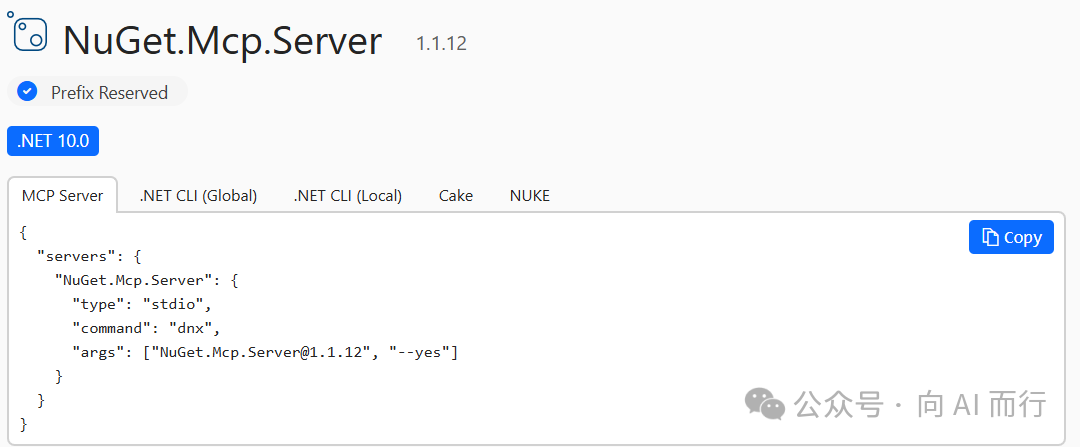
NuGet Packages Can Distribute MCP Servers

This is an important step in the integration of .NET and the AI ecosystem. Now you can package an MCP Server as a NuGet package for distribution; users just need to install the NuGet package to gain AI tool capabilities. This allows the .NET community to share AI tools more conveniently.
2.2 C# 14 New Features
Alongside .NET 10, C# 14 brings several practical language improvements.
field Keyword
Now you can directly access the backing field in auto-properties:
public class Person
{
public string Name
{
get => field;
set => field = value?.Trim() ?? throw new ArgumentNullException();
}
}
No need to explicitly declare a private field; the code is more concise.
Extension Members
C# 14 significantly enhances the capabilities of extension methods; you can now define extension properties, extension static members, etc.:
public extension IntExtensions for int
{
public bool IsEven => this % 2 == 0;
public static int Zero => 0;
}
// Usage
int x = 10;
bool even = x.IsEven; // true
int zero = int.Zero; // 0
Enhanced params Collections
The params keyword now supports more collection types, not just arrays:
void PrintAll(params IEnumerable<string> items)
{
foreach (var item in items)
Console.WriteLine(item);
}
// Can pass List, Array, or any IEnumerable<string>
PrintAll(["a", "b", "c"]);
PrintAll(new List<string> { "x", "y" });
2.3 Framework Ecosystem Updates
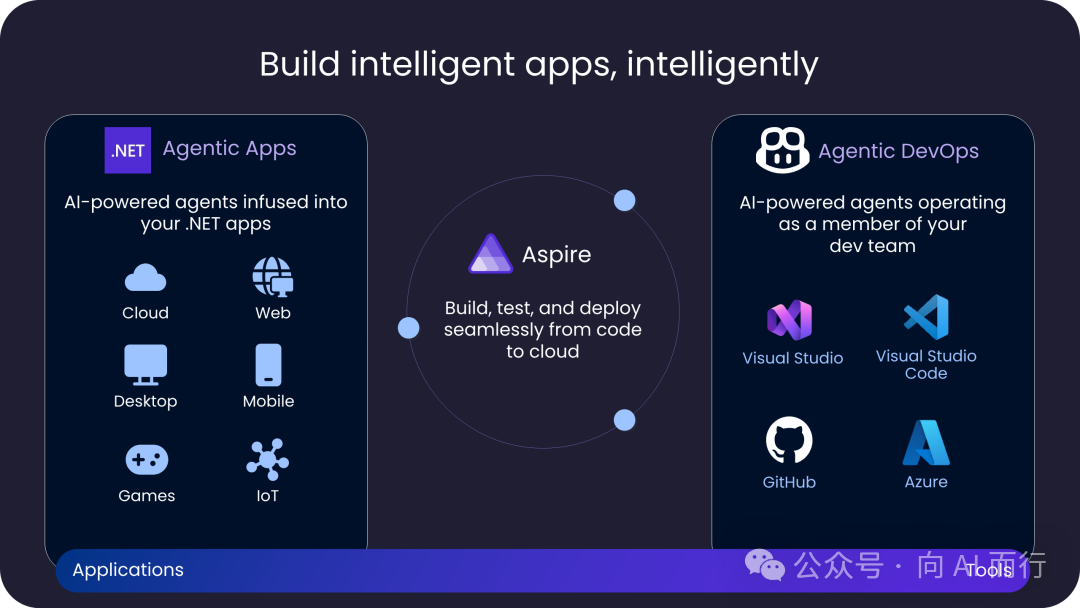
Aspire 13 Released
.NET Aspire is Microsoft's cloud-native application development framework, which received a major upgrade in 2025—Aspire 13. This is the largest release to date:
aspire docommand: A new build, publish, deploy pipeline experience, supporting custom pipeline steps- Aspire MCP Server: Dashboard has a built-in MCP server; AI assistants can directly query running application logs and trace data
- Multi-language connection strings: Database resources automatically expose multiple formats (.NET format, Python URI format, Java JDBC format)
- JavaScript/Python first-class citizen support: New APIs like
AddJavaScriptApp,AddPythonApp - New official website aspire.dev: All documentation and resources migrated
ASP.NET Core 10
- Blazor enhancements:
[PersistentState]declarative state persistence, circuit state retention, nested form validation, Passkey passwordless authentication, NotFound page parameters, JS interop enhancements - Minimal API improvements: Built-in
AddValidation()validation support,TypedResults.ServerSentEventsnative SSE, Record type validation - OpenAPI 3.1 native support: Default generation of 3.1 spec, YAML format output, automatic integration of XML doc comments
- Authentication/authorization metrics: New OpenTelemetry auth/authorization metrics; API endpoints intelligently return 401/403
MAUI 10
- .NET Aspire integration: New project templates, support for OpenTelemetry telemetry and service discovery
- XAML source generator: Compile-time generation of strongly-typed code, global XML namespace simplification
- Control enhancements: HybridWebView request interception support, CollectionView performance optimization, MediaPicker multi-select
- Platform improvements: Experimental Android CoreCLR support, iOS binding projects can be built on Windows
EF Core 10
EF Core 10, released as an LTS version alongside .NET 10, brings several important updates:
- Vector search support: Full support for SQL Server 2025 and Azure SQL's
vectordata type, implemented viaSqlVector<float>andVectorDistance()functions for AI semantic search and RAG scenarios - JSON data type: Native support for SQL Server 2025's
jsoncolumn type, greatly improved query efficiency - LeftJoin/RightJoin operators: Supports .NET 10's new LINQ left and right join methods, simplifying complex queries
- Named query filters: Supports configuring multiple named filters for entities, which can be selectively disabled in queries
- Complex type enhancements: Supports optional complex types, JSON mapping, struct mapping
- ExecuteUpdate JSON column support: Can efficiently batch update JSON document properties
- Parameterized collection improvements: New default translation mode, each collection value becomes an independent parameter, optimizing query plan caching
- Cosmos DB full-text search: Supports full-text search and hybrid search (RRF function)
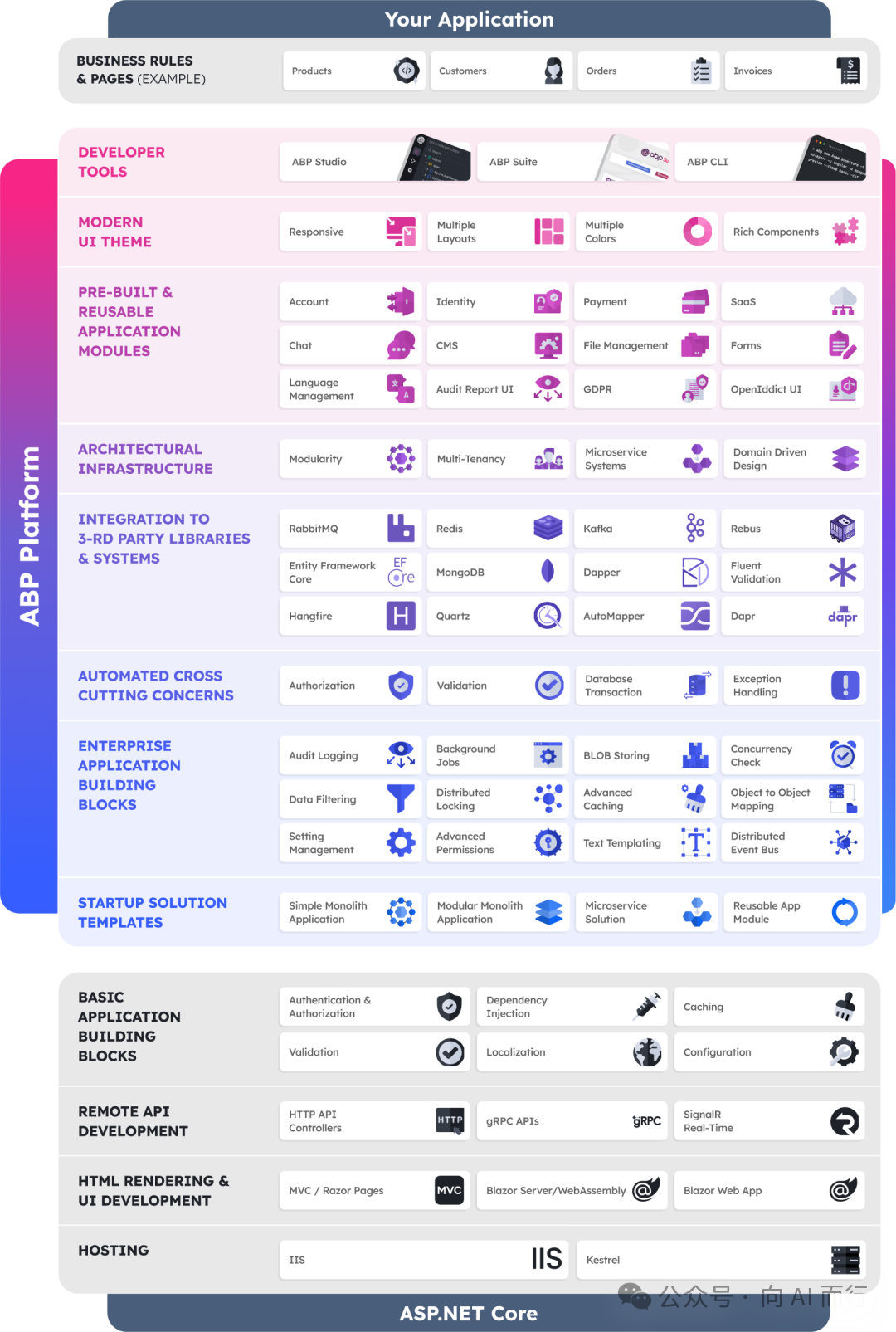
ABP 10 Released

As an excellent enterprise application framework for .NET, ABP released version 10.0 in 2025, a significant update:
- Upgraded to .NET 10: Full support for the latest .NET 10 LTS version
- AI integration (
Volo.Abp.AI): Provides unified AI capability integration, supporting Microsoft.Extensions.AI, Microsoft Agent Framework, and Semantic Kernel, introducing the AI Workspace concept for isolated configuration - New Workflow module: Integrates Elsa Workflows, supporting the creation of visual, long-running event-driven workflows
- Mapperly replaces AutoMapper: Uses compile-time source generators, better performance, no runtime reflection needed
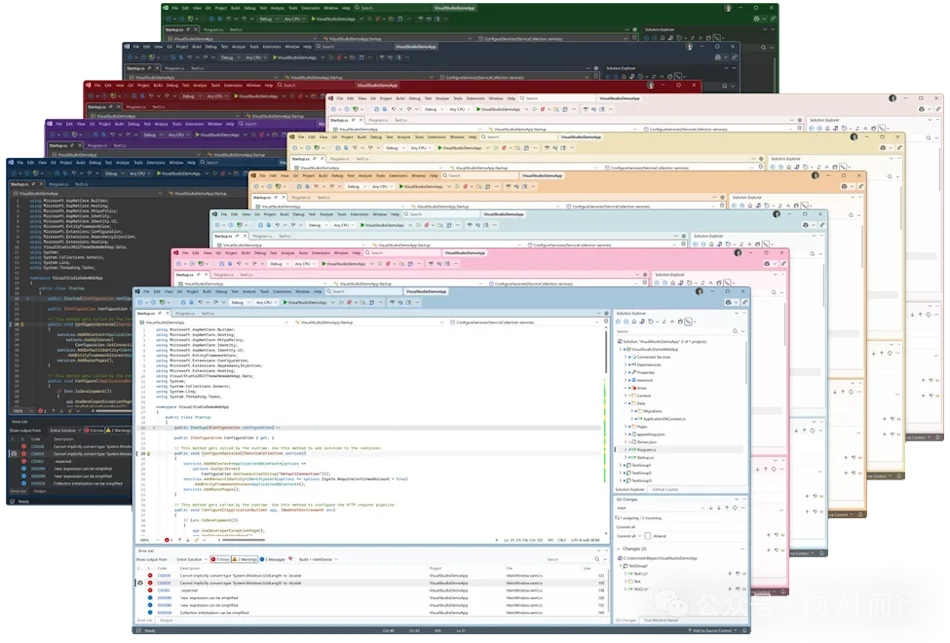
2.4 Visual Studio 2026 Released

One of the most exciting announcements for .NET developers in 2025 is the release of Visual Studio 2026.
Microsoft said goodbye to the year-based naming convention, and the brand-new Visual Studio 2026 brings:
- Deep AI Copilot integration: Agent mode natively supported, no additional plugins needed
- Major performance improvements: Faster startup, lower memory usage
- New UI design: Modern interface, better dark theme support
- Enhanced Git integration: More powerful code review and merge experience
- Full support for .NET 10 and C# 14: Out-of-the-box support for the latest technology stack
III. Deep Integration of .NET + AI

In 2025, the integration of .NET and AI has reached new heights. Microsoft provides a complete AI development toolchain from low-level abstractions to high-level frameworks.
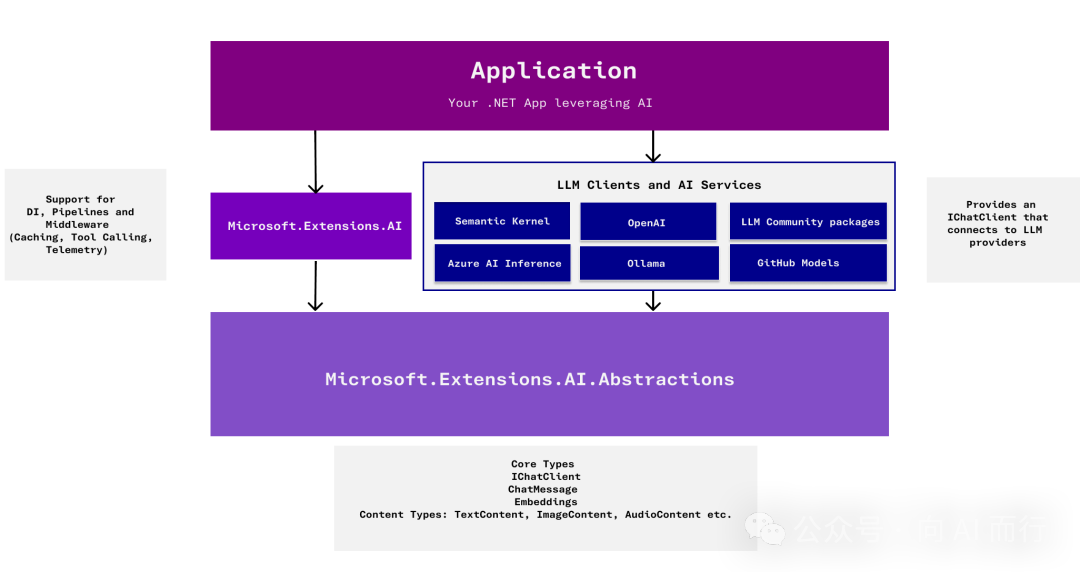
3.1 Microsoft.Extensions.AI (MEAI)

MEAI is Microsoft's unified abstraction layer for AI services, updated to version 10.0 in 2025.
Core Value
The core problem MEAI solves is: How to make your code independent of a specific AI provider.
Just as ILogger makes your logging code independent of any particular logging framework, MEAI's IChatClient makes your AI code independent of OpenAI, Azure, or any other provider.
Core Interfaces
// Chat client interface
public interface IChatClient
{
Task<ChatCompletion> CompleteAsync(
IList<ChatMessage> chatMessages,
ChatOptions? options = null,
CancellationToken cancellationToken = default);
}
// Embedding generation interface
public interface IEmbeddingGenerator<TInput, TEmbedding>
{
Task<GeneratedEmbeddings<TEmbedding>> GenerateAsync(
IEnumerable<TInput> values,
EmbeddingGenerationOptions? options = null,
CancellationToken cancellationToken = default);
}
Supported Providers
MEAI supports multiple AI providers:
- OpenAI / Azure OpenAI
- Anthropic Claude
- Google Gemini
- Ollama (local models)
- More community implementations...
Middleware Pattern
MEAI supports a middleware pattern, allowing you to insert various processing logic into the AI call chain:
IChatClient client = new ChatClientBuilder(openAIClient)
.UseLogging() // Logging
.UseFunctionInvocation() // Function calling
.UseRetry() // Retry policy
.Build();
3.2 Semantic Kernel (SK)
Semantic Kernel is an AI orchestration framework introduced by Microsoft in 2023, updated to version 1.68 in 2025 with more mature functionality.
Agent Framework
SK's Agent framework is a core highlight, supporting the creation of intelligent agents that can autonomously plan and execute tasks:
var agent = new ChatCompletionAgent
{
Name = "CodeReviewer",
Instructions = "You are a code review expert helping developers improve code quality.",
Kernel = kernel
};
var response = await agent.InvokeAsync("Please review this code...");
Deep Integration with MEAI
SK is now fully built on top of MEAI, which means:
- You can use any AI provider supported by MEAI
- You benefit from MEAI's middleware capabilities
- Your code remains portable
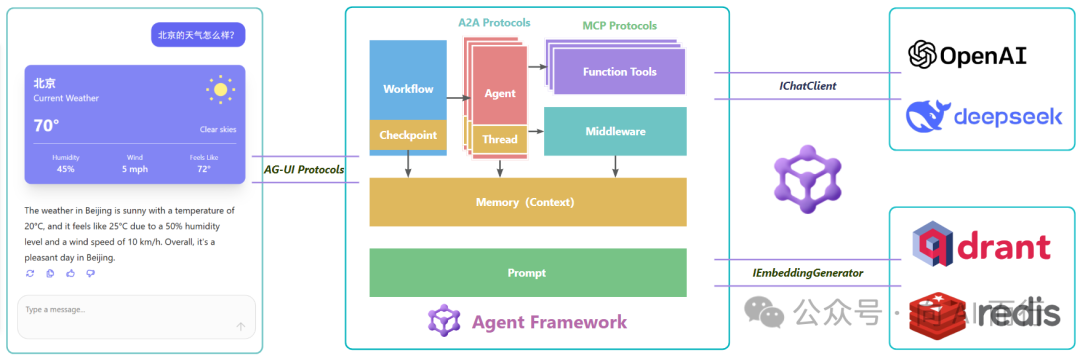
3.3 Microsoft Agent Framework (MAF)

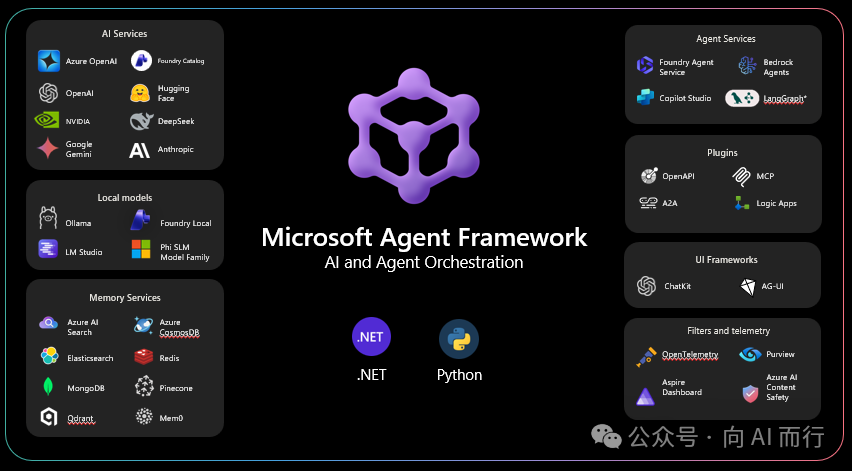
In October 2025, Microsoft officially released the preview version of the Microsoft Agent Framework, a brand-new unified framework for .NET developers to build AI Agents.
Technical Foundation
MAF is not built from scratch; it builds on Microsoft's existing AI technology stack:
- Semantic Kernel: Provides powerful orchestration capabilities
- AutoGen: Supports advanced multi-agent collaboration and research-driven techniques
- Microsoft.Extensions.AI: Provides standardized AI building blocks
MAF is the evolution and unification of these technologies, offering .NET developers a consistent Agent development experience.
Core Concepts
MAF defines an Agent as: a system that combines reasoning, context, and tools to pursue a goal.
- Reasoning and Decision Making: Typically driven by an LLM, but can also use search algorithms, planning systems, etc.
- Context Awareness: Dialogue history, knowledge bases, enterprise data, and other external information
- Tool Use: APIs, MCP tools, code execution, data queries, and other callable capabilities
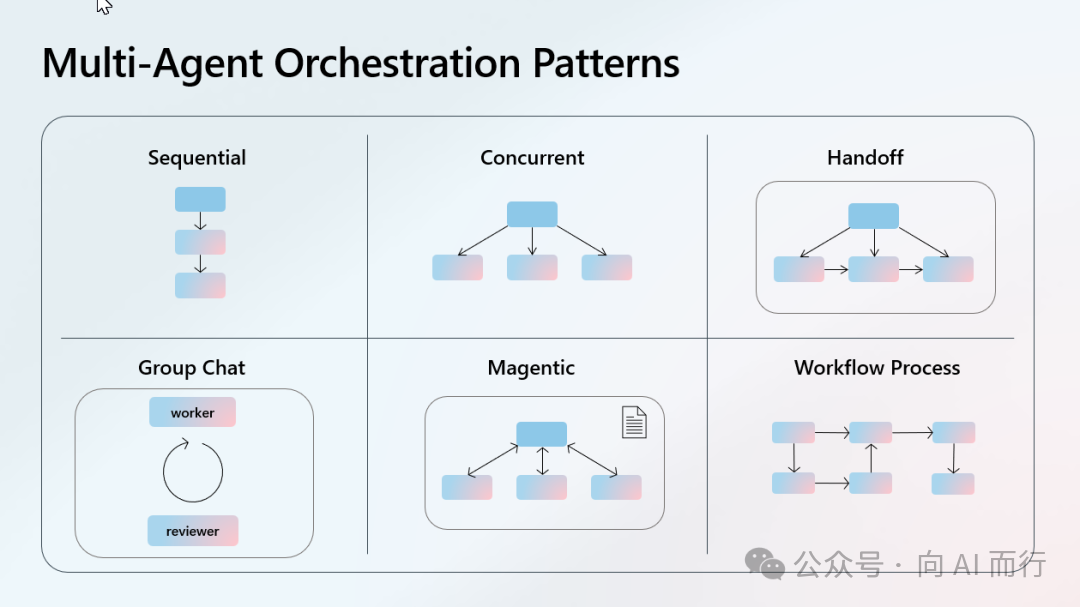
Workflow Types

MAF supports multiple workflow patterns to meet different scenario needs:
- Sequential: Agents execute in order, results pass along the chain
- Concurrent: Multiple Agents work in parallel
- Handoff: Transfer control between Agents based on context
- GroupChat: Agents collaborate in a shared, real-time conversation space
Code Example
Creating an Agent takes just a few lines of code:
// Create a writer Agent
AIAgent writer = new ChatClientAgent(
chatClient,
new ChatClientAgentOptions
{
Name = "Writer",
Instructions = "Write stories that are engaging and creative."
});
// Create an editor Agent
AIAgent editor = new ChatClientAgent(
chatClient,
new ChatClientAgentOptions
{
Name = "Editor",
Instructions = "Make the story more engaging, fix grammar, and enhance the plot."
});
// Combine into a workflow
Workflow workflow = AgentWorkflowBuilder.BuildSequential(writer, editor);
AIAgent workflowAgent = await workflow.AsAgentAsync();
// Execute
var response = await workflowAgent.RunAsync("Write a short story about a haunted house.");
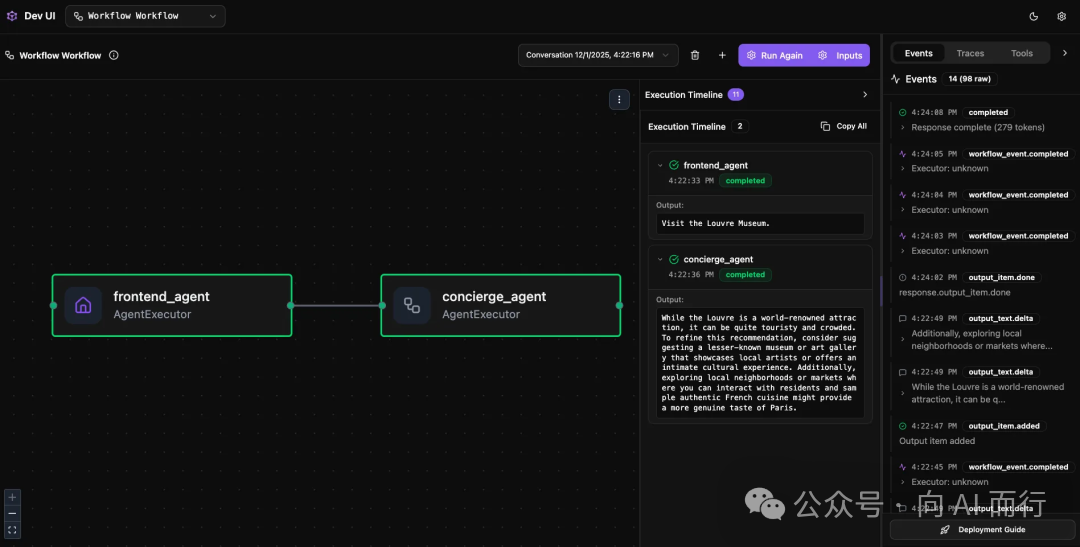
DevUI for Developers

MAF provides an intuitive DevUI to help developers visualize, design, debug, and monitor Agents and workflows. It can be quickly integrated by installing the Microsoft.Agents.AI.DevUI package.
Production-Ready Features
- ASP.NET Integration: Expose Agent services using the familiar Minimal API pattern
- Dependency Injection: Register via
AddAIAgent, supporting Keyed Services - OpenTelemetry: Built-in observability, enable telemetry with a single line of code
- Evaluation: Integrates
Microsoft.Extensions.AI.Evaluationsfor quality assessment
3.4 Full Protocol SDK Support

The .NET ecosystem now fully supports the major AI protocols, including MCP, A2A, and AG-UI.
MCP C# SDK
The official MCP .NET implementation, based on the ModelContextProtocol library, lets you easily create MCP Servers. .NET 10 provides project templates, creatable with a single command:
dotnet new mcpserver -n MyMcpServer
Define tools using the [McpServerTool] attribute:
[McpServerTool]
[Description("Gets a random number between min and max.")]
public int GetRandomNumber(
[Description("Minimum value")] int min,
[Description("Maximum value")] int max)
{
return Random.Shared.Next(min, max + 1);
}
[McpServerTool]
[Description("Describes random weather in the provided city.")]
public string GetCityWeather(
[Description("Name of the city")] string city)
{
var weather = new[] { "sunny", "rainy", "cloudy" };
return $"The weather in {city} is {weather[Random.Shared.Next(weather.Length)]}.";
}
Even better, MCP Servers can be directly packaged as NuGet packages for distribution; users can install and use them with a single dnx command.
A2A C# SDK
The A2A .NET SDK provides a complete implementation of agent-to-agent communication:
dotnet add package A2A
dotnet add package A2A.AspNetCore
Server: Manage Agents via TaskManager, map endpoints using MapA2A:
var taskManager = new TaskManager();
var agent = new EchoAgent();
agent.Attach(taskManager); // Register callbacks: OnAgentCardQuery, OnMessageReceived
app.MapA2A(taskManager, "/echo");
Client: Discover Agents using A2ACardResolver, send messages using A2AClient:
var cardResolver = new A2ACardResolver(new Uri("https://localhost:5048/echo"));
var agentCard = await cardResolver.GetAgentCardAsync();
var client = new A2AClient(new Uri(agentCard.Url));
var response = await client.SendMessageAsync(new MessageSendParams
{
Message = new AgentMessage
{
Role = MessageRole.User,
Parts = [new TextPart { Text = "Hello!" }]
}
});
MAF Integration: The Microsoft Agent Framework also provides A2A protocol support (Microsoft.Agents.A2A), allowing you to expose MAF Agents as A2A servers for cross-framework Agent interoperability.
.NET Support for AG-UI

The MAF framework has built-in AG-UI support, enabling streaming interactions between Agents and user interfaces:
dotnet add package Microsoft.Agents.AI.Hosting.AGUI.AspNetCore # Server
dotnet add package Microsoft.Agents.AI.AGUI # Client
Server: Register services with AddAGUI(), map endpoints with MapAGUI():
builder.Services.AddAGUI();
AIAgent agent = chatClient.AsIChatClient().CreateAIAgent(
name: "Assistant",
instructions: "You are a friendly AI assistant.");
app.MapAGUI("/", agent); // Automatically handles SSE streaming responses
Client: Use AGUIChatClient to connect to the server, RunStreamingAsync to receive streaming responses:
AGUIChatClient chatClient = new(httpClient, "http://localhost:8888");
AIAgent agent = chatClient.CreateAIAgent(name: "client");
AgentThread thread = agent.GetNewThread();
await foreach (var update in agent.RunStreamingAsync(messages, thread))
{
if (update.Contents.OfType<TextContent>().FirstOrDefault() is { } text)
Console.Write(text.Text);
}
3.5 .NET Support for Agent Skills
Agent Skills is a lightweight, open format for extending AI Agent capabilities. A Skill is essentially a folder containing a SKILL.md file:
skill-name/
├── SKILL.md # Required: Skill description and usage instructions
├── scripts/ # Optional: Executable scripts
│ └── tool.cs
├── references/ # Optional: Detailed reference documents
│ └── REFERENCE.md
└── assets/ # Optional: Static resources
└── template.json
SKILL.md format: Contains YAML frontmatter and Markdown body:
---
name: split-pdf
description: Split PDF files into separate single-page documents. Use when you need to divide a PDF into multiple files.
license: MIT
---
# Split PDF
Split a PDF file into multiple single-page files.
## Usage
dotnet scripts/split-pdf.cs input.pdf output-dir/
.NET 10's unique advantage: File-Based Apps make C# an ideal choice for Agent Skills scripts:
#!/usr/bin/env dotnet
#:package PdfSharpCore@1.3.65
#:package Spectre.Console@0.49.1
using PdfSharpCore.Pdf;
using PdfSharpCore.Pdf.IO;
using Spectre.Console;
if (args.Length < 2)
{
AnsiConsole.MarkupLine("[red]Usage: dotnet split-pdf.cs <PDF file> <output directory>[/]");
return 1;
}
var pdfPath = args[0];
var outputDir = args[1];
Directory.CreateDirectory(outputDir);
using var doc = PdfReader.Open(pdfPath, PdfDocumentOpenMode.Import);
for (int i = 0; i < doc.PageCount; i++)
{
using var output = new PdfDocument();
output.AddPage(doc.Pages[i]);
output.Save(Path.Combine(outputDir, $"page_{i + 1:D3}.pdf"));
}
AnsiConsole.MarkupLine($"[green]✅ Split complete! {doc.PageCount} files generated[/]");
return 0;
Compared to Python, .NET File-Based Apps have advantages: dependency declarations are inline in the file (#:package), compile-time type checking, and Native AOT compilation support for millisecond startup.
IV. Outlook for 2026
4.1 Technology Trend Predictions
Agent Capabilities Continue to Strengthen
In 2026, we will see more powerful Agents:
- Longer context: Handling more complex tasks
- Better planning: Higher success rates for multi-step tasks
- Stronger tool calling: Supporting more complex tool combinations
Multimodal AI Becomes Standard
Understanding and generating images, audio, and video will become a basic capability of AI, not an advanced feature. .NET developers need to be prepared to handle multimodal data.
Evolution of AI-Native Application Architecture
"AI-native" will become a new architectural paradigm, just as "cloud-native" changed how we build applications. We need to rethink:
- How to design AI-friendly APIs
- How to build services that can be called by AI
- How to handle AI's uncertainty
4.2 Opportunities for .NET Developers
Growing Demand for AI Agent Development
Demand for customized AI Agents in enterprises is exploding. According to Gartner, by 2026, over 80% of enterprises will deploy some form of AI Agent. Developers familiar with .NET and AI have opportunities to shine in the following areas:
Enterprise Application Scenarios:
- Intelligent customer service Agents: 7x24 intelligent Q&A systems based on enterprise knowledge bases
- Business process automation: Automation of repetitive tasks like order processing, report generation, data analysis
- Code assistants: Enterprise-internal tools for code review, document generation, technical debt detection
- DevOps Agents: Automated deployment, monitoring alert analysis, fault diagnosis
Technical Implementation Paths:
- Develop MCP Servers: Package internal enterprise systems (ERP, CRM, databases) as MCP tools for AI to call
- Build multi-Agent collaboration systems: Use MAF's Workflow mode to implement intelligent orchestration of complex business processes
- Create domain-specific Agents: Combine .NET ecosystem advantages (e.g., finance, manufacturing, healthcare) to create industry-customized solutions
Career Development Opportunities:
- AI application architect: Design enterprise-level AI application architectures
- Agent development engineer: Master MEAI/MAF, become the team's core
- AI tool developer: Develop open-source MCP Servers and Agent Skills, build a personal brand
.NET's Unique Advantages in AI
.NET has unique strengths in the AI field:
- Performance: .NET is an ideal choice for AI applications requiring high performance
- Enterprise foundation: Many enterprise systems are built on .NET, giving AI enhancements a natural advantage
- Mature toolchain: Visual Studio + Copilot is currently one of the best AI-assisted development experiences
- Ecosystem completeness: MEAI/SK/MAF provide a complete AI development toolchain
Continuous Learning Recommendations
As a .NET developer, it is recommended to focus on:
- Learn Vibe Coding: Improve AI-assisted development efficiency
- Follow AI model development: Understand the latest AI capabilities and trends
- Master MEAI: This is the foundation of .NET AI development
- Learn Microsoft Agent Framework: The core framework for Agent development
- Understand MCP/AG-UI/A2A protocols: The de facto standards for AI tool development
- Practice Agent development: Gain experience through real projects
V. Summary
2025 is a landmark year for the integration of .NET and AI.
Looking back on this year:
- AI enters the Agent era: From code completion to autonomous task completion, AI capabilities have undergone a qualitative change
- Protocol standardization drives ecosystem prosperity: Protocols like MCP, A2A, and AG-UI have built an interoperability foundation
- .NET 10 brings important upgrades: Directly running .cs files, performance optimization, AI integration enhancements
- Visual Studio 2026 brand-new experience: Deep AI Copilot integration, greatly improved development efficiency
- .NET AI toolchain matures: MEAI, SK, MAF provide complete development capabilities
For .NET developers, this is the best of times. We have a mature language and platform, a complete toolchain, and an active community. Now, we also have powerful AI assistance.
Embracing AI is not a choice, but an inevitability.
The future is here. Are you ready?
Written on December 25, 2025. I wish all developers a happy New Year, good health, success in work, fulfillment of wishes, and a happy family!