

虽然 8 又带来了很多方面的增强,比如:人工智能、云原生、性能、native AOT 等,但我还是最关注 C# 语言和一些框架层面的变化,下面介绍下 C# 12 和框架中的我认为比较实用的新增功能。

在 .NET Conf 2023 大会上,.NET 8 正式发布了,.NET 8 是一个长期支持(LTS)版本,这意味着可以获得三年的支持和补丁。我们也计划将框架从 .NET Core3.1 升级到 8 ,关于如何升级等升级完成后再来分享。
要使用 .NET 8 ,需要安装相关的 SDK,可以在这个地址进行下载:https://dotnet.microsoft.com/zh-cn/download/dotnet/8.0,或者将 VS2022 升级到 17.8 。
虽然 8 又带来了很多方面的增强,比如:人工智能、云原生、性能、native AOT 等,但我还是最关注 C# 语言和一些框架层面的变化,下面介绍下 C# 12 和框架中的我认为比较实用的新增功能,全部更新说明可以看官方文档:https://learn.microsoft.com/zh-cn/dotnet/core/whats-new/dotnet-8 。
序列化增强
其他类型的内置支持
- 可以对附加类型:Half、Int128、UInt128 进行序列化,在 .NET 7 中对这些类型序列化时不会报错,但内容不能正常获取。
- 可以对 ReadOnlyMemory、Memory 类型进行序列化。
- 当 T 的类型为 byte 时,序列化结果为 base64,否则为 json 数组。
using System.Text.Json;
//输出:[65500,170141183460469231731687303715884105727,340282366920938463463374607431768211455]
Console.WriteLine(JsonSerializer.Serialize(new object[] { Half.MaxValue, Int128.MaxValue, UInt128.MaxValue }));
//输出:"AQIDBAUG"
Console.WriteLine(JsonSerializer.Serialize<ReadOnlyMemory<byte>>(new byte[] { 1,2,3,4,5,6}));
//输出:[1,2,3]
Console.WriteLine(JsonSerializer.Serialize<Memory<int>>(new int[] { 1, 2, 3 }));
接口层次结构
IDerived value = new DerivedImplement { Base = 0, Derived = 1 };
Console.WriteLine(JsonSerializer.Serialize(value));
//输出:{"Base":0,"Derived":1}

public interface IBase
{
    public int Base { get; set; }
}

public interface IDerived : IBase
{
    public int Derived { get; set; }
}

public class DerivedImplement : IDerived
{
    public int Base { get; set; }
    public int Derived { get; set; }
}
上面代码中 IDerived 接口继承了 IBase 接口后,就拥有两个属性了。
在之前的版本(3.1、6、7)中使用包含两个属性的接口 IDerived 来接收对象的实例化,然后进行序列化,得到的结果只有:{Derived":1} ,继承过来的属性 Base 不能被识别。
在 8 中得到了改进,可以得到期望的结果,值得注意的是,如果之前使用了变通方式来进行处理,升级后需要有针对性进行测试和调整。
命名策略
下图是 8 中序列化时对命名策略的支持:
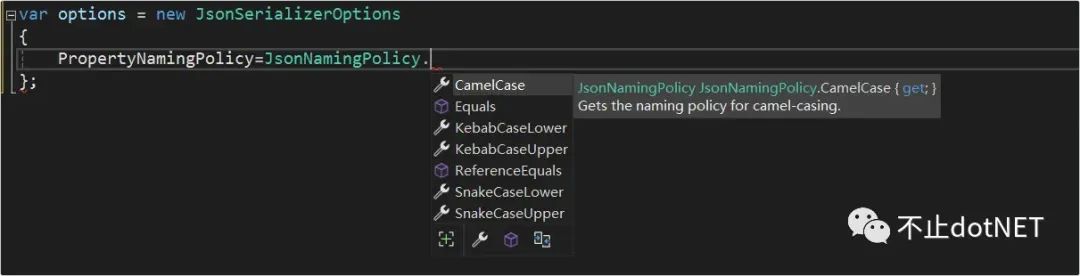
在之前的版本:3.1、6、7 中都只支持 CamelCase 。在 8 中新增的策略如下:
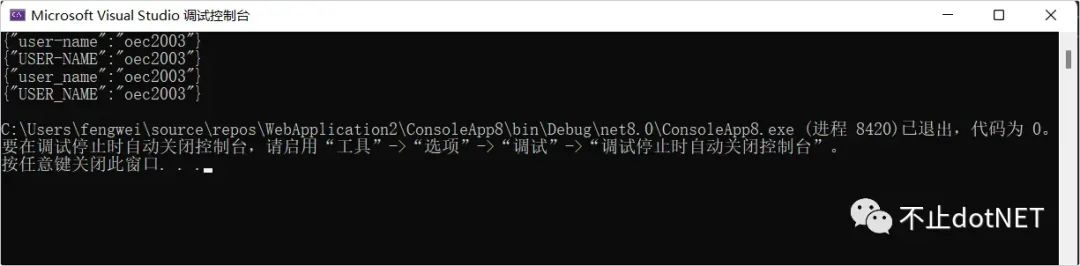
- KebabCaseLower:小写中划线,例如:user-name。
- KebabCaseUpper:大写中划线,例如:USER-NAME。
- SnakeCaseLower:小写下划线,例如:user_name。
- SnakeCaseUpper:大写下划线,例如:USER_NAME。
var options1 = new JsonSerializerOptions
{
    PropertyNamingPolicy = JsonNamingPolicy.KebabCaseLower,
};
var options2 = new JsonSerializerOptions
{
    PropertyNamingPolicy = JsonNamingPolicy.KebabCaseUpper,
};
var options3 = new JsonSerializerOptions
{
    PropertyNamingPolicy = JsonNamingPolicy.SnakeCaseLower,
};
var options4 = new JsonSerializerOptions
{
    PropertyNamingPolicy = JsonNamingPolicy.SnakeCaseUpper,
};
Console.WriteLine(JsonSerializer.Serialize(new UserInfo() { UserName = "oec2003" }, options1));
Console.WriteLine(JsonSerializer.Serialize(new UserInfo() { UserName = "oec2003" }, options2));
Console.WriteLine(JsonSerializer.Serialize(new UserInfo() { UserName = "oec2003" }, options3));
Console.WriteLine(JsonSerializer.Serialize(new UserInfo() { UserName = "oec2003" }, options4));

public class UserInfo
{
    public string? UserName { get; set; }
}
结果如下:
调用 API 直接获取到对象
现在有一个接口返回如下图中的数据:
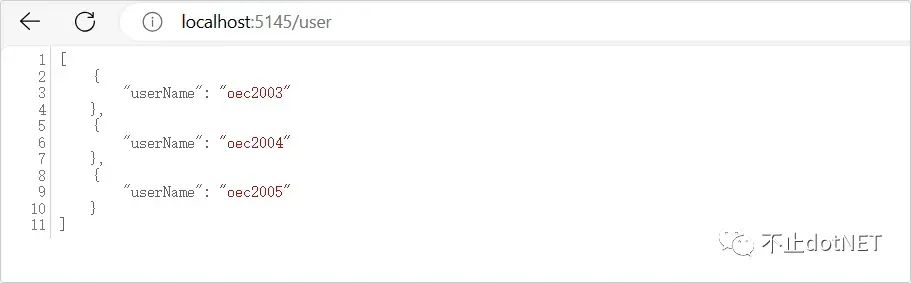
如果是在 8 以前的版本中获取该接口的数据,需要先获取到接口内容,然后进行反序列化,代码如下:
const string RequestUri = "http://localhost:5145/user";
using var client = new HttpClient();
var stream =await client.GetStreamAsync(RequestUri);
//反序列化
var users = JsonSerializer.DeserializeAsyncEnumerable<UserInfo>(stream);
await foreach(UserInfo user in users)
{
    Console.WriteLine($"姓名:{user.userName}");
}
Console.ReadKey();

public record UserInfo(string userName);
在版本 8 中可以直接调用 GetFromJsonAsAsyncEnumerable 方法直接得到对象,无需进行反序列化:
const string RequestUri = "http://localhost:5145/user";
using var client = new HttpClient();
IAsyncEnumerable<UserInfo> users = client.GetFromJsonAsAsyncEnumerable<UserInfo>(RequestUri);

await foreach (UserInfo user in users)
{
    Console.WriteLine($"姓名: {user.userName}");
}
Console.ReadKey();

public record UserInfo(string userName);
上面两种代码的结果一样,如下图:

随机数增强
- 在 8 中对随机数类 Random 提供了 GetItems() 方法,可以根据指定的数量在提供的一个集合中随机抽取数据项生成一个新的集合:
ReadOnlySpan<string> colors = new[]{"Red","Green","Blue","Black"};

string[] t1 = Random.Shared.GetItems(colors, 10);
Console.WriteLine(JsonSerializer.Serialize(t1));

//输出:["Black","Green","Blue","Blue","Green","Blue","Green","Black","Green","Blue"]
//每次都会不一样
Console.ReadKey();
- 通过 Random 提供的 Shuffle() 方法,可以将一个集合中的数据项的顺序打乱:
string[] colors = new[]{"Red","Green","Blue","Black"};
Random.Shared.Shuffle(colors);

Console.WriteLine(JsonSerializer.Serialize(colors));

Console.ReadKey();
新增的提高性能的类型
- 新增了
FrozenDictionary<TKey,TValue>和FrozenSet,这两个类型在System.Collections.Frozen命名空间下,创建这两种类型的集合后,就不允许对键和值进行任何更改,因此可以实现更快的读取操作。
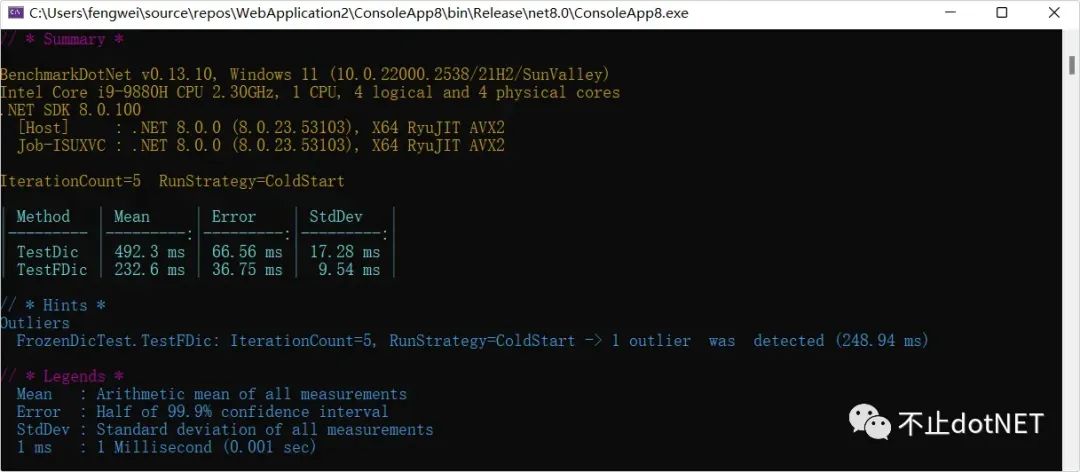
下面是使用 BenchmarkDotNet 对 FrozenDictionary 和 Dictionary 进行测试的代码:
BenchmarkRunner.Run<FrozenDicTest>();
Console.ReadKey();

[SimpleJob(RunStrategy.ColdStart, iterationCount:5)]
public class FrozenDicTest
{
    public static Dictionary<string, string> dic = new() {
        { "name1","oec2003"},
        { "name2","oec2004"},
        { "name3","oec2005"}
    };

    public static FrozenDictionary<string, string> fdic = dic.ToFrozenDictionary();

    [Benchmark]
    public void TestDic()
    {
        for (int i = 0; i < 100000000; i++)
        {
            dic.TryGetValue("name", out _);
        }
    }

    [Benchmark]
    public void TestFDic()
    {
        for (int i = 0; i < 100000000; i++)
        {
            fdic.TryGetValue("name", out _);
        }
    }
}
从测试结果看,效果还是很明显的:
- 新增的
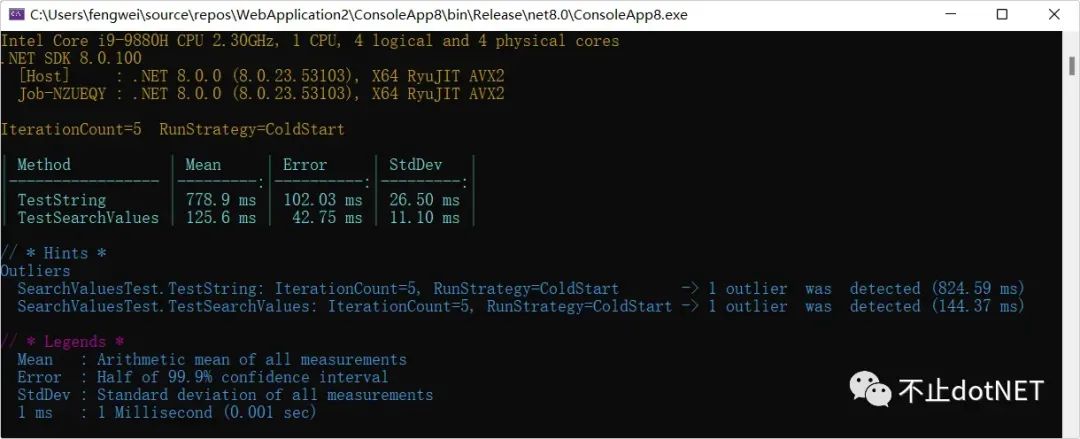
System.Buffers.SearchValues类,可以用来进行字符串的查找和匹配,相比较 string 类型的操作,性能有大幅提升,下面还是用 BenchmarkDotNet 进行测试:
BenchmarkRunner.Run<SearchValuesTest>();
Console.ReadKey();

[SimpleJob(RunStrategy.ColdStart, iterationCount: 5)]
public class SearchValuesTest
{
    [Benchmark]
    public void TestString()
    {
        var str = "!@#$%^&*()_1234567890ABCDEFGHIJKLMNOPQRSTUVWXYZabcdefghijklmnopqrstuvwxyz";
        for (int i = 0; i < 100000000; i++)
        {
            str.Contains("z");
        }
    }

    [Benchmark]
    public void TestSearchValues()
    {
        var sv = SearchValues.Create("!@#$%^&*()_1234567890ABCDEFGHIJKLMNOPQRSTUVWXYZabcdefghijklmnopqrstuvwxyz"u8);
        byte b = (byte)"z"[0];
        for (int i = 0; i < 100000000; i++)
        {
            sv.Contains(b);
        }
    }
}
从运行结果看,有大约 5 倍的的提升:
依赖注入增强
在 8 之前的版本中,依赖注入写法如下:
var builder = WebApplication.CreateBuilder(args);

builder.Services.AddTransient<IUser, UserA>();

var app = builder.Build();

app.MapGet("/user", (IUser user) =>
{
    return $"hello , {user.GetName()}";
});

app.Run();

internal interface IUser
{
    string GetName();
}
internal class UserA: IUser
{
    public string GetName() => "oec2003";
}
如果 IUser 接口有两个实现,上面代码中的写法就只能获取到最后一个注册类的实例,要实现一个接口多个实现类的注入,还需要写一些额外的代码,比较繁琐。
版本 8 中添加了注入关键字,可以很方便实现,看下面代码:
var builder = WebApplication.CreateBuilder(args);

builder.Services.AddKeyedSingleton<IUser, UserA>("A");
builder.Services.AddKeyedSingleton<IUser, UserB>("B");

var app = builder.Build();

app.MapGet("/user1", ([FromKeyedServices("A")] IUser user) =>
{
    return $"hello , {user?.GetName()}";
});
app.MapGet("/user2", ([FromKeyedServices("B")] IUser user) =>
{
    return $"hello , {user?.GetName()}";
});

app.Run();

internal interface IUser
{
    string GetName();
}
internal class UserA: IUser
{
    public string GetName() => "oec2003";
}
internal class UserB : IUser
{
    public string GetName() => "oec2004";
}