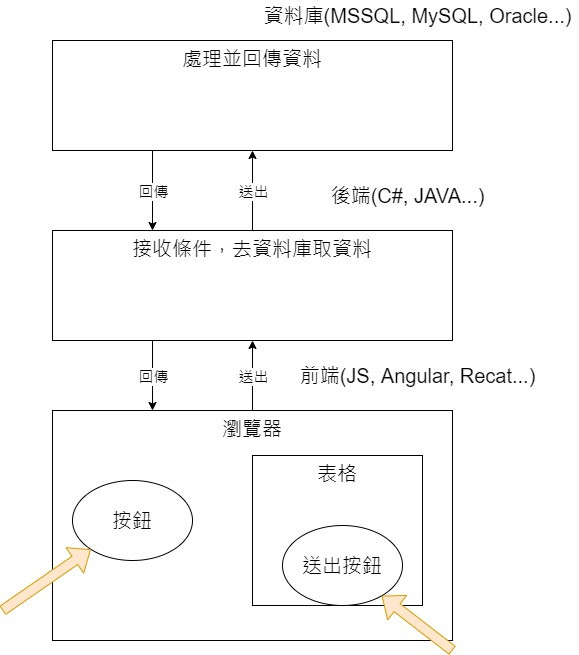
The author's understanding of a website consists of frontend, backend, and database. When a user presses a button or submits a form on the browser page, it triggers a frontend event, which packages the collected conditions and sends them to the backend. The backend receives the conditions, processes them against the database, retrieves the data the user wants, and then sends the page and data back to the frontend. The frontend then displays the corresponding data on the page. This is the most basic form of frontend-backend communication.

Later, someone found that always having to refresh the page was too cumbersome, leading to the development of Ajax technology, which supports asynchronous execution. If event A hasn't finished, other events B, C don't wait for A to finish but proceed on their own. This way, when a user submits a form request, the webpage doesn't keep spinning while waiting for a refresh; instead, the user sees the page first, and other tasks continue processing in the background, greatly improving user experience.
Since dynamic web page specifications have been unified by JS, even the emergence of strongly typed TypeScript (the language used by frontend frameworks like Angular, React, Vue) eventually compiles back to JS that browsers understand. And since TypeScript is based on JS, a backend engineer who wants to build a website inevitably has to deal with JS. For those accustomed to strong typing, this is like starting from scratch. If the company has lax standards and you work with a colleague who likes to use any type, a variable might be both a number and a string, which is maddening. Luckily, Blazor appeared.
Blazor is a portmanteau of Browser and Razor, representing Razor components that execute in the browser.
Blazor comes in two modes: WebAssembly Hosting and Server Hosting, simply put, client-side and server-side. Both have their pros and cons. But before continuing, we need to explain what WebAssembly is.
WebAssembly, abbreviated Wasm, is a binary representation language. Any programming language can be compiled into Wasm after specific compilation. The advantage of Wasm is that it passes the entire program to the browser without needing a server. Because it's binary and already compiled, rendering web pages is faster than JS, and the files are smaller.
Blazor WebAssembly packages compiled dll files and the .NET runtime and sends them to the user's browser, so the initial connection is slower. Blazor Server establishes a SignalR connection between the server and browser. When the browser triggers an event, the server does not refresh the entire page (sending all HTML elements to the frontend) but instead sends only the changed elements (e.g., a div) to the browser via SignalR. This is because Blazor, like Angular, uses the SPA (Single Page Application) mode, where there is only one page from start to finish, covered with components of different functions. Triggering an event only updates the relevant component.
Blazor WebAssembly
Advantages:
- Because files are on the browser, speed is faster than Blazor Server.
- No server required.
- No need to stay connected to the server at all times.
- The client's browser is fully utilized, reducing server load.
- Can be hosted on any server, such as the cloud, Microsoft Azure, or even CDN (Content Delivery Network, a model that caches data closer to the user's geographic location. For example, if you want to log into a website hosted in the US, it will be much slower than one hosted in Taiwan. CDN caches data on servers in regions closer to Taiwan, such as Hong Kong or Singapore, providing faster connection speeds.)
Disadvantages:
- First load takes more time because the browser needs to download .NET runtime and other components (Note: Before the Ironman competition, the author created a new Blazor WebAssembly project and found that no components were downloaded. Microsoft's official images also didn't show component downloads. Perhaps there has been a change in the new version.)
- Limited by the browser's processing capability.
- Both client-side hardware and software are important.
Blazor Server
Advantages:
- Faster load time.
- Can fully leverage server capability.
- The only requirement for any client using this software is a browser.
- Source code is not transmitted to the client, making it more secure.
Disadvantages:
- Requires a server.
- Must maintain a connection with the server.
- Due to data being transmitted back and forth, latency feels heavier.
- It's difficult to scale computing power because a server can only handle a limited number of clients. Microsoft data shows that a single-core Blazor Server with 3.5 GB of memory can handle 5,000 connections; a quad-core Blazor Server with 14 GB of memory can handle 20,000 connections.
Listing the pros and cons of Blazor WebAssembly and Blazor Server, it's clear that no single mode is perfect. Only the most suitable one exists. If you already have a server with another programming language stack like PHP, Node, or Rails and need a client-side program that doesn't require a constant server connection, Blazor WebAssembly is a good choice. Additionally, Blazor WebAssembly has PWA (Progressive Web App) functionality. Although developed as a website, it allows users to download it like an app to their desktop or phone. Well-known sites like Twitter, Pinterest, and Starbucks are notable examples. If you open the Twitter website on a computer, you'll see a download button on the far right of the address bar. If you need to build a website from scratch that requires frequent server connections (e.g., for adding, editing, or deleting data), Blazor Server is suitable.
However, since Blazor is a new Microsoft product, the author has only used ASP.NET Core with Blazor. Integrating Blazor WebAssembly with backends developed in non-Microsoft languages like PHP may present other challenges. Anyone with such requirements should consider multiple factors.
After all this text, many readers, like the author initially, may still not fully understand. Tomorrow, the author will create both types of projects to show the differences.
- Reference: What is Blazor
- Reference: ASP NET Core blazor hosting models
- Reference: The Differences Between Blazor WebAssembly And Blazor Server
- Reference: 了解 WebAssembly 的基础使用方法
- Reference: WebAssembly design
- Reference: WHAT IS A CDN & WHERE DOES IT SHINE?
- Reference: Twitter
Note: The code in this article has been refactored using .NET 6 + Visual Studio 2022. You can click the original link to compare with the refactored code. Thanks for reading and supporting the original author.
- This article Markdown: Click to browse