C# Using RRQMSocket for TCP Communication

C# Using RRQMSocket for TCP Communication

After packaging by RRQM, a series of basic functions such as high connection, high concurrency, and data processing are bundled, allowing users to focus on business without worrying about infrastructure construction.

Last updated 5/26/2022 9:11 PM
黑哥聊dotNet
4 min read
Category
.NET
Tags
.NET C# Architecture Design RRQMSocket TCP

Introduction

  • The TCP component is the most basic component based on the TCP protocol. Its fundamental functions are the same as Socket, but after being encapsulated by RRQM, it packages a series of basic functions such as high connections, high concurrency, and data processing, allowing users to no longer worry about the underlying architecture and focus on their business.
  • Theoretically, the TCP component can be used for any product based on the TCP protocol, such as HTTP, FTP, WebSocket, Telnet, PLC communication, host computer communication, etc.

Product Features

  • Simple and easy to use.
  • Multithreading.
  • Memory pool.
  • High performance (the server can receive 2 million messages per second, with a data reception rate of up to 2.5GB/s).
  • Multiple data reception modes (IOCP, BIO, Select).
  • Multi-address listening (can listen on multiple IPs and ports simultaneously).
  • Adapter preprocessing, one-click solution for packet fragmentation, sticky packets, object parsing (such as HTTP, JSON), etc.
  • Extremely simple synchronous sending, asynchronous sending, receiving, and other operations.
  • Event-driven, giving you full control over every operation.

Product Application Scenarios

  • Basic TCP usage scenarios: cross-platform, cross-language.
  • Custom protocol parsing scenarios: can parse TCP data messages in any data format.

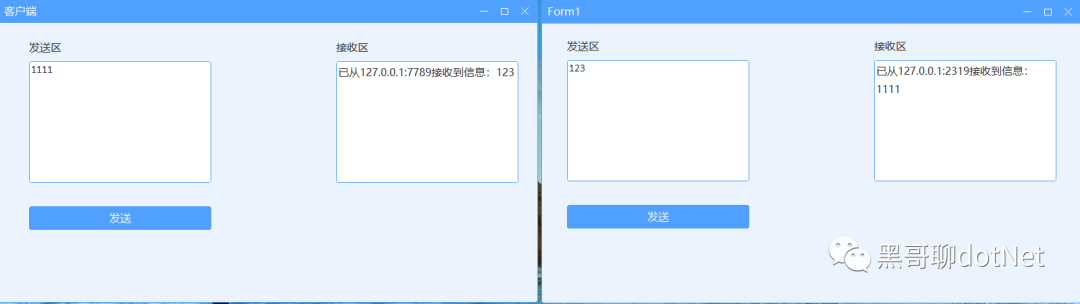
Below we demonstrate our system:

Creating TcpService

TcpService is the base class for TCP server components, but it does not participate in actual data interaction. The actual data interaction is handled by SocketClient. Therefore, the functionality of TcpService is limited to configuration, activation, management, deregistration, and reconstruction of SocketClient class instances. Thus, in TcpService, you must specify the derived generic type of its SocketClient and then implement the HandleReceivedData method, which indicates how to handle received data or objects converted by the adapter.

The specific creation process is as follows.

TcpService service = new TcpService();
service.Connecting += (client, e) =>{};//A client is connecting
service.Connected += (client, e) =>{};//A client has connected
service.Disconnected += (client, e) =>{};//A client has disconnected
service.Received += (client, byteBlock ,requestInfo) =>
{
    //Received message from client
    string mes = Encoding.UTF8.GetString(byteBlock.Buffer, 0, byteBlock.Len);
    Console.WriteLine($"Received message from {client.Name}: {mes}");//Name is IP+Port
};
//Declare configuration
var config = new TcpServiceConfig();
config.ListenIPHosts = new IPHost[] { new IPHost("127.0.0.1:7789"), new IPHost(7790) };//Listen on two addresses simultaneously
//Load configuration
service.Setup(config);
service.Start();

Creating TcpClient

TcpClient is the base class for TCP clients. It is an abstract class and cannot be instantiated directly. You must inherit it and implement the HandleReceivedData method, which indicates how to handle received data.

SimpleTcpClient tcpClient = new SimpleTcpClient();
tcpClient.Connected += (client, e) =>{};//Successfully connected to server
tcpClient.Disconnected += (client, e) =>{};//Disconnected from server, not triggered when connection fails.
tcpClient.Received += (client, byteBlock ,requestInfo) =>
{
    //Received message from server
    string mes = Encoding.UTF8.GetString(byteBlock.Buffer, 0, byteBlock.Len);
    Console.WriteLine($"Received message: {mes}");
};
//Load configuration
tcpClient.Setup("127.0.0.1:7789");
tcpClient.Connect();
tcpClient.Send(Encoding.UTF8.GetBytes("RRQM"));

Sending between client and server both encapsulate the send method. TcpClient and TcpService have multiple built-in sending methods; just call them to send. If sending fails, an exception is thrown immediately.

service.Send(“”);

Finally, if you like my articles, please follow me. I hope the .NET ecosystem gets better and better!

Keep Exploring

Related Reading

More Articles