
简介
性能优化就是如何在保证处理相同数量的请求情况下占用更少的资源,而这个资源一般就是 CPU 或者内存,当然还有操作系统 IO 句柄、网络流量、磁盘占用等等。但是绝大多数时候,我们就是在降低 CPU 和内存的占用率。
之前分享的内容都有一些局限性,很难直接改造,今天要和大家分享一个简单的方法,只需要替换几个集合类型,就可以达到提升性能和降低内存占用的效果。
今天要给大家分享一个类库,这个类库叫 Collections.Pooled,从名字就可以看出来,它是通过池化内存来达到降低内存占用和 GC 的目的,后面我们会直接来看看它的性能到底怎么样,另外也会带大家看看源码,为什么它会带来这些性能提升。
Collections.Pooled
项目链接:https://github.com/jtmueller/Collections.Pooled
该库基于System.Collections.Generic中的类,这些类已经被修改,以利用新的System.Span<T>和System.Buffers.ArrayPool<T>类库,达到减少内存分配,提高性能,并允许与现代 API 的更大的互操作性的目的。
Collections.Pooled 支持 .NET Standard 2.0(.NET Framework 4.6.1+),以及针对.NET Core 2.1+的优化构建。一套广泛的单元测试和基准已经从 corefx 移植过来。
测试总数:27501。通过:27501。失败:0。跳过:0。
测试运行成功。
测试执行时间:9.9019秒
如何使用
通过 NuGet 就可以很简单的安装这个类库,NuGet Version 。
Install-Package Collections.Pooled
dotnet add package Collections.Pooled
paket add Collections.Pooled
在Collections.Pooled类库中,它针对我们常使用的集合类型都实现了池化的版本,和.NET 原生类型的对比如下所示。
| .NET 原生 | Collections.Pooled | 备注 |
|---|---|---|
| List |
PooledList |
泛型集合类 |
| Dictionary<TKey, TValue> | PooledDictionary<TKey, TValue> | 泛型字典类 |
| HashSet |
PooledSet |
泛型哈希集合类 |
| Stack |
Stack |
泛型栈 |
| Queue |
PooledQueue |
泛型队列 |
在使用时,我们只需要将对应的.NET 原生版本换成Collections.Pooled版本就可以了,如下方的代码所示:
using Collections.Pooled;

// 使用方式是一样的
var list = new List<int>();
var pooledList = new PooledList<int>();

var dictionary = new Dictionary<int,int>();
var pooledDictionary = new PooledDictionary<int,int>();

// 包括PooledSet、PooledQueue、PooledStack的使用方法都是一样的

var pooledList1 = Enumerable.Range(0,100).ToPooledList();
var pooledDictionary1 = Enumerable.Range(0,100).ToPooledDictionary(i => i, i => i);
但是我们需要注意,Pooled类型实现了IDispose接口,它通过Dispose()方法将使用的内存归还到池中,所以我们需要在使用完Pooled集合对象以后调用它的Dispose()方法。或者可以直接使用using var关键字。
using Collections.Pooled;

// 使用using var 会在pooled对象使用完毕后自动释放
using var pooledList = new PooledList<int>();
Console.WriteLine(pooledList.Count);

// 使用using作用域 作用域结束以后就会释放
using (var pooledDictionary = new PooledDictionary<int, int>())
{
	Console.WriteLine(pooledDictionary.Count);
}

// 手动调用Dispose方法
var pooledStack = new PooledStack<int>();
Console.WriteLine(pooledStack.Count);
pooledList.Dispose();
注意: 使用 Collections.Pooled 内的集合对象最好需要释放掉它,不过不释放也没有关系,GC 最终会回收它,只是它不能归还到池中,达不到节省内存的效果了。
由于它会复用内存空间,在将内存空间返回到池中的时候,需要对集合内的元素做处理,它提供了一个叫ClearMode的枚举供使用,定义如下:
namespace Collections.Pooled
{
    /// <summary>
    /// 这个枚举允许控制在内部数组返回到ArrayPool时如何处理数据。
    /// 数组返回到ArrayPool时如何处理数据。在使用默认选项之外的其他选项之前,请注意了解
    /// 在使用默认值Auto之外的任何其他选项之前,请仔细了解每个选项的作用。
    /// </summary>
    public enum ClearMode
    {
        /// <summary>
        /// <para><code>Auto</code>根据目标框架有不同的行为</para>
        /// <para>.NET Core 2.1: 引用类型和包含引用类型的值类型在内部数组返回池时被清除。 不包含引用类型的值类型在返回池时不会被清除。</para>
        /// <para>.NET Standard 2.0: 在返回池之前清除所有用户类型,以防它们包含引用类型。 对于 .NET Standard,Auto 和 Always 具有相同的行为。</para>
        /// </summary>
        Auto = 0,

        /// <summary>
        /// The <para><code>Always</code> 设置的效果是在返回池之前总是清除用户类型。
        /// </summary>
        Always = 1,

        /// <summary>
        /// <para><code>Never</code> 将导致池化集合在将它们返回池之前永远不会清除用户类型。</para>
        /// </summary>
        Never = 2
    }
}
默认情况下,使用默认值 Auto 即可,如果有特殊的性能要求,知晓风险后可以使用 Never。
对于引用类型和包含引用类型的值类型,我们必须在将内存空间归还到池的时候清空数组引用,如果不清除会导致 GC 无法释放这部分内存空间(因为元素的引用一直被池持有),如果是纯值类型,那么就可以不清空,在使用结构体替代类这篇文章中,我描述了引用类型和结构体(值类型)数组的存储区别,纯值类型没有对象头回收也无需 GC 介入。
性能对比
我没有单独做 Benchmark,直接使用的开源项目的跑分结果,很多项目的内存占用都是 0,那是因为使用的池化的内存,没有多余的分配。
PooledList<T>
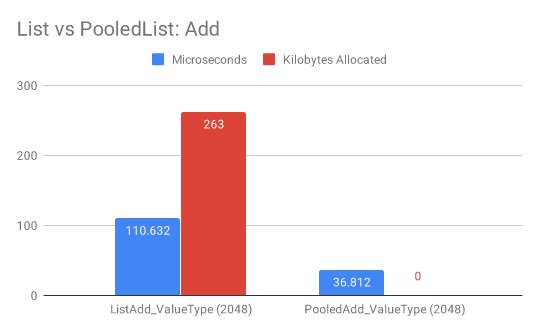
在 Benchmark 中循环向集合添加 2048 个元素,.NET 原生的List<T>需要 110us(根据实际跑分结果,图中的毫秒应该是笔误)和 263KB 内存,而PooledList<T>只需要 36us 和 0KB 内存。
PooledDictionary<TKey, TValue>
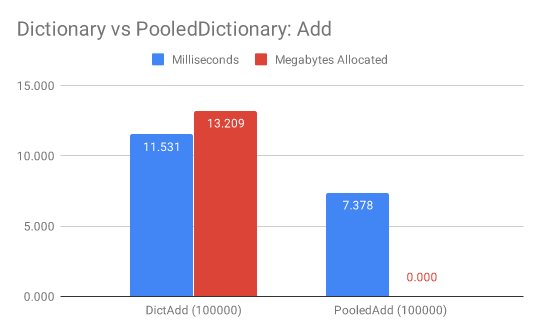
在 Benchmark 中循环向字典添加 10_0000 个元素,.NET 原生的Dictionary<TKey, TValue>需要 11ms 和 13MB 内存,而PooledDictionary<TKey, TValue>只需要 7ms 和 0MB 内存。
PooledSet<T>
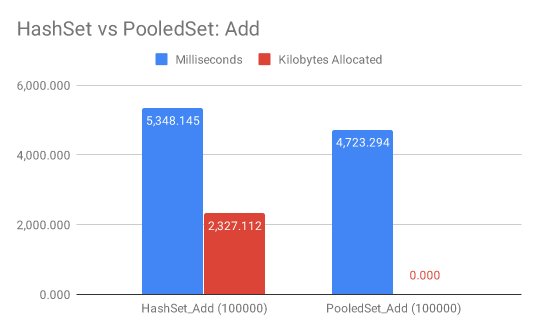
在 Benchmark 中循环向哈希集合添加 10_0000 个元素,.NET 原生的HashSet<T>需要 5348ms 和 2MB,而PooledSet<T>只需要 4723ms 和 0MB 内存。
PooledStack<T>
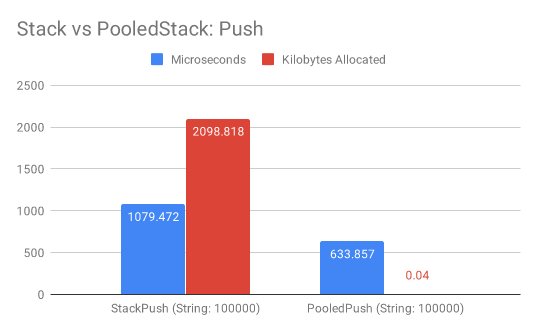
在 Benchmark 中循环向栈添加 10_0000 个元素,.NET 原生的PooledStack<T>需要 1079ms 和 2MB,而PooledStack<T>只需要 633ms 和 0MB 内存。
PooledQueue<T>
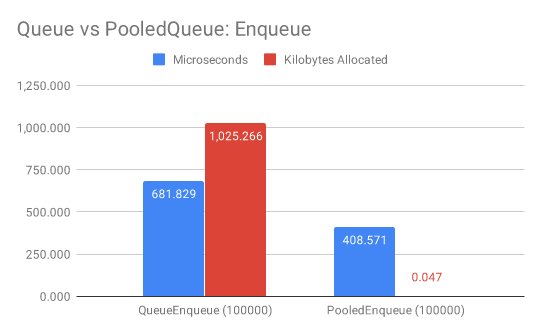
在 Benchmark 中循环向队列添加 10_0000 个元素,.NET 原生的PooledQueue<T>需要 681ms 和 1MB,而PooledQueue<T>只需要 408ms 和 0MB 内存。
未手动释放场景
另外在上文中我们提到了Pooled的集合类型需要释放,但是不释放也没有太大的关系,因为 GC 会去回收。
private static readonly string[] List = Enumerable
    .Range(0, 10000).Select(c => c.ToString()).ToArray();
// 使用默认的集合类型
[Benchmark(Baseline = true)]
public int UseList()
{
    var list = new List<string>(1024);
    for (var index = 0; index < List.Length; index++)
    {
        var item = List[index];
        list.Add(item);
    }
    return list.Count;
}
// 使用PooledList 并且及时释放
[Benchmark]
public int UsePooled()
{
    using var list = new PooledList<string>(1024);
    for (var index = 0; index < List.Length; index++)
    {
        var item = List[index];
        list.Add(item);
    }
    return list.Count;
}
// 使用PooledList 不释放
[Benchmark]
public int UsePooledWithOutUsing()
{
    var list = new PooledList<string>(1024);
    for (var index = 0; index < List.Length; index++)
    {
        var item = List[index];
        list.Add(item);
    }
    return list.Count;
}
Benchmark 结果如下:
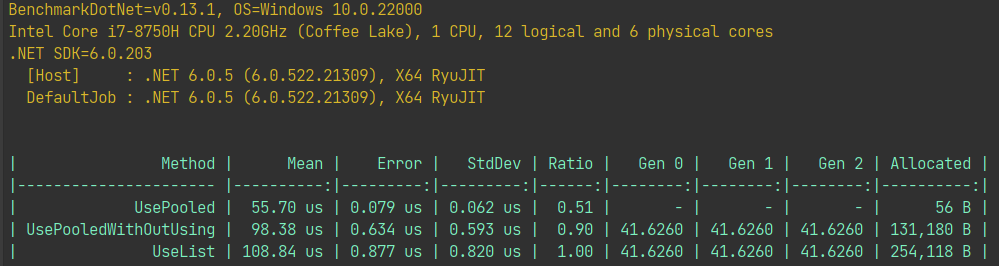
可以从上面的 Benchmark 结果可以得出结论。
- 及时释放
Pooled类型集合几乎不会触发 GC 和分配内存,从上图中它只分配了 56Byte 内存。 - 就算不释放
Pooled类型集合,因为它从池中分配内存,在进行ReSize扩容操作时还是会复用内存,另外跳过了 GC 分配内存初始化步骤,速度也比较快。 - 最慢的就是使用普通集合类型,每次
ReSize扩容操作都需要申请新的内存空间,GC 也要回收之前的内存空间。
原理解析
如果大家看过我之前的博文你应该为集合类型设置初始大小和浅析 C# Dictionary 实现原理就可以知道,.NET BCL 开发人员为了高性能的随机访问,这些基本集合类型的底层数据结构都是数组,我们以List<T>为例。
- 创建新的数组来存储添加进来的元素。
- 如果数组空间不够,那么就触发扩容操作,申请 2 倍的空间大小。
构造函数代码如下,可以看到是直接创建的泛型数组:
public List(int capacity)
{
      if (capacity < 0)
          ThrowHelper.ThrowArgumentOutOfRangeException(ExceptionArgument.capacity, ExceptionResource.ArgumentOutOfRange_NeedNonNegNum);

      if (capacity == 0)
          _items = s_emptyArray;
      else
          _items = new T[capacity];
}
那么如果想要池化内存,只需要把类库中使用new关键字申请的地方,改为使用池化的申请。这里和大家分享.NET BCL 中的一个类型,叫ArrayPool,它提供了可重复使用的泛型实例的数组资源池,使用它可以降低对 GC 的压力,在频繁创建和销毁数组的情况下提升性能。
而我们Pooled类型的底层就是使用ArrayPool来共享资源池,从它的构造函数中,我们可以看到它默认使用的是ArrayPool<T>.Shared来分配数组对象,当然你也可以创建自己的ArrayPool来让它使用。
// 默认使用ArrayPool<T>.Shared池
public PooledList(int capacity, ClearMode clearMode, bool sizeToCapacity) : this(capacity, clearMode, ArrayPool<T>.Shared, sizeToCapacity) { }

// 分配数组使用 ArrayPool
public PooledList(int capacity, ClearMode clearMode, ArrayPool<T> customPool, bool sizeToCapacity)
{
    if (capacity < 0)
        ThrowHelper.ThrowArgumentOutOfRangeException(ExceptionArgument.capacity, ExceptionResource.ArgumentOutOfRange_NeedNonNegNum);
    _pool = customPool ?? ArrayPool<T>.Shared;
    _clearOnFree = ShouldClear(clearMode);
    if (capacity == 0)
    {
        _items = s_emptyArray;
    }
    else
    {
        _items = _pool.Rent(capacity);
    }

    if (sizeToCapacity)
    {
        _size = capacity;
        if (clearMode != ClearMode.Never)
        {
            Array.Clear(_items, 0, _size);
        }
    }
 }
另外在进行容量调整操作(扩容)时,会将旧的数组归还回线程池,新的数组也在池中获取。
public int Capacity
{
    get => _items.Length;
    set
    {
        if (value < _size)
        {
            ThrowHelper.ThrowArgumentOutOfRangeException(ExceptionArgument.value, ExceptionResource.ArgumentOutOfRange_SmallCapacity);
        }

        if (value != _items.Length)
        {
            if (value > 0)
            {
                // 从池中分配数组
                var newItems = _pool.Rent(value);
                if (_size > 0)
                {
                    Array.Copy(_items, newItems, _size);
                }
                // 旧数组归还到池中
                ReturnArray();
                _items = newItems;
            }
            else
            {
                ReturnArray();
                _size = 0;
            }
        }
    }
}
private void ReturnArray()
{
    if (_items.Length == 0)
        return;
    try
    {
        // 归还到池中
        _pool.Return(_items, clearArray: _clearOnFree);
    }
    catch (ArgumentException)
    {
        // ArrayPool可能会抛出异常,我们直接吞掉
    }
    _items = s_emptyArray;
}
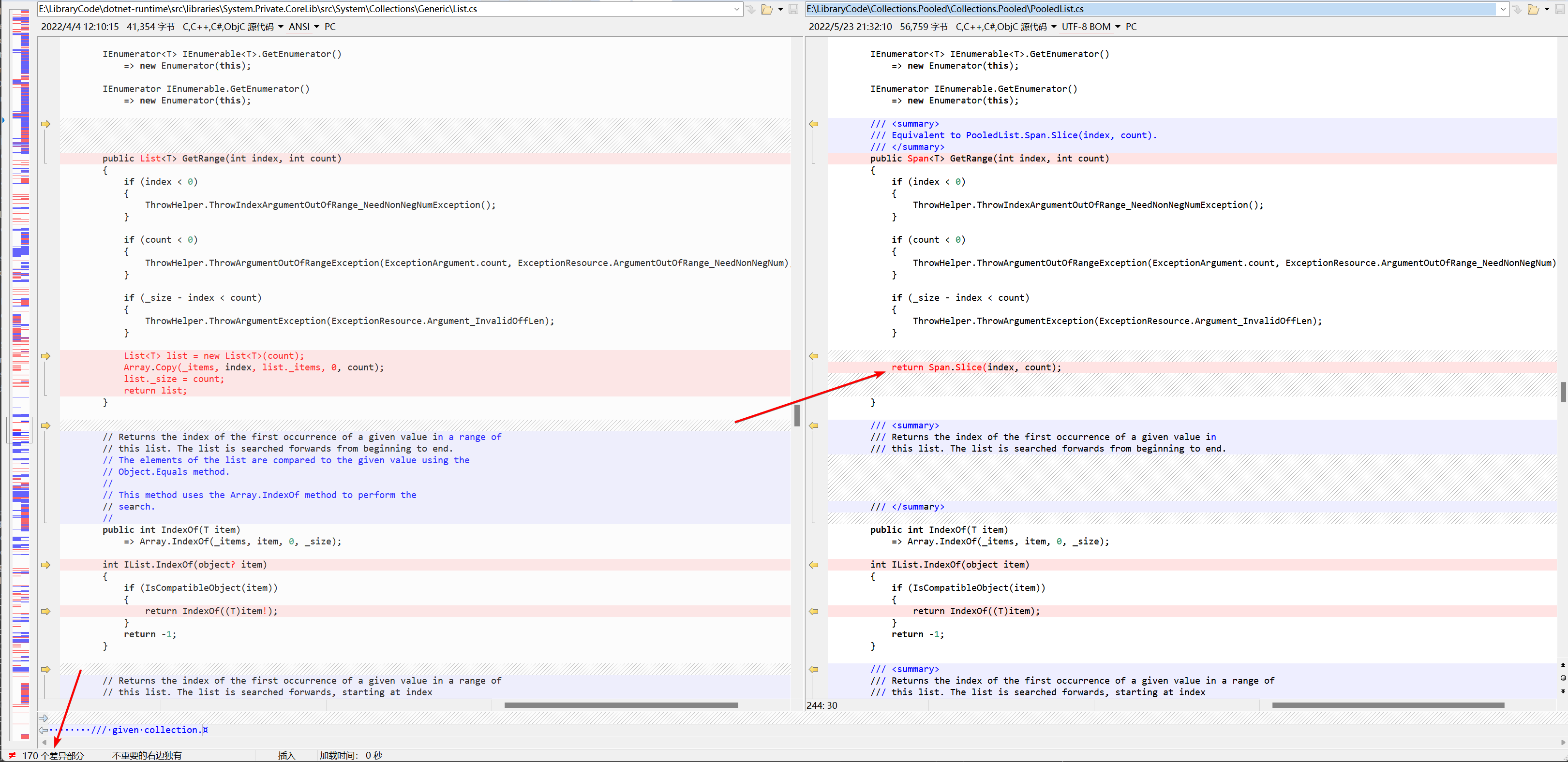
另外作者使用了 Span 优化了Add、Insert等等 API,让它们有更好的随机访问性能;另外还加入了TryXXX系列 API,可以更方便的方式的使用它。比如List<T>类相比PooledList<T>就有多达 170 个修改。
总结
在我们线上实际的使用过程中,完全可以用Pooled提供的集合类型替代原生的集合类型,对降低内存占用率和 P95 延时有非常大的帮助。
另外就算忘记释放了,那性能也不会比使用原生的集合类型差多少。当然最好的习惯就是及时的释放它。