

前言
这一次要和大家分享的一个 Tips 是在字符串拼接场景使用的,我们经常会遇到有很多短小的字符串需要拼接的场景,在这种场景下及其的不推荐使用String.Concat也就是使用+=运算符。
目前来说官方最推荐的方案就是使用StringBuilder来构建这些字符串,那么有什么更快内存占用更低的方式吗?那就是今天要和大家介绍的ValueStringBuilder。
ValueStringBuilder
ValueStringBuilder不是一个公开的 API,但是它被大量用于.NET 的基础类库中,由于它是值类型的,所以它本身不会在堆上分配,不会有 GC 的压力。
微软提供的ValueStringBuilder有两种使用方式,一种是自己已经有了一块内存空间可供字符串构建使用。这意味着你可以使用栈空间,也可以使用堆空间甚至非托管堆的空间,这对于 GC 来说是非常友好的,在高并发情况下能大大降低 GC 压力。
// 构造函数:传入一个Span的Buffer数组
public ValueStringBuilder(Span<char> initialBuffer);

// 使用方式:
// 栈空间
var vsb = new ValueStringBuilder(stackalloc char[512]);
// 普通数租
var vsb = new ValueStringBuilder(new char[512]);
// 使用非托管堆
var length = 512;
var ptr = NativeMemory.Alloc((nuint)(512 * Unsafe.SizeOf<char>()));
var span = new Span<char>(ptr, length);
var vsb = new ValueStringBuilder(span);
.....
NativeMemory.Free(ptr); // 非托管堆用完一定要Free
另外一种方式是指定一个容量,它会从默认的ArrayPool的char对象池中获取缓冲空间,因为使用的是对象池,所以对于 GC 来说也是比较友好的,千万需要注意,池中的对象一定要记得归还。
// 传入预计的容量
public ValueStringBuilder(int initialCapacity)
{
    // 从对象池中获取缓冲区
    _arrayToReturnToPool = ArrayPool<char>.Shared.Rent(initialCapacity);
    ......
}
那么我们就来比较一下使用+=、StringBuilder和ValueStringBuilder这几种方式的性能吧。
// 一个简单的类
public class SomeClass
{
    public int Value1; public int Value2; public float Value3;
    public double Value4; public string? Value5; public decimal Value6;
    public DateTime Value7; public TimeOnly Value8; public DateOnly Value9;
    public int[]? Value10;
}
// Benchmark类
[MemoryDiagnoser]
[HtmlExporter]
[Orderer(SummaryOrderPolicy.FastestToSlowest)]
public class StringBuilderBenchmark
{
    private static readonly SomeClass Data;
    static StringBuilderBenchmark()
    {
        var baseTime = DateTime.Now;
        Data = new SomeClass
        {
            Value1 = 100, Value2 = 200, Value3 = 333,
            Value4 = 400, Value5 = string.Join('-', Enumerable.Range(0, 10000).Select(i => i.ToString())),
            Value6 = 655, Value7 = baseTime.AddHours(12),
            Value8 = TimeOnly.MinValue, Value9 = DateOnly.MaxValue,
            Value10 = Enumerable.Range(0, 5).ToArray()
        };
    }

    // 使用我们熟悉的StringBuilder
    [Benchmark(Baseline = true)]
    public string StringBuilder()
    {
        var data = Data;
        var sb = new StringBuilder();
        sb.Append("Value1:"); sb.Append(data.Value1);
        if (data.Value2 > 10)
        {
            sb.Append(" ,Value2:"); sb.Append(data.Value2);
        }
        sb.Append(" ,Value3:"); sb.Append(data.Value3);
        sb.Append(" ,Value4:"); sb.Append(data.Value4);
        sb.Append(" ,Value5:"); sb.Append(data.Value5);
        if (data.Value6 > 20)
        {
            sb.Append(" ,Value6:"); sb.AppendFormat("{0:F2}", data.Value6);
        }
        sb.Append(" ,Value7:"); sb.AppendFormat("{0:yyyy-MM-dd HH:mm:ss}", data.Value7);
        sb.Append(" ,Value8:"); sb.AppendFormat("{0:HH:mm:ss}", data.Value8);
        sb.Append(" ,Value9:"); sb.AppendFormat("{0:yyyy-MM-dd}", data.Value9);
        sb.Append(" ,Value10:");
        if (data.Value10 is null or {Length: 0}) return sb.ToString();
        for (int i = 0; i < data.Value10.Length; i++)
        {
            sb.Append(data.Value10[i]);
        }

        return sb.ToString();
    }

    // StringBuilder使用Capacity
    [Benchmark]
    public string StringBuilderCapacity()
    {
        var data = Data;
        var sb = new StringBuilder(20480);
        sb.Append("Value1:"); sb.Append(data.Value1);
        if (data.Value2 > 10)
        {
            sb.Append(" ,Value2:"); sb.Append(data.Value2);
        }
        sb.Append(" ,Value3:"); sb.Append(data.Value3);
        sb.Append(" ,Value4:"); sb.Append(data.Value4);
        sb.Append(" ,Value5:"); sb.Append(data.Value5);
        if (data.Value6 > 20)
        {
            sb.Append(" ,Value6:"); sb.AppendFormat("{0:F2}", data.Value6);
        }
        sb.Append(" ,Value7:"); sb.AppendFormat("{0:yyyy-MM-dd HH:mm:ss}", data.Value7);
        sb.Append(" ,Value8:"); sb.AppendFormat("{0:HH:mm:ss}", data.Value8);
        sb.Append(" ,Value9:"); sb.AppendFormat("{0:yyyy-MM-dd}", data.Value9);
        sb.Append(" ,Value10:");
        if (data.Value10 is null or {Length: 0}) return sb.ToString();
        for (int i = 0; i < data.Value10.Length; i++)
        {
            sb.Append(data.Value10[i]);
        }

        return sb.ToString();
    }

    // 直接使用+=拼接字符串
    [Benchmark]
    public string StringConcat()
    {
        var str = "";
        var data = Data;
        str += ("Value1:"); str += (data.Value1);
        if (data.Value2 > 10)
        {
            str += " ,Value2:"; str += data.Value2;
        }
        str += " ,Value3:"; str += (data.Value3);
        str += " ,Value4:"; str += (data.Value4);
        str += " ,Value5:"; str += (data.Value5);
        if (data.Value6 > 20)
        {
            str += " ,Value6:"; str += data.Value6.ToString("F2");
        }
        str += " ,Value7:"; str += data.Value7.ToString("yyyy-MM-dd HH:mm:ss");
        str += " ,Value8:"; str += data.Value8.ToString("HH:mm:ss");
        str += " ,Value9:"; str += data.Value9.ToString("yyyy-MM-dd");
        str += " ,Value10:";
        if (data.Value10 is not null && data.Value10.Length > 0)
        {
            for (int i = 0; i < data.Value10.Length; i++)
            {
                str += (data.Value10[i]);
            }
        }

        return str;
    }

    // 使用栈上分配的ValueStringBuilder
    [Benchmark]
    public string ValueStringBuilderOnStack()
    {
        var data = Data;
        Span<char> buffer = stackalloc char[20480];
        var sb = new ValueStringBuilder(buffer);
        sb.Append("Value1:"); sb.AppendSpanFormattable(data.Value1);
        if (data.Value2 > 10)
        {
            sb.Append(" ,Value2:"); sb.AppendSpanFormattable(data.Value2);
        }
        sb.Append(" ,Value3:"); sb.AppendSpanFormattable(data.Value3);
        sb.Append(" ,Value4:"); sb.AppendSpanFormattable(data.Value4);
        sb.Append(" ,Value5:"); sb.Append(data.Value5);
        if (data.Value6 > 20)
        {
            sb.Append(" ,Value6:"); sb.AppendSpanFormattable(data.Value6, "F2");
        }
        sb.Append(" ,Value7:"); sb.AppendSpanFormattable(data.Value7, "yyyy-MM-dd HH:mm:ss");
        sb.Append(" ,Value8:"); sb.AppendSpanFormattable(data.Value8, "HH:mm:ss");
        sb.Append(" ,Value9:"); sb.AppendSpanFormattable(data.Value9, "yyyy-MM-dd");
        sb.Append(" ,Value10:");
        if (data.Value10 is not null && data.Value10.Length > 0)
        {
            for (int i = 0; i < data.Value10.Length; i++)
            {
                sb.AppendSpanFormattable(data.Value10[i]);
            }
        }

        return sb.ToString();
    }
    // 使用ArrayPool 堆上分配的StringBuilder
    [Benchmark]
    public string ValueStringBuilderOnHeap()
    {
        var data = Data;
        var sb = new ValueStringBuilder(20480);
        sb.Append("Value1:"); sb.AppendSpanFormattable(data.Value1);
        if (data.Value2 > 10)
        {
            sb.Append(" ,Value2:"); sb.AppendSpanFormattable(data.Value2);
        }
        sb.Append(" ,Value3:"); sb.AppendSpanFormattable(data.Value3);
        sb.Append(" ,Value4:"); sb.AppendSpanFormattable(data.Value4);
        sb.Append(" ,Value5:"); sb.Append(data.Value5);
        if (data.Value6 > 20)
        {
            sb.Append(" ,Value6:"); sb.AppendSpanFormattable(data.Value6, "F2");
        }
        sb.Append(" ,Value7:"); sb.AppendSpanFormattable(data.Value7, "yyyy-MM-dd HH:mm:ss");
        sb.Append(" ,Value8:"); sb.AppendSpanFormattable(data.Value8, "HH:mm:ss");
        sb.Append(" ,Value9:"); sb.AppendSpanFormattable(data.Value9, "yyyy-MM-dd");
        sb.Append(" ,Value10:");
        if (data.Value10 is not null && data.Value10.Length > 0)
        {
            for (int i = 0; i < data.Value10.Length; i++)
            {
                sb.AppendSpanFormattable(data.Value10[i]);
            }
        }

        return sb.ToString();
    }

}
结果如下所示。
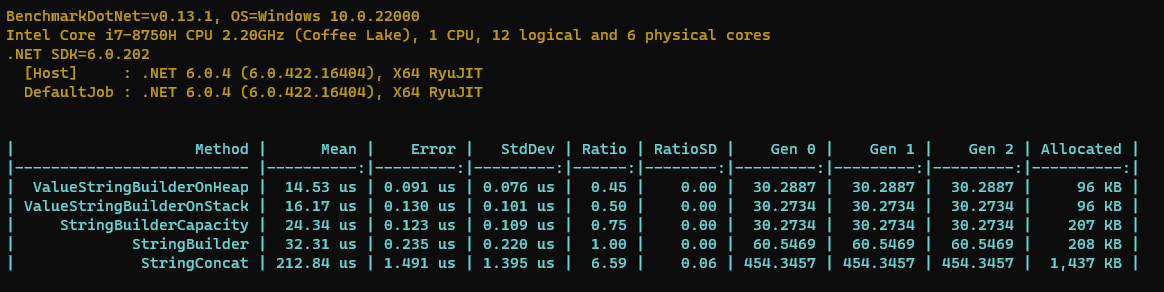
从上图的结果中,我们可以得出如下的结论。
- 使用
StringConcat是最慢的,这种方式是无论如何都不推荐的。 - 使用
StringBuilder要比使用StringConcat快 6.5 倍,这是推荐的方法。 - 设置了初始容量的
StringBuilder要比直接使用StringBuilder快 25%,正如我在你应该为集合类型设置初始大小一样,设置初始大小绝对是相当推荐的做法。 - 栈上分配的
ValueStringBuilder比StringBuilder要快 50%,比设置了初始容量的StringBuilder还快 25%,另外它的 GC 次数是最低的。 - 堆上分配的
ValueStringBuilder比StringBuilder要快 55%,他的 GC 次数稍高与栈上分配。
从上面的结论中,我们可以发现ValueStringBuilder的性能非常好,就算是在栈上分配缓冲区,性能也比StringBuilder快 25%。
源码解析
ValueStringBuilder的源码不长,我们挑几个重要的方法给大家分享一下,部分源码如下。
// 使用 ref struct 该对象只能在栈上分配
public ref struct ValueStringBuilder
{
    // 如果从ArrayPool里分配buffer 那么需要存储一下
    // 以便在Dispose时归还
    private char[]? _arrayToReturnToPool;
    // 暂存外部传入的buffer
    private Span<char> _chars;
    // 当前字符串长度
    private int _pos;

    // 外部传入buffer
    public ValueStringBuilder(Span<char> initialBuffer)
    {
        // 使用外部传入的buffer就不使用从pool里面读取的了
        _arrayToReturnToPool = null;
        _chars = initialBuffer;
        _pos = 0;
    }

    public ValueStringBuilder(int initialCapacity)
    {
        // 如果外部传入了capacity 那么从ArrayPool里面获取
        _arrayToReturnToPool = ArrayPool<char>.Shared.Rent(initialCapacity);
        _chars = _arrayToReturnToPool;
        _pos = 0;
    }

    // 返回字符串的Length 由于Length可读可写
    // 所以重复使用ValueStringBuilder只需将Length设置为0
    public int Length
    {
        get => _pos;
        set
        {
            Debug.Assert(value >= 0);
            Debug.Assert(value <= _chars.Length);
            _pos = value;
        }
    }

    ......

    [MethodImpl(MethodImplOptions.AggressiveInlining)]
    public void Append(char c)
    {
        // 添加字符非常高效 直接设置到对应Span位置即可
        int pos = _pos;
        if ((uint) pos < (uint) _chars.Length)
        {
            _chars[pos] = c;
            _pos = pos + 1;
        }
        else
        {
            // 如果buffer空间不足,那么会走
            GrowAndAppend(c);
        }
    }

    [MethodImpl(MethodImplOptions.AggressiveInlining)]
    public void Append(string? s)
    {
        if (s == null)
        {
            return;
        }

        // 追加字符串也是一样的高效
        int pos = _pos;
        // 如果字符串长度为1 那么可以直接像追加字符一样
        if (s.Length == 1 && (uint) pos < (uint) _chars .Length)
        {
            _chars[pos] = s[0];
            _pos = pos + 1;
        }
        else
        {
            // 如果是多个字符 那么使用较慢的方法
            AppendSlow(s);
        }
    }

    private void AppendSlow(string s)
    {
        // 追加字符串 空间不够先扩容
        // 然后使用Span复制 相当高效
        int pos = _pos;
        if (pos > _chars.Length - s.Length)
        {
            Grow(s.Length);
        }

        s
#if !NETCOREAPP
                .AsSpan()
#endif
            .CopyTo(_chars.Slice(pos));
        _pos += s.Length;
    }

    // 对于需要格式化的对象特殊处理
    [MethodImpl(MethodImplOptions.AggressiveInlining)]
    public void AppendSpanFormattable<T>(T value, string? format = null, IFormatProvider? provider = null)
        where T : ISpanFormattable
    {
        // ISpanFormattable非常高效
        if (value.TryFormat(_chars.Slice(_pos), out int charsWritten, format, provider))
        {
            _pos += charsWritten;
        }
        else
        {
            Append(value.ToString(format, provider));
        }
    }

    [MethodImpl(MethodImplOptions.NoInlining)]
    private void GrowAndAppend(char c)
    {
        // 单个字符扩容在添加
        Grow(1);
        Append(c);
    }

    // 扩容方法
    [MethodImpl(MethodImplOptions.NoInlining)]
    private void Grow(int additionalCapacityBeyondPos)
    {
        Debug.Assert(additionalCapacityBeyondPos > 0);
        Debug.Assert(_pos > _chars.Length - additionalCapacityBeyondPos,
            "Grow called incorrectly, no resize is needed.");

        // 同样也是2倍扩容,默认从对象池中获取buffer
        char[] poolArray = ArrayPool<char>.Shared.Rent((int) Math.Max((uint) (_pos + additionalCapacityBeyondPos),
            (uint) _chars.Length * 2));

        _chars.Slice(0, _pos).CopyTo(poolArray);

        char[]? toReturn = _arrayToReturnToPool;
        _chars = _arrayToReturnToPool = poolArray;
        if (toReturn != null)
        {
            // 如果原本就是使用的对象池 那么必须归还
            ArrayPool<char>.Shared.Return(toReturn);
        }
    }

    //
    [MethodImpl(MethodImplOptions.AggressiveInlining)]
    public void Dispose()
    {
        char[]? toReturn = _arrayToReturnToPool;
        this = default; // 为了安全,在释放时置空当前对象
        if (toReturn != null)
        {
            // 一定要记得归还对象池
            ArrayPool<char>.Shared.Return(toReturn);
        }
    }
}
从上面的源码我们可以总结出ValueStringBuilder的几个特征:
- 比起
StringBuilder来说,实现方式非常简单。 - 一切都是为了高性能,比如各种
Span的用法,各种内联参数,以及使用对象池等等。 - 内存占用非常低,它本身就是结构体类型,另外它是
ref struct,意味着不会被装箱,不会在堆上分配。
适用场景
ValueStringBuilder是一种高性能的字符串创建方式,针对于不同的场景,可以有不同的使用方式。
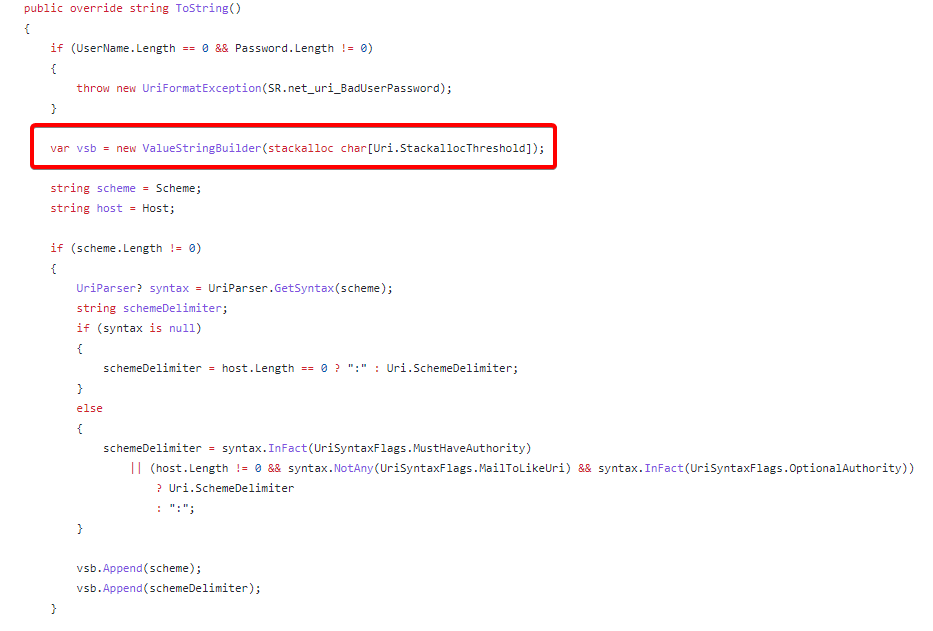
- 非常高频次的字符串拼接的场景,并且字符串长度较小,此时可以使用栈上分配的
ValueStringBuilder。
大家都知道现在 ASP.NET Core 性能非常好,在其依赖的内部库UrlBuilder中,就使用栈上分配,因为栈上分配在当前方法结束后内存就会回收,所以不会造成任何 GC 压力。
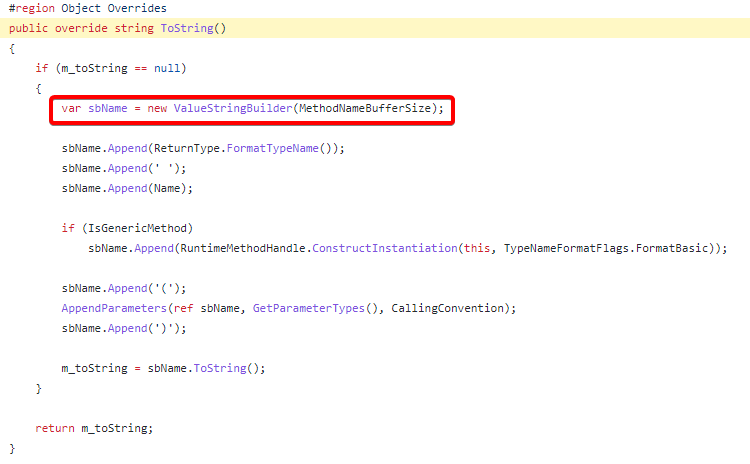
- 非常高频次的字符串拼接场景,但是字符串长度不可控,此时使用 ArrayPool 指定容量的
ValueStringBuilder。比如在.NET BCL 库中有很多场景使用,比如动态方法的ToString实现。从池中分配虽然没有栈上分配那么高效,但是一样的能降低内存占用和 GC 压力。
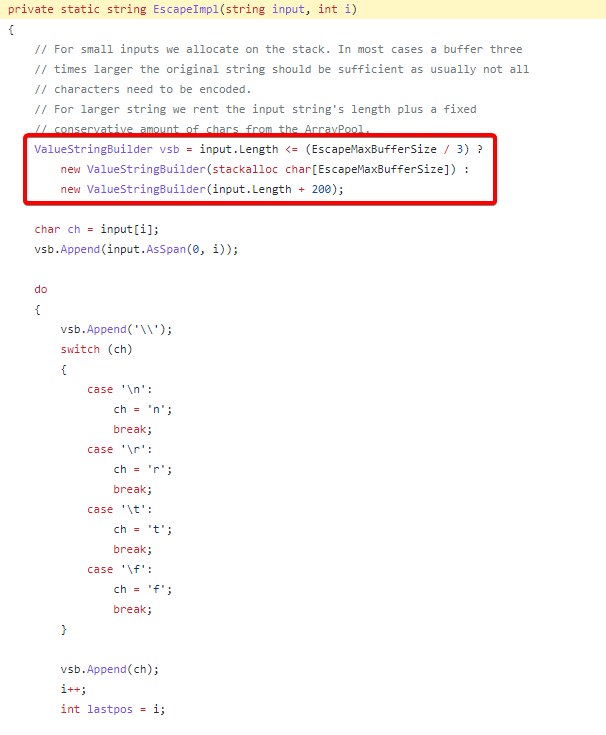
- 非常高频次的字符串拼接场景,但是字符串长度可控,此时可以栈上分配和 ArrayPool 分配联合使用,比如正则表达式解析类中,如果字符串长度较小那么使用栈空间,较大那么使用 ArrayPool。
需要注意的场景
- 在
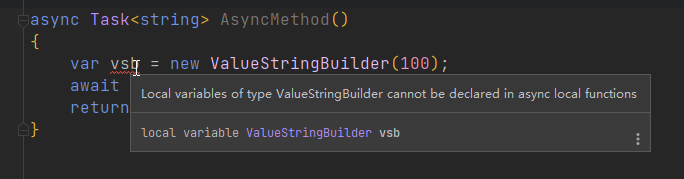
async\await中无法使用ValueStringBuilder。原因大家也都知道,因为ValueStringBuilder是ref struct,它只能在栈上分配,async\await会编译成状态机拆分await前后的方法,所以ValueStringBuilder不好在方法内传递,不过编译器也会警告。
- 无法将
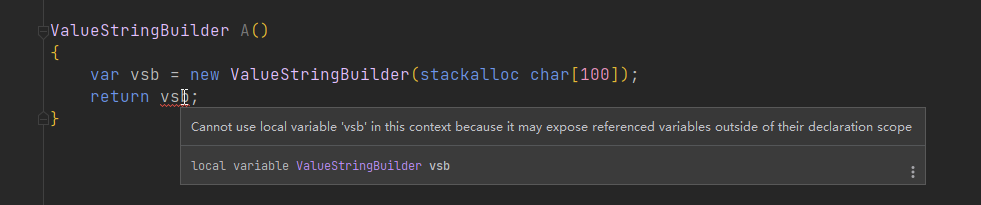
ValueStringBuilder作为返回值返回,因为在当前栈上分配,方法结束后它会被释放,返回它将指向未知的地址。这个编译器也会警告。
- 如果要将
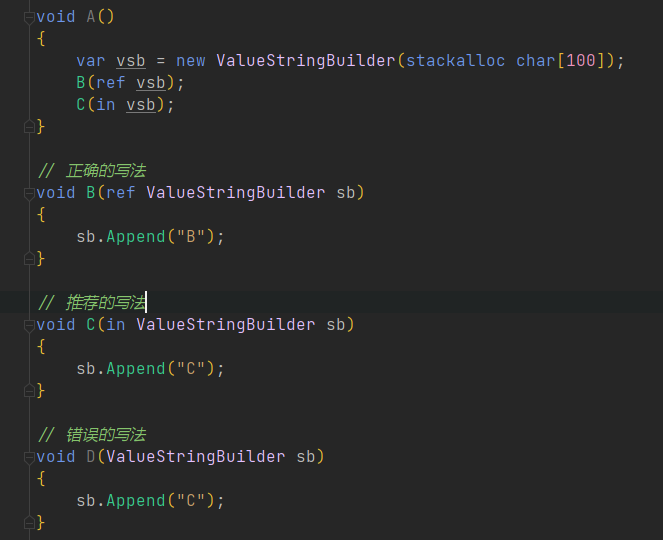
ValueStringBuilder传递给其他方法,那么必须使用ref传递,否则发生值拷贝会存在多个实例。这个编译器不会警告,但是你必须非常注意。
- 如果使用栈上分配,那么 Buffer 大小控制在 5KB 内比较稳妥,至于为什么需要这样,后面有机会在讲一讲。
总结
今天和大家分享了一下高性能几乎无内存占用的字符串拼接结构体ValueStringBuilder,在大多数的场景还是推荐大家使用。但是要非常注意上面提到的的几个场景,如果不符合条件,那么大家还是可以使用高效的 StringBuilder 来进行字符串拼接。
本文源码链接: https://github.com/InCerryGit/BlogCode-Use-ValueStringBuilder