
作者:InCerry
出处:https://www.cnblogs.com/InCerry/archive/2022/05/05/Dotnet-Opt-Perf-Use-Struct-Instead-Of-Class.html
版权:本作品采用「署名-非商业性使用-相同方式共享 4.0 国际」许可协议进行许可。
声明:本博客版权归「InCerry」所有。
1. 前言
我们知道在 C#和 Java 明显的一个区别就是 C#可以自定义值类型,也就是今天的主角struct,我们有了更加方便的class为什么微软还加入了struct呢?这其实就是今天要谈到的一个优化性能的 Tips使用结构体替代类。
那么使用结构体替代类有什么好处呢?在什么样的场景需要使用结构体来替代类呢?今天的文章为大家一一解答。
注意:本文全部都以 x64 位平台为例
2. 现实的案例
举一个现实系统的例子,大家都知道机票购票的流程,开始选择起抵城市和机场(这是航线),然后根据自己的需要日期和时间,挑一个自己喜欢的航班和舱位,然后付款。

2.1 内存占用
那么全国大约 49 航司,8000 多个航线,平均每个航线有 20 个航班,每个航班平均有 10 组舱位价格(经济舱、头等还有不同的折扣权益),一般 OTA(Online Travel Agency:在线旅游平台)允许预订一年内的机票。也就是说平台可能有8000*20*10*365=~5亿的价格数据(以上数据均来源网络,实际中的数据量不方便透露)。
OTA 平台为了能让你更快的搜索想要的航班,会将热门的航线价格数据从数据库拿出来缓存在内存中(内存比单独网络和磁盘传输快的多得多,详情见下图),就取 20%也大约有 1 亿数据在内存中。
| 操作 | 速度 |
|---|---|
| 执行指令 | 1/1,000,000,000 秒 = 1 纳秒 |
| 从一级缓存读取数据 | 0.5 纳秒 |
| 分支预测失败 | 5 纳秒 |
| 从二级缓存读取数据 | 7 纳秒 |
| 使用 Mutex 加锁和解锁 | 25 纳秒 |
| 从主存(RAM 内存)中读取数据 | 100 纳秒 |
| 在 1Gbps 速率的网络上发送 2Kbyte 的数据 | 20,000 纳秒 |
| 从内存中读取 1MB 的数据 | 250,000 纳秒 |
| 磁头移动到新的位置(代指机械硬盘) | 8,000,000 纳秒 |
| 从磁盘中读取 1MB 的数据 | 20,000,000 纳秒 |
| 发送一个数据包从美国到欧洲然后回来 | 150 毫秒 = 150,000,000 纳秒 |
假设我们有如下一个类,类里面有这些属性(现实中要复杂的多,而且会分航线、日期等各个维度存储,而且不同航班有不同的售卖规则,这里演示方便忽略),那么这 1 亿数据缓存在内存中需要多少空间呢?
public class FlightPriceClass
{
    /// <summary>
    /// 航司二字码 如 中国国际航空股份有限公司:CA
    /// </summary>
    public string Airline { get; set; }

    /// <summary>
    /// 起始机场三字码 如 上海虹桥国际机场:SHA
    /// </summary>
    public string Start { get; set; }

    /// <summary>
    /// 抵达机场三字码 如 北京首都国际机场:PEK
    /// </summary>
    public string End { get; set; }

    /// <summary>
    /// 航班号 如 CA0001
    /// </summary>
    public string FlightNo { get; set; }

    /// <summary>
    /// 舱位代码 如 Y
    /// </summary>
    public string Cabin { get; set; }

    /// <summary>
    /// 价格 单位:元
    /// </summary>
    public decimal Price { get; set; }

    /// <summary>
    /// 起飞日期 如 2017-01-01
    /// </summary>
    public DateOnly DepDate { get; set; }

    /// <summary>
    /// 起飞时间 如 08:00
    /// </summary>
    public TimeOnly DepTime { get; set; }

    /// <summary>
    /// 抵达日期 如 2017-01-01
    /// </summary>
    public DateOnly ArrDate { get; set; }

    /// <summary>
    /// 抵达时间 如 08:00
    /// </summary>
    public TimeOnly ArrTime { get; set; }
}
我们可以写一个 Benchmark,来看看 100W 的数据需要多少空间,然后在推导出 1 亿的数据
// 随机预先生成100W的数据 避免计算逻辑导致结果不准确
public static readonly FlightPriceClass[] FlightPrices = Enumerable.Range(0,
        100_0000
    ).Select(index =>
        new FlightPriceClass
        {
            Airline = $"C{(char)(index % 26 + 'A')}",
            Start = $"SH{(char)(index % 26 + 'A')}",
            End = $"PE{(char)(index % 26 + 'A')}",
            FlightNo = $"{index % 1000:0000}",
            Cabin = $"{(char)(index % 26 + 'A')}",
            Price = index % 1000,
            DepDate = DateOnly.FromDateTime(BaseTime.AddHours(index)),
            DepTime = TimeOnly.FromDateTime(BaseTime.AddHours(index)),
            ArrDate = DateOnly.FromDateTime(BaseTime.AddHours(3 + index)),
            ArrTime = TimeOnly.FromDateTime(BaseTime.AddHours(3 + index)),
        }).ToArray();

// 使用类来存储
[Benchmakr]
public FlightPriceClass[] GetClassStore()
{
    var arrays = new FlightPriceClass[FlightPrices.Length];
    for (int i = 0; i < FlightPrices.Length; i++)
    {
        var item = FlightPrices[i];
        arrays[i] = new FlightPriceClass
        {
            Airline = item.Airline,
            Start = item.Start,
            End = item.End,
            FlightNo = item.FlightNo,
            Cabin = item.Cabin,
            Price = item.Price,
            DepDate = item.DepDate,
            DepTime = item.DepTime,
            ArrDate = item.ArrDate,
            ArrTime = item.ArrTime
        };
    }
    return arrays;
}
来看看最终的结果,图片如下所示。
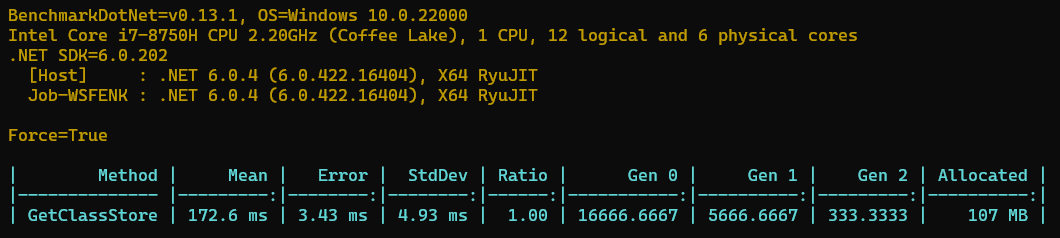
从上面的图可以看出来 100W 数据大约需要 107MB 的内存存储,那么一个占用对象大约就是 112byte 了,那么一亿的对象就是约等于 10.4GB。这个大小已经比较大了,那么还有没有更多的方案可以减少一些内存占用呢?有小伙伴就说了一些方案。
- 可以用 int 来编号字符串
- 可以使用 long 来存储时间戳
- 可以想办法用 zip 之类算法压缩一下
- 等等
我们暂时也不用这些方法,对照本文的的标题,大家应该能想到用什么办法,嘿嘿,那就是使用结构体来替代类,我们定义了一个一样的结构体,如下所示。
[StructLayout(LayoutKind.Auto)]
public struct FlightPriceStruct
{
    // 属性与类一致
    ......
}
我们可以使用Unsafe.SizeOf来查看值类型所需要的内存大小,比如像下面这样。
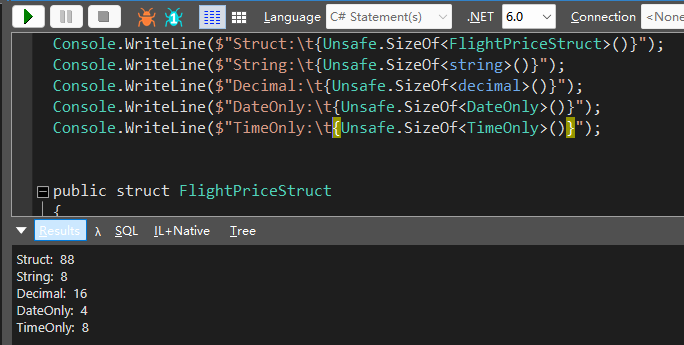
可以看到这个结构体只需要 88byte,比类所需要的 112byte 少了 27%。来实际看看能节省多少内存。

结果很不错呀,内存确实如我们计算的一样少了 27%,另外赋值速度快了 57%,而且更重要的是 GC 发生的次数也少了。
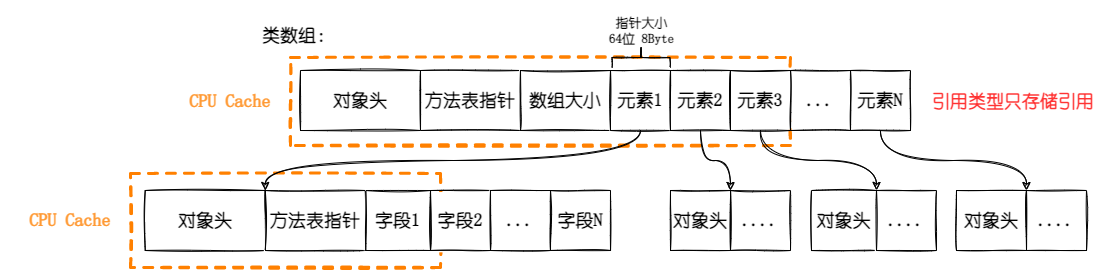
那么为什么结构体可以节省那么多的内存呢?这里需要聊一聊结构体和类存储数据的区别,下图是类数组的存储格式。
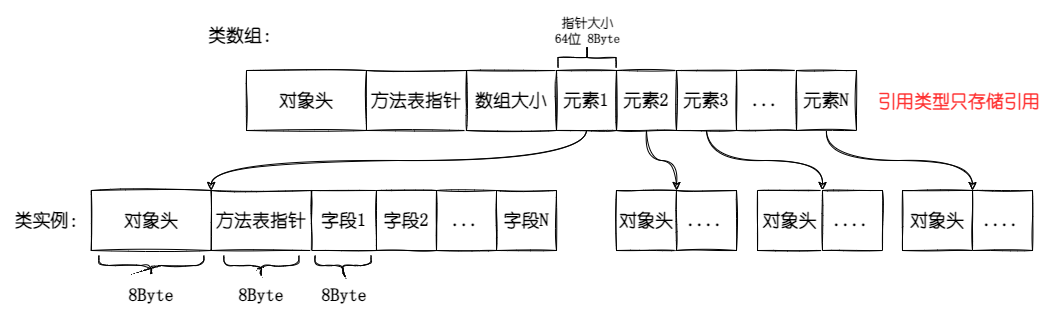
我们可以看到类数组只存放指向数组引用元素的指针,不直接存储数据,而且每个引用类型的实例都有以下这些东西。
- 对象头:大小为 8Byte,CoreCLR 上的描述是存储“需要负载到对象上的所有附加信息”,比如存储对象的 lock 值或者 HashCode 缓存值。
- 方法表指针:大小为 8Byte,指向类型的描述数据,也就是经常提到的(Method Table),MT 里面会存放 GCInfo,字段以及方法定义等等。
- 对象占位符:大小为 8Byte,当前的 GC 要求所有的对象至少有一个当前指针大小的字段,如果是一个空类,除了对象头和方法表指针以外,还会占用 8Byte,如果不是空类,那就是存放第一个字段。
也就是说一个空类不定义任何东西,也至少需要 24byte 的空间,8byte 对象头+8byte 方法表指针+8byte 对象占位符。
回到本文中,由于不是一个空类,所以每个对象除了数据存储外需要额外的 16byte 存储对象头和方法表,另外数组需要 8byte 存放指向对象的指针,所以一个对象存储在数组中需要额外占用 24byte 的空间。我们再来看看值类型(结构体)。
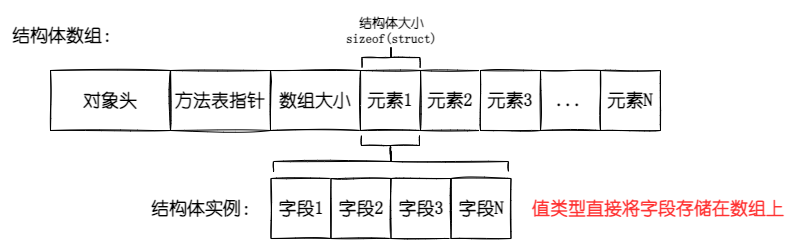
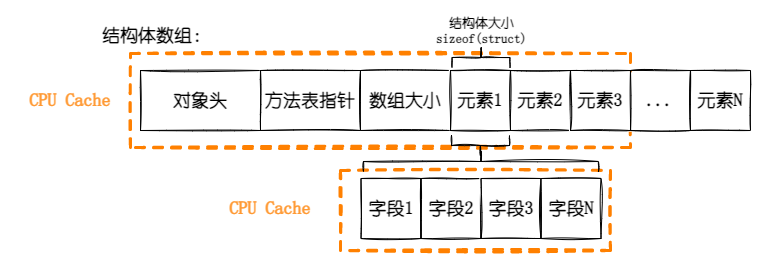
从上图中,我们可以看到如果是值类型的数组,那么数据是直接存储在数组上,不需要引用。所以存储相同的数据,每个空结构体都能省下 24byte(无需对象头、方法表和指向实例的指针)。
另外结构体数组当中的数组,数组也是引用类型,所以它也有 24byte 的数据,它的对象占位符用来存放数组类型的第一个字段-数组大小。
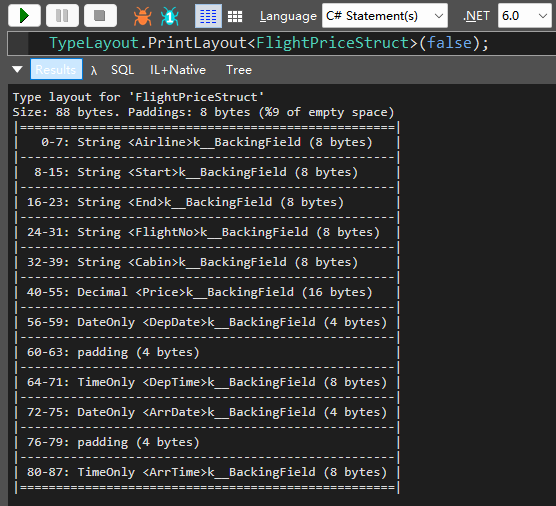
我们可以使用ObjectLayoutInspector这个 NuGet 包打印对象的布局信息,类定义的布局信息如下,可以看到除了数据存储需要的 88byte 以外,还有 16byte 额外空间。

结构体定义的布局信息如下,可以看到每个结构体都是实际的数据存储,不包含额外的占用。
那可不可以节省更多的内存呢?我们知道在 64 位平台上一个引用(指针)是 8byte,而在 C#上默认的字符串使用Unicode-16,也就是说 2byte 代表一个字符,像航司二字码、起抵机场这些小于 4 个字符的完全可以使用 char 数组来节省内存,比一个指针占用还要少,那我们修改一下代码。
// 跳过本地变量初始化
[SkipLocalsInit]
// 调整布局方式 使用Explicit自定义布局
[StructLayout(LayoutKind.Explicit, CharSet = CharSet.Unicode)]
public struct FlightPriceStructExplicit
{
    // 需要手动指定偏移量
    [FieldOffset(0)]
    // 航司使用两个字符存储
    public unsafe fixed char Airline[2];

    // 由于航司使用了4byte 所以起始机场偏移4byte
    [FieldOffset(4)]
    public unsafe fixed char Start[3];

    // 同理起始机场使用6byte 偏移10byte
    [FieldOffset(10)]
    public unsafe fixed char End[3];

    [FieldOffset(16)]
    public unsafe fixed char FlightNo[4];

    [FieldOffset(24)]
    public unsafe fixed char Cabin[2];

    // decimal 16byte
    [FieldOffset(28)]
    public decimal Price;

    // DateOnly 4byte
    [FieldOffset(44)]
    public DateOnly DepDate;

    // TimeOnly 8byte
    [FieldOffset(48)]
    public TimeOnly DepTime;
    [FieldOffset(56)]
    public DateOnly ArrDate;
    [FieldOffset(60)]
    public TimeOnly ArrTime;

}
在来看看这个新结构体对象的布局信息。
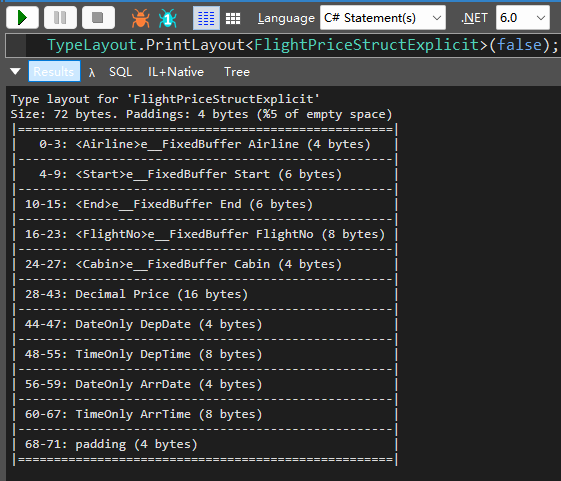
可以看到现在只需要 68byte 了,最后 4byte 是为了地址对齐,因为 CPU 字长是 64bit,我们不用管。按照我们的计算能比 88Byte 节省了 29%的空间。当然使用unsafe fixed char以后就不能直接赋值了,需要进行数据拷贝才行,代码如下。
// 用于设置string值的扩展方法
[MethodImpl(MethodImplOptions.AggressiveInlining)]
public static unsafe void SetTo(this string str, char* dest)
{
    fixed (char* ptr = str)
    {
        Unsafe.CopyBlock(dest, ptr, (uint)(Unsafe.SizeOf<char>() * str.Length));
    }
}

// Benchmark的方法
public static unsafe FlightPriceStructExplicit[] GetStructStoreStructExplicit()
{
    var arrays = new FlightPriceStructExplicit[FlightPrices.Length];
    for (int i = 0; i < FlightPrices.Length; i++)
    {
        ref var item = ref FlightPrices[i];
        arrays[i] = new FlightPriceStructExplicit
        {
            Price = item.Price,
            DepDate = item.DepDate,
            DepTime = item.DepTime,
            ArrDate = item.ArrDate,
            ArrTime = item.ArrTime
        };
        ref var val = ref arrays[i];
        // 需要先fixed 然后再赋值
        fixed (char* airline = val.Airline)
        fixed (char* start = val.Start)
        fixed (char* end = val.End)
        fixed (char* flightNo = val.FlightNo)
        fixed (char* cabin = val.Cabin)
        {
            item.Airline.SetTo(airline);
            item.Start.SetTo(start);
            item.End.SetTo(end);
            item.FlightNo.SetTo(flightNo);
            item.Cabin.SetTo(cabin);
        }
    }
    return arrays;
}
再来跑一下,看看这样存储提升是不是能节省 29%的空间呢。
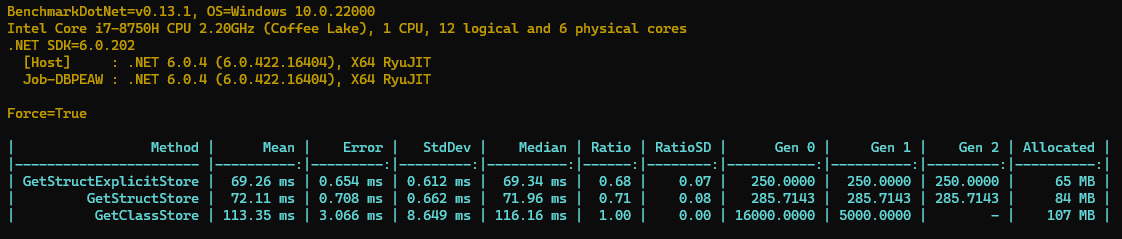
是吧,从 84MB->65MB 节省了大约 29%的内存,不错不错,基本可以达到预期了。
但是我们发现这个 Gen0 Gen1 Gen2 这些 GC 发生了很多次,在实际中的话因为这些都是使用的托管内存,GC 在进行回收的时候会扫描这 65MB 的内存,可能会让它的 STW 变得更久;既然这些是缓存的数据,一段时间内不会回收和改变,那我们能让 GC 别扫描这些嘛?答案是有的,我们可以直接使用非托管内存,使用Marshal类就可以申请和管理非托管内存,可以达到你写 C 语言的时候用的malloc函数类似的效果。
// 分配非托管内存
// 传参是所需要分配的字节数
// 返回值是指向内存的指针
IntPtr Marshal.AllocHGlobal(int cb);

// 释放分配的非托管内存
// 传参是由Marshal分配内存的指针地址
void Marshal.FreeHGlobal(IntPtr hglobal);
再修改一下 Benchmark 的代码,将它改成使用非托管内存。
// 定义了out ptr参数,用于将指针传回
public static unsafe int GetStructStoreUnManageMemory(out IntPtr ptr)
{
    // 使用AllocHGlobal分配内存,大小使用SizeOf计算结构体大小乘需要的数量
    var unManagerPtr = Marshal.AllocHGlobal(Unsafe.SizeOf<FlightPriceStructExplicit>() * FlightPrices.Length);
    ptr = unManagerPtr;
    // 将内存空间指派给FlightPriceStructExplicit数组使用
    var arrays = new Span<FlightPriceStructExplicit>(unManagerPtr.ToPointer(), FlightPrices.Length);
    for (int i = 0; i < FlightPrices.Length; i++)
    {
        ref var item = ref FlightPrices[i];
        arrays[i] = new FlightPriceStructExplicit
        {
            Price = item.Price,
            DepDate = item.DepDate,
            DepTime = item.DepTime,
            ArrDate = item.ArrDate,
            ArrTime = item.ArrTime
        };
        ref var val = ref arrays[i];
        fixed (char* airline = val.Airline)
        fixed (char* start = val.Start)
        fixed (char* end = val.End)
        fixed (char* flightNo = val.FlightNo)
        fixed (char* cabin = val.Cabin)
        {
            item.Airline.SetTo(airline);
            item.Start.SetTo(start);
            item.End.SetTo(end);
            item.FlightNo.SetTo(flightNo);
            item.Cabin.SetTo(cabin);
        }
    }
    // 返回长度
    return arrays.Length;
}

// 切记,非托管内存不使用的时候 需要手动释放
[Benchmark]
public void GetStructStoreUnManageMemory()
{
    _ = FlightPriceCreate.GetStructStoreUnManageMemory(out var ptr);
    // 释放非托管内存
    Marshal.FreeHGlobal(ptr);
}
再来看看 Benchmark 的结果。
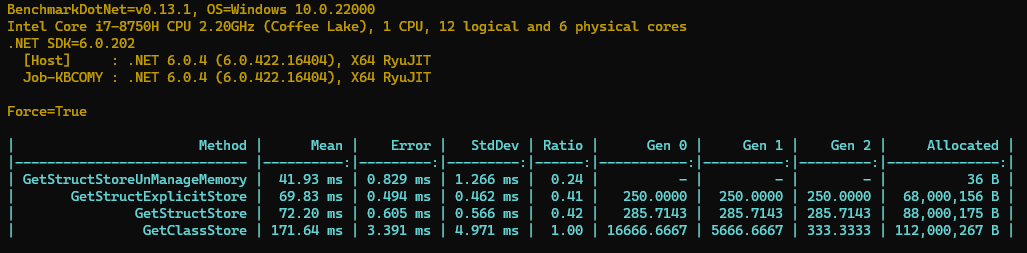
结果非常 Amazing 呀,没有在托管内存上分配空间,赋值的速度也比原来快了很多,后面发生 GC 的时候也无需扫描这一段内存,降低了 GC 压力。这样的结果基本就比较满意了。
到现在的话存储 1 亿的数据差不多 6.3GB,如果使用上文中提高的其他方法,应该还能降低一些,比如像如下代码一样,使用枚举来替换字符串,金额使用'分'存储,只存时间戳。
[StructLayout(LayoutKind.Explicit, CharSet = CharSet.Unicode)]
[SkipLocalsInit]
public struct FlightPriceStructExplicit
{
	// 使用byte标识航司  byte范围0~255
	[FieldOffset(0)]
	public byte Airline;

	// 使用无符号整形表示起抵机场和航班号 2^16次方
	[FieldOffset(1)]
	public UInt16 Start;

	[FieldOffset(3)]
	public UInt16 End;

	[FieldOffset(5)]
	public UInt16 FlightNo;

	[FieldOffset(7)]
	public byte Cabin;

	// 不使用decimal 价格精确到分存储
	[FieldOffset(8)]
	public long PriceFen;

	// 使用时间戳替代
	[FieldOffset(16)]
	public long DepTime;

	[FieldOffset(24)]
	public long ArrTime;
}
最后的出来的结果,每个数据只需要 32byte 的空间存储,这样存储一亿的的话也不到 3GB。
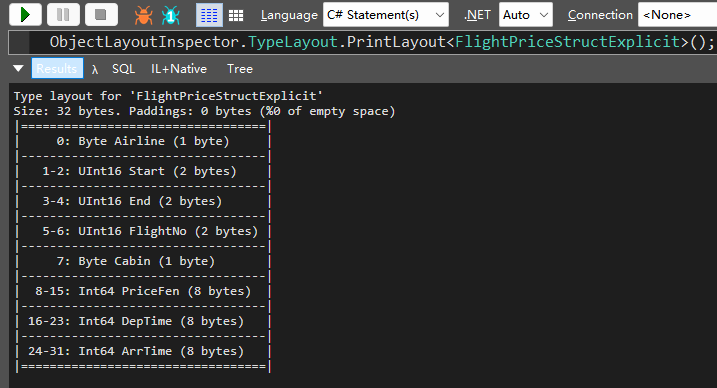
本文就不继续讨论这些方式了。
2.2 计算速度
那么使用结构体有什么问题吗?我们来看看计算,这个计算很简单,就是把符合条件的航线筛选出来,首先类和结构体都定义了如下代码的方法,Explicit 结构体比较特殊,我们使用 Span 比较。
// 类和结构体定义的方法 当然实际中的筛选可能更加复杂
// 比较航司
public bool EqulasAirline(string airline)
{
    return Airline == airline;
}
// 比较起飞机场
public bool EqualsStart(string start)
{
    return Start == start;
}
// 比较抵达机场
public bool EqualsEnd(string end)
{
    return End == end;
}
// 比较航班号
public bool EqualsFlightNo(string flightNo)
{
    return FlightNo == flightNo;
}
// 价格是否小于指定值
public bool IsPriceLess(decimal min)
{
    return Price < min;
}
// 对于Explicit结构体 定义了EqualsSpan方法
[MethodImpl(MethodImplOptions.AggressiveInlining)]
public static unsafe bool SpanEquals(this string str, char* dest, int length)
{
    // 使用span来比较两个数组
    return new Span<char>(dest, length).SequenceEqual(str.AsSpan());
}

// 实现的方法如下所示
public static unsafe bool EqualsAirline(FlightPriceStructExplicit item, string airline)
{
    // 传需要比较的长度
    return airline.SpanEquals(item.Airline, 2);
}
// 下面的方式类似,不再赘述
public static unsafe bool EqualsStart(FlightPriceStructExplicit item, string start)
{
    return start.SpanEquals(item.Start, 3);
}
public static unsafe bool EqualsEnd(FlightPriceStructExplicit item, string end)
{
    return end.SpanEquals(item.End, 3);
}
public static unsafe bool EqualsFlightNo(FlightPriceStructExplicit item, string flightNo)
{
    return flightNo.SpanEquals(item.FlightNo, 4);
}
public static unsafe bool EqualsCabin(FlightPriceStructExplicit item, string cabin)
{
    return cabin.SpanEquals(item.Cabin, 2);
}
public static bool IsPriceLess(FlightPriceStructExplicit item, decimal min)
{
    return item.Price < min;
}
最后 Benchmark 的代码如下所示,对于每种存储结构都是同样的代码逻辑,由于 100W 数据一下就跑完了,每种存储方式的数据量都为 150W。
// 将需要的数据初始化好  避免对测试造成影响
private static readonly FlightPriceClass[] FlightPrices = FlightPriceCreate.GetClassStore();
private static readonly FlightPriceStruct[] FlightPricesStruct = FlightPriceCreate.GetStructStore();
private static readonly FlightPriceStructUninitialized[] FlightPricesStructUninitialized =
    FlightPriceCreate.GetStructStoreUninitializedArray();
private static readonly FlightPriceStructExplicit[] FlightPricesStructExplicit =
    FlightPriceCreate.GetStructStoreStructExplicit();
// 非托管内存比较特殊 只需要存储指针地址即可
private static IntPtr _unManagerPtr;
private static readonly int FlightPricesStructExplicitUnManageMemoryLength =
    FlightPriceCreate.GetStructStoreUnManageMemory(out _unManagerPtr);
[Benchmark(Baseline = true)]
public int GetClassStore()
{
    var caAirline = 0;
    var shaStart = 0;
    var peaStart = 0;
    var ca0001FlightNo = 0;
    var priceLess500 = 0;
    for (int i = 0; i < FlightPrices.Length; i++)
    {
        // 简单的筛选数据
        var item = FlightPrices[i];
        if (item.EqualsAirline("CA"))caAirline++;
        if (item.EqualsStart("SHA"))shaStart++;
        if (item.EqualsEnd("PEA"))peaStart++;
        if (item.EqualsFlightNo("0001"))ca0001FlightNo++;
        if (item.IsPriceLess(500))priceLess500++;
    }
    Debug.WriteLine($"{caAirline},{shaStart},{peaStart},{ca0001FlightNo},{priceLess500}");
    return caAirline + shaStart + peaStart + ca0001FlightNo + priceLess500;
}
[Benchmark]
public int GetStructStore()
{
    var caAirline = 0;
    var shaStart = 0;
    var peaStart = 0;
    var ca0001FlightNo = 0;
    var priceLess500 = 0;
    for (int i = 0; i < FlightPricesStruct.Length; i++)
    {
        var item = FlightPricesStruct[i];
        if (item.EqualsAirline("CA"))caAirline++;
        if (item.EqualsStart("SHA"))shaStart++;
        if (item.EqualsEnd("PEA"))peaStart++;
        if (item.EqualsFlightNo("0001"))ca0001FlightNo++;
        if (item.IsPriceLess(500))priceLess500++;
    }
    Debug.WriteLine($"{caAirline},{shaStart},{peaStart},{ca0001FlightNo},{priceLess500}");
    return caAirline + shaStart + peaStart + ca0001FlightNo + priceLess500;
}
[Benchmark]
public int GetFlightPricesStructExplicit()
{
    var caAirline = 0;
    var shaStart = 0;
    var peaStart = 0;
    var ca0001FlightNo = 0;
    var priceLess500 = 0;
    for (int i = 0; i < FlightPricesStructExplicit.Length; i++)
    {
        var item = FlightPricesStructExplicit[i];
        if (FlightPriceStructExplicit.EqualsAirline(item,"CA"))caAirline++;
        if (FlightPriceStructExplicit.EqualsStart(item,"SHA"))shaStart++;
        if (FlightPriceStructExplicit.EqualsEnd(item,"PEA"))peaStart++;
        if (FlightPriceStructExplicit.EqualsFlightNo(item,"0001"))ca0001FlightNo++;
        if (FlightPriceStructExplicit.IsPriceLess(item,500))priceLess500++;
    }
    Debug.WriteLine($"{caAirline},{shaStart},{peaStart},{ca0001FlightNo},{priceLess500}");
    return caAirline + shaStart + peaStart + ca0001FlightNo + priceLess500;
}
[Benchmark]
public unsafe int GetFlightPricesStructExplicitUnManageMemory()
{
    var caAirline = 0;
    var shaStart = 0;
    var peaStart = 0;
    var ca0001FlightNo = 0;
    var priceLess500 = 0;
    var arrays = new Span<FlightPriceStructExplicit>(_unManagerPtr.ToPointer(), FlightPricesStructExplicitUnManageMemoryLength);
    for (int i = 0; i < arrays.Length; i++)
    {
        var item = arrays[i];
        if (FlightPriceStructExplicit.EqualsAirline(item,"CA"))caAirline++;
        if (FlightPriceStructExplicit.EqualsStart(item,"SHA"))shaStart++;
        if (FlightPriceStructExplicit.EqualsEnd(item,"PEA"))peaStart++;
        if (FlightPriceStructExplicit.EqualsFlightNo(item,"0001"))ca0001FlightNo++;
        if (FlightPriceStructExplicit.IsPriceLess(item,500))priceLess500++;
    }
    Debug.WriteLine($"{caAirline},{shaStart},{peaStart},{ca0001FlightNo},{priceLess500}");
    return caAirline + shaStart + peaStart + ca0001FlightNo + priceLess500;
}
Benchmark 的结果如下。
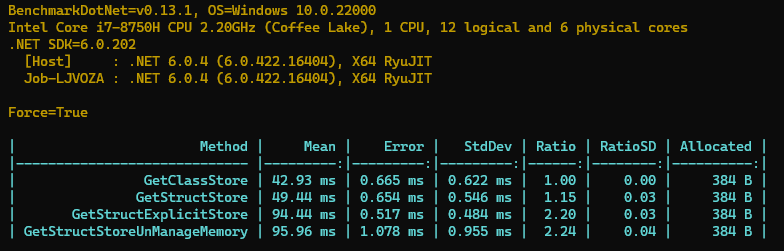
我们看到单独使用结构体比类要慢一点点,但是后面那些使用 Explicit 布局方式和非托管内存的就慢很多很多了,有一倍多的差距,鱼和熊掌真的不可兼得吗?
我们来分析一下后面 2 种方式比较慢的原因,原因是因为值拷贝,我们知道在 C#中默认引用类型是引用传递,而值类型是值传递。
- 引用类型调用方法传递时只需要拷贝一次,长度为 CPU 字长,32 位系统就是 4byte,64 位就是 8byte
- 值类型调用方法是值传递,比如值需要占用 4byte,那么就要拷贝 4byte,在小于等于 CPU 字长时有优势,大于时优势就变为劣势。
而我们的结构体都远远大于 CPU 字长 64 位 8byte,而我们的后面的代码实现发生了多次值拷贝,这拖慢了整体的速度。
那么有没有什么办法不发生值拷贝呢?当然,值类型在 C#中也可以引用传递,我们有 ref 关键字,只需要在值拷贝的地方加上就好了,代码如下所示。
// 改造比较方法,使其支持引用传递
// 加入ref
public static unsafe bool EqualsAirlineRef(ref FlightPriceStructExplicit item, string airline)
{
    // 传递的是引用 需要fixed获取指针
    fixed(char* ptr = item.Airline)
    {
        return airline.SpanEquals(ptr, 2);
    }
}

// Benchmark内部代码也修改为引用传递
[Benchmark]
public unsafe int GetStructStoreUnManageMemoryRef()
{
    var caAirline = 0;
    var shaStart = 0;
    var peaStart = 0;
    var ca0001FlightNo = 0;
    var priceLess500 = 0;
    var arrays = new Span<FlightPriceStructExplicit>(_unManagerPtr.ToPointer(), FlightPricesStructExplicitUnManageMemoryLength);
    for (int i = 0; i < arrays.Length; i++)
    {
        // 从数组里面拿直接引用
        ref var item = ref arrays[i];
        // 传参也直接传递引用
        if (FlightPriceStructExplicit.EqualsAirlineRef(ref item,"CA"))caAirline++;
        if (FlightPriceStructExplicit.EqualsStartRef(ref item,"SHA"))shaStart++;
        if (FlightPriceStructExplicit.EqualsEndRef(ref item,"PEA"))peaStart++;
        if (FlightPriceStructExplicit.EqualsFlightNoRef(ref item,"0001"))ca0001FlightNo++;
        if (FlightPriceStructExplicit.IsPriceLessRef(ref item,500))priceLess500++;
    }
    Debug.WriteLine($"{caAirline},{shaStart},{peaStart},{ca0001FlightNo},{priceLess500}");
    return caAirline + shaStart + peaStart + ca0001FlightNo + priceLess500;
}
我们再来跑一下结果,我们的 Explicit 结构体遥遥领先,比使用类足足快 33%,而上一轮中使用非托管内存表现也很好,排在了第二的位置。
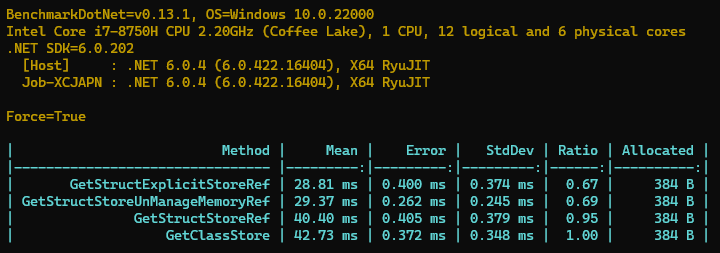
那么同样是引用传递,使用类会更慢一些呢?这就要回到更加底层的 CPU 相关的知识了,我们 CPU 里面除了基本的计算单元以外,还有 L1、L2、L3 这些数据缓存,如下图所示。
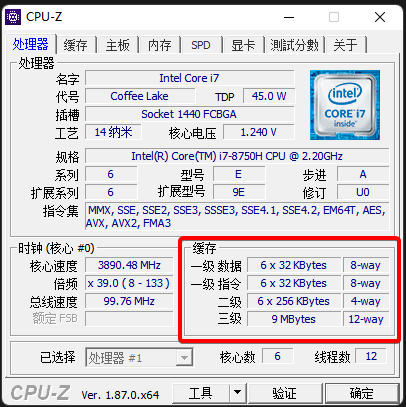
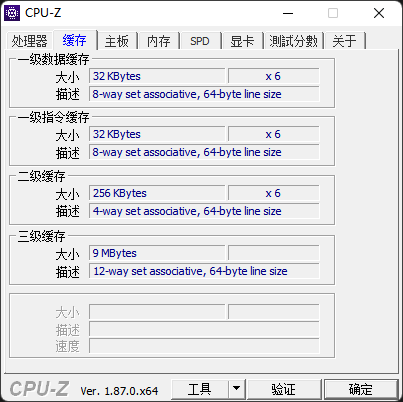
这个和 CPU 的性能挂钩,记得文章开头那一个图吗?CPU 内部的缓存是速度最快的,所以第一个原因就是对于结构体数组数据是存放的连续的地址空间,非常利于 CPU 缓存;而类对象,由于是引用类型,需要指针访问,对于 CPU 缓存不是很有利。
第二个原因是因为引用类型在访问时,需要进行解引用操作,也就是说需要通过指针找到对应内存中的数据,而结构体不需要。
那么如何验证我们的观点呢,其实BenchmarkDotNet提供了这样的指标展示,只需要引入BenchmarkDotNet.Diagnostics.Windows NuGet 包,然后在需要评测的类上面加入以下代码。
[HardwareCounters(
    HardwareCounter.LlcMisses, // 缓存未命中次数
    HardwareCounter.LlcReference)]  // 解引用次数
public class SpeedBench : IDisposable
{
    ......
}
结果如下所示,由于需要额外的统计 Windows ETW 的信息,所以跑的会稍微慢一点。
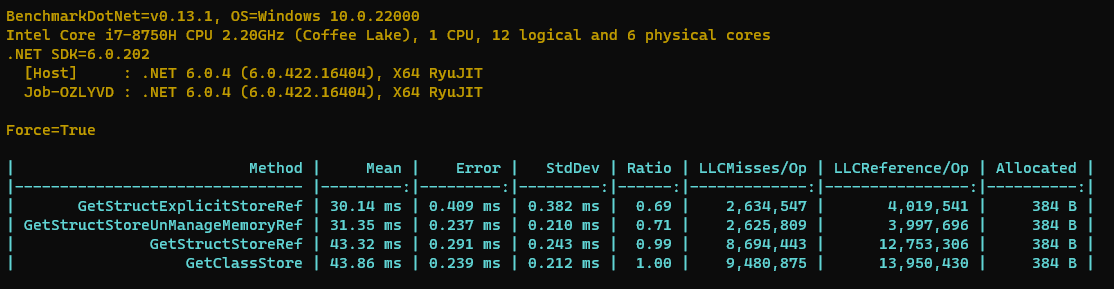
我们可以从上图看出,使用引用类型缓存未命中的次数最多,解引用的次数也很多,这些拖慢了性能。
如下图所示,顺序存储的结构体要比跳跃式的引用类型内存访问效率高。另外对象的体积越小,对于缓存就越友好。
3. 总结
在本文章中,我们讨论了如何使用结构体替换类,达到降低大量内存占用和提升几乎一半计算性能的目的。也讨论了非托管内存在.NET 中的简单使用。结构体是我非常喜欢的东西,它有着相当高效的存储结构和相当优异的性能。但是你不应该将所有的类都转换为结构体,因为它们有不同的适用场景。
那么我们在什么时候需要使用结构体,什么时候需要使用类呢?微软官方给出了答案。
✔️ 如果类型的实例比较小并且通常生存期较短或者常嵌入在其他对象中,则考虑定义结构体而不是类。
❌ 避免定义结构,除非具有所有以下特征:
- 它逻辑上表示单个值,类似于基元类型(int、double 等等)- 比如我们的缓存数据,基本都是基元类型。
- 它的实例大小小于 16 字节 - 值拷贝的代价是巨大的,不过现在有了 ref 能有更多的适用场景。
- 它是不可变的 - 在我们今天的例子中,缓存的数据是不会改变的,所以具有这个特征。
- 它不必频繁装箱 - 频繁装拆箱对性能有较大的损耗,在我们的场景中,函数都做了 ref 适配,所以也不存在这种情况。
在所有其他情况下,都应将类型定义为类。
其实大家从这些方式也能看出来,C#是一门入门简单但是上限很高的语言,平时可以利用 C#的语法特性,快速的进行需求变现;而如果有了性能瓶颈,你完全可以像写 C代码一样写 C#代码,获得和 C媲美的性能。