

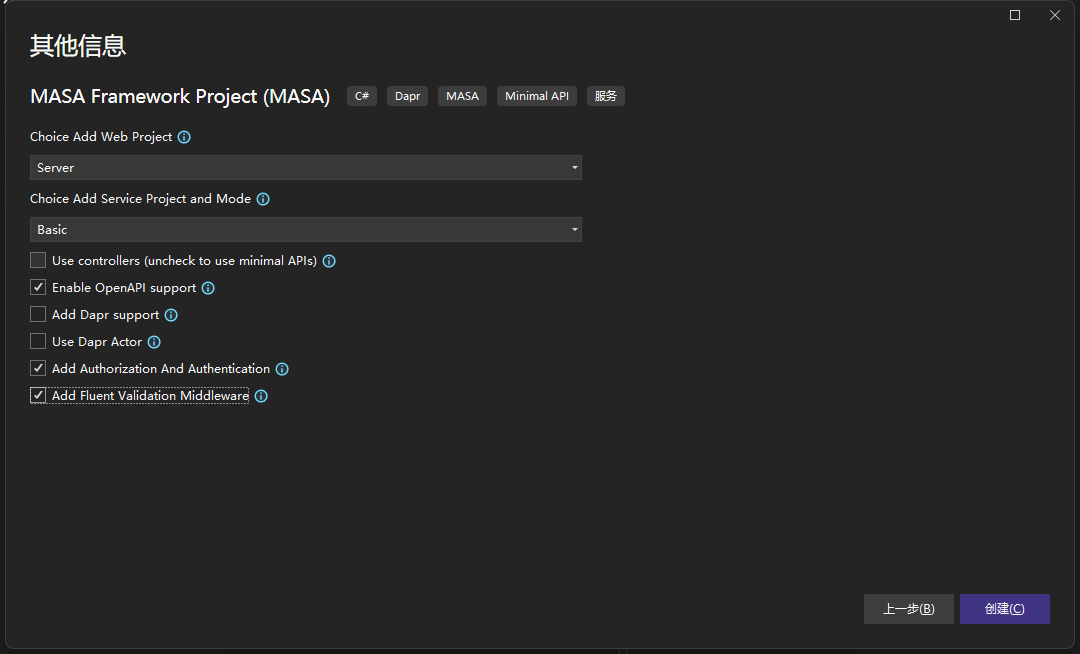
首先我们需要创建一个 MasaFramework 模板的项目,项目名称 TokenDemo,项目类型如图所示:
删除 Web/TokenDemo.Admin 项目,新建 Masa Blazor Pro 项目模板项目,项目位置在 src/Web 项目:
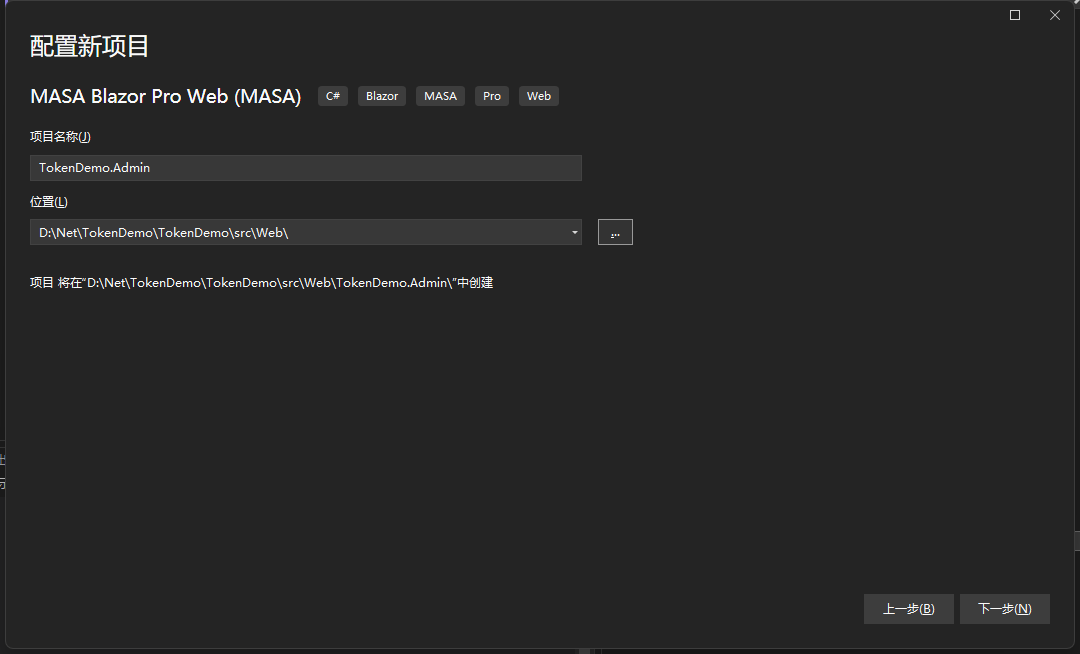
项目类型选择 ServerAndWasm,为了让我们支持俩种模式:
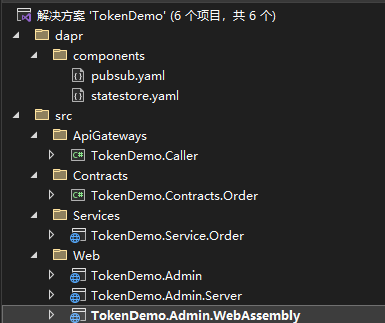
创建完成以后的目录,然后在 TokenDemo.Admin 中添加项目引用 TokenDemo.Caller。
配置 EntityFrameworkCore 和 Sqlite
修改 TokenDemo.Service 项目的包依赖为预览版
<ItemGroup>
    <PackageReference Include="Masa.BuildingBlocks.Dispatcher.Events" Version="1.0.0-preview.18" />
    <PackageReference Include="Masa.Contrib.Data.Contracts" Version="1.0.0-preview.18" />
    <PackageReference Include="Masa.Contrib.Data.EFCore.Sqlite" Version="1.0.0-preview.18" />
    <PackageReference Include="Masa.Contrib.Dispatcher.Events" Version="1.0.0-preview.18" />
    <PackageReference Include="Masa.Contrib.Dispatcher.IntegrationEvents.EventLogs.EFCore" Version="1.0.0-preview.18" />
    <PackageReference Include="FluentValidation" Version="11.5.1" />
    <PackageReference Include="FluentValidation.AspNetCore" Version="11.2.2" />
    <PackageReference Include="Masa.Utils.Extensions.DependencyInjection" Version="1.0.0-preview.18" />
    <PackageReference Include="Masa.Contrib.Service.MinimalAPIs" Version="1.0.0-preview.18" />
    <PackageReference Include="Microsoft.AspNetCore.Authentication.JwtBearer" Version="6.0.3" />
    <PackageReference Include="Swashbuckle.AspNetCore" Version="6.5.0" />
</ItemGroup>
Masa.Contrib.Data.Contracts 提供了数据过滤的能力, 但它不是必须的,然后会出现报错,LogMiddleware将代码修改为以下代码:
namespace TokenDemo.Service.Infrastructure.Middleware;

public class LogMiddleware<TEvent> : EventMiddleware<TEvent>
    where TEvent : notnull, IEvent
{
    private readonly ILogger<LogMiddleware<TEvent>> _logger;

    public LogMiddleware(ILogger<LogMiddleware<TEvent>> logger)
    {
        _logger = logger;
    }

    public override async Task HandleAsync(TEvent action, EventHandlerDelegate next)
    {
        var typeName = action.GetType().FullName;

        _logger.LogInformation("----- command {CommandType}", typeName);

        await next();
    }
}
ValidatorMiddleware 将代码修改为以下代码:
namespace TokenDemo.Service.Infrastructure.Middleware;

public class ValidatorMiddleware<TEvent> : EventMiddleware<TEvent>
    where TEvent : notnull, IEvent
{
    private readonly ILogger<ValidatorMiddleware<TEvent>> _logger;
    private readonly IEnumerable<IValidator<TEvent>> _validators;

    public ValidatorMiddleware(IEnumerable<IValidator<TEvent>> validators, ILogger<ValidatorMiddleware<TEvent>> logger)
    {
        _validators = validators;
        _logger = logger;
    }

    public override async Task HandleAsync(TEvent action, EventHandlerDelegate next)
    {
        var typeName = action.GetType().FullName;

        _logger.LogInformation("----- Validating command {CommandType}", typeName);

        var failures = _validators
            .Select(v => v.Validate(action))
            .SelectMany(result => result.Errors)
            .Where(error => error != null)
            .ToList();

        if (failures.Any())
        {
            _logger.LogWarning("Validation errors - {CommandType} - Command: {@Command} - Errors: {@ValidationErrors}", typeName, action, failures);

            throw new ValidationException("Validation exception", failures);
        }

        await next();
    }
}
OrderEventHandler 将代码修改为以下代码:
namespace TokenDemo.Service.Infrastructure.Handlers;

public class OrderEventHandler
{
    readonly IOrderRepository _orderRepository;

    public OrderEventHandler(IOrderRepository orderRepository)
    {
        _orderRepository = orderRepository;
    }

    [EventHandler(Order = 1)]
    public async Task HandleAsync(QueryOrderListEvent @event)
    {
        @event.Orders = await _orderRepository.GetListAsync();
    }
}

public class OrderEventAfterHandler : IEventHandler<QueryOrderListEvent>
{
    public async Task HandleAsync(QueryOrderListEvent @event, CancellationToken cancellationToken = new CancellationToken())
    {
        await Task.CompletedTask;
    }
}
修改 appsettings.json 添加 Sqlite 地址:
{
  "Logging": {
    "LogLevel": {
      "Default": "Information",
      "Microsoft": "Warning",
      "Microsoft.Hosting.Lifetime": "Information"
    }
  },
  "AllowedHosts": "*",
  "ConnectionStrings": {
    "DefaultConnection": "Data Source=Catalog.db;"
  }
}
修改 Program.cs 代码:
using TokenDemo.Service.Infrastructure;

var builder = WebApplication.CreateBuilder(args);

builder.Services
    .AddAuthorization()
    .AddAuthentication(options =>
    {
        options.DefaultAuthenticateScheme = JwtBearerDefaults.AuthenticationScheme;
        options.DefaultChallengeScheme = JwtBearerDefaults.AuthenticationScheme;
    })
    .AddJwtBearer(options =>
    {
        options.Authority = "";
        options.RequireHttpsMetadata = false;
        options.Audience = "";
    });

builder.Services.AddMasaDbContext<ShopDbContext>(dbContextBuilder =>
{
    dbContextBuilder
        .UseSqlite() //使用Sqlite数据库
        .UseFilter(); //数据数据过滤
});

builder.Services.AddAutoInject();
var app = builder.Services
    .AddEndpointsApiExplorer()
    .AddSwaggerGen(options =>
    {
        options.AddSecurityDefinition("Bearer", new OpenApiSecurityScheme()
        {
            Name = "Authorization",
            Type = SecuritySchemeType.ApiKey,
            Scheme = "Bearer",
            BearerFormat = "JWT",
            In = ParameterLocation.Header,
            Description = "JWT Authorization header using the Bearer scheme. \r\n\r\n Enter 'Bearer' [space] and then your token in the text input below.\r\n\r\nExample: \"Bearer xxxxxxxxxxxxxxx\"",
        });
        options.AddSecurityRequirement(new OpenApiSecurityRequirement
        {
            {
                new OpenApiSecurityScheme
                {
                    Reference = new OpenApiReference
                    {
                        Type = ReferenceType.SecurityScheme,
                        Id = "Bearer"
                    }
                },
                new string[] {}
            }
        });
    })
    .AddFluentValidationAutoValidation().AddFluentValidationClientsideAdapters()
    .AddEventBus(eventBusBuilder =>
    {
        eventBusBuilder.UseMiddleware(typeof(ValidatorMiddleware<>));
        eventBusBuilder.UseMiddleware(typeof(LogMiddleware<>));
    })
    .AddServices(builder);

// Configure the HTTP request pipeline.
if (app.Environment.IsDevelopment())
{
    app.UseSwagger();
    app.UseSwaggerUI();
}
app.UseRouting();

app.UseAuthentication();
app.UseAuthorization();

app.UseHttpsRedirection();

app.Run();
添加 EFCore 迁移依赖:
<PackageReference Include="Microsoft.EntityFrameworkCore.Design" Version="6.0.15">
    <PrivateAssets>all</PrivateAssets>
    <IncludeAssets>runtime; build; native; contentfiles; analyzers; buildtransitive</IncludeAssets>
</PackageReference>
<PackageReference Include="Microsoft.EntityFrameworkCore.Tools" Version="6.0.15">
    <PrivateAssets>all</PrivateAssets>
    <IncludeAssets>runtime; build; native; contentfiles; analyzers; buildtransitive</IncludeAssets>
</PackageReference>
在程序包管理器控制台中输入 Add-Migration Init生成 Init 的迁移文件(如果出现 error NETSDK1082: Microsoft.AspNetCore.App 没有运行时包可用于指定的 RuntimeIdentifier“browser-wasm”这个错误的话就先把TokenDemo.Admin.WebAssembly项目移除)。
使用Update-Database生成Sqlitem。
然后就可以看到项目中生成了Catalog.db文件。
启动 TokenDemo.Service.Order 我们就可以看到 Swagger 的界面了。
如何对接接口
打开 TokenDemo.Caller 项目中的Callers\OrderCaller.cs文件,修改BaseAdderss为TokenDemo.Service.Order的服务地址,打开TokenDemo.Service.Order项目的Services\OrderService.cs文件并且修改代码:
namespace TokenDemo.Service.Services;

public class OrderService : ServiceBase
{
    public OrderService(IServiceCollection services) : base(services)
    {
        App.MapGet("/order/list", QueryList).Produces<List<Infrastructure.Entities.Order>>()
            .WithName("GetOrders");
    }

    public async Task<IResult> QueryList(IEventBus eventBus)
    {
        var orderQueryEvent = new QueryOrderListEvent();
        await eventBus.PublishAsync(orderQueryEvent);
        return Results.Ok(orderQueryEvent.Orders);
    }
}
然后在通过命令行启动TokenDemo.Service.Order项目:
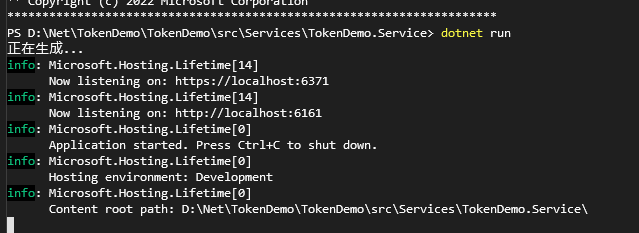
打开TokenDemo\Admin项目的Pages\Home\Index.razor文件并且修改代码:
@page "/"
@using TokenDemo.Caller.Callers
@inherits LayoutComponentBase
@inject NavigationManager Nav
@inject OrderCaller OrderCaller
@code {

    protected override async Task OnAfterRenderAsync(bool firstRender)
    {
        Nav.NavigateTo(GlobalVariables.DefaultRoute,true);
        var data = await OrderCaller.GetListAsync();
        await base.OnAfterRenderAsync(firstRender);
    }

}
并且在await base.OnAfterRenderAsync(firstRender);这里打一个断点用于查看是否获取到消息,打开TokenDemo.Admin.Server项目的Program.cs,添加以下代码:
builder.Services.AddCaller(typeof(TokenDemo.Caller.Callers.OrderCaller).Assembly);
然后启动 TokenDemo.Admin.Server 项目,进入断点:
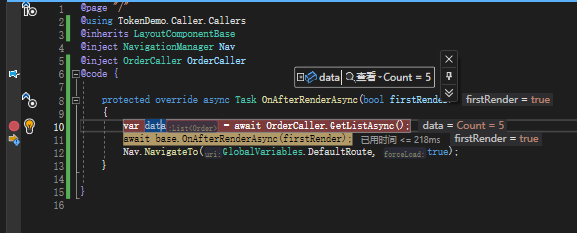
得到结果。
结尾
通过上文我们可以基本将 MasaFramework 的使用掌握,前端和后端的接口也掌握了。
当前是 MasaFramework 的第三篇入门,我会继续学习 MasaFramework 并且分享给大家。
来自 token 的分享。
- MASA Framework
- 学习交流:737776595