First, what is MasaFramework?
MasaFramework is a backend framework based on .NET 6.0 that can be used to develop web applications, WPF projects, and console projects.
Essentially, MasaFramework provides many powerful packages and has excellent support for Dapr. If you want to try Dapr, you can give MasaFramework a shot.
Then let's start using MasaFramework and get into practice
- Install MasaFramework project template
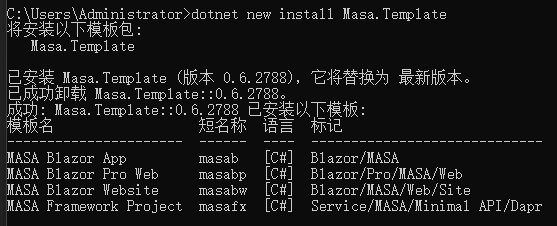
dotnet new install Masa.Template
This is what a successful installation looks like:

- Create a project
Open a directory, open the console to create a template project, and create an mfDemo project template
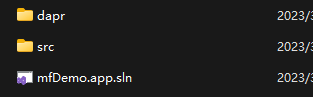
dotnet new masafx --name mfDemo
This completes the creation. Open the solution:

- Project structure analysis

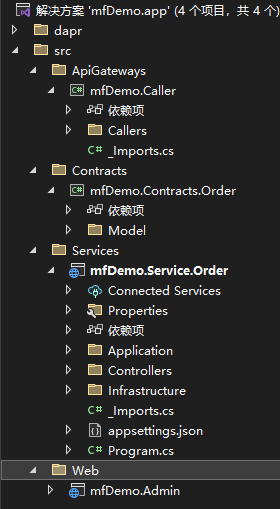
We can see the project structure after opening the solution.
The project is divided into four layers: src/ApiGateways, src/Contracts, src/Services, and src/Web. At this point, many people might be confused about why it differs from the traditional Abp architecture design. Actually, this is the beauty of the MasaFramework design.
src/ApiGateways contains the interface implementations used externally (editor's note: encapsulation of client-side API calls). In other words, you can directly provide src/ApiGateways to the src/Web front-end project. The advantage of this is that it reduces the front-end project's dependencies and facilitates rapid API integration.
src/Contracts contains basic models and some shared items. src/Contracts is pure and has no dependencies, so both src/ApiGateways and src/Services directly depend on it to share Models or other things.
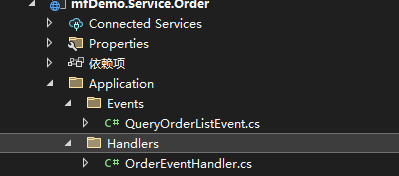
src/Services contains the specific business logic and implementation, and includes Host. The Application folder includes business processing or event handling:

If you are not using MiniApi, you should see Controllers:

In fact, it is recommended to use MiniApi because the two implementation approaches differ, and MiniApi performs better than Controllers.
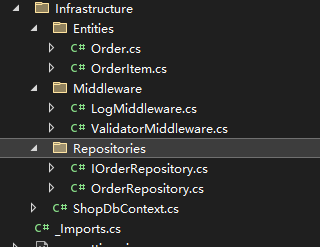
Infrastructure contains the project's infrastructure. Looking at the diagram, we see that Entity, Middleware, Repository, and DbContext are all in the infrastructure:

MasaFramework's design philosophy is to simplify project complexity by integrating everything into a single project. If you are new to MasaFramework, please do not split it up—splitting it deviates from MasaFramework's own design. However, if you are an experienced expert, feel free to ignore this advice. For those just starting with MasaFramework, be sure to follow the framework's original design.
src/Web is our actual front-end project.
The default template provides a Blazor Server project. You can optionally split it into three layers: mfDemo.Shared, mfDemo.Server, and mfDemo.WebAssembly.
mfDemo.Shared can be understood as everything related to the project's implementation, UI file organization, and all features.
mfDemo.Server is essentially a Blazor Server shell used to host the mfDemo.Shared project.
mfDemo.WebAssembly is also a Blazor WebAssembly shell used to host the mfDemo.Shared project.
In this way, our project can support both Blazor Server and Blazor WebAssembly modes.
Conclusion
From the above, we have basically understood the project structure of MasaFramework and its design philosophy.
This is the first introductory article about MasaFramework. I will continue learning MasaFramework and share it with everyone.
Shared by token
Learning exchange: 737776595