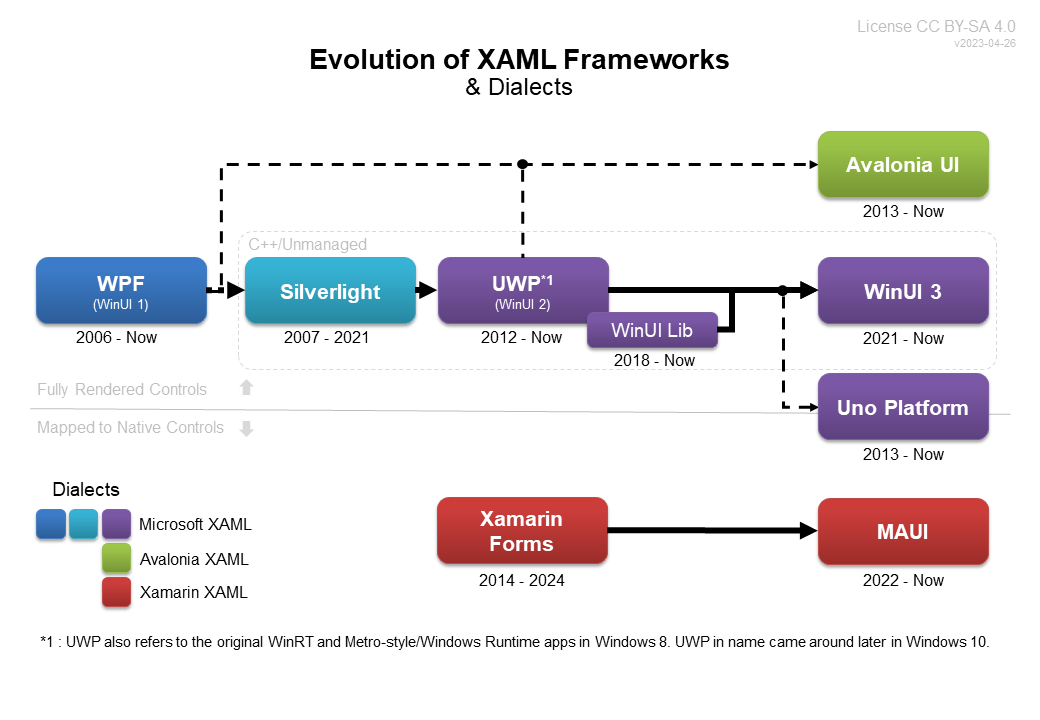
Over the years, XAML-based UI frameworks have evolved significantly, as best illustrated by the chart below. These frameworks primarily include: Avalonia UI, Uno Platform, and .NET MAUI for cross-platform applications. In fact, aside from Avalonia UI, the demand for cross-platform XAML has been the main driving force behind its development. If Microsoft had released a cross-platform UI framework like Flutter earlier, we might not have had so many choices. This has both pros and cons: the advantage is that we have many cross-platform options to choose from; the disadvantage is that different frameworks have different object models and their own specific dialects of XAML.
When examining various .NET UI frameworks, we all ask the same question: which XAML UI framework should we use to develop our applications? This is a legitimate and important question. To date, there is no clear answer. However, for each specific application, this question is easy to answer because we can comparatively analyze the advantages and disadvantages of each framework based on the specific application requirements. By outlining the pros and cons of the major XAML-based UI frameworks, this document aims to help companies and developers answer the following question:
Which XAML framework should I choose to develop my cross-platform application?
From a high-level perspective, the architectural differences of these cross-platform XAML-based UI frameworks can be described. These frameworks are all based on the same .NET (formerly Mono) tooling. It is important not to overlook the contribution Xamarin has made to .NET, which enables these frameworks to exist. Furthermore, in .NET 6+, these frameworks use the same runtime and core libraries on each platform.
- Avalonia UI : Renders controls and UI elements entirely by itself, same as Flutter.
- .NET MAUI : Standardizes a set of names, properties, events, and applies/links them to platform-specific native controls. If a feature is not supported on a single platform, that feature will not be available in MAUI across all platforms (without platform-specific code).
- Uno Platform : Builds and renders controls using a selected few platform-specific base elements. For advanced controls, this provides near pixel-perfect results. This means Uno Platform renders controls similarly to Avalonia UI and Flutter; however, it also supports directly embedding platform-native controls, making it a hybrid architecture.
Since WPF and UWP/WinUI, which are XAML-based Microsoft frameworks, are not cross-platform, they are not compared in detail here. However, WPF can run cross-platform via Wine Mono or Avalonia XPF. WinUI/UWP already supports cross-platform through Uno Platform, discussed next.
Project Links
| Project | Website | GitHub | Docs |
|---|---|---|---|
| Avalonia UI | avaloniaui.net | github.com/AvaloniaUI/Avalonia | docs.avaloniaui.net |
| .NET MAUI | maui | github.com/dotnet/maui | docs.microsoft.com/en-us/dotnet/maui/ |
| Uno Platform | platform.uno | github.com/unoplatform/uno | platform.uno/docs/ |
Other Frameworks
There are some other solutions available for .NET cross-platform development that are not detailed in this article. Even though this article will not compare them in depth, these frameworks or solutions are worth knowing about:
- WPF : As mentioned above, WPF can run cross-platform via Wine Mono or Avalonia XPF. This cross-platform solution is worth considering for existing applications with a large amount of WPF code.
- Eto.Forms : A UI framework similar to .NET MAUI, using platform-native controls to build UI; XAML can also be used for serialization and constructing UI.
- Noesis GUI : Used for game development, Noesis GUI recreates WPF for use in game engines (such as Unity) to build user interfaces. Noesis GUI has extensive XAML support and can be used with Microsoft Blend. If it could work outside of game engines and had better licensing for smaller applications, it would be an interesting technology that predates other cross-platform XAML implementations.
- .NET MAUI + Blazor Hybrid : .NET MAUI can host Blazor web applications (within a BlazorWebView control), making it more of an application and service container. This is a very attractive option for those who want to repackage existing web applications and distribute them as mobile apps.
- .NET MAUI + Avalonia UI Hybrid : .NET MAUI can also host Avalonia UI (within an AvaloniaView control), making it more of an application and service container. Since Avalonia is just a UI framework, this is very attractive when you want easy access to all of .NET MAUI's additional platform abstractions (Essentials) and easier packaging and deployment for mobile apps.
More often, using .NET MAUI as an application-plus-service container and then hosting other UI frameworks (such as Blazor or Avalonia UI) is an attractive choice. This architecture may gain more attention in the future and is definitely an area to watch closely.
Framework Comparison
Each framework performs differently—in some places significantly. The table below focuses on areas and features with high impact. Where all frameworks behave the same, it is not presented in the table (only differences are shown).
This comparison is based on extensive research and experience with various frameworks; the results are inevitably somewhat subjective. It is also worth noting that experience with .NET MAUI is the least among the three options, which may affect ranking accuracy.
- ✔️ means the feature is supported ❌ means not supported
- ⭐⭐⭐ is the highest/best rating, ⭐ is the lowest/worst
| Avalonia | .NET MAUI | Uno Platform | |
|---|---|---|---|
| ▶ Features | |||
| MVVM Pattern | ✔️ | ⭐⭐⭐ | ✔️ | ⭐⭐ | ✔️ | ⭐⭐⭐ |
| MVU Pattern | ❌ | ✔️ | ⭐⭐ | ✔️ | ⭐ |
| Pixel-perfect rendering | ✔️ | ⭐⭐⭐ | ❌ | ✔️ | ⭐⭐ |
| Lookless Controls | ✔️ | ⭐⭐⭐ | ❌ | ✔️ | ⭐⭐⭐ |
| Styling and Theming | ✔️ | ⭐⭐⭐ | ✔️ | ⭐ | ✔️ | ⭐⭐⭐ |
| Unified appearance support | ✔️ | ⭐⭐⭐ | ❌ | ✔️ | ⭐⭐⭐ |
| Platform-native appearance | ❌ | ✔️ | ⭐⭐⭐ | ✔️ | ⭐ |
| Platform consistency | ✔️ | ⭐⭐⭐ | ✔️ | ⭐ | ✔️ | ⭐⭐ |
| Native control integration | ✔️ | ⭐ | ✔️ | ⭐⭐⭐ | ✔️ | ⭐⭐⭐ |
| XAML syntax and code sharing | ✔️ | ⭐⭐ | ✔️ | ⭐ | ✔️ | ⭐⭐⭐ |
| C# code-behind sharing | ✔️ | ⭐⭐ | ✔️ | ⭐ | ✔️ | ⭐⭐⭐ |
| Hot Reload | ❌ | ✔️ | ⭐⭐⭐ | ✔️ | ⭐⭐⭐ |
| Third-party support | ✔️ | ⭐ | ✔️ | ⭐⭐⭐ | ✔️ | ⭐⭐ |
| Advanced text formatting | ✔️ | ⭐⭐⭐ | ❌ | ❌ |
| Non-UI features | ❌ | ✔️ | ⭐⭐ | ✔️ | ⭐⭐⭐ |
| ▶ Strategy & Development | |||
| Performance (theoretical) | ⭐⭐⭐ | ⭐⭐⭐ | ⭐⭐ |
| Mobile app stability | ⭐ | ⭐⭐ | ⭐⭐ |
| Desktop app stability | ⭐⭐⭐ | ⭐⭐ | ⭐ |
| Available controls | ⭐ | ⭐⭐ | ⭐⭐⭐ |
| Code license | ⭐⭐⭐ | ⭐⭐⭐ | ⭐⭐ |
| Free support | ⭐ | ⭐⭐ | ⭐⭐⭐ |
| Paid support | ⭐⭐⭐ | ⭐⭐ | ⭐⭐⭐ |
| Project velocity | ⭐⭐ | ⭐⭐ | ⭐⭐ |
| Ease of contribution | ⭐⭐⭐ | ⭐⭐ | ⭐⭐ |
| Codebase readability | ⭐⭐⭐ | ⭐ | ⭐ |
| Developer experience | ⭐⭐⭐ | ⭐⭐ | ⭐ |
| Enterprise support | ⭐⭐ | ⭐⭐ | ⭐⭐⭐ |
| ▶ IDE & Integration Tools | |||
| Visual Studio | ✔️ | ⭐⭐ | ✔️ | ⭐⭐⭐ | ✔️ | ⭐⭐ |
| Visual Studio Code | ✔️ | TBD | ✔️ | ⭐⭐ | ✔️ | ⭐⭐⭐ |
| Rider | ✔️ | ⭐⭐⭐ | ✔️ | ⭐ | ✔️ | ⭐⭐ |
| Design tool integration | ❌ | ❌ | ✔️ | ⭐⭐ |
| ▶ Platform Support | |||
| iOS | ✔️ | ⭐ | ✔️ | ⭐⭐⭐ | ✔️ | ⭐⭐ |
| Android | ✔️ | ⭐ | ✔️ | ⭐⭐⭐ | ✔️ | ⭐ |
| Windows Desktop | ✔️ | ⭐⭐ | ✔️ | ⭐ | ✔️ | ⭐⭐⭐ |
| macOS Desktop | ✔️ | ⭐⭐⭐ | ✔️ | ⭐ | ✔️ | ⭐ |
| Linux Desktop | ✔️ | ⭐⭐⭐ | ❌ | ✔️ | ⭐ |
| Web Browser (WASM) | ✔️ | ⭐ | ❌ | ✔️ | ⭐⭐⭐ |
| ▶ Overall Platform Support | |||
| Mobile | ✔️ | ⭐ | ✔️ | ⭐⭐⭐ | ✔️ | ⭐⭐ |
| Desktop | ✔️ | ⭐⭐⭐ | ✔️ | ⭐ | ✔️ | ⭐ |
| Web | ✔️ | ⭐ | ❌ | ✔️ | ⭐⭐⭐ |
This table was last updated in July 2023.
Notes
MVU Pattern
.NET MAUI has the most complete support for what is traditionally considered the MVU pattern with C# Markup and Comet. This is an active experimental and development area, expected to achieve the same level of support as MVVM in the future. Uno Platform has developed its own MVU variant called MVU-X. This differs significantly from others and has a higher learning curve, but integrates better with XAML data binding. The long-term viability of this brand-new approach to MVU remains to be seen, and it is best to be cautious before it stabilizes. Avalonia does not directly support MVU. However, it provides two libraries that support writing UI using declarative syntax instead of XAML. Avalonia.Markup.Declarative supports many C# Markup concepts by providing helper methods and extensions on Avalonia. This provides a good way to write UI in C# that can follow the MVU pattern without using XAML. Another option for F# developers is Avalonia.FuncUI, which provides similar support specifically for the F# language. Notably, among all frameworks, Avalonia has the best support for F# (provided by the community).
Pixel-Perfect Rendering
Among the three frameworks, only Avalonia supports true "pixel-perfect" rendering. This is due to architecture: only Avalonia draws its own user interface and controls entirely. Although Uno Platform attempts to achieve "pixel-perfect", due to its use of native base controls, discrepancies often exist across platforms. Uno Platform (except Skia) never fully draws its own controls, so it only approximates "pixel-perfect".
Lookless Controls, Styling & Theming
When developers think of XAML, they usually think of lookless controls. The ability to completely change a control's style and default template to transform it into something completely different is a major feature of WPF. Both Avalonia and Uno Platform fully support their own versions of lookless controls and template redefinition. However, MAUI does not have this capability and only supports changing some common properties. In this regard, MAUI can be seen as similar to older UI toolkits like Windows Forms. For example, this means placing icons or graphics inside a button is not supported in MAUI, whereas it is easy in other XAML frameworks. What are Lookless Controls? WPF controls have fixed behavior. For instance, a button has a fixed set of events, including a click event. No matter what you do with the button control, it still has a click event. WPF controls do not have a fixed "look". The word "lookless" precisely conveys this idea. The default appearance of a button is defined by a default XAML template, which can be replaced with a completely different template, thereby completely changing the appearance of the button control.
Platform Consistency
When developing with a cross-platform framework, consistency of the application and code across platforms is very important. You do not want to develop and validate a feature on one platform only to find it behaves differently on another. In this respect, .NET MAUI is very poor because it binds to native controls on each platform. This not only requires validation everywhere, but also requires writing custom controls multiple times and spending a lot of time tweaking content to look consistent (similar to making a web page render correctly on all browsers). In most cases, Uno Platform performs better than MAUI. However, it also has some serious issues, with some features not supported on all platforms. Features that are available on all platforms usually behave consistently, but subtle differences can exist that are hard to fix. Due to architectural differences, Avalonia UI easily surpasses other frameworks in terms of platform consistency. Avalonia renders entirely by itself, so it always looks exactly the same on every platform (except for fonts, input differences, popups, etc.).
Native Control Integration
.NET MAUI and Uno Platform are both built on Xamarin Native and fully integrated with it. This means both frameworks can access platform-specific native controls via C# bindings. This is very powerful for accessing native platform features and controls with virtually no compromises. Native controls can be added directly in XAML and code-behind just like any other control built into the framework. In contrast, Avalonia UI is its own UI layer and does not integrate directly with Xamarin Native (and its platform-specific controls). Instead, Avalonia provides a NativeControlHost that allows embedding native controls in Avalonia applications. However, this is not as seamless as in MAUI or Uno Platform. It is similar to WindowsFormsHost in WPF, but unlike that, Avalonia UI also solves the "airspace problem" using 3D elements, allowing drawing UI on various surfaces. This actually allows Avalonia to run on game engines or DirectX, which is impossible in other frameworks.
XAML Syntax and Code Sharing
In terms of code sharing, Uno Platform has the highest rating. It uses the same XAML dialect and object model as UWP/WinUI, making it 100% compatible in both XAML and C#. Avalonia and MAUI both deviate from past XAML versions and are not compatible with WPF or UWP/WinUI. Nevertheless, Avalonia strives to be similar to WPF in object model, whereas MAUI deviates for minor reasons (Height/Width, TextBlock, etc.). In some cases, Avalonia has also successfully become a more powerful next-generation WPF syntax and object model. Due to some changes to XAML (styles, bool IsVisible, simplified Grid row/column syntax, etc.), some operations are easier in Avalonia. Compared to MAUI, Avalonia has better compatibility and code sharing with existing WPF code, thus receiving a higher overall score.
Advanced Text Formatting
The original XAML framework WPF has a very advanced text formatting API (FlowDocument). This is still more advanced than what is found in WinUI 3 or its predecessor UWP. In fact, before Avalonia UI version 11.0, no other cross-platform XAML framework supported advanced text features. Now, Avalonia UI has nearly the same API as WPF and can accomplish text formatting and measurement that are simply impossible in .NET MAUI and Uno Platform. Due to architectural differences, it is likely that Avalonia UI will remain the only framework supporting advanced text (without third-party controls) for the foreseeable future. This includes controls like RichTextBox, which can be implemented in Avalonia, are very difficult in Uno Platform, and nearly impossible in .NET MAUI.
Non-UI Features
The main disadvantage of Avalonia UI is that it is just a UI framework. .NET MAUI has essential packages, and Uno Platform is a full application development platform following UWP. It can be said that both .NET MAUI and Uno Platform are more than just UI frameworks. This means features like persistent settings, file handling, authentication, localization, and device permissions are available out of the box in .NET MAUI and Uno Platform but not in Avalonia. Uno Platform even has some audio-related advanced APIs found only in UWP, and they are cross-platform. Uno Platform attempts to cover the entire UWP public API surface, which includes a large number of APIs. The entire API is auto-generated, with many features being unimplemented stubs. This means most non-UI APIs are not available and will throw exceptions if used in the application. This does cause some issues during development, but the compiler will show which unimplemented APIs are being used. Nevertheless, Uno Platform has more non-UI features than the other frameworks.
Performance
XAML originates from desktop applications and is inherently resource-intensive. WPF (the original XAML framework) typically builds the entire view from XAML markup at runtime, which can severely impact performance on first load. Additionally, using MVVM involves binding controls to viewmodels via reflection, which is inherently slower than compiled code. Most importantly, traditional XAML controls have higher performance and system requirements, which may be a consideration for mobile or cloud platforms. UWP and Uno Platform improve this by allowing lazy loading via x:Load. They both support compiled binding with x:Bind. MAUI's architecture completely avoids the first issue by using native controls. Avalonia UI has largely switched to precompiled XAML and compiled bindings, solving both problems. Theoretically, all three frameworks outperform WPF in performance. The MVU pattern related to performance should not be overlooked. UI is not constructed from XAML markup; it is typically constructed in code together with business logic in code-behind. By default, this means controls and UI elements are only constructed when referenced in code and need to be displayed. In this way, applications using MVU are expected to outperform MVVM pattern applications. Both MAUI and Uno Platform support MVU. Avalonia also fully supports creating UI in code without XAML, achieving the same performance advantage. MAUI's performance is not deliberately rated two stars, lower than Avalonia's three stars. The reason is that MAUI uses native controls, which involve interop. Native compilation largely mitigates this, but both C# and Android control integration degrade performance. However, Avalonia renders entirely by itself and does not interact with Android native controls (unless hosting native views). This means Avalonia can essentially have video game-level performance. Uno Platform's performance is usually sufficient on most platforms. However, on Android, there are severe interop performance issues between the .NET runtime and Java runtime. This is a problem with .NET and Android themselves. However, due to Uno Platform's architecture (integration with native controls), this interop is always necessary. This means that on Android, Uno Platform's performance is fundamentally inferior to other frameworks, and high-performance Uno Platform applications on Android are currently impossible.
Application Stability
MAUI's mobile application stability is ranked the same as Uno Platform; however, it is common to encounter layout issues that require extensive platform-specific code and markup to handle. Uno Platform also has many unhandled cases and some bugs that appear throughout development. This is largely a result of a strategy prioritizing fast development over correctness and stability. In contrast, Avalonia UI has considered stability from the start: its features are complete. In practice, Avalonia UI is probably the most stable and easiest to develop with.
Code License
Uno Platform uses Apache 2.0 instead of MIT. The Apache license is not as permissive as MIT. Among other things, this prevents code sharing back to other MIT-licensed frameworks. Uno Platform can use source code from MIT-licensed projects (like WinUI, WPF, and Avalonia), but these projects basically cannot use Uno Platform's code. This is why Uno Platform ranks lower here. Avalonia UI was originally fully MIT-licensed and received three stars. However, with the re-licensing of the composition renderer, which prohibits modification and distribution in any form other than the original binary, the score is reduced. The composition renderer is the only supported renderer in Avalonia version 11+, and other renderers have been removed. This makes modifying Avalonia and distributing it in your own application prohibited. The team has clarified that the license will "revert to MIT when v11 goes GA". (This section was deprecated in July 2023, replaced by the next paragraph.) Avalonia UI is fully MIT-licensed and can freely share code between most .NET Foundation and WinUI projects. For companies that need full control over the UI framework for rapid fixes, ensuring specific application stability, or even replacing custom internal components, Avalonia UI is an ideal choice.
Support
Although MAUI is developed by Microsoft, both Avalonia and Uno Platform rank higher than MAUI in terms of paid support. This is mainly due to the agility of smaller companies. Microsoft is now highly bureaucratic, and any feedback or changes, even minor, require extensive discussion before action. This contrasts sharply with Avalonia, which can adopt new features very quickly, and Uno Platform, which also communicates very quickly. In terms of free support, the Uno Platform community's response rate is comparable to the larger MAUI community. But Uno Platform can usually fix bugs and implement features faster.
Code Readability and Ease of Contribution
Avalonia UI has the cleanest codebase, greatly lowering the barrier to public contribution. Uno Platform and .NET MAUI are much more complex, as can be seen from the code. In the long run, increased complexity often carries high costs in terms of maintenance and stability. In Uno Platform, this complexity is necessary to meet architectural goals and support native control integration.
Developer Experience
Avalonia UI offers the best overall developer experience. The codebase is easy to read, and the development/debugging experience with Rider is top-notch (but less so on other IDEs). .NET MAUI follows closely, as its integration with Visual Studio now surpasses all other frameworks. However, .NET MAUI falls short in overall developer experience due to the need to validate/adjust each feature/view on each platform separately. Uno Platform's developer experience is poor, with less integration with Visual Studio, long compilation times, and difficult debugging. For more details on developer experience, see the IDE Integration section.
Enterprise Support
At first glance, Microsoft-developed .NET MAUI seems to have the strongest enterprise support. However, Microsoft has not invested heavily in this project, and based on Microsoft's history of abandoning UI frameworks, support for MAUI is uncertain. Avalonia, though originally fully open source, is now backed by a company formed by some core team members. This provides good stability and revenue measures for maintaining the project. However, caution is needed regarding the increased corporate influence and progress toward a closed-source codebase. For example, the composition renderer is currently under a license that does not allow free modification (while the rest of the code is MIT-licensed), which is expected to revert after V11's official release. Uno Platform stands out in enterprise sponsorship due to its innovation and incredible communication and response rates. Notably, it has collaboration and close communication with Microsoft.
Visual Studio Integration
No framework has three stars for Visual Studio integration. This is because Visual Studio has historically focused on Windows platform frameworks (WinForms, WPF, UWP, WinUI) and hardcoded support for these frameworks in a non-extensible manner. However, .NET MAUI's support has greatly improved (from nearly unusable at launch). Uno Platform's Visual Studio integration still has much room for improvement and is clearly the least developed among the three. This is not their fault, as Microsoft unreasonably supports any project type using .xaml files. Avalonia support in Visual Studio provides reliable previewer support, and most features work—using the special .axaml extension—but XAML is not as smooth as in other IDEs like Rider.
Visual Studio Code Integration
The Uno Platform team has developed an extension for Visual Studio Code that supports development and, importantly, debugging mobile and web applications. This is a significant step forward for VS Code tools, which have historically been unfriendly to developers of C#/.NET applications. Surprisingly, the extension also supports .NET MAUI applications. The Uno Platform team has indeed stepped up in this area, filling a long-standing gap in VS Code support for C#/.NET applications, hence Uno Platform gets three stars for this IDE integration. Uno Platform applications are now best supported in Visual Studio Code (except when developing WinUI on Windows, where Visual Studio is still best). Note that this extension is not open source. Avalonia UI announced a preview of a Visual Studio Code extension in July 2023 that supports XAML preview and code completion. This makes Avalonia UI more developable in Visual Studio Code and will make it a viable IDE option.
Design Tool Integration
Currently, only Uno Platform supports design tools (Figma) for building UI. This support is provided by a closed-source XAML generator. In the past, Microsoft Blend served a similar role for WPF. The quality and efficiency of the generated XAML may be insufficient, but for companies with a clear separation between design and development teams, it helps with the designer-to-developer transition. .NET MAUI does not support any design tools and likely never will due to its architecture. However, it provides out-of-the-box support for live editing of XAML, allowing designers to adjust and add some UI elements directly in the application before adding code. Uno Platform also supports live editing of XAML.
Platform Support
Uno Platform supports the most platforms, running on nearly any device with varying degrees of success (its strongest areas are mobile and web). Uno Platform directly supports Windows desktop apps through WinUI/UWP, thus gaining the highest ranking for Windows desktop native apps. However, note that in Uno Platform, some backends and platforms lack features present in others. This can lead to situations where you can do something on iOS/Android that you cannot do on Linux. Therefore, platform support is not consistent and should be carefully reviewed. This is especially true on macOS, where Uno Platform performed extremely poorly in the last test (2021). Nowadays, building macOS apps with macCatalyst is usually better because Uno Platform's iOS support is significantly better and more complete. The Skia backend also works on all desktop platforms (even older versions of Windows). Keep in mind (as mentioned in the Performance section) that Uno Platform's performance on Android is not as good as on iOS. Avalonia UI is far ahead of other frameworks on macOS and Linux desktop platforms. Avalonia also scores highly on Windows desktop, but since it does not use a native UI toolkit, it scores slightly lower than Uno Platform. Mobile and web support are newly released in version 11.0 and may take some time to stabilize, hence the lower scores currently. Avalonia's web implementation renders as an HTML5 canvas. This will never be as good as Uno Platform's architecture, where it is fully integrated as HTML elements. .NET MAUI does not support Linux or web at all, clearly lacking in platform coverage compared to the other two frameworks.
Framework Recommendations by Platform
On each platform, there is a framework that performs best. This is subjective; however, overall, the evaluation should be correct and consider all factors.
| Platform | Best Framework | |
|---|---|---|
| Windows | WPF/WinUI | |
| macOS | Avalonia UI | |
| Linux | ||
| Android | ||
| iOS | ||
| Web/Wasm |
If an application only needs desktop platforms, Avalonia is a very good choice. Its Windows support is first-rate, only lagging behind WinUI or WPF because it is not native UI. However, Avalonia has no obvious shortcomings for desktop applications, and many desktop applications already use it. In fact, Avalonia even supports operations that are impossible in WPF, such as overlaying XAML controls on a DirectX surface.
If an application needs to be cross-platform, it can be written first with WinUI or WPF. A WPF codebase on Windows can be converted to Avalonia well, but it still requires three different XAML variants. For this reason, it is usually better to use WinUI because it can share code 100% with Uno Platform, requiring only two XAML variants.
Also note:
- Web/Wasm is a clear advantage for Uno Platform. Due to architectural differences (fully using Skia rendering), Avalonia finds it hard to compete in this area.
- Avalonia UI is more of a competitor to Flutter. It uses Skia (or optionally Direct2D on Windows) to render entirely by itself on each platform. This gives it a significant performance advantage over Uno Platform, especially on macOS and Android. In this way, Avalonia has the purest architecture among all frameworks and the lowest barrier to community participation.
- Avalonia UI is positioned as the next-generation WPF, reimplementing most of its features. Avalonia draws ideas and code from WPF (Grid, text formatting) and WinUI (ItemsRepeater, touch input APIs), while still having unique ideas not found in other XAML frameworks (an advanced styling system closer to CSS in some aspects). It is now ready for desktop application developers, especially those with existing WPF code. The transition for UWP/WinUI developers is less smooth, but version 11 added the latest features from UWP/WinUI to improve the transition. For enterprise applications that do not want to change existing WPF code, Avalonia also provides Avalonia XPF, which implements the open-source WPF codebase on top of the Avalonia rendering engine.
- .NET MAUI is deliberately not listed as the best for any platform. It is most useful for small applications without complex UI. Even for medium-complexity applications, its practicality and ability to share code across platforms quickly fall behind other frameworks. However, in some line-of-business or simpler applications, MAUI may be a better choice. MAUI has recently also gained the ability to host both Blazor and Avalonia UI, which offers an interesting option for some scenarios.
- For versions earlier than Windows 10, Avalonia is the most appropriate choice. Although Uno Platform also has a Skia-based solution, it lags far behind in terms of features, stability, and completeness.
- As shown in the table above, using two XAML dialects can support all platforms well. WinUI/UWP for Windows (Uno Platform for mobile), and Avalonia for the rest.
References and Links
- Question: XAML Flavor, Architecture & Roadmap
- The New .NET Multi-platform App UI
- Goodbye Xamarin.Forms
- Putting "Universal" back into UWP
- Evolution of Client Development: Richard Campbell
- [Spec] Slim Renderer Architecture
- Discussion: Compatibility with WPF, UWP and WinUI
- Project Reunion: An End to Microsoft's UI Madness?
Conclusion
It has taken years to get to this point, but we finally have some powerful .NET UI frameworks covering all use cases. Interestingly, these frameworks have each developed unique and almost complementary features. Everything you might want to try is included in one of these approaches. Today, we can write cross-platform XAML/C# applications that run well. Most of this technology (except the UI layer) is based on Mono, so much of the credit goes to Xamarin.
The achievements of each framework are remarkable. However, none dominate across all platforms; each has its strengths and weaknesses. Uno Platform originated from Android/iOS and is strongest on mobile and web. Avalonia originated from desktop applications and works best on Windows/Linux/macOS, but its mobile support is rapidly developing. As of 2023, Uno Platform's macOS support is at best experimental and only suitable for developing simple applications. As of 2023, Avalonia initially only supported mobile, but is actually more stable on all platforms. However, it may still be necessary to use two different UI frameworks to achieve cross-platform XAML-based UI for the time being.
Original link: https://github.com/robloo/PublicDocs/blob/master/XAMLFrameworkComparison.md
Author: czwy
Source: https://www.cnblogs.com/czwy/p/17572226.html
License: This work is licensed under the Attribution-ShareAlike 4.0 International license.