
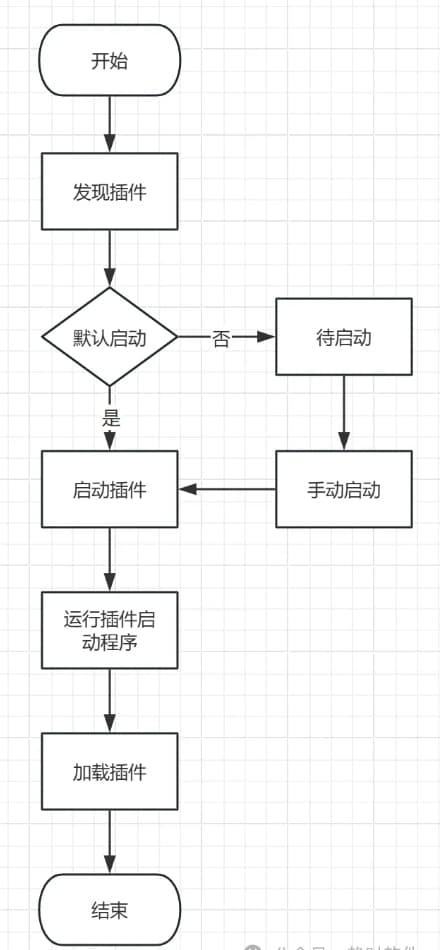
插件化的需求主要源于对软件架构灵活性的追求,特别是在开发大型、复杂或需要不断更新的软件系统时,插件化可以提高软件系统的可扩展性、可定制性、隔离性、安全性、可维护性、模块化、易于升级和更新以及支持第三方开发等方面的能力,从而满足不断变化的业务需求和技术挑战。
1. 插件化探索
在 WPF 中我们想要开发一个插件化的程序通常有两种选择,一种是 MEF,另一种是 MAF,它们有自己的优势和劣势,下面我们来分析一下。
1.1. MEF(Managed Extensibility Framework)
1.1.1. 优点
上手容易:使用相对简单,开发人员可以通过简单的属性标记来定义和导出组件,而不需要编写大量的复杂代码。
轻量化:MEF 是一个轻量级的框架,它的性能开销较小。
低耦合性:通过将应用程序拆分为多个独立的插件,每个插件都负责实现特定的功能,降低了模块之间的耦合性。这使得代码更易于理解和维护,同时也降低了修改一个模块时对其他模块产生意外影响的风险。
并行开发:使用 MEF,不同的开发团队可以并行地开发不同的插件,而无需担心它们之间的依赖关系。每个团队都可以专注于自己的功能实现,而无需等待其他团队完成其工作。这可以显著提高开发效率。
易于测试和维护:由于每个插件都是一个独立的单元,因此可以单独对其进行测试和维护。这减少了测试和维护的复杂性,并使得在出现问题时能够更快速地定位和解决问题。
易于扩展新功能:当需要添加新功能时,只需要开发一个新的插件并将其添加到应用程序中即可。这避免了对整个应用程序进行大的修改和重新编译的需要,从而缩短了开发周期并降低了成本。
1.1.2. 缺点:
插件隔离:无法支持插件隔离,这意味着一旦其中一个插件运行出现了问题会影响到整个应用程序。它也不能热插拔,在运行时不能动态更新插件。
生命周期:不支持插件生命周期管理,不能细粒度控制插件启停。
1.2. MAF(Managed AddIn Framework)
MAF 与 MEF 插件一样也拥有低耦合性、并行开发、易于测试和维护、易于扩展新功能等优点,当然它还有一些其他优点。
1.2.1. 优点
插件隔离:MAF 支持应用程序域及进程级的插件隔离,插件运行异常不会影响整个应用程序,当插件需要更新时不需要重启整个应用程序。
生命周期:MAF 提供的了完善的生命周期管理,可以控制插件的启停卸载等操作。
插件版本:MAF 可以支持同时运行一个插件的多个版本,这一特性可以实现插件的动态回滚,一旦新插件出现问题,可以瞬间回退到老版本。
1.2.2. 缺点
复杂性:MAF 的使用和配置相对复杂。开发人员需要理解应用程序域、插件激活、沙箱执行等概念,并且需要编写相应的代码来管理插件的加载和卸载过程。
性能开销:由于每个插件都在独立的应用程序域中执行,因此可能会产生额外的性能开销。特别是在加载大量插件或频繁加载插件时,可能会影响到应用程序的性能。
1.3 总结
通过对比,我们对插件系统有了一个基本的认识,如果没有插件隔离运行的要求,那么 MEF 是一个很好的选择,它比较简单,不需要理解复杂的理论,参照示例代码,很快就可以在项目中用起来。如果我们需要构建安全性更高,性能更好的应用程序,那么选 MAF 就比较合适,但是 MAF 有一些很大的问题,比如就算实现一个很简单的功能你也必须按照固定的项目结构来实现,灵活性较差,使用起来异常复杂,门槛很高。当应用程序达到一定规模以后,他的程序加载速度会是一个问题。这些缺点导致它在实际项目开发中选择它的人屈指可数。
基于以上原因,我们需要一个融合了 MEF 与 MAF 特点的插件系统,它应该是一个轻量级的框架并且性能不错,有使用简便、可扩展性强、安全可靠这些特性,这就是今天的主题。
2. 系统设计
2.1. 系统架构
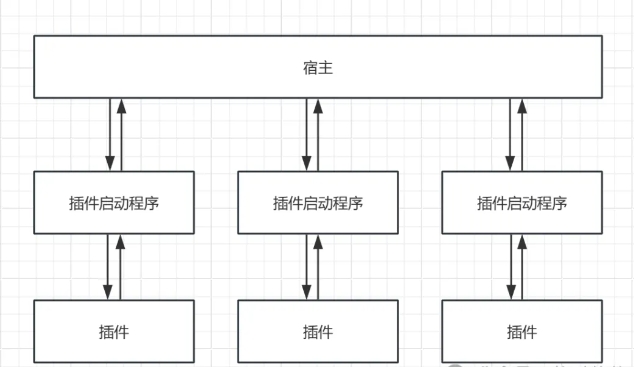
2.2. 启动流程
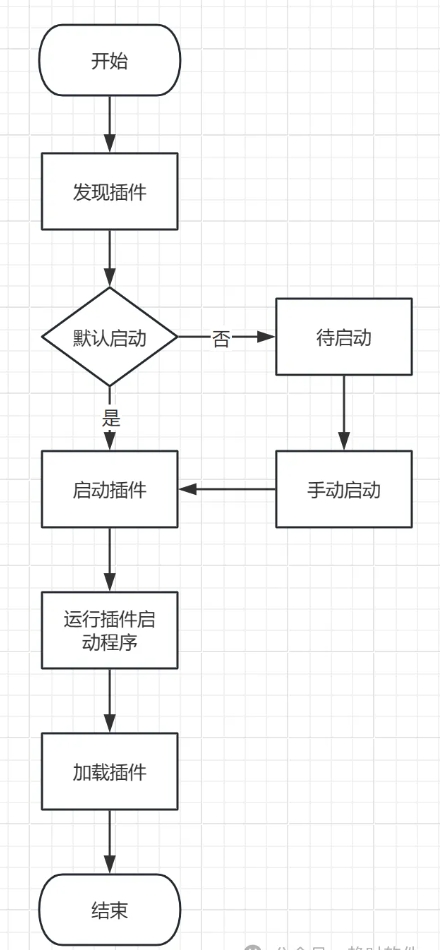
2.3. 详细设计
2.3.1. 容器
容器是插件系统的核心,它提供了插件探测、插件加载、跨进程通讯服务、异常报告、消息转发、插件生命周期管理等服务。
2.3.2. 插件启动程序
它是一个控制台应用程序,负责插件的运行,具体有插件配置文件加载、向容器报告插件异常信息、插件热插拔等功能。
2.3.3. 插件
插件是一个dll程序集或exe程序,该程序集或exe程序必须有一个类继承自Plugin抽象类,以供容器探测插件时被识别到。在插件类中可以定义自己的 UI(可以是任何FrameworkElement元素)或服务,以供容器调用。
3. 实例分析
3.1. 容器的创建用配置
// 创建一个容器
var container = new Container();
// 配置参数
container.Configure(options =>
{
    // 插件目录
    options.PluginDirectory = "Plugins";
    // 启动插件进程的超时时间
    options.PluginProcessTimeout = 6000;
    // 单个插件是否允许多开
    options.PluginAllowsMultipleInstances = false;
    // 是否启用热插拔
    options.IsEnableHotSwap = true;
    // 显示控制台
    options.IsShowConsole = false;
});
// 注册跨进程通讯服务
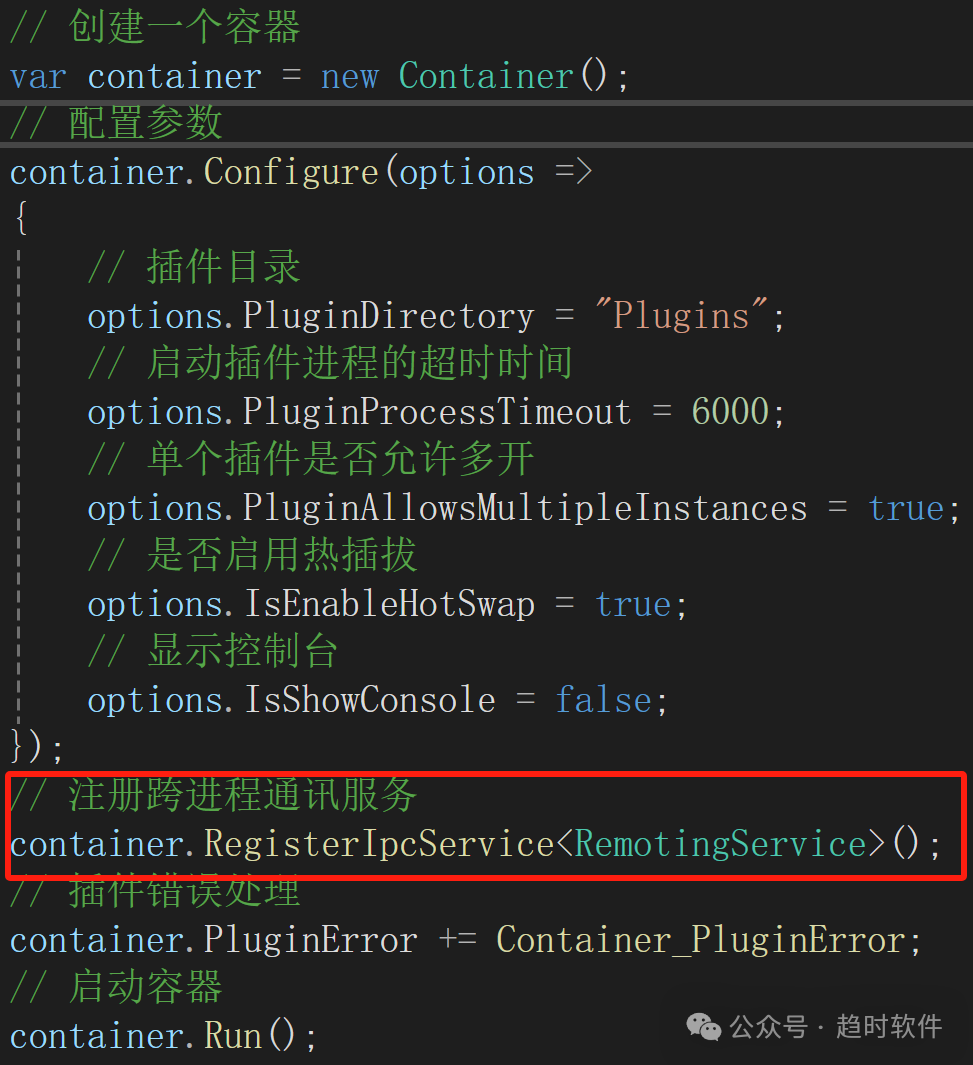
container.RegisterIpcService<RemotingService>();
// 插件错误处理
container.PluginError += Container_PluginError;
// 启动容器
container.Run();
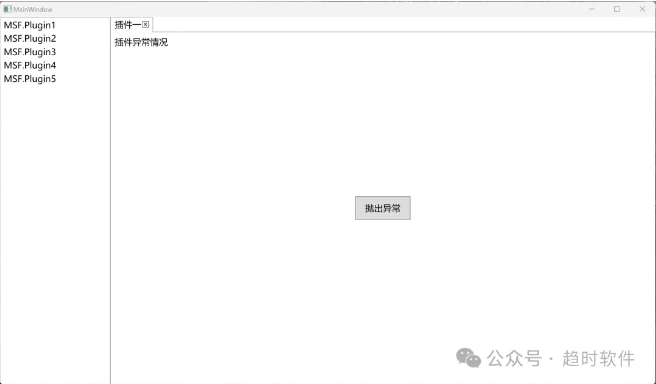
3.2. 插件运行效果
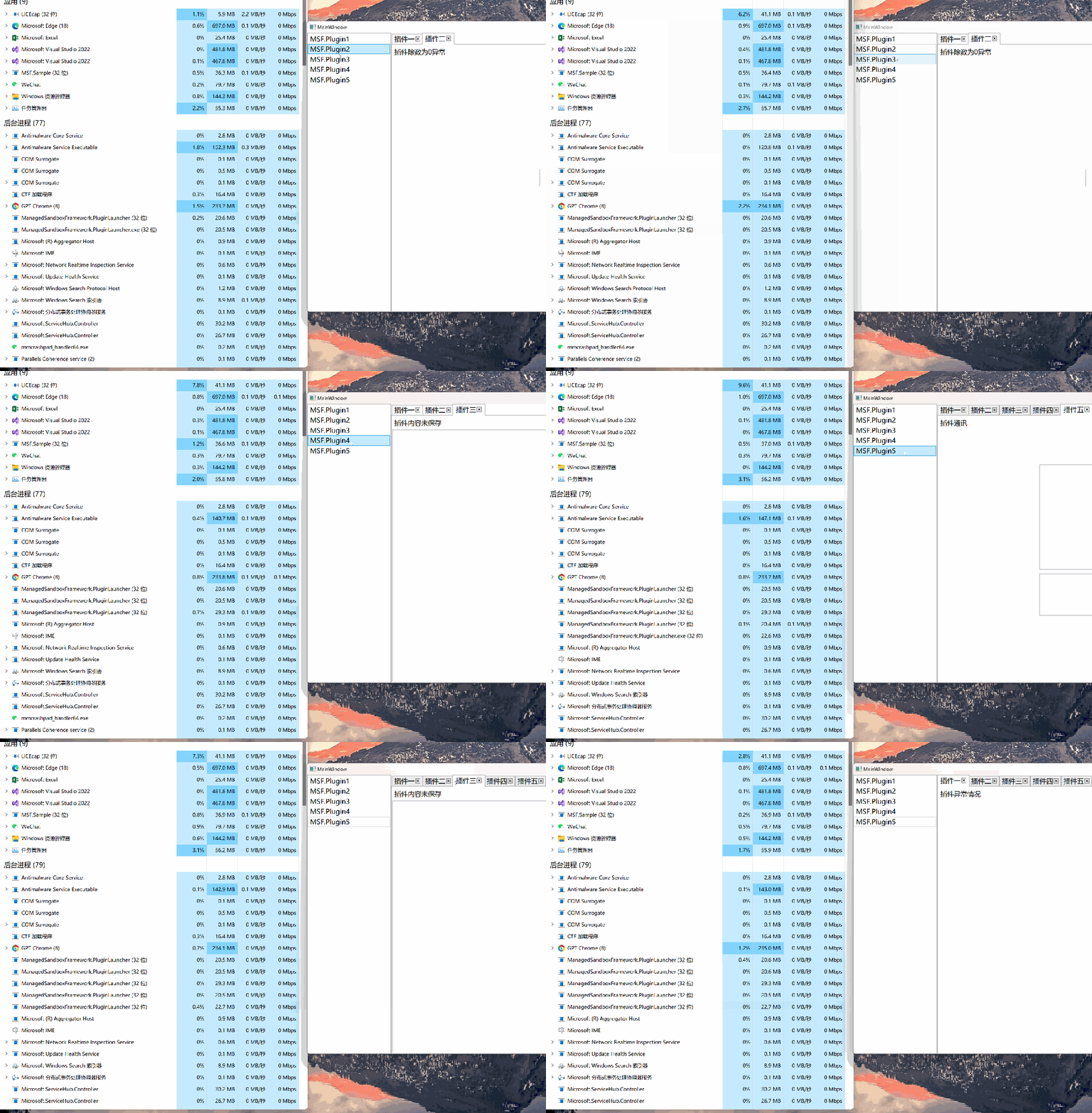
3.3. 多插件隔离运行
每个插件启动后都是一个独立的 exe 程序,它们运行不会相互影响。
3.4. 插件异常
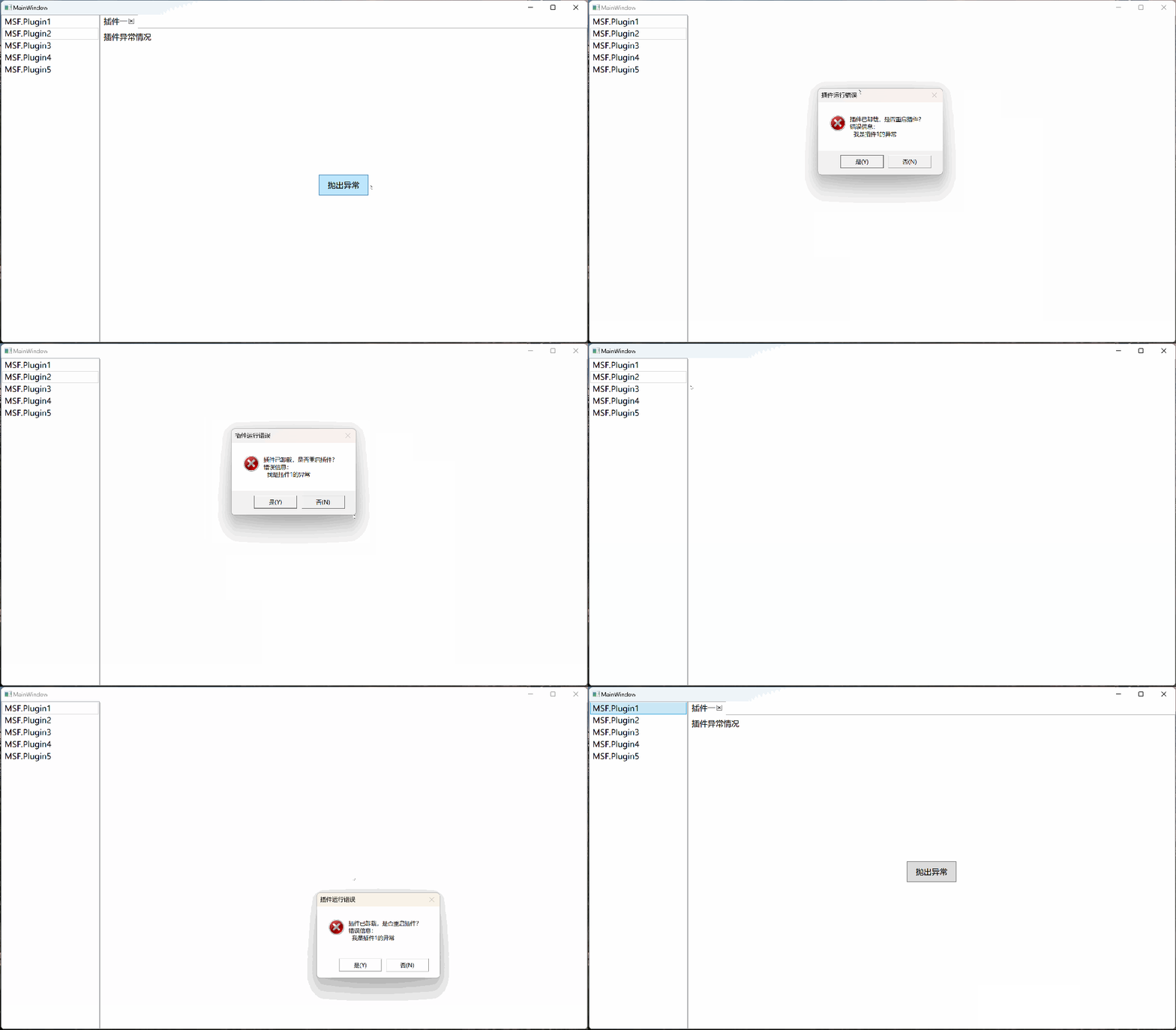
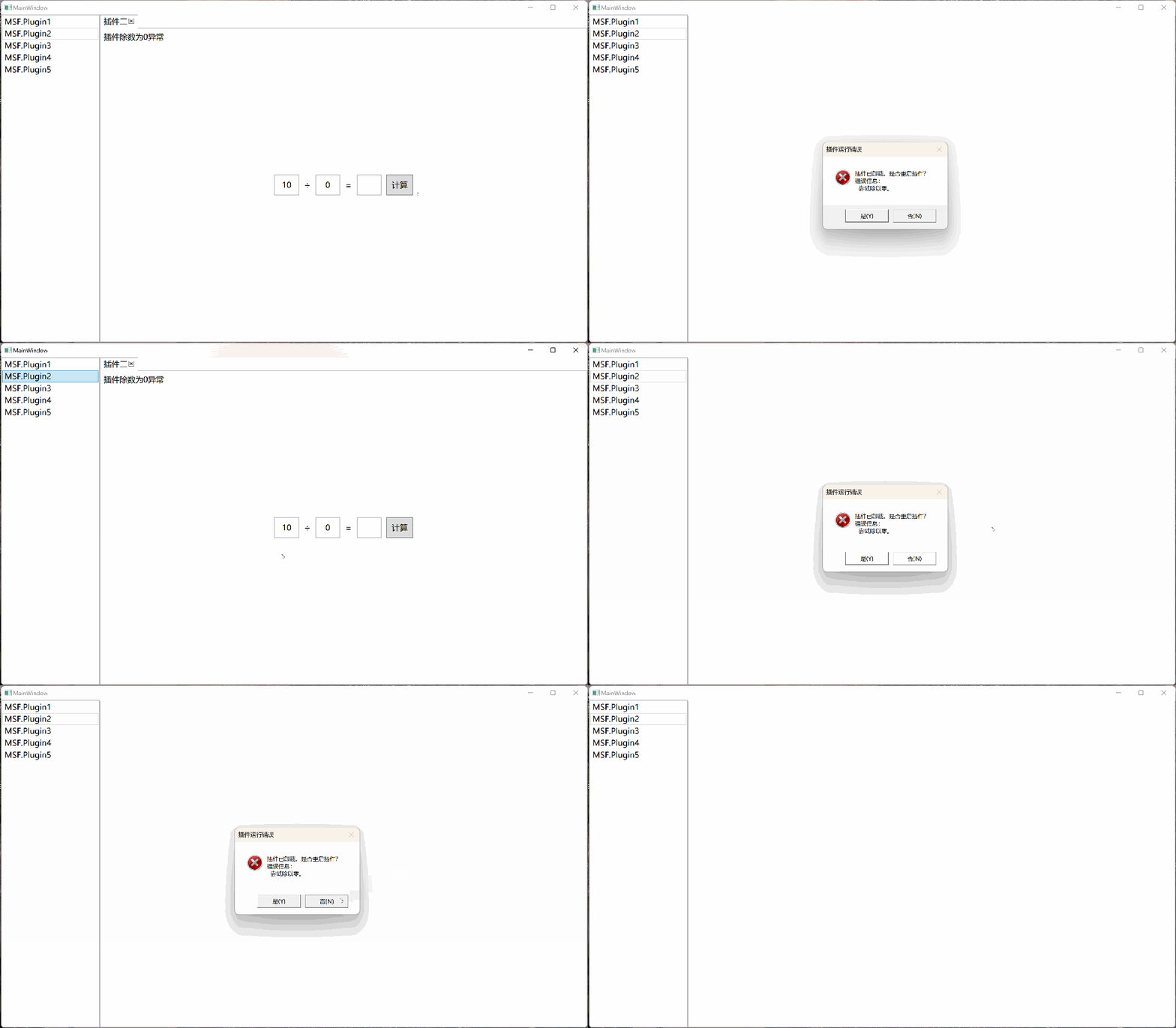
当插件异常时插件启动进程会将异常信息报告给容器,容器会将插件卸载掉,并将是否重启插件的选择权交给宿主程序。
3.4.1. 手动抛出异常
3.4.2. 除数为零异常
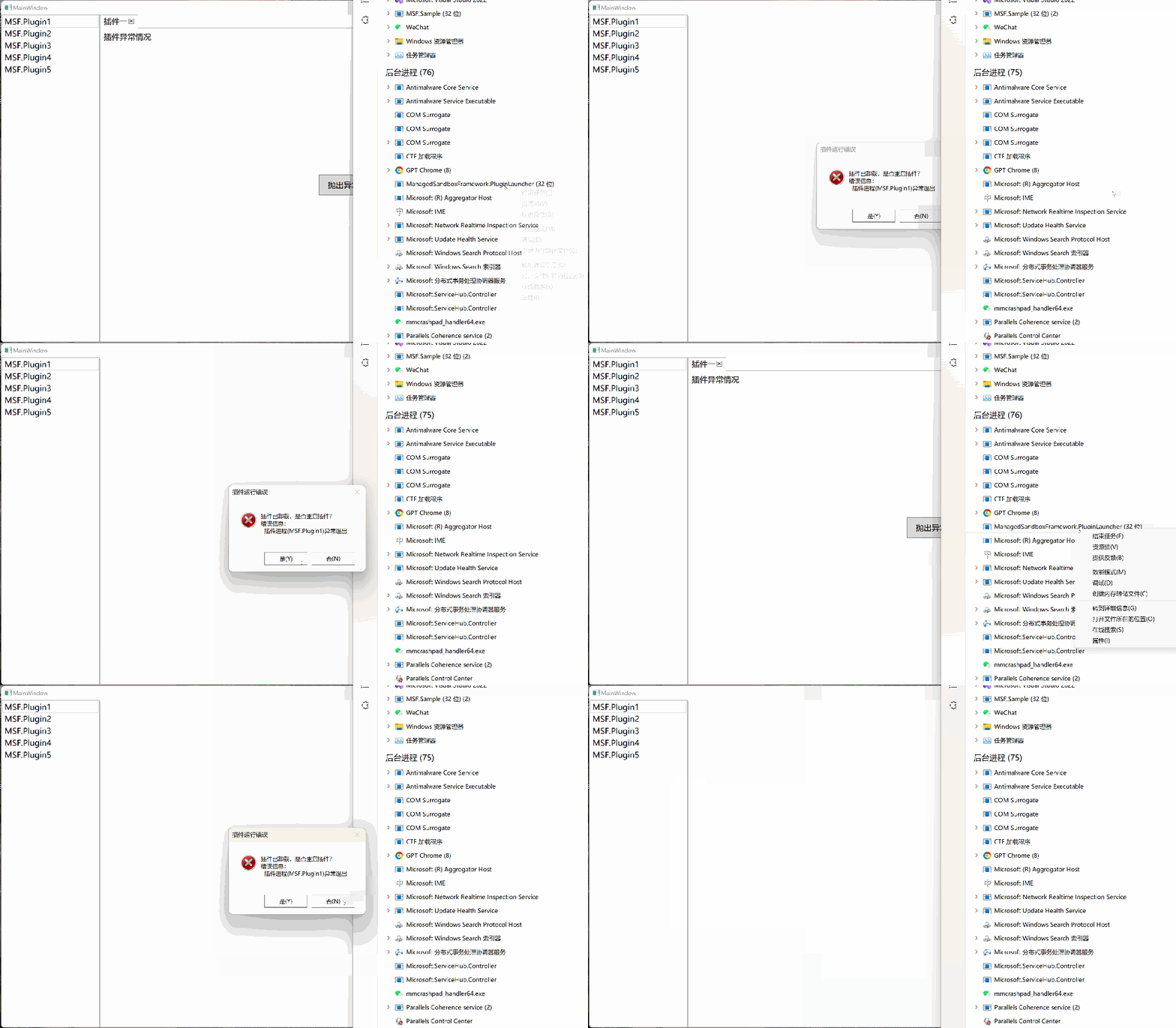
3.5. 插件进程意外退出
插件的运行状态会被容器全过程监控,如果发现插件进程被意外终止,容器会将信息报告给宿主程序,由宿主程序决定是否重启插件。
3.6. 插件的热插拔
3.6.1. 运行时发现新插件
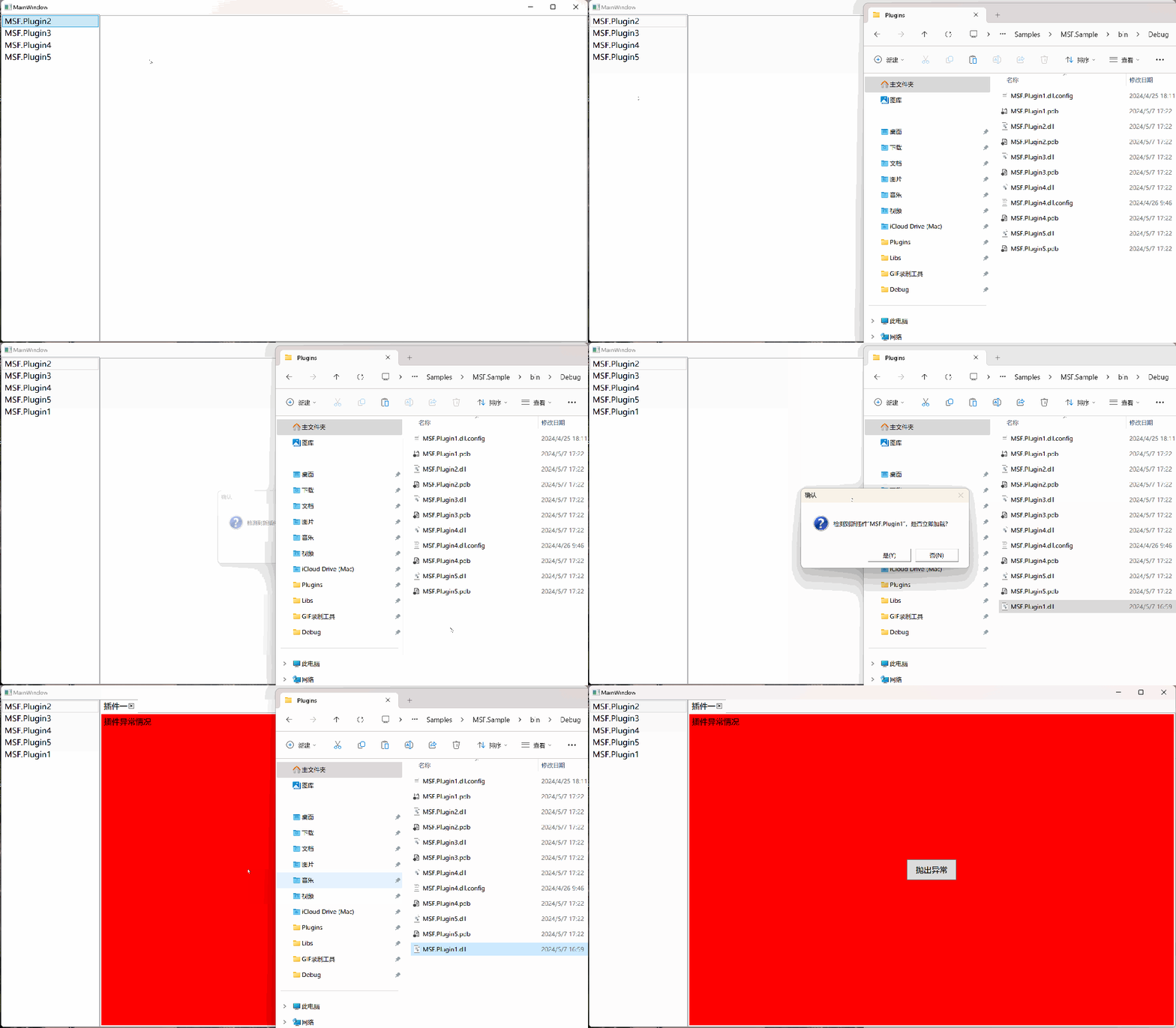
默认只识别到了 4 个插件,从另一个文件夹中复制一个插件dll文件到插件目录以后会通知宿主程序发现了新插件,宿主程序可以决定是否要加载这个插件。
3.6.2. 运行时删除插件
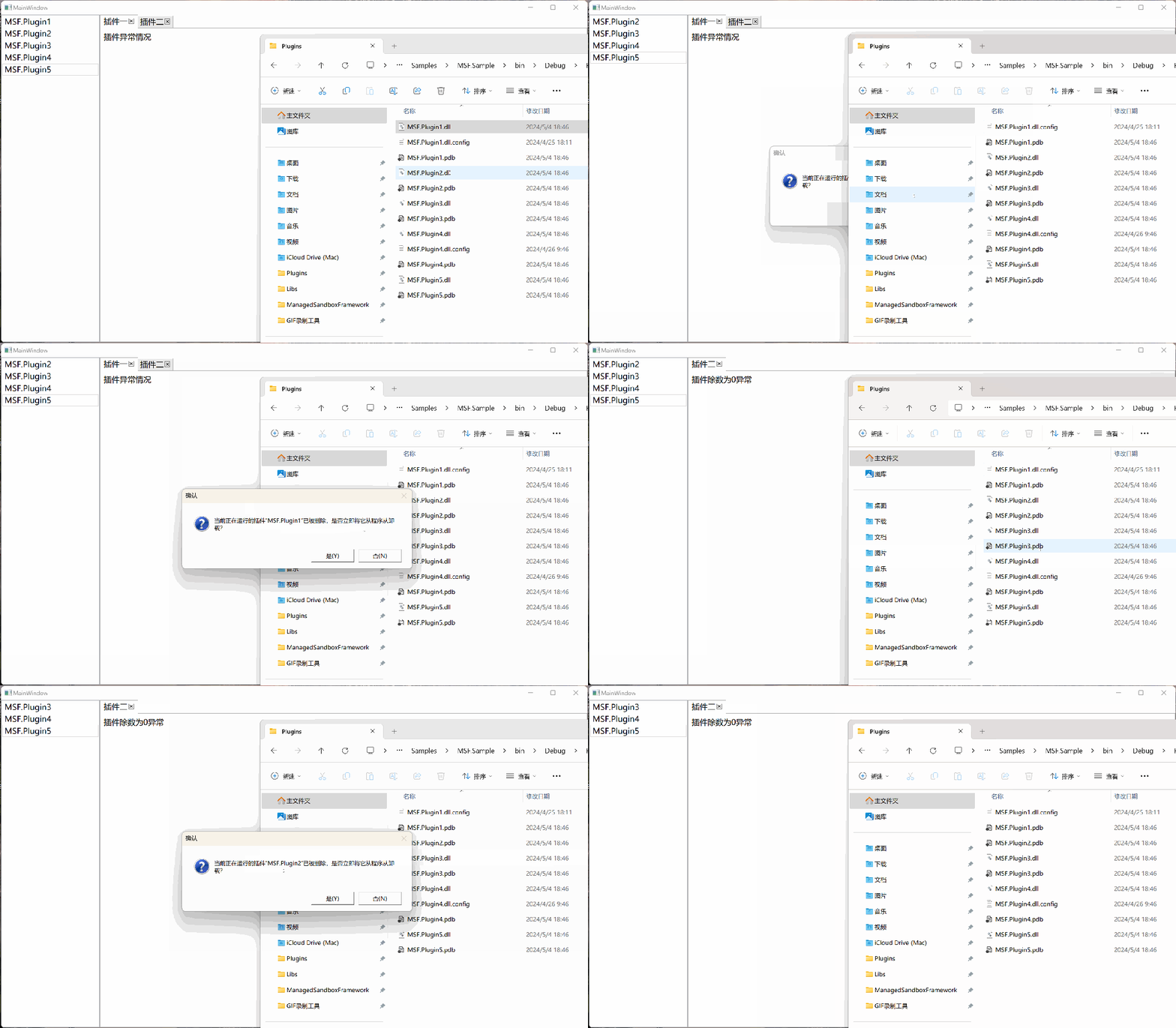
删除插件文件时容器会接收到通知,但它并不会立即卸载插件,而是将选择权交于宿主程序,由宿主程序决定是否要卸载已删除的插件,如果宿主不想卸载,那么已删除的插件可以继续运行,工作不会被中断。
3.6.3. 运行时更新插件
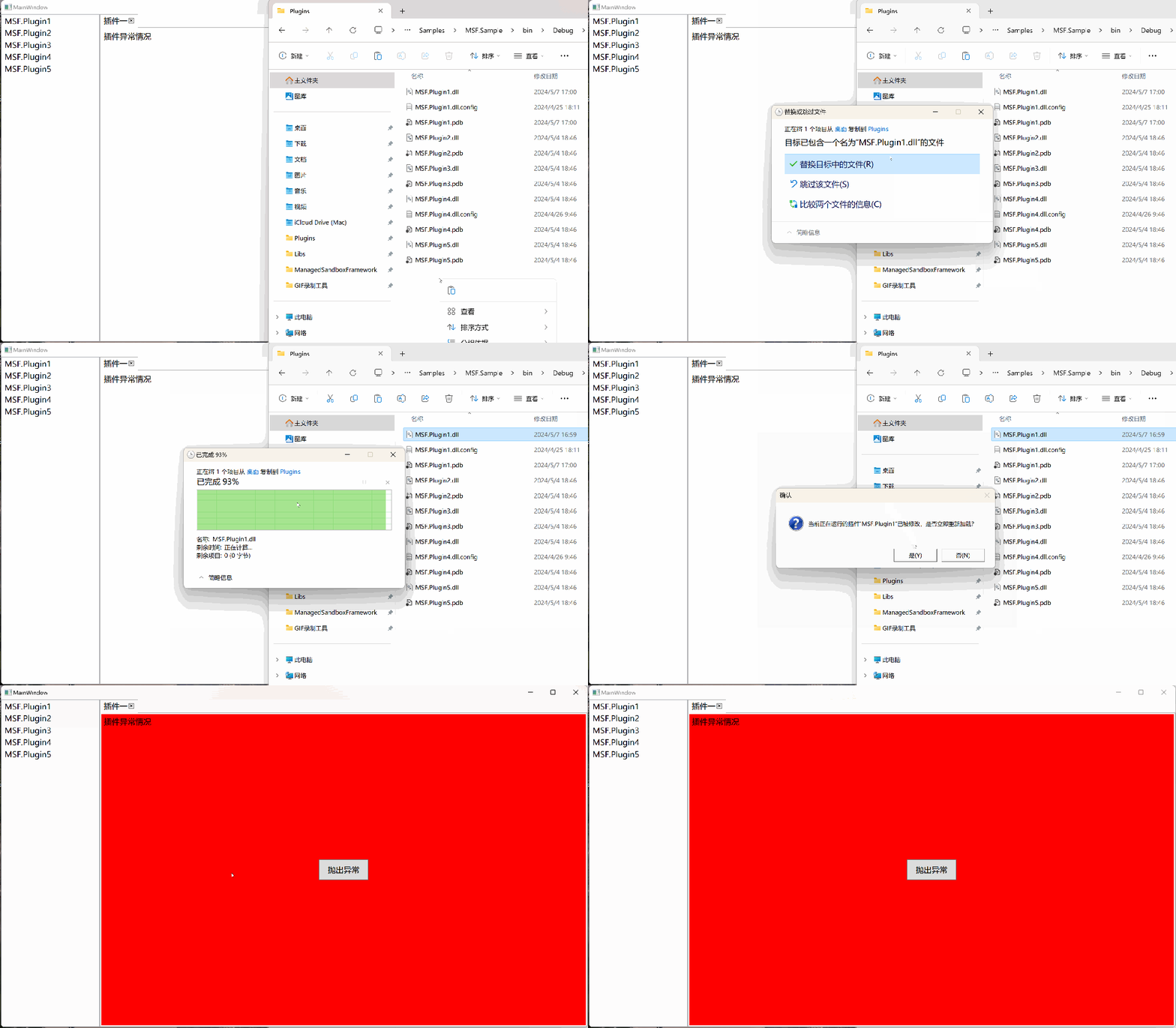
插件 1 为白色背景,插件 1 的新版本为红色背景,当用新版本替换旧版本后,容器会向宿主发送通知询问是否要替换插件。
3.7. 插件间通讯
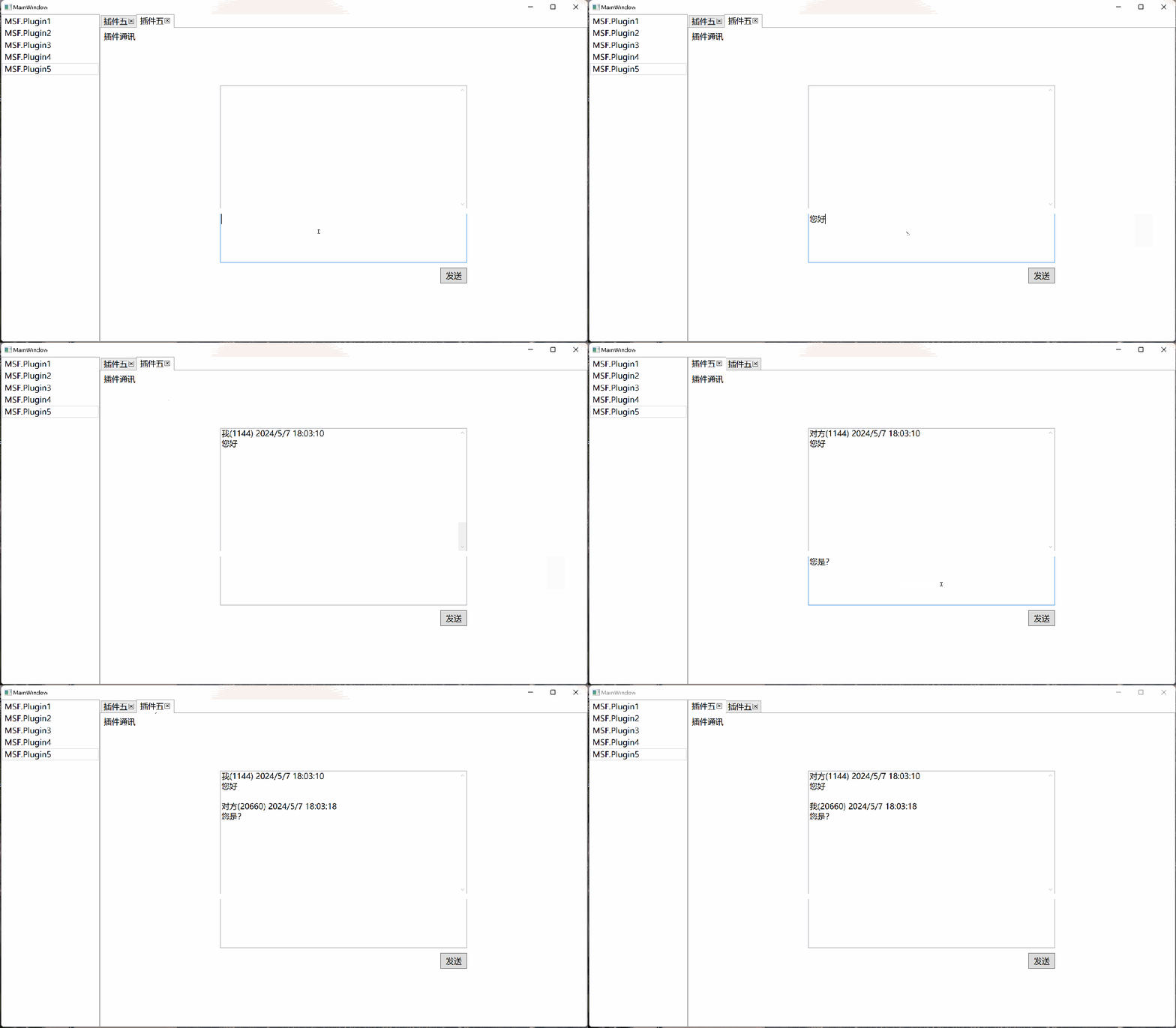
插件通讯部分包含的内容有注册消息、接收消息、发送消息,消息的接收与发送都只需要关注消息类型,不需要关注发送者和接收者是谁,只要注册了这个类型的消息,一旦有这个类型的消息就会接收到通知。插件不仅可以和插件通讯,也可以与宿主通讯。
3.7.1. 注册消息
以下代码注册一个类型为Notice的消息,并在注册方法中传入一个名为ReceiveMessages的回调方法,在该方法中处理消息接收。
plugin.ReregisterMessage<Notice>(ReceiveMessages);
3.7.2. 接收消息
private void ReceiveMessages(Notice notice){
}
3.7.3. 消息发送
plugin.SendMessage(notice);
3.7.4. 效果演示
3.8. 插件未保存提示
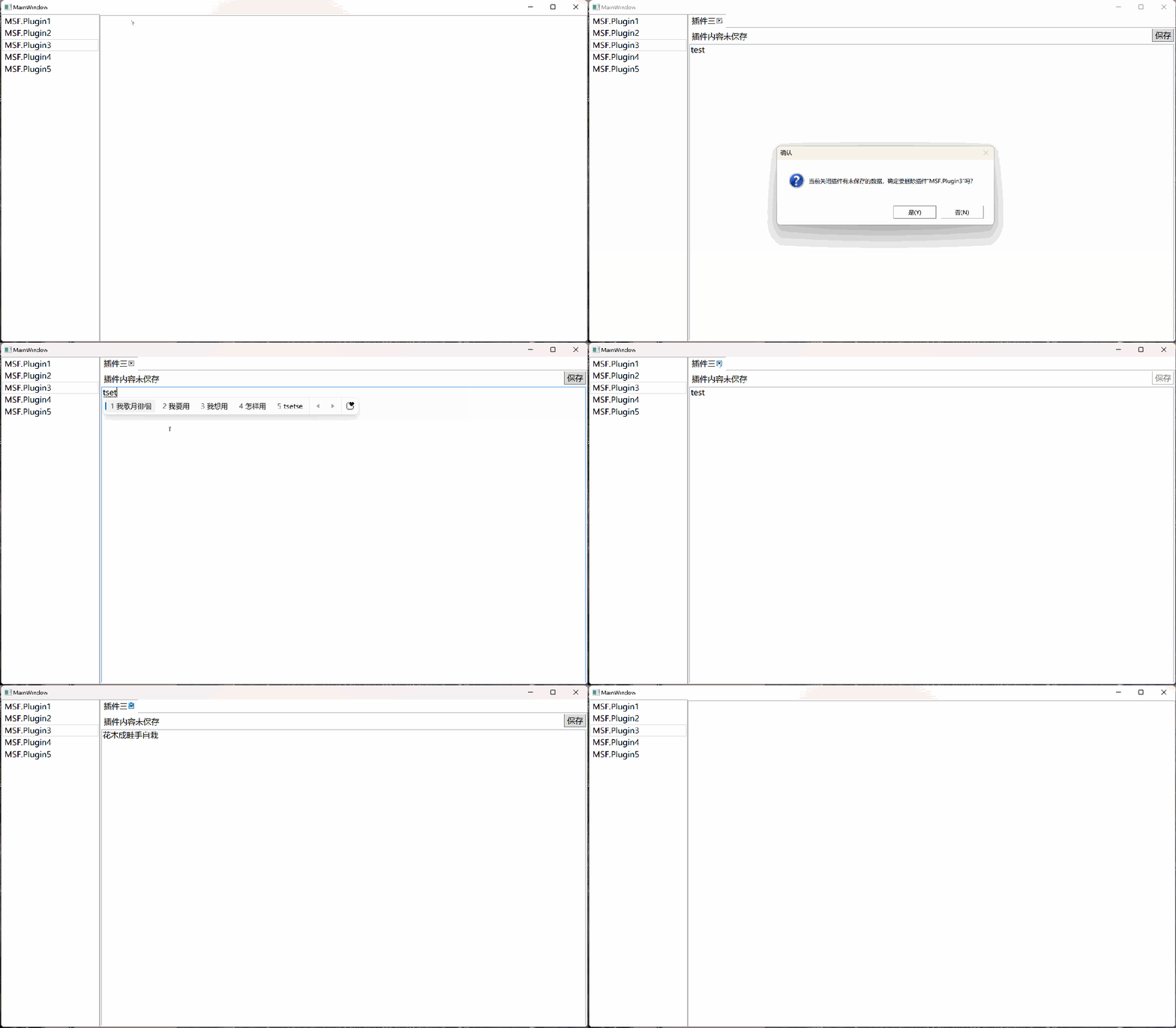
在宿主关闭插件前可以根据插件的状态决定是否可以关闭,如果有未保存的工作,可以通知宿主取消关闭插件。
3.9. 插件使用独立的 App.config 文件
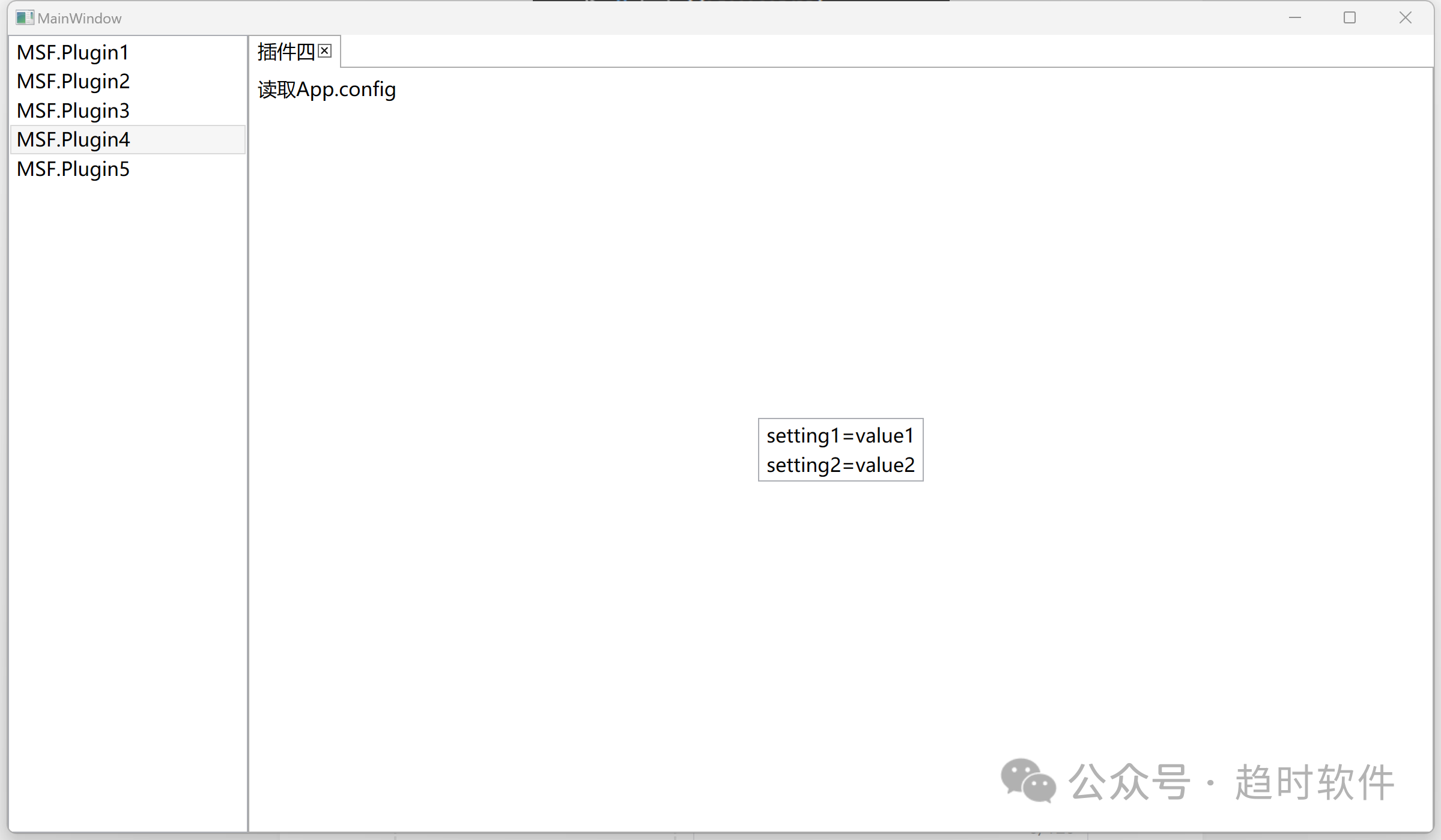
每个应用程序默认只能加载一个与应用程序文件名同名的配置文件,插件可以创建自己的应用程序配置文件。
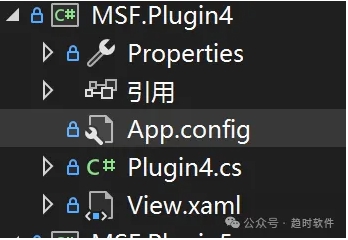
App.config
<?xml version="1.0" encoding="utf-8" ?>
<configuration>
  <appSettings>
    <add key="setting1" value="value1" />
    <add key="setting2" value="value2" />
  </appSettings>
</configuration>
运行效果
3.10. 插件多开
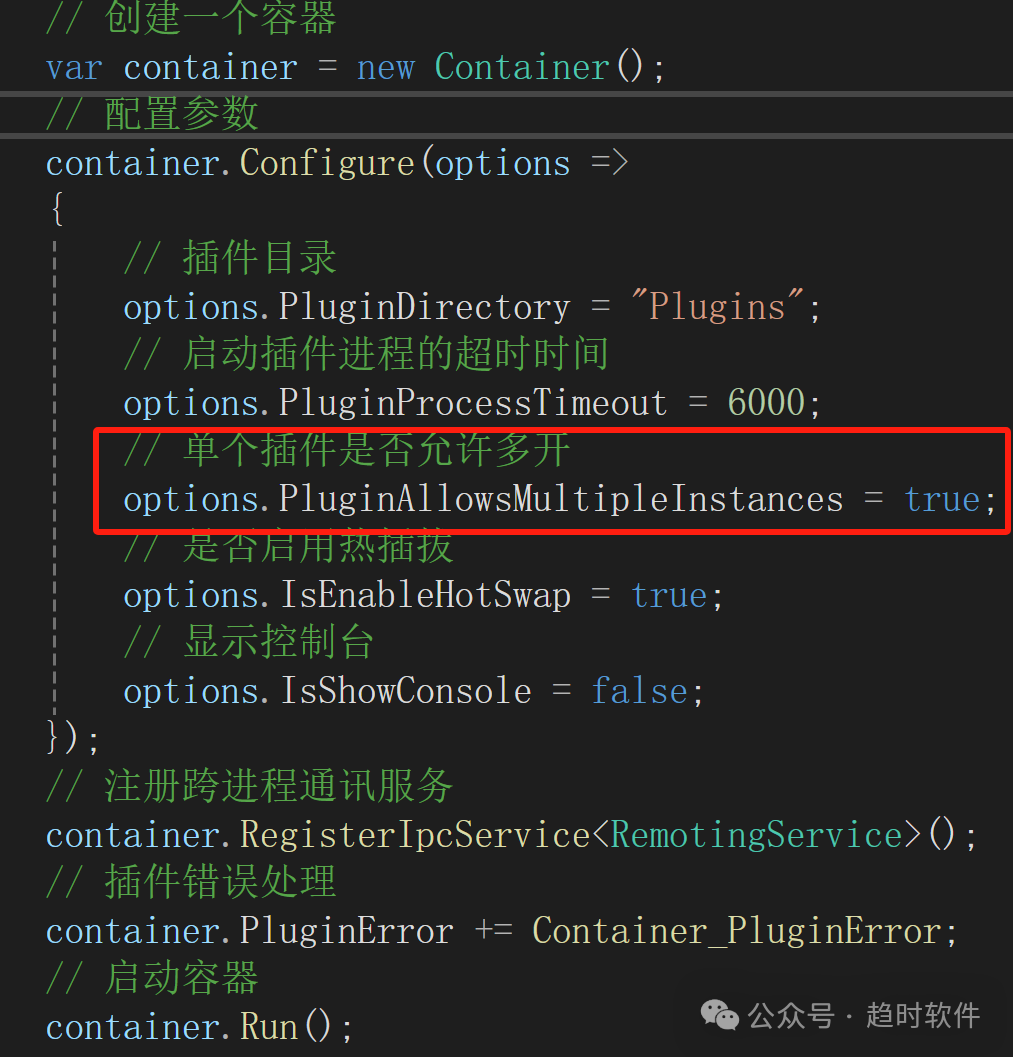
单个插件允许同时运行多个实例可以在容器参数中配置。
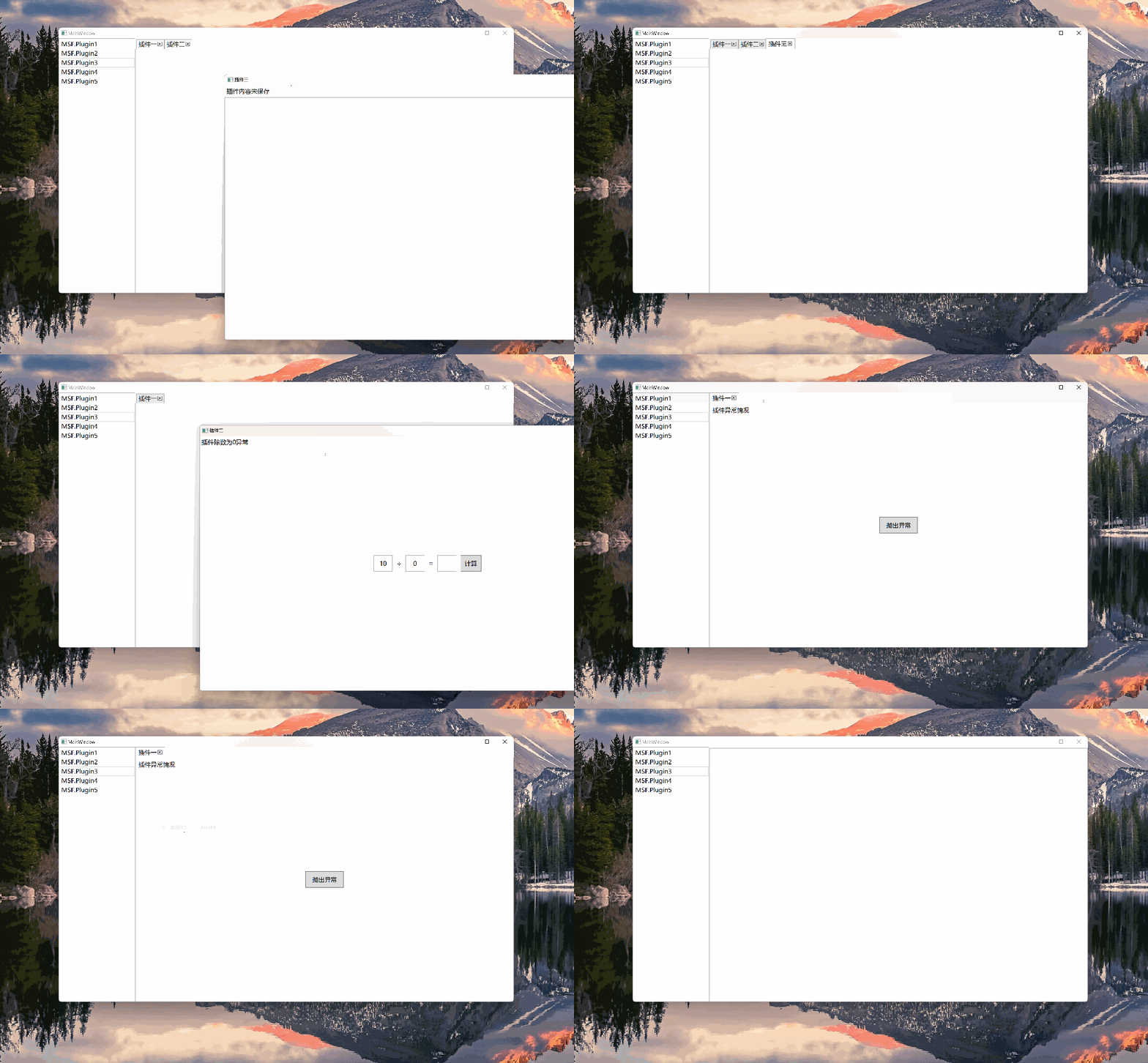
3.11. 脱离宿主窗口运行
3.12. 跨进程通讯服务扩展
插件系统默认使用Remoting的IpcChannel进行跨进程通讯,但是为了便于扩展,这里并没有直接把Ipc服务写进容器,而是采用了开放性的设计,如果不想使用IpcChannel,可以在创建容器以后注册自己的 Ipc 服务。
4. 项目实战
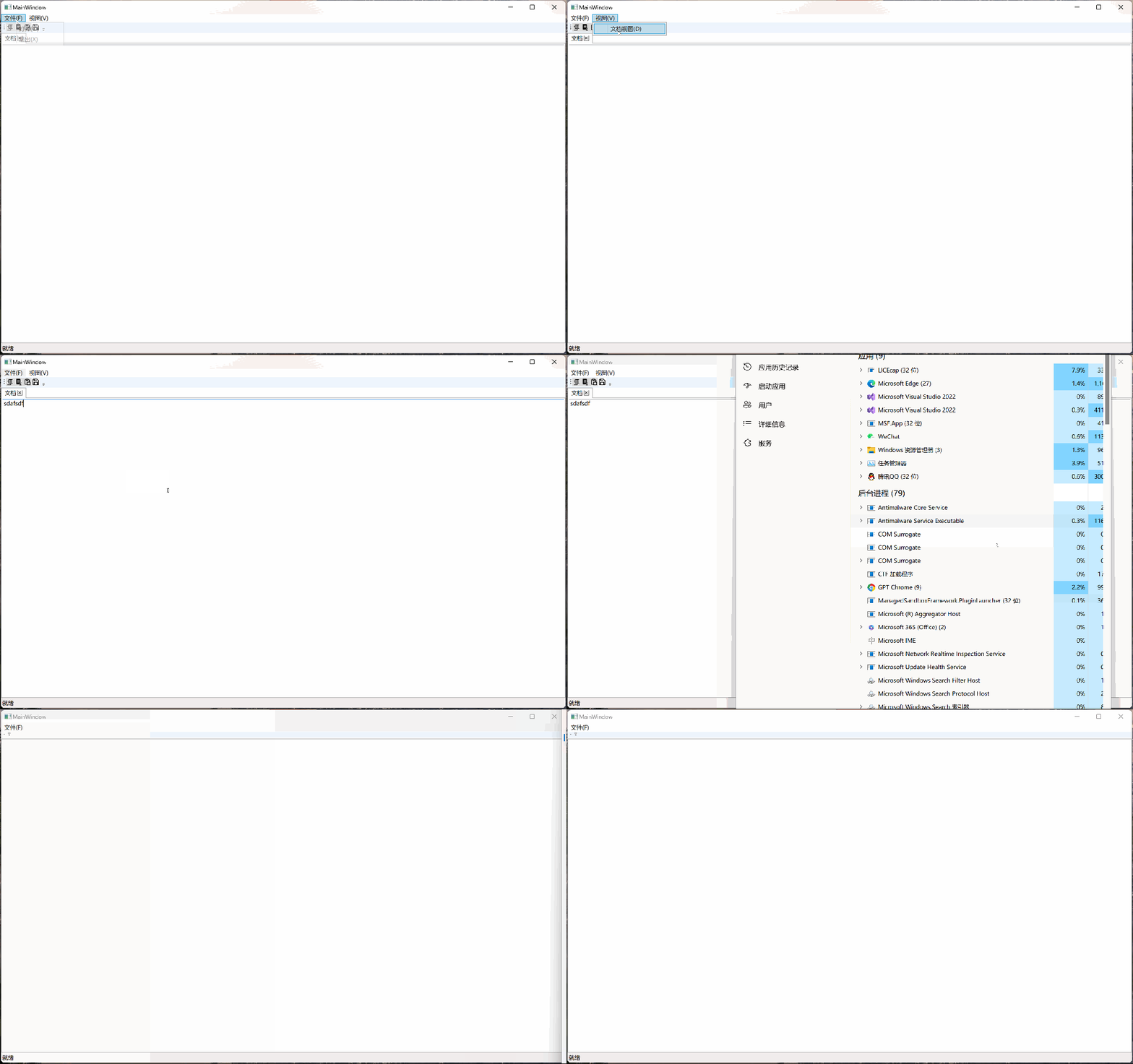
以下案例展示了插件系统在一个有菜单、工具栏、文档的典型软件中的应用。当插件加载时,插件中的菜单、工具栏、文档会被加载到宿主程序员,当插件意外终止或主动关闭时,插件中的菜单、工具栏、文档会被自动卸载。
4.1. 菜单
插件中添加了两个命令,分别是文件菜单下的“打开”菜单,视图下的“文档视图”菜单,点击菜单后命令会转发到插件中执行。
private MSFCommand[] CreateCommands()
{
    var openCommand = new MSFCommand(() => MessageBox.Show("菜单"), () => true)
    {
        Id = Guid.NewGuid().ToString(),
        Name = "打开",
        Type = "Menu",
        Target = "MainWindow",
        Location = "文件(_F).打开(_O)",
        Order = 0
    };

    var editorViewCommand = new MSFCommand(() => MessageBox.Show("文档视图"))
    {
        Id = Guid.NewGuid().ToString(),
        Name = "文档视图",
        Type = "Menu",
        Target = "MainWindow",
        Location = "视图(_V).文档视图(_D)",
        Order = 0
    };

    return new MSFCommand[]
    {
        openCommand,
        editorViewCommand
    };
}
4.2. 工具栏
考虑到工具栏的复杂性(可能会添加很多种类型的控件),这里并没有使用命令来实现,而是将 Button 传给了宿主程序。
internal class CopyButtonWrapper : IWrapper
{
    private PluginContractElement contractElement;

    public CopyButtonWrapper(DocumentViewModel documentViewModel)
    {
        var button = new Button()
        {
            Content = new Image { Width = 16, Height = 16, Source = new BitmapImage(new Uri("pack://application:,,,/EditorPlugin;component/Images/copy.png")) },
            BorderThickness = new System.Windows.Thickness(0),
            BorderBrush = Brushes.Transparent,
            Command = documentViewModel.CopyCommand
        };
        contractElement = new PluginContractElement()
        {
            Id = Guid.NewGuid().ToString(),
            Name = "复制",
            Type = "ToolBar",
            Order = 2,
            Location = "MainWindow.ToolBar.Copy",
            Description = "复制",
            UIContract = new NativeHandleContractInsulator(button)
        };
    }

    public PluginContractElement PluginContractElement => contractElement;
}
4.3. 文档视图
文档是将一个 UserControl 传递给宿主程序。
internal class DocumentViewWrapper : IWrapper
{
    private PluginContractElement documentContractElement;

    public DocumentViewWrapper(DocumentView documentView)
    {
        documentContractElement = new PluginContractElement()
        {
            Id = Guid.NewGuid().ToString(),
            Name = "文档",
            Type="Document",
            Location = "MainWindow.Document",
            Description = "这是文档",
            UIContract = new NativeHandleContractInsulator(documentView)
        };
    }

    public PluginContractElement PluginContractElement => documentContractElement;
}
4.4. 依赖注入
实际项目中我们大多会使用Prism这种提供了依赖注入功能的框架,所以在设计时充分考虑了兼容性,不管是在宿主中还是在插件中都可以使用 Prism 这种框架。
public class EditorPlugin : PluginBase
{
    private readonly DryIoc.Container container;
    private readonly PluginContractElement[] _elements;
    private readonly IMSFCommand[] _commands;
    public EditorPlugin()
    {
        container = new DryIoc.Container();

        RegisterTypes();
        RegisterInstances();

        _commands = CreateCommands();
        _elements = CreateUIElement();
    }

    private void RegisterTypes()
    {
        container.Register<DocumentViewModel>();
        container.Register<DocumentView>();
        container.Register<PluginContractElementBuilder>();
        container.Register<DocumentViewWrapper>();
        container.Register<CopyButtonWrapper>();
        container.Register<CutButtonWrapper>();
        container.Register<PasteButtonWrapper>();
        container.Register<SaveButtonWrapper>();
    }

    ...........
}
5. 结束语
该插件系统可以让我们以较低的成本使用沙箱运行、异常隔离、进程通讯等高级功能,通过这些高级功能我们可以解决软件开发过程中的一些顽疾(比如内存占用、多核利用率、未知问题引起的软件崩溃等问题),同时它还赋予了我们无限的想象力,让我们能够以此为基础构建出功能更加强大的软件。