Today, I, the webmaster, want to talk about CodeWF Toolbox, a toolbox I developed myself.
Those who are familiar with me usually call me "Webmaster" because I also run a website: CodeWF. This toolbox was born out of the repeated needs I encounter in my daily coding, website maintenance, organizing information, and troubleshooting. It's not just an Avalonia demo with a few buttons; it's a local desktop toolbox with over 100 tool entry points.
The project uses C# + Avalonia + Prism + Semi.Avalonia + Ursa, with a straightforward goal: to gather the conversion, encoding, formatting, validation, generation, and query tools that developers repeatedly use daily into a single local desktop application.
The repository is on GitHub: https://github.com/dotnet9/CodeWF.Toolbox. If you want to see the complete source code, module organization, release configuration, or future updates, you can start from this repository.
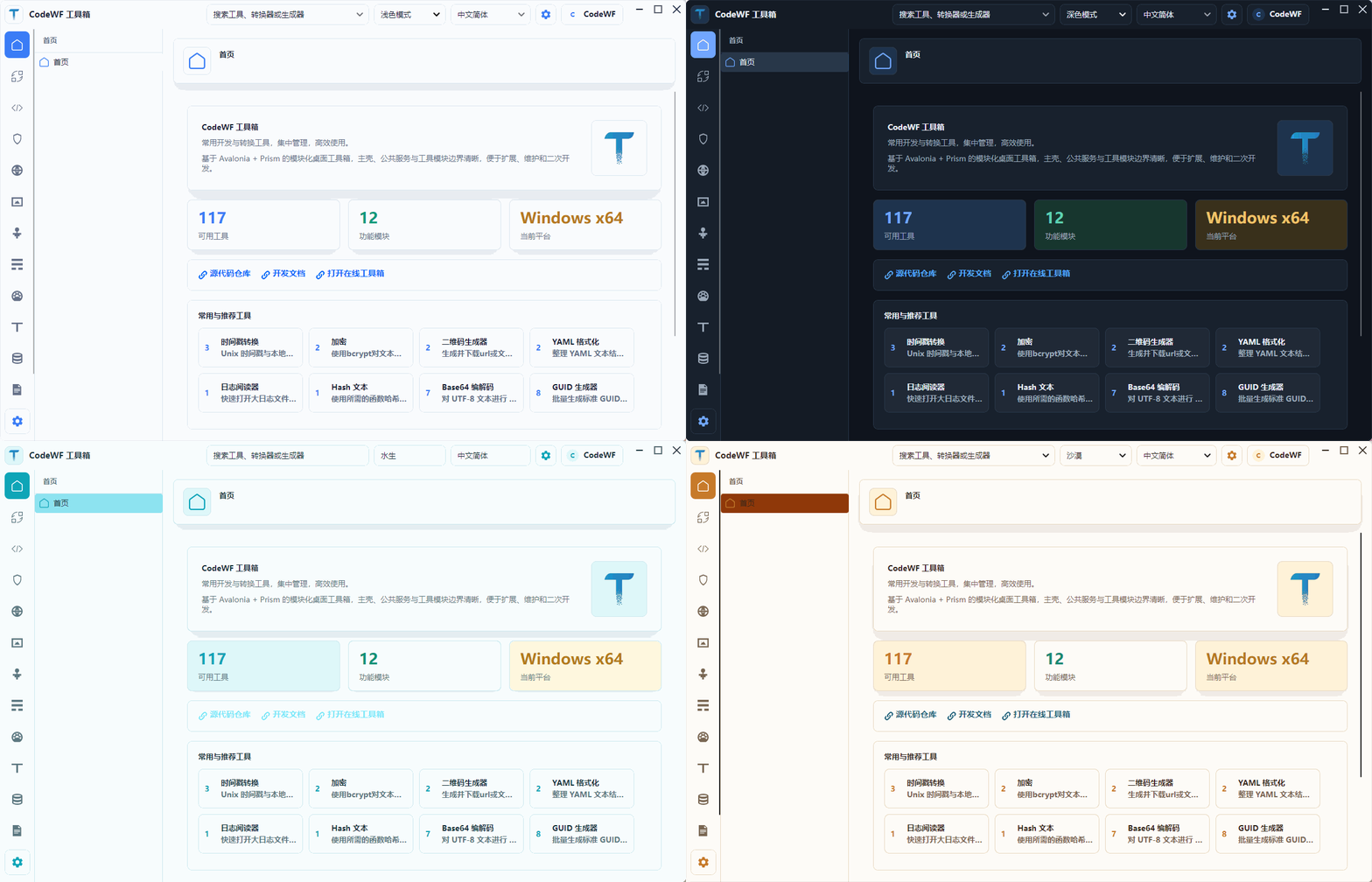
This time, I'm not going to talk about vague "cross-platform UI capabilities." Instead, I'll break down what CodeWF Toolbox can actually do now. The interface screenshots have also been updated, the main window size has been slightly reduced, and the home page now includes frequently used and recommended tool entries. The overall display uses my preferred Desert theme.
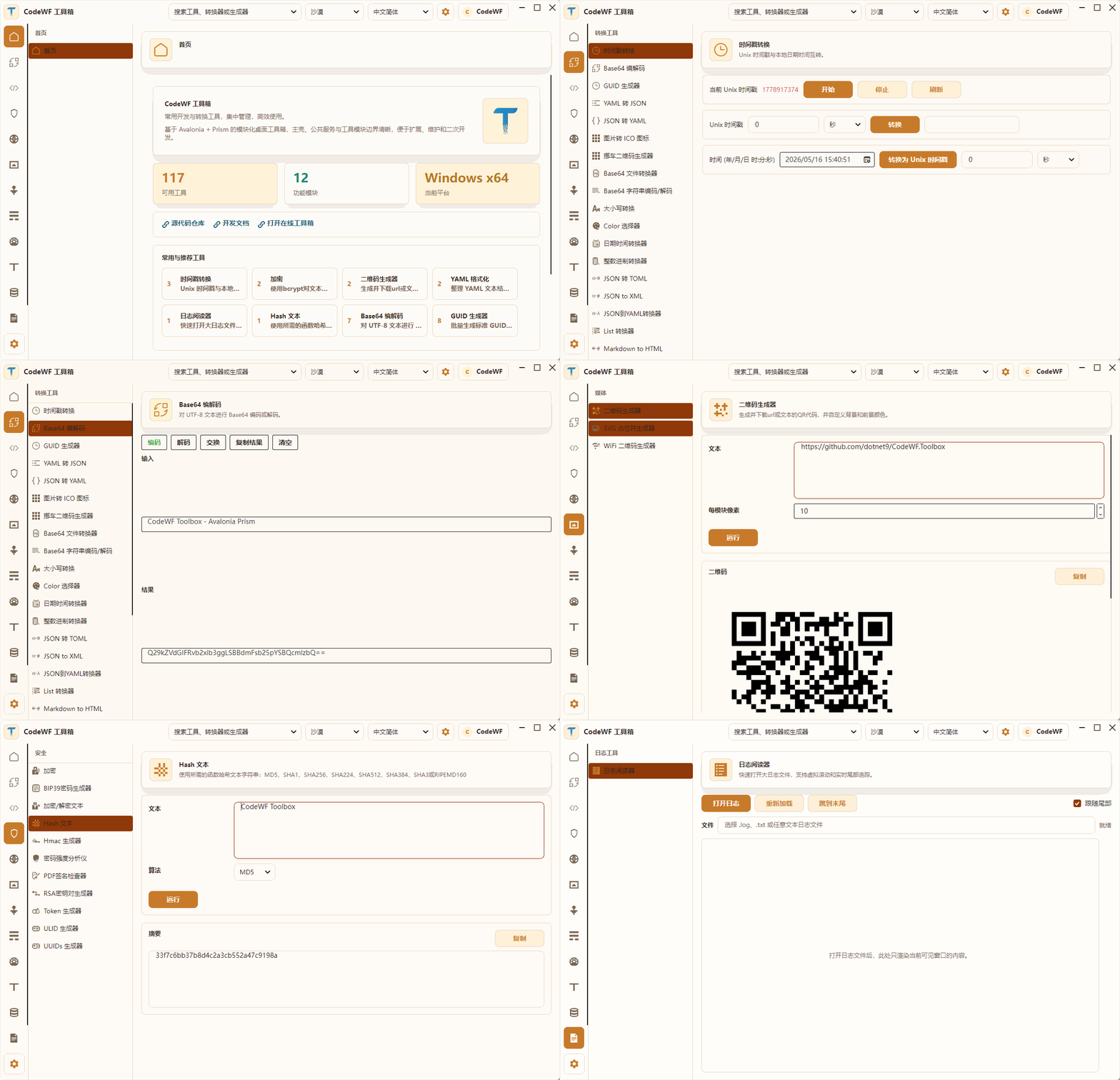
Let's start with a feature tour GIF.

Home Page: No Longer Just a Blank Welcome Page
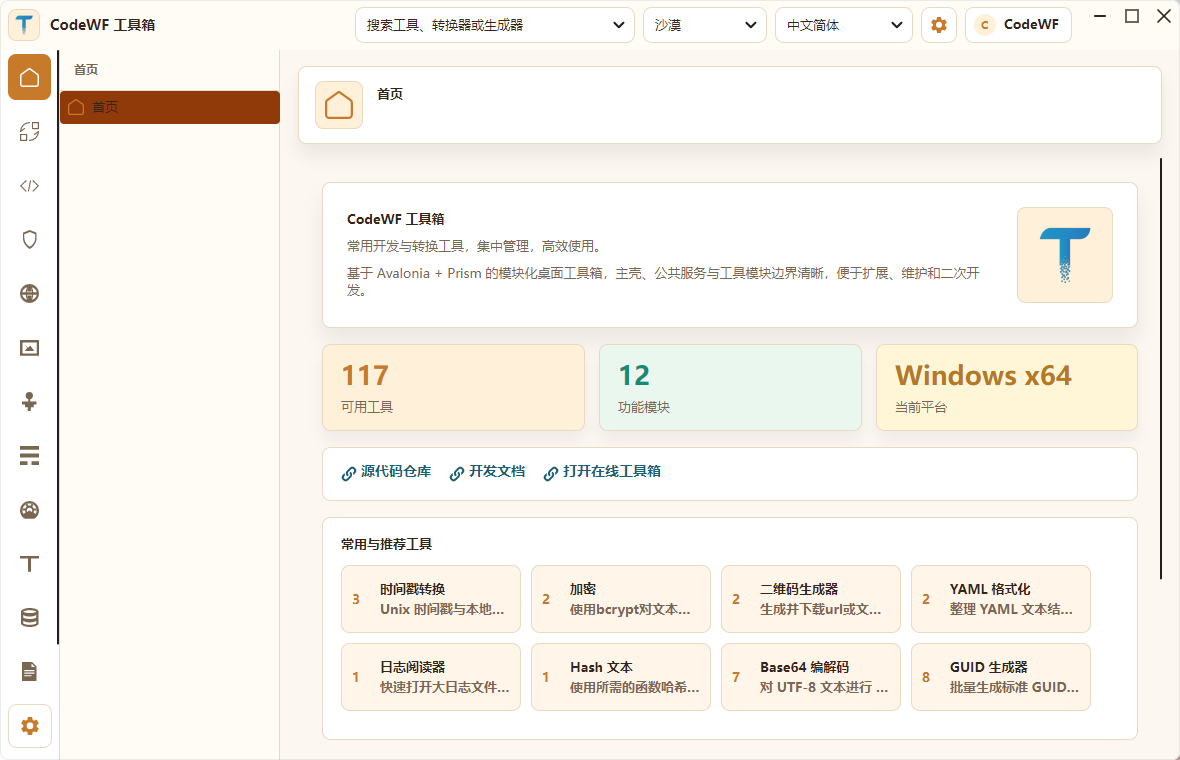
The new home page is one of the key areas I focused on this time. Previously, it was more like a generic welcome page; now it's better suited as an entry point for the toolbox.

The top of the home page displays three core pieces of information:
- Number of available tools: 117.
- Number of functional modules: 12.
- Current running platform: Windows x64.
Below, there is a "Frequently Used & Recommended Tools" section. If a user has used tools before, frequently used tools are displayed first; if there are fewer than 8, they are supplemented with recommended tools. Even when opening for the first time, it doesn't look empty – users can see high-frequency entries like Timestamp, Base64, GUID, QR Code, Hash, and Log Viewer.
Although this adjustment is small, it's crucial for the toolbox experience. When I was building this desktop toolbox, I had a clear idea: the home page shouldn't just be a promotional page; it should let users start working immediately after opening.
Converter Tools: Small Functions Developers Use Every Day
Converter tools are the most basic and commonly used category in CodeWF Toolbox.

The current converter module includes these independent pages and data-driven tools:
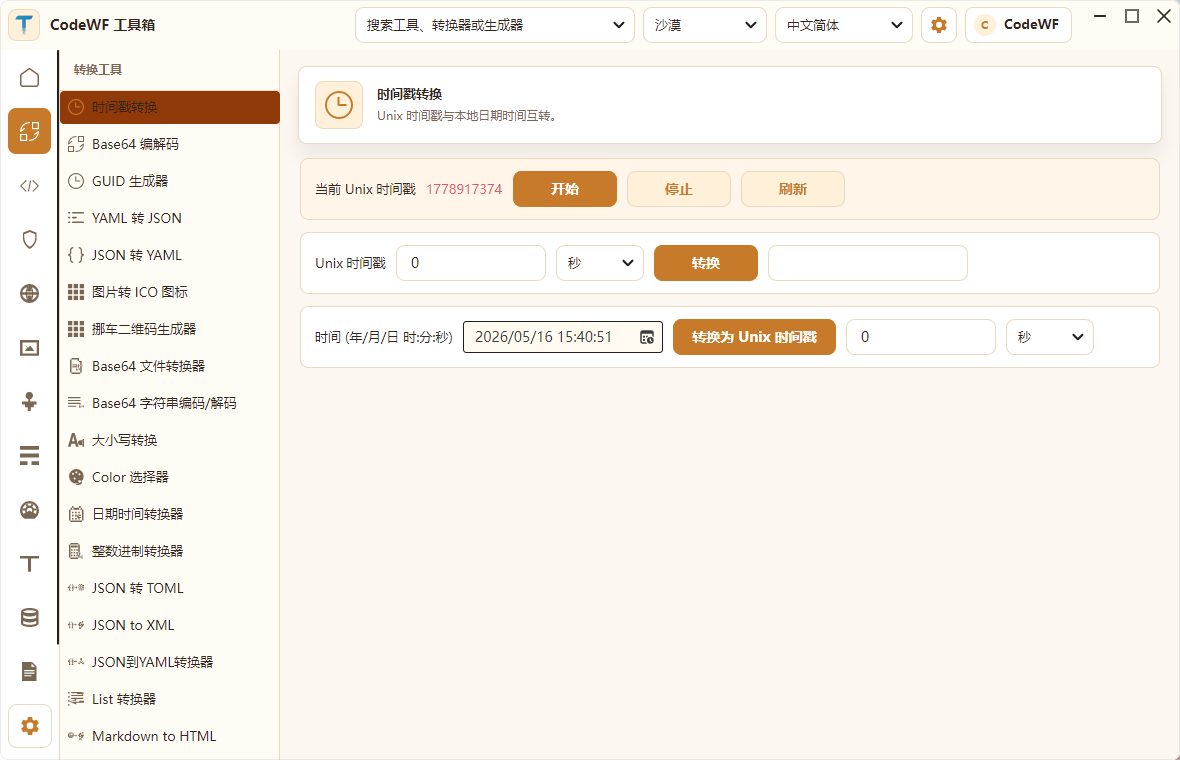
- Timestamp Converter: Convert between Unix timestamps and local time, supporting seconds and milliseconds.
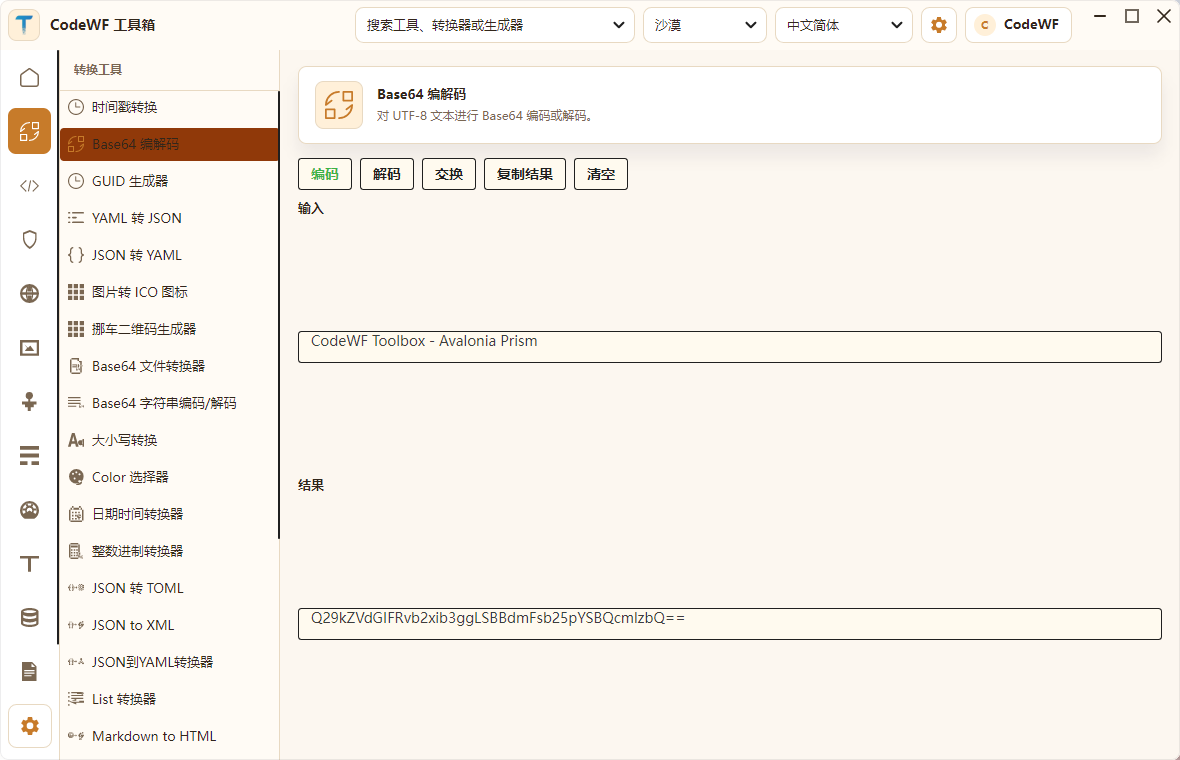
- Base64 Encode/Decode: Encode/decode UTF-8 text, with swap and copy.
- GUID Generator: Generate GUIDs in batch, controlling case and format.
- YAML to JSON, JSON to YAML.
- Image to ICO Icon.
- Parking QR Code Generator.
- Base64 File Converter.
- Base64 String Encode/Decode.
- Case Converter.
- Color Picker.
- Date Time Converter.
- Integer Base Converter.
- JSON/TOML/XML/YAML Interconversion.
- List Converter, Markdown to HTML, Roman Numeral Converter, etc.
For example, the Base64 encode/decode page directly returns the encoded result after inputting text.

These functions are small, but they are exactly what developers repeatedly search for on web pages every day. By making them part of a local toolbox, the advantages are obvious: fast response, offline availability, no ads, and no need to paste temporary text to external sites.
Development Tools: Formatting, Parsing, Diffing, and Command Assistance
The development module is more about "writing code assistants." Many of these tools are ones I use daily, so they were given high priority when building the toolbox.

The existing development tools cover a wide range:
- JSON Formatter, JSON Minifier, JSON Path Extraction, JSON to CSV.
- YAML Formatter.
- XML Formatter, XML XPath Tester.
- SQL Beautifier/Formatter.
- CSV to JSON, CSV to Markdown Table.
- INI to JSON, .env to JSON.
- HTTP Header Parser.
- Data URL Parser.
- Docker Image Tag Parser.
- Docker Run to docker-compose.
- Chmod Calculator.
- Crontab Expression Generator.
- Regex Tester, Regex Cheatsheet, Regex Replace.
- Git Cheat Sheet.
- Hex Dump Viewer.
- SemVer Check and Compare.
- Markdown Table Generator.
- NanoID, UUID v5, Random Port, etc. generators.
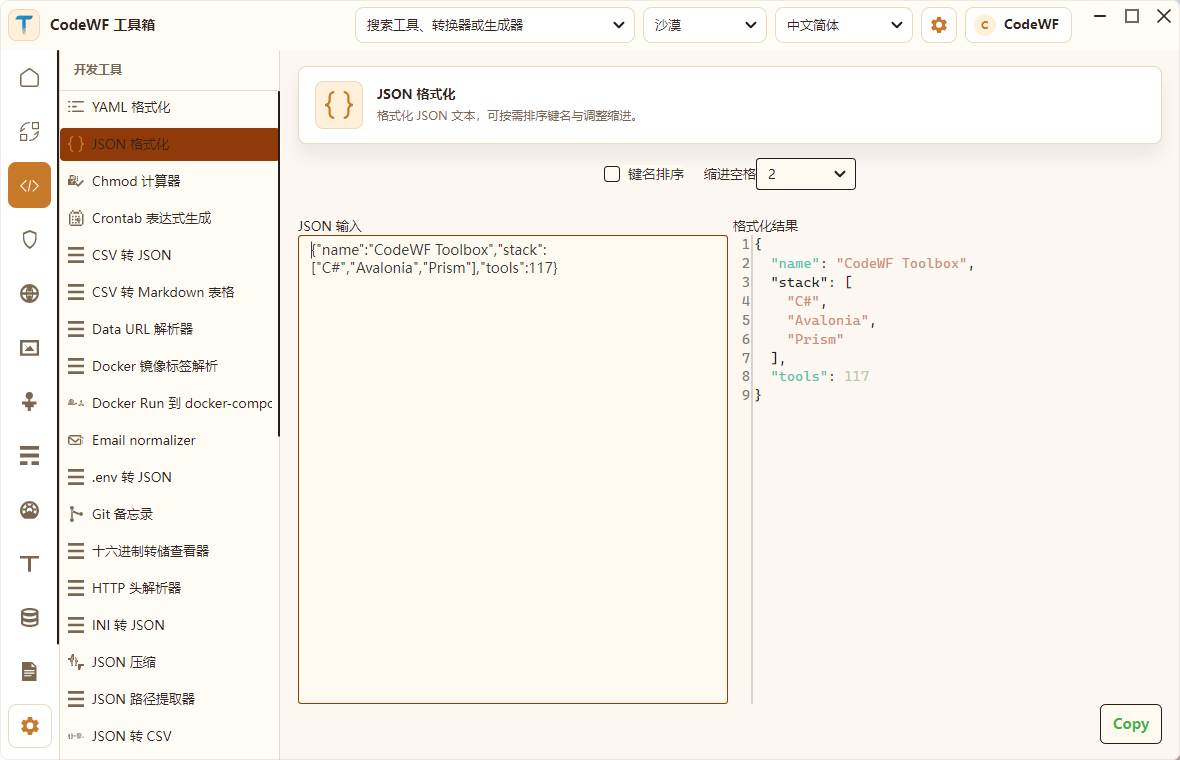
The JSON formatting page in the screenshot is typical: paste raw JSON on the left, get formatted output on the right, with control over key sorting and indent spaces.
Such tools are well-suited for abstraction as data-driven forms: input fields, output fields, run functions, and auto-run configuration can all be described by ToolSpec, instead of writing repetitive XAML for each tool. This is important to me because as the number of tools grows, maintenance cost becomes the real issue.
Security Tools: Hashing, HMAC, Keys, and Password Related
The security module contains security-related tools that developers often need for temporary calculations or generation.

Current features include:
- Bcrypt Hash and Compare.
- BIP39 Mnemonic/Seed Generation.
- AES, TripleDES Text Encryption/Decryption.
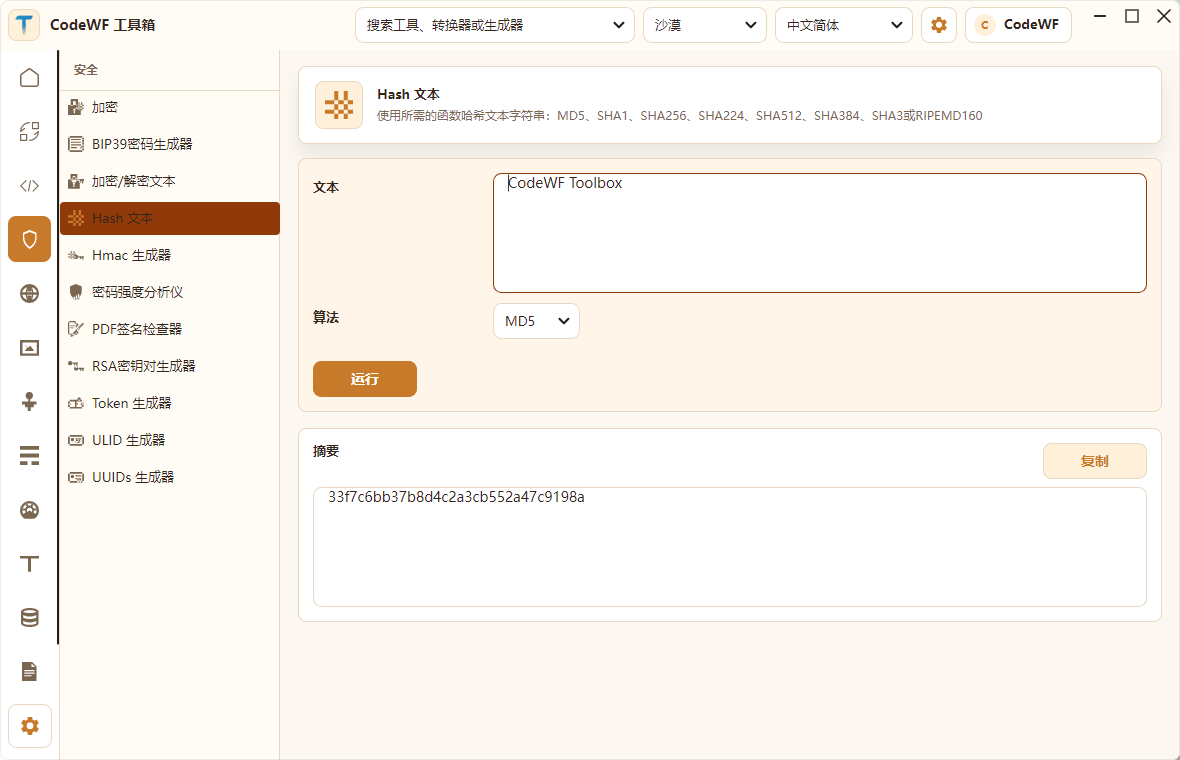
- Hash Text: MD5, SHA1, SHA2, SHA3, RIPEMD160.
- HMAC Generator.
- Password Strength Analyzer.
- PDF Signature Check.
- RSA Key Pair Generation.
- Token Generator.
- ULID Generator.
- UUID v4 Generator.
The screenshot shows the Hash Text tool. After entering CodeWF Toolbox, the tool directly generates the digest value. Similar functionality can be done via command line, but a desktop tool is more suitable for temporary verification, copying, and comparison.
Web Tools: HTTP, JWT, URL, MIME, UA
The web module is mainly for front-end/back-end debugging, interface troubleshooting, and web metadata processing. As a webmaster maintaining a site and writing APIs, I use these small tools frequently.
Existing tools include:
- Basic Auth Header Generator.
- Current Device Info Viewer.
- HTML Entity Escape/U Escape.
- HTML WYSIWYG Content Generator.
- HTTP Status Code Lookup.
- JWT Parser.
- Keycode Info Viewer.
- Open Graph / Twitter Meta Tag Generator.
- MIME Type Lookup.
- OTP (One-Time Password) Generator & Verifier.
- Outlook SafeLink Decoder.
- Slugify Strings.
- URL Encode/Decode.
- URL Parser.
- User-Agent Parser.
- JSON Diff.
The common feature of these tools is that their input and output structures are quite standard, making them perfect to maintain within a unified ToolFramework.
Media Tools: QR Code, WiFi QR Code, and SVG Placeholder
The media module currently doesn't include "large media tools" like video editors, but rather small generation tools for developers' daily needs.

Currently available:
- QR Code Generator.
- WiFi QR Code Generator.
- SVG Placeholder Generator.
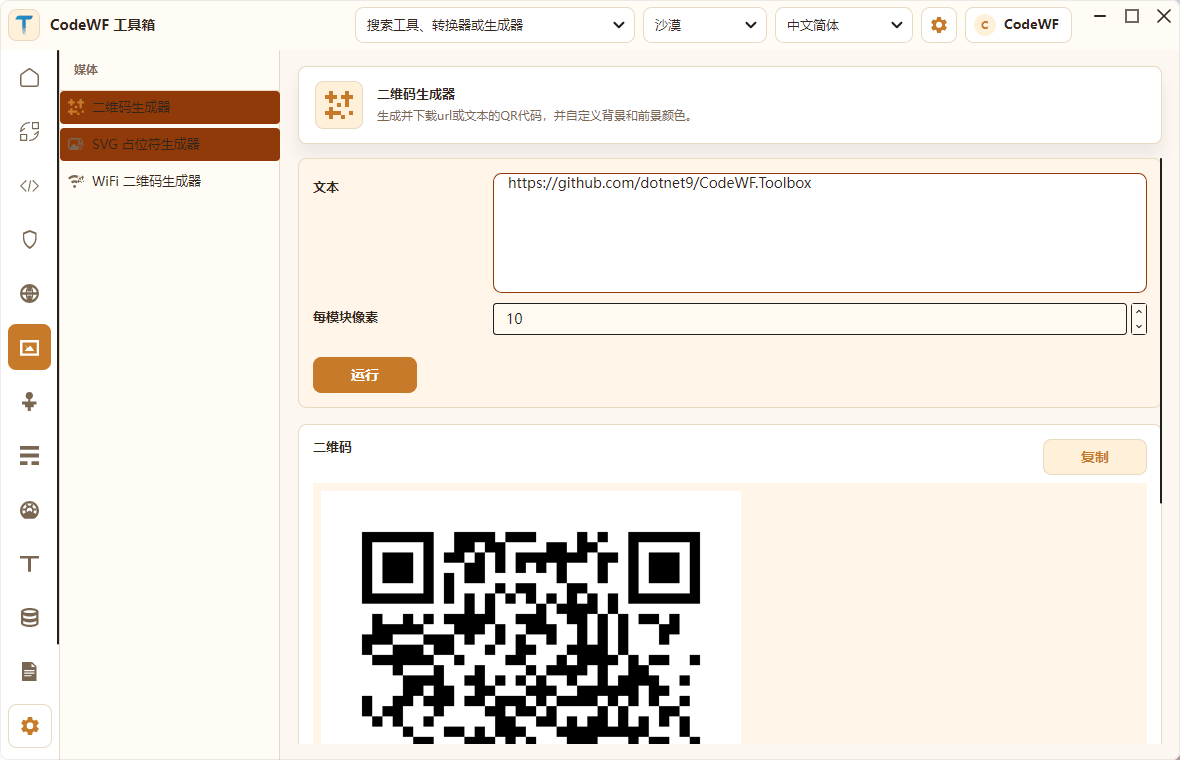
The QR Code Generator supports inputting URLs or text and generating QR codes. This function is very convenient when you need to quickly share a local address, document link, or repository address for mobile scanning.
Network Tools: IP, CIDR, MAC Address
The network module currently covers basic IP and MAC address tools:
- IPv4 Address Converter: decimal, binary, hexadecimal, IPv6 mapped, etc.
- IPv4 Range Expander: start-end IP to CIDR range.
- IPv4 Subnet Calculator.
- IPv6 ULA Generator.
- MAC Address Generator.
- MAC Address Vendor Lookup.
These tools are very practical for backend, operations, network troubleshooting, and local development environment configuration. I included them in CodeWF Toolbox so that scattered but commonly used queries and conversions no longer depend on temporary web searches.
Math, Measurement, Text & Data Tools
CodeWF Toolbox is not just about encoding/decoding; it also includes small calculation and text processing tools.
Math:
- ETA Calculator.
- Math Expression Calculator.
- Percentage Calculator.
Measurement:
- Benchmark Builder.
- Chronometer.
- Temperature Converter.
Text:
- ASCII Art Text Generator.
- Emoji Picker.
- Lorem Ipsum Generator.
- Numeronym Generator.
- String Obfuscator.
- Text Diff.
- Text Statistics.
Data:
- IBAN Validation and Parsing.
- Phone Number Parsing & Formatting.
These functions aren't used every day, but they fit into the "need it temporarily, search for a tool" scenario. Since I'm building a toolbox, I want to include these low-frequency but practical capabilities.
Log Viewer: Not Loading Large Files Into Memory at Once
The Log Viewer is one of my favorite module directions.

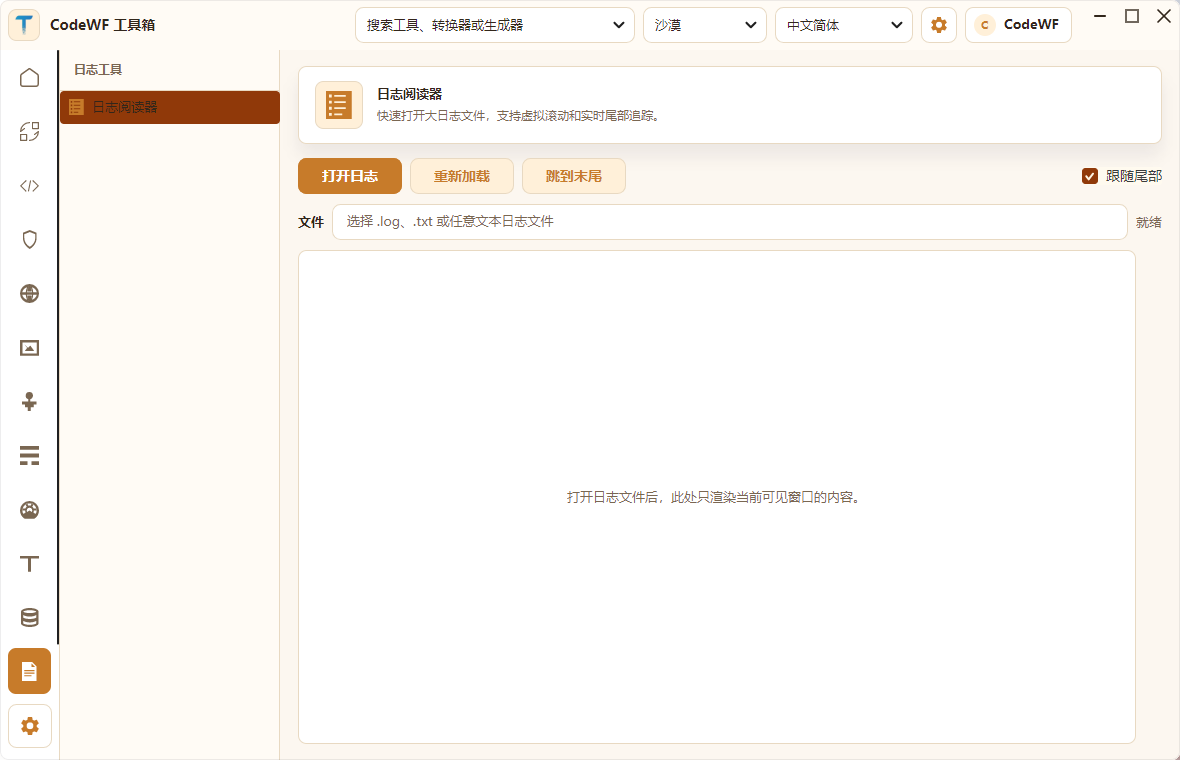
It doesn't simply call ReadAllText() on a log file and dump it into a text box. Instead, it renders based on the visible window, designed for large log files and real-time tail scenarios. The interface shows:
- Open Log.
- Reload.
- Jump to End.
- Follow Tail.
- Current File Path.
- Visible Content Area.
This kind of feature is highly valuable for a desktop tool. Many times, I just want to quickly browse a hundreds-of-MB log file without opening an IDE or causing a regular text editor to freeze.
Internationalization Resource Management: Merging and Managing XML Translation Files
The project also includes a CodeWF.Modules.XmlTranslatorManager module to handle XML language resource management.
It includes:
- Merge XML Files.
- Manage XML Files.
- Multi-language properties and language class models.
This module is an example of CodeWF Toolbox serving itself. As the number of tools grows, multi-language resources, module menus, and resource merging need to be tool-oriented; doing these manually over time is error-prone.
Note: The current version uses JSON as the multilingual file format; the XML format is in the i18n-xml branch.
Theme & Language: The Desert Theme is Indeed More Appealing
In these screenshots, I primarily used the Desert theme. Its overall appearance is more distinctive than a plain light theme, yet doesn't dim the content like a dark theme.
Theme switching effects can be seen in this GIF:

Current theme list includes:
- Follow System.
- Light Mode.
- Dark Mode.
- Aquatic.
- Desert.
- Dusk.
- Night Sky.
Language resources include:
- Simplified Chinese.
- Traditional Chinese.
- English.
- Japanese.
It's worth noting that themes and languages aren't just about swapping a few strings. For a long-term usable desktop application, themes, control libraries, fonts, window sizes, list widths, and dropdown widths all need to be considered together. For example, the main window was adjusted from a larger startup size to a more suitable desktop ratio, and the home page cards now use a more compact 4-column layout.
How is it Organized with So Many Tools?
If every small tool required writing a full page, maintenance would become painful. CodeWF Toolbox currently has two general approaches to tool organization.
The first category: standalone page tools.
For example:
- Timestamp Converter.
- Base64 Encode/Decode.
- GUID Generator.
- Image to ICO.
- Log Viewer.
- XML Translation Resource Manager.
These tools have more specific interactions and states, so it's more appropriate to write separate Views and ViewModels.
The second category: data-driven tools.
For example:
- JSON Formatter.
- JWT Parser.
- Hash Text.
- URL Encode.
- MIME Lookup.
- MAC Address Lookup.
- QR Code Generator.
- Math Calculator.
- Text Statistics.
These tools have more standard input/output patterns and can be described using ToolSpec:
public class ToolSpec
{
public string Id { get; set; }
public string Category { get; set; }
public string Name { get; set; }
public string Description { get; set; }
public List<ToolField> Fields { get; } = [];
public List<ToolOutput> Outputs { get; } = [];
public Func<ToolRunContext, CancellationToken, Task> RunAsync { get; set; }
public bool AutoRun { get; set; }
}
This way, when adding a new tool, in many cases you only need to provide:
- Tool ID.
- Category.
- Input fields.
- Output fields.
- Algorithm function.
- Multi-language resources.
- Icon.
The UI form can be reused, and the tool logic won't pollute the main window. This is the foundation for how I hope CodeWF Toolbox can continue to expand.
Prism Modularity Allows Features to Grow
In the project entry, modules are registered via Prism:
moduleCatalog.AddModule<MainModule>();
moduleCatalog.AddModule<ToolFrameworkModule>();
moduleCatalog.AddModule<ConverterModule>();
moduleCatalog.AddModule<DevelopmentModule>();
moduleCatalog.AddModule<SecurityModule>();
moduleCatalog.AddModule<WebModule>();
moduleCatalog.AddModule<MediaModule>();
moduleCatalog.AddModule<NetworkModule>();
moduleCatalog.AddModule<MathModule>();
moduleCatalog.AddModule<MeasurementModule>();
moduleCatalog.AddModule<TextModule>();
moduleCatalog.AddModule<DataModule>();
moduleCatalog.AddModule<LogViewerModule>();
moduleCatalog.AddModule<XmlTranslatorManagerModule>();
Each module is responsible for registering its own menu items and views. The main program doesn't need to know how each tool page is implemented internally; it only handles:
- Application startup.
- Login window.
- Main window.
- Theme and language.
- Common services.
- Prism regions.
- Module catalog.
- System tray and exit behavior.
This boundary is essential. A toolbox project can easily become scattered, with the main window cluttered with feature details. Prism modularity provides a relatively clear direction for expansion and helps me avoid writing messy code as I continue adding tools.
Q: Why is the tool module strongly referenced in the main project?
A: After Windows AOT publishing, managed module dynamic libraries cannot be loaded dynamically normally (they depend on .NET runtime). Publishing as unmanaged dynamic libraries doesn't support modular dynamic loading (I haven't looked into this). Without AOT publishing, compatibility with Win7 breaks.
Suitable Learning Points
If you're learning Avalonia, I think CodeWF Toolbox is more worth studying than a single-window demo, because it handles many real-world desktop application issues:
- Main window and login window.
- System tray.
- Theme switching.
- Multi-language resources.
- Modular navigation.
- ToolFramework data-driven tools.
- File selection.
- Clipboard operations.
- Large log file viewing.
- User configuration and usage history.
- Platform differences reserved for Windows/Linux/macOS.
- Release configuration.
These engineering points are often not about "can you draw a button?" but rather "can you still maintain it when there are many tools?" This project is my way of organizing these engineering issues while building.
Areas That Can Still Be Polished
CodeWF Toolbox already has a relatively complete direction, but I'm well aware it still has room for improvement:
- Some tool page control styles can be further unified, such as input borders, button hierarchy, spacing.
- Some Chinese resource files still contain machine-translation traces and can be gradually refined.
- The number of tools is already large; the recommendation strategy on the home page can be made clearer.
- Search results can better highlight tool categories and recent usage.
- The Log Viewer can include sample files or drag-and-drop entry.
- Build still has preview SDK warnings, obsolete APIs, and Avalonia XAML accessibility warnings, which can be gradually cleaned up.
I've already reduced the default main window size and added 8 shortcut entries on the home page. With the Desert theme, it looks more like a daily-use toolbox rather than an oversized desktop shell.
Finally
CodeWF Toolbox is a toolbox I develop and maintain myself. Its value doesn't lie in how complex any single tool is, but in organizing many high-frequency developer tools into an extensible desktop application.
It currently covers:
- Converter Tools.
- Development Tools.
- Security Tools.
- Web Tools.
- Media Tools.
- Network Tools.
- Math Tools.
- Measurement Tools.
- Text Tools.
- Data Tools.
- Log Viewer.
- Internationalization XML Resource Manager.
Writing desktop tools in C# is not outdated. For scenarios involving files, local clipboard, logs, offline conversions, temporary generation, formatting, and system integration, local desktop applications still hold great value.
And Avalonia + Prism provides a relatively modern path for this direction: cross-platform capability plus modular maintenance of a large number of features.
Going forward, I will continue to polish CodeWF Toolbox toward "truly daily usable." Rather than just making a demo window, I want to practice the ability to organize an ever-increasing number of small tools into a product that can be maintained long-term.