Part 1 Introduction

EasyNetQ is an easy-to-use .NET API for RabbitMQ.
If you just want to get up and running as quickly as possible, head over to the Quick Start guide.
The aim of EasyNetQ is to provide a library for using RabbitMQ in .NET as simply as possible. To do this it trades flexibility for simplicity by enforcing a few simple conventions. These include:
- Messages should be represented by a .NET type.
- Messages should be routed by their .NET type.
This means that messages are defined by a .NET class. Each distinct message type that you want to send is represented by a single class. The class must be public, and must have a default constructor with public read/write properties. You typically don't implement any functionality in the message, but treat it as a simple data container, or Data Transfer Object (DTO). Here's a simple message:
public class MyMessage
{
public string Text { get; set; }
}
EasyNetQ routes messages by message type. When you publish a message, EasyNetQ inspects its type and gives it a routing key based on the type name, namespace, and assembly. On the consuming side, subscribers subscribe to a type. Once subscribed, messages of that type are routed to the subscriber.
By default, EasyNetQ uses the Newtonsoft.Json library to serialize .NET types to JSON. The advantage of this is that messages are human-readable, so you can debug messaging issues using tools like the RabbitMQ management application.
Part 2 API Design

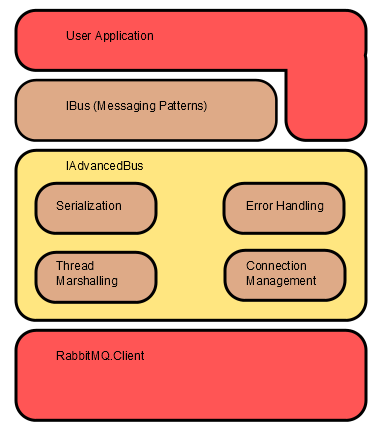
EasyNetQ is a collection of components that sit on top of the RabbitMQ.Client library and provide services for you: serialization, error handling, thread marshalling, connection management, and so on. They are composed by a mini-IoC container. You can easily replace any component with your own implementation. So if you want XML serialization instead of the built-in JSON, just write an implementation of ISerializer and register it with the container.
These components are fronted by an IAdvancedBus API. This looks very much like the AMQP specification, and indeed you can run most AMQP methods from this API. The only AMQP concept that this API hides from you is channels. This is because channels are a confusing low-level concept that should never have been part of the AMQP specification in the first place. To be honest, 'Advanced' is not a very good name for this API; IAmqp would be much better.
On top of the advanced API is a set of messaging patterns: Publish/Subscribe, Request/Response, and Send/Receive. This is the 'opinionated' part of EasyNetQ. This is our take on how these patterns should be implemented. There is little flexibility; either you accept our way of doing things, or you don't use it. The intention is that you, the user, don't have to spend brain power re-inventing the same patterns over and over; you don't have to make choices every time you just want to publish and subscribe to messages. It's designed to fulfil the core aim of EasyNetQ, which is to be the simplest possible way to use RabbitMQ.
These patterns sit behind the IBus API. Again, this is a poor name; it has little to do with the concept of a message bus. A better name would be IPackagedMessagePatterns.
IBus is designed to work for 80% of users, 80% of the time. It is not exhaustive. If the pattern that you want to implement is not provided by IBus, you should use IAdvancedBus. There is no problem with doing so; EasyNetQ is designed that way.
Part 3 Why do I need EasyNetQ?
Doesn't RabbitMQ already have a .NET client?
Yes, it does. You can download the .NET AMQP client library here.
So why do I need EasyNetQ? The RabbitMQ .NET client implements the client side of the AMQP protocol (RabbitMQ implements the server side). AMQP is intended as the 'HTTP of messaging'. It is designed to be cross-platform and language-agnostic. It is also designed to be flexible enough to support a wide range of messaging patterns based on the Exchange/Binding/Queue model.
Having this flexibility is great, but with flexibility comes complexity. This means you need to write a lot of code to get off the ground with the RabbitMQ client. Typically this code will include:
- Implementing messaging patterns like publish/subscribe or request/response. Although, to be fair, the .NET client does provide some support here.
- Implementing routing strategies. How will you design your exchange-queue bindings, and how will messages be routed between producers and consumers?
- Implementing message serialization/deserialization. How will you convert the binary representation of a message in AMQP into something your programming language can understand?
- Implementing consumer threads for subscriptions. You need to have a dedicated consumer loop to wait for messages you have subscribed to. How will you handle multiple subscribers or temporary subscribers like the one waiting for a request response?
- Implementing subscriber reconnection. If the connection drops or the RabbitMQ server bounces, how do you detect it and ensure all subscriptions are re-established?
- Understanding and implementing Quality of Service settings. What settings do you need to make to have a reliable client?
- Implementing error handling strategies. What should you do if your client receives a badly formed message, or if an unexpected exception is thrown?
- Implementing publisher confirms for reliable messaging.
EasyNetQ aims to encapsulate all of these issues in a simple, easy-to-use library that sits on top of the existing AMQP client. It is the distillation of several years' experience using RabbitMQ in high volume commercial environments.
Part 4 Simple Usage
Connect to the RabbitMQ broker
var bus = RabbitHutch.CreateBus("host=localhost");
Publish a message
await bus.PubSub.PublishAsync(message);
Publish a message with a 5 second delay
await bus.Scheduler.FuturePublishAsync(message, TimeSpan.FromSeconds(5));
Subscribe to a message
await bus.PubSub.SubscribeAsync<MyMessage>(
"my_subscription_id", msg => Console.WriteLine(msg.Text)
);
RPC server
await bus.Rpc.RespondAsync<TestRequestMessage, TestResponseMessage>(request =>
new TestResponseMessage{ Text = request.Text + " all done!" }
);
Part 5 Address
- Original link: https://github.com/EasyNetQ/EasyNetQ/wiki/Introduction
- Repository link: https://github.com/EasyNetQ/EasyNetQ