
本文来自翻译(谷歌翻译加持)。
原文作者: Eric Ouellet
原文标题:WPF - WrapPanel with Fill
原文链接:https://www.codeproject.com/Tips/990854/WPF-WrapPanel-with-Fill
原文示例代码:https://www.codeproject.com/KB/static/990854/WpfWrapPanelWithFill.zip
介绍
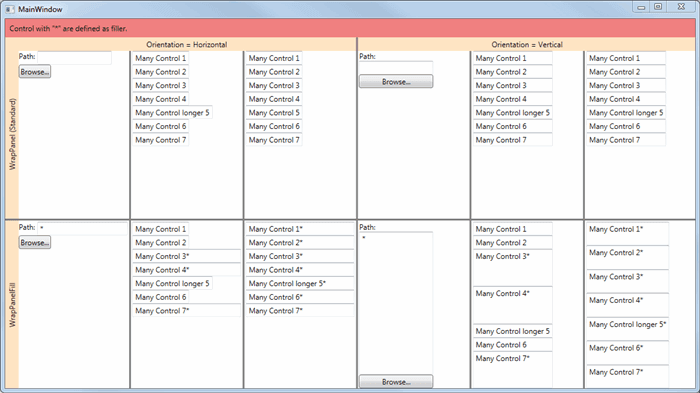
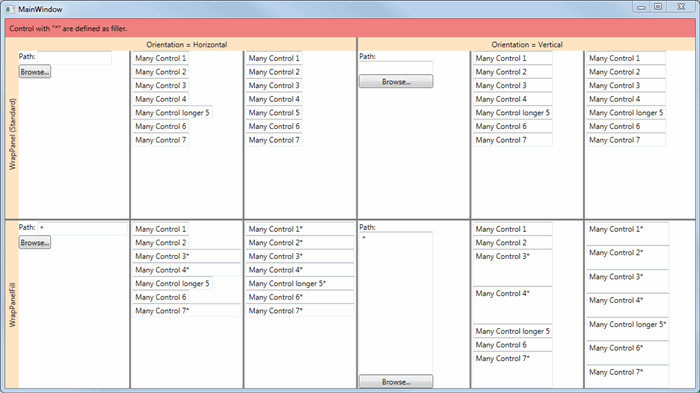
我意识到很多人都需要和我一样的布局容器:一个 WrapPanel,可以用一个或多个子控件填充右边空白空间(Orientation=Horizontal,站长注:注意了哦,不一定填充的是在最左边,也不一定是最右边,可以是中间哦)。我决定编写一个可重复使用的控件来在两个方向上完成这项工作。
该代码包含一个小演示,您可以在其中轻松查看它是否符合您的需要。
注意:我非常感谢反馈。如果您不喜欢代码,请告诉我原因。我希望它可以帮助任何人。
示例代码截图
背景
StackOverflow 上有几个问答,但没有真正简单的解决方案可以在多行时起作用。另外,我想做一个可以在任何地方轻松重复使用的控件(容器)。我从微软的代码开始修改它以提供所需的行为。
使用代码
您可以使用 DLL 或仅将源代码(只有一个.cs 文件)复制到您自己的库中。
用法如下:
<Window x:Class="WpfWrapPanelWithFillTestApp.MainWindow"
        xmlns="http://schemas.microsoft.com/winfx/2006/xaml/presentation"
        xmlns:x="http://schemas.microsoft.com/winfx/2006/xaml"
        xmlns:wrapPanelWithFill="clr-namespace:WrapPanelWithFill;assembly=WrapPanelWithFill"
        Title="MainWindow" Height="400" Width="800">

  <wrapPanelWithFill:WrapPanelFill Grid.Row="2" Grid.Column="6" Orientation="Vertical">
    <TextBlock Text="Path: " TextWrapping="Wrap"></TextBlock>
    <TextBox MinWidth="120" wrapPanelWithFill:WrapPanelFill.UseToFill="True">*</TextBox>
    <Button>Browse...</Button>
  </wrapPanelWithFill:WrapPanelFill>

</Window>
限制(改进方法)
- 为定义为填充的控件考虑设置
MaxWidth属性(或当Orientation是Vertical时设置MaxHeight)。 - 每个子控件的填充宽度始终相同(当更多子控件被定义为“填充”时。如果在“Grid”中使用“GridLength”做相同的“比例”定义会很好。例如 RowDefinition 的“Width”)。
- 添加
HorizontalContentAlignement和VerticalContentAlignement使控件更加完整。 当我们需要在右侧或中心而不是左侧对齐控件时,它很有用。 我在 StackOverflow 的 DTig 找到了一个很好的解决方案。
理想情况下,它是一个解决方案中每项改进的组合,这将是很好的。
历史
- 2015-05-12, 第一版
- 2015-05-13,使代码更简洁,修复了提示中的一些错误并添加了屏幕截图
- 2015-05-22,澄清限制。稍微改进一下文本。
协议
本文以及任何相关的源代码和文件均已获得代码项目开放许可证 (CPOL) 的许可
站长追加
本文功能最佳食用效果如前面说的,把容器代码复制到自己的项目中,然后使用。
站长也将该容器添加到Dotnet9WPFCotnrols包下,代码如下:
    <Window
    /**省略 */
    xmlns:dotnet9="https://dotnet9.com"
    /**省略 */
    >
    /**省略 */
    <GroupBox Header="WrapPanelFill">
        <StackPanel Orientation="Vertical">
            <Image
                Width="300"
                Height="300"
                Source="Images/Swift.png" />
            <dotnet9:WrapPanelFill>
                <Button Content="反馈" Style="{StaticResource Styles.ButtonDemo}" />
                <TextBlock dotnet9:WrapPanelFill.UseToFill="True" />
                <Button Content="喜欢" Style="{StaticResource Styles.ButtonDemo}" />
                <Button Content="不感冒" Style="{StaticResource Styles.ButtonDemo}" />
            </dotnet9:WrapPanelFill>
        </StackPanel>
    </GroupBox>
</Window>
和前面的代码类似,使用一个TextBlock作为空白填充,运行效果如下:

最后再给出本文所有代码出处:
- 原文示例代码:https://www.codeproject.com/KB/static/990854/WpfWrapPanelWithFill.zip
- Dotnet9WPFControls 包:https://www.nuget.org/packages/Dotnet9WPFControls/0.1.0-preview.3
- Dotnet9WPFControls 源码:https://github.com/dotnet9/Dotnet9WPFControls
- 文末示例代码:https://github.com/dotnet9/TerminalMACS.ManagerForWPF/blob/master/src/Demo/WpfThemeDemo/MainWindow.xaml