WPF Version of [Luyao Toolbox] is Free and Open Source! Solve Development Pain Points and Double Your Efficiency!

WPF Version of [Luyao Toolbox] is Free and Open Source! Solve Development Pain Points and Double Your Efficiency!

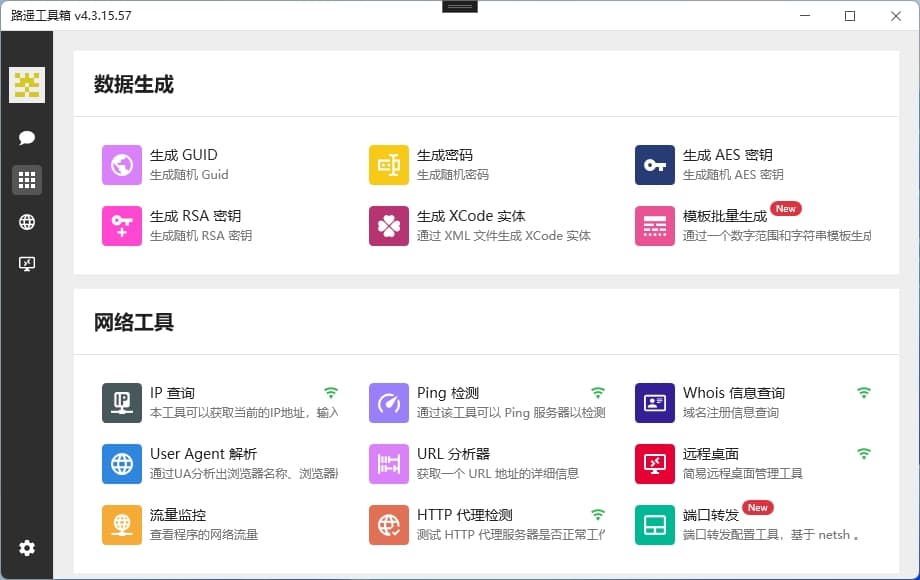
Luyao Toolbox is an open-source tool developed based on C# WPF, aimed at solving common functional requirements in the development process and automating them. It currently has over a dozen practical features, making your development work more efficient!

Last updated 11/14/2023 3:25 PM
沙漠尽头的狼
6 min read
Category
WPF
Tags
.NET C# WPF Open Source Toolbox

LuYao Toolbox is an open-source toolbox software developed based on C# WPF, designed to address common functional needs in the development process and automate them. It currently has over a dozen practical features to double your development efficiency!

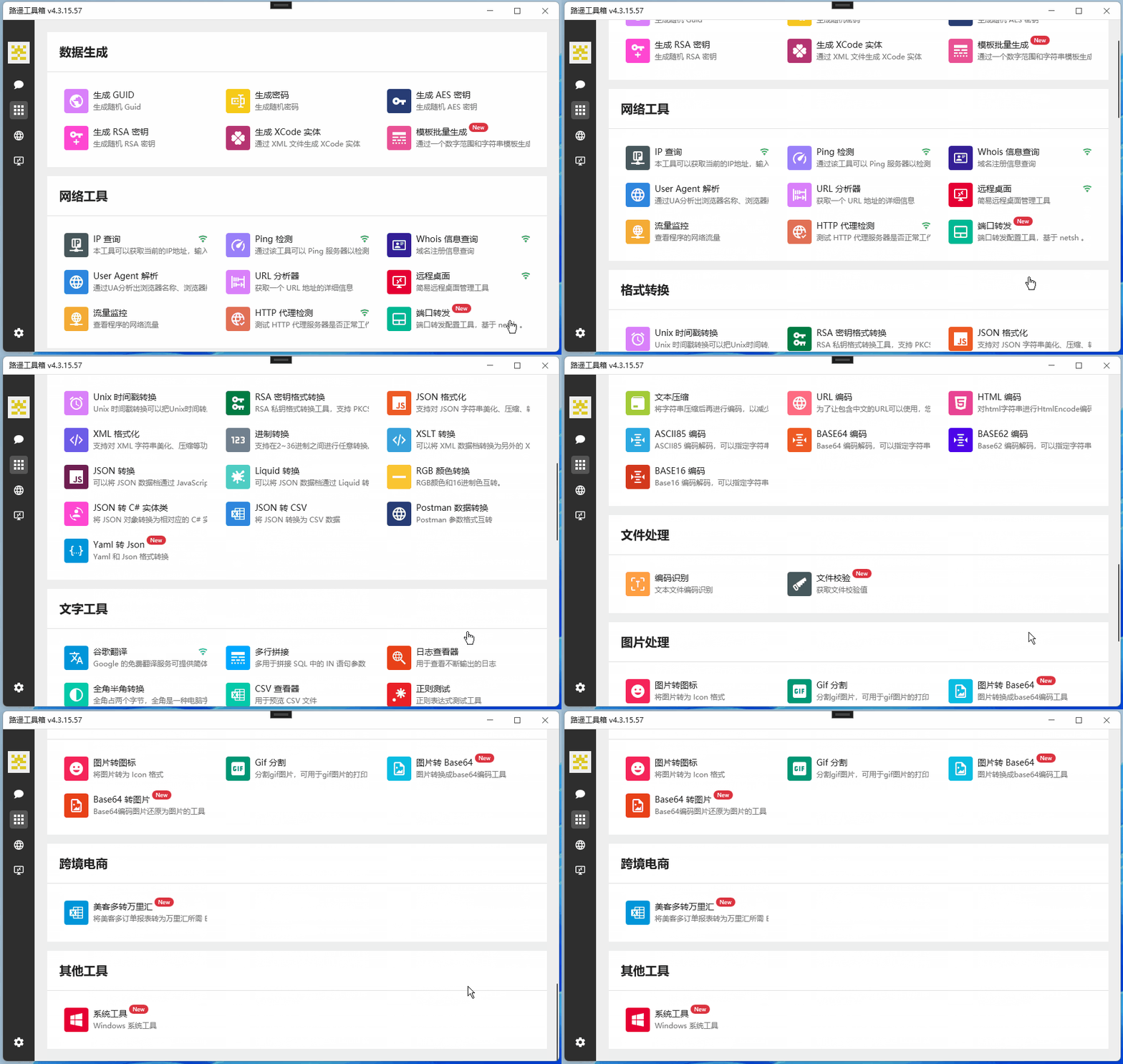
Toolbox Feature List:

1. Toolbox Feature Overview

  1. Data Generation
  • Generate GUID: Quickly generate unique identifiers.
  • Generate Password: Automatically generate strong passwords.
  • Generate AES Key: Easily generate keys required for the AES encryption algorithm.
  • Generate RSA Key: Generate public and private keys required for the RSA asymmetric encryption algorithm with one click.
  • Generate XCode Entity: Generate XCode entity classes from JSON data.
  • Template Batch Generation: Generate code in batch based on template files.
  1. Network Tools
  • IP Lookup: Query detailed information for a specified IP address.
  • Ping Test: Test network connectivity to a specified host.
  • Whois Information Query: Query Whois information for a specified domain name.
  • User Agent Parsing: Parse User Agent strings to obtain device and browser information.
  • URL Analyzer: Parse URLs to obtain detailed information for each part.
  1. Remote Desktop
  • Traffic Monitoring: Monitor network traffic in real-time to help you understand network usage.
  1. Format Conversion
  • Unix Timestamp Conversion: Convert Unix timestamps to date and time.
  • RSA Key Format Conversion: Convert the format of RSA keys for use across different platforms.
  • JSON Formatting: Beautify and format JSON data.
  • XML Formatting: Beautify and format XML data.
  • Base Conversion: Support conversion between binary, octal, decimal, and hexadecimal.
  • XSLT Transformation: Transform XML data using XSLT stylesheets.
  • JSON Conversion: Support conversion between JSON and other formats (e.g., XML, YAML, CSV).
  • Liquid Transformation: Transform data using the Liquid template engine.
  • RGB Color Conversion: Convert RGB color values to hexadecimal or CSS color names.
  • JSON to C# Entity Class: Generate C# entity classes from JSON data.
  • JSON to CSV: Convert JSON data to CSV format.
  • Postman Data Conversion: Convert data exported from Postman to other formats.
  • YAML to JSON: Convert YAML format data to JSON format.
  1. Text Tools
  • Google Translate: Perform text translation using the Google Translate API.
  • Multi-line Join: Join multiple lines of text into a single line.
  • Log Viewer: View and analyze log files.
  • Full-width Half-width Conversion: Convert full-width characters to half-width characters, or vice versa.
  • CSV Viewer: View and edit CSV files.
  • Regex Testing: Test if a regular expression matches specified text.
  • Youdao Dictionary: Look up word definitions and translations online.
  • Hash Calculator: Calculate the hash value of text.
  • Encoding Conversion: Support conversion between common encodings (e.g., UTF-8, GBK, ISO-8859-1).
  • Text Compression: Compress and decompress text.
  • URL Encoding: Encode and decode URLs.
  • HTML Encoding: Encode and decode HTML code.
  • ASCII85 Encoding: Encode and decode ASCII85 encoding.
  • BASE64 Encoding: Encode and decode BASE64 encoding.
  • BASE62 Encoding: Encode and decode BASE62 encoding.
  • BASE16 Encoding: Encode and decode BASE16 encoding.
  1. File Processing
  • Encoding Detection: Automatically detect the encoding format of files.
  • File Verification: Verify the integrity and consistency of files.
  1. Image Processing
  • Image to Icon: Convert images to ICO icons.
  • GIF Splitting: Split GIF animations into multiple static images.
  • Image to Base64: Convert images to Base64 encoding.
  • Base64 to Image: Convert Base64 encoding to images.

2. Project Source Code Organization

This section simply introduces how to view the toolbox source code. Screenshot from the source code repository:

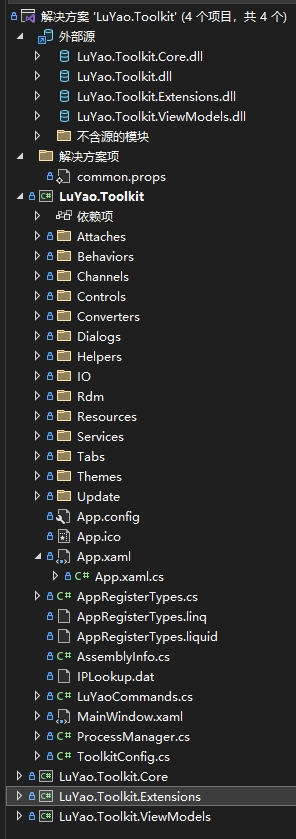
The source code of LuYao Toolbox is well-organized, easy to understand and maintain. Below is the project organization structure:

How to view the toolbox code?

Take the "Generate GUID" tool as an example.

  1. Open the "Generate GUID" tool

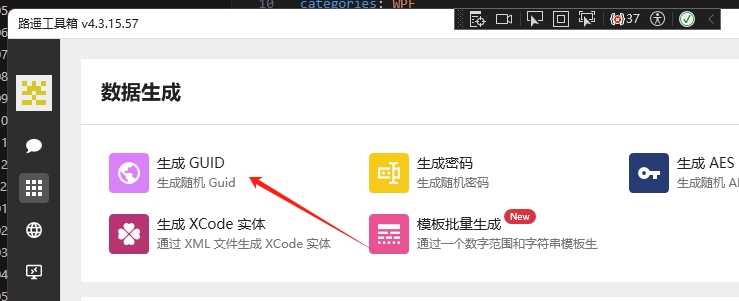
Click the second small icon menu on the left sidebar, then click "Generate GUID":

  1. In debug mode, click the tool button to locate the view

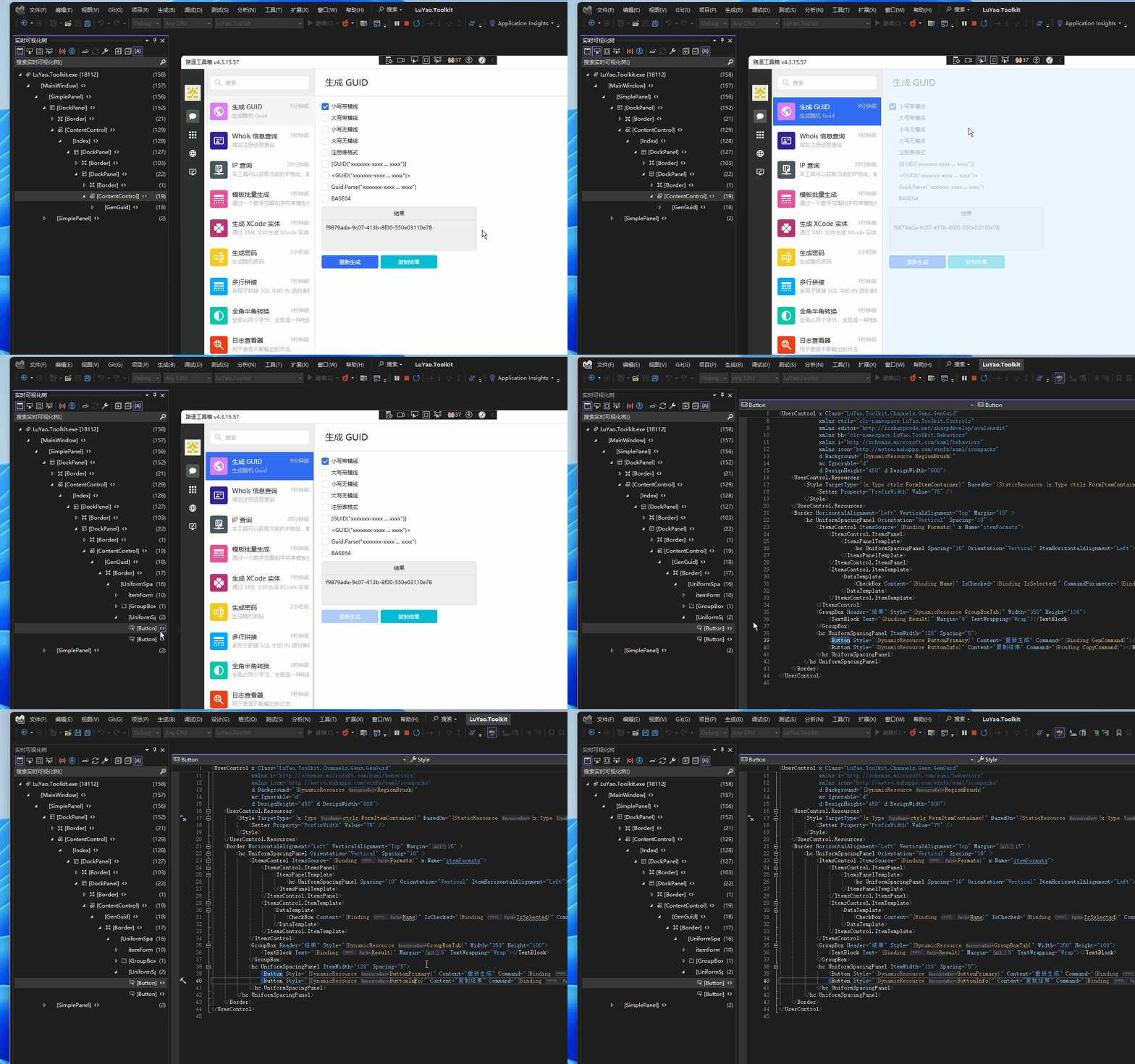
Select "Pick Element" from the title bar, then click the "Regenerate" button. In the Visual Studio Live Visual Tree, you can locate the XAML code for the "Regenerate" button:

From there, you can locate the view code file: LuYao.Toolkit/Channels/Gens/GenGuid.xml
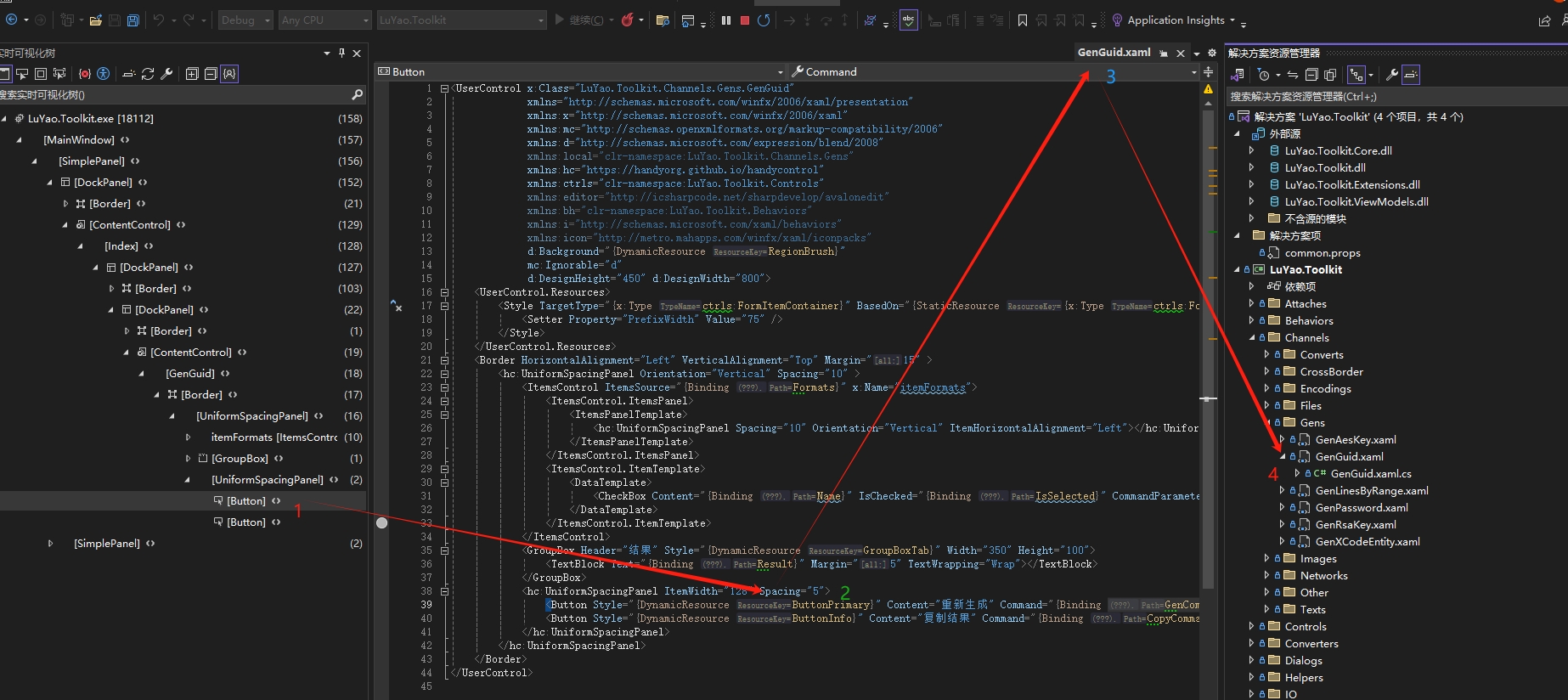
The command bound to the "Regenerate" button is GenCommand. Next, search for the ViewModel functional logic code.

  1. Search for command execution code

You can search globally for GenCommand (though you might not find it...), but a more convenient approach is to directly search for the ViewModel corresponding to the view. The functional code is located in the LuYao.Toolkit.ViewModels project under the corresponding directory (same path as the GenGuid.xml file): LuYao.Toolkit.ViewModels/Channels/Gens/GenGuidViewModel.cs
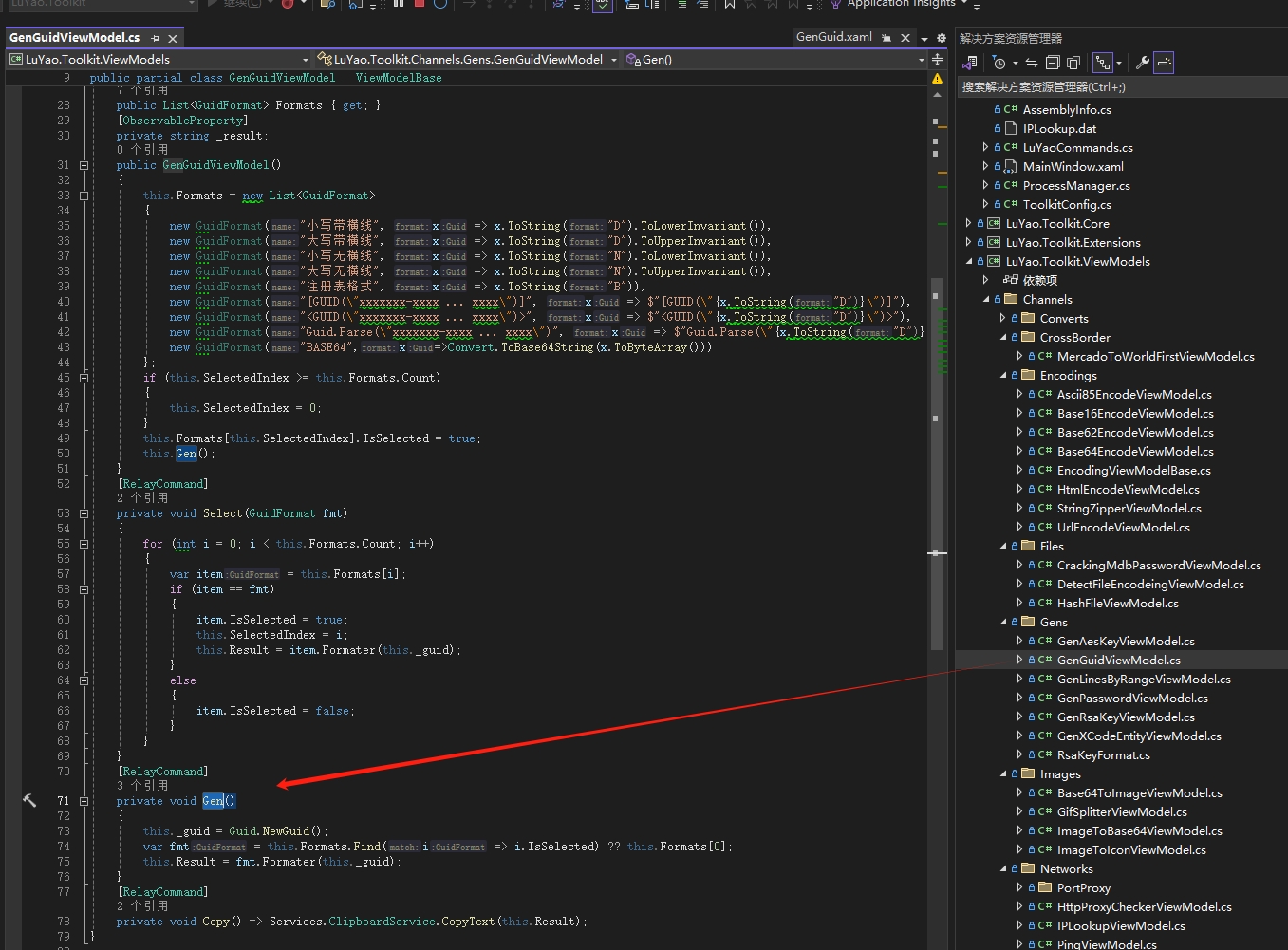
How is the GenCommand linked to the command handler method Gen()?

[RelayCommand]
private void Gen()
{
    this._guid = Guid.NewGuid();
    var fmt = this.Formats.Find(i => i.IsSelected) ?? this.Formats[0];
    this.Result = fmt.Formater(this._guid);
}

RelayCommand is provided by the framework CommunityToolkit.Mvvm, which automatically maps commands to their handler methods. For specific usage, please refer to the help documentation.

3. Summary

If interested, you can clone the source code or directly download the tool for use and learning. The address is still in the GitHub repository: https://github.com/landv/LuYao.Toolkit

The above covers the main features of LuYao Toolbox. Each feature helps improve development efficiency and solve pain points during development. If you're interested in how the features are implemented, feel free to open the source code. Download and try it out now!

Keep Exploring

Related Reading

More Articles
Same category / Same tag 1/26/2025

Implementing Internationalization in WPF Using Custom XML Files

This article details the method of implementing internationalization in WPF applications using custom XML files, including installing the necessary NuGet packages, dynamically retrieving the language list, dynamically switching languages, using translated strings in code and XAML interfaces, and provides a source code link to help developers easily achieve internationalization in WPF applications.

Continue Reading