
ClearScript 是一个 .NET 平台下的开源库,用于在 C# 和其他 .NET 语言中执行脚本代码。它提供了一种方便和安全的方法来将脚本与应用程序集成,并允许将应用程序暴露给脚本以进行更高级别的自定义和交互。本篇文章将深入介绍 ClearScript 的使用方法和特点,包括如何在 C# 中执行 JavaScript 脚本、如何与脚本交互、如何调用 C# 方法等方面的内容。
安装和配置
ClearScript 可以通过 NuGet 包管理器进行安装。要安装 ClearScript,可以在 Visual Studio 中打开 NuGet 包管理器控制台,并运行以下命令:
Install-Package ClearScript
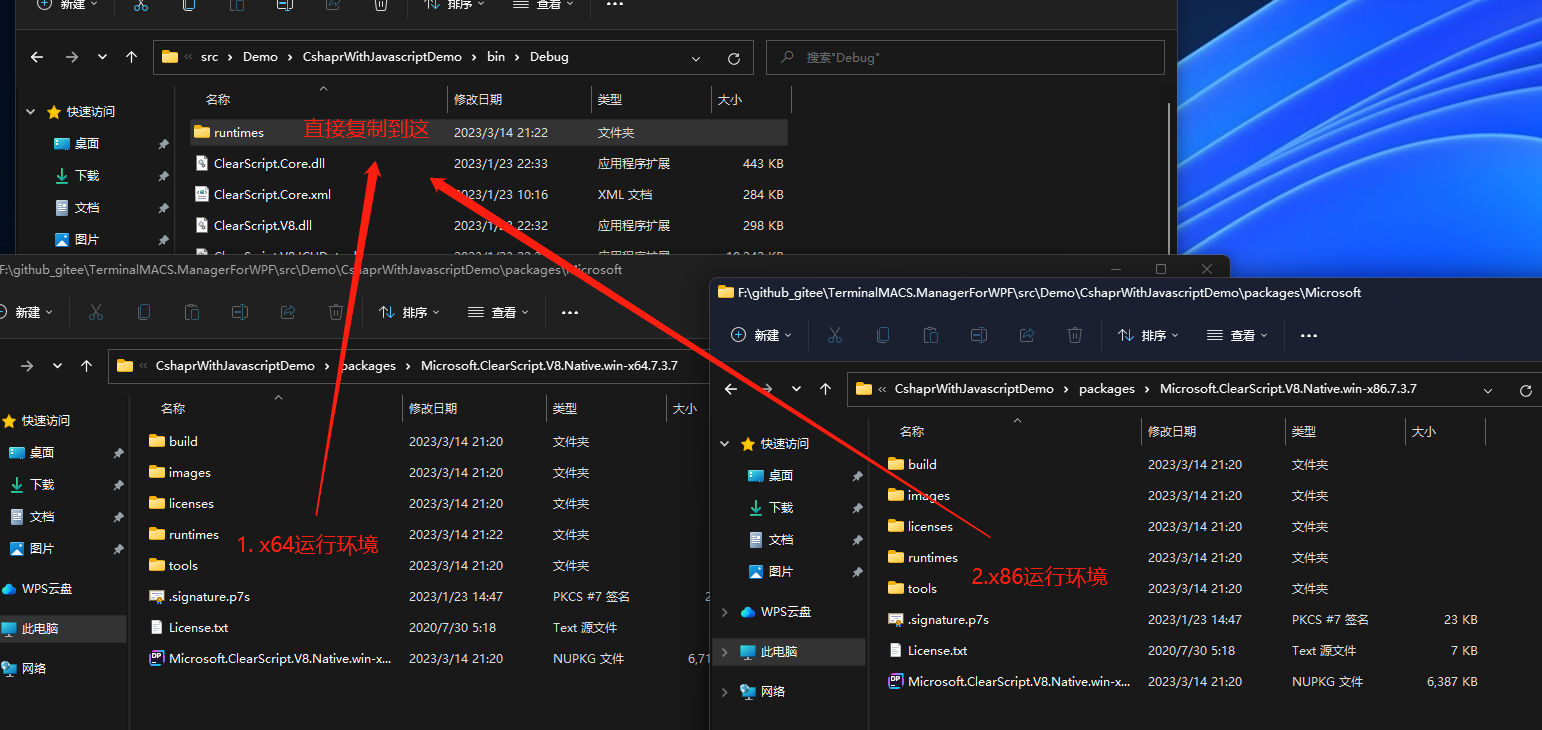
安装完成后,还需要将ClearScript nuget包下的runtimes目录复制到运行目录,然后就可以在项目中使用 ClearScript 库。
执行 JavaScript 脚本
要在 C# 中执行 JavaScript 脚本,需要创建一个 JavaScript 引擎实例,并将脚本传递给该实例。以下是一个简单的示例,演示了如何执行一个简单的 JavaScript 程序:
using var engine = new V8ScriptEngine();
engine.Execute("var a = 10; var b = 20; var c = a + b;");
var result = engine.Script.c;
Console.WriteLine(result); // 输出 30
在这个示例中,我们创建了一个名为“engine”的 V8ScriptEngine 对象,并调用其 Execute() 方法来执行一些 JavaScript 代码。在这种情况下,我们定义了三个变量(a、b 和 c),将它们相加,并将结果存储在变量 c 中。然后,我们从 engine.Script 对象中检索变量 c 的值,并将其输出到控制台。
与脚本交互
在执行 JavaScript 脚本时,可以将 C# 对象传递给脚本,以便脚本可以访问这些对象。要将对象传递给脚本,需要使用 AddHostObject() 方法将对象添加到 JavaScript 引擎中。以下是一个简单的示例,演示了如何将 C# 对象传递给 JavaScript:
/// <summary>
/// Person类需要为Public,V8引擎才能正常访问
/// </summary>
public class Person
{
    public string? Name { get; set; }
    public int Age { get; set; }
}

/// <summary>
/// JS与C#交互
/// </summary>
static void InteractionBetweenJsAndCsharp()
{
    using var engine = new V8ScriptEngine();
    var person = new Person { Name = "沙漠尽头的狼", Age = 18 };
    engine.AddHostObject("person", person);
    engine.Execute("var c = person.Name + ' 才 ' + person.Age + ' 岁呀?';");
    var result = engine.Script.c;
    Console.WriteLine(result); // 沙漠尽头的狼 才 18 岁呀?
}
在这个示例中,我们创建了一个名为“person”的 C# 对象, 注意Person的定义访问修饰符为public,并使用 AddHostObject() 方法将其添加到 JavaScript 引擎中。然后,我们执行一个 JavaScript 程序,该程序拼接person对象的属性组成一个JS变量,最后C#访问JS变量输出到控制台(尝试在JS中使用console.log输出未成功,有知道原因的朋友请留言告知)。
JS 调用 C# 方法
除了将 C# 对象传递给 JavaScript 外,还可以在 JavaScript 中调用 C# 方法。要在 JavaScript 中调用 C# 方法,需要创建一个包含方法的类,并使用 AddHostObject() 方法将该类添加到 JavaScript 引擎中。以下是一个简单的示例,演示了如何在 JavaScript 中调用 C# 方法:
/// <summary>
/// JS调用C#的方法
/// </summary>
static void JsCallCSharpMethod()
{
    using var engine = new V8ScriptEngine();
    var calculator = new Calculator();
    engine.AddHostObject("calculator", calculator);
    engine.Execute("var result = calculator.Add(15, 20)");
    var result = engine.Script.result;
    Console.WriteLine(result); // 35
}

public class Calculator
{
    public int Add(int a, int b)
    {
        return a + b;
    }
}
在这个示例中,我们创建了一个名为“calculator”的 Calculator 对象,并使用 AddHostObject() 方法将其添加到 JavaScript 引擎中。然后,我们在 JavaScript 中执行一个程序,该程序调用 Calculator 对象的 Add() 方法,并将结果赋值给JS变量,最后C#中取得变量值并输出到控制台。
多线程使用
ClearScript 还支持在多个线程中使用 JavaScript 引擎。要在多个线程中使用 JavaScript 引擎,需要创建多个 JavaScript 引擎实例,并使用各自的线程来执行脚本。以下是一个简单的示例,演示了如何在多个线程中使用 JavaScript 引擎:
using System.Threading.Tasks;
using Microsoft.ClearScript.V8;

var engine1 = new V8ScriptEngine();
var engine2 = new V8ScriptEngine();

Task.Run(() =>
{
    engine1.Execute("var a = 'Hello from thread 1!'");
});

Task.Run(() =>
{
    engine2.Execute("var b = 'Hello from thread 2!'");
});
在这个示例中,我们创建了两个名为“engine1”和“engine2”的 V8ScriptEngine 对象,并在两个不同的线程中分别执行了两个 JavaScript 程序。这些程序定义JS变量。
需要注意的是,在多个线程中使用 JavaScript 引擎时,应该避免同时访问同一个 JavaScript 引擎实例,以避免线程安全问题。
总结
本文介绍了 ClearScript 的使用方法和特点,包括如何在 C# 中执行 JavaScript 脚本、如何与脚本交互、如何调用 C# 方法、多线程使用等方面的内容。ClearScript 提供了一种方便和安全的方法来将脚本与应用程序集成,并允许将应用程序暴露给脚本以进行更高级别的自定义和交互。通过使用 ClearScript,可以为应用程序添加灵活性和可扩展性,并在应用程序中实现动态脚本执行功能。
参考资料
- ClearScript Examples:https://microsoft.github.io/ClearScript/Examples/Examples.html