UDP Packet Length, Theoretical UDP Packet Length
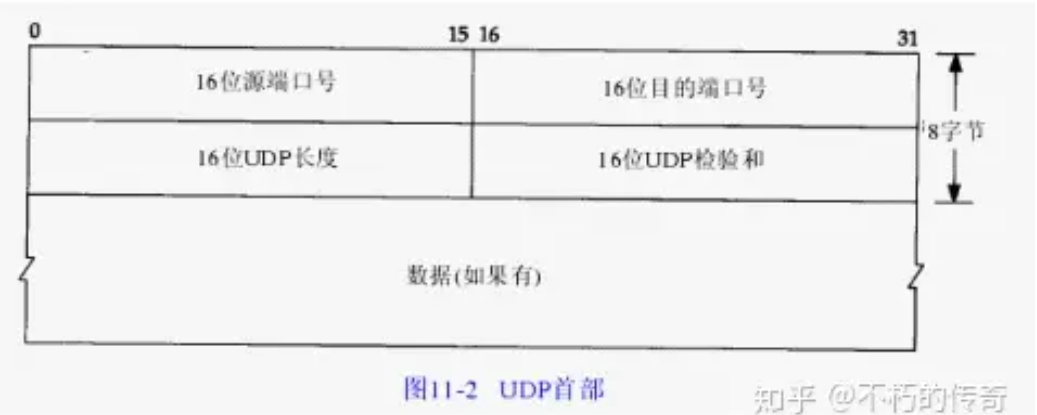
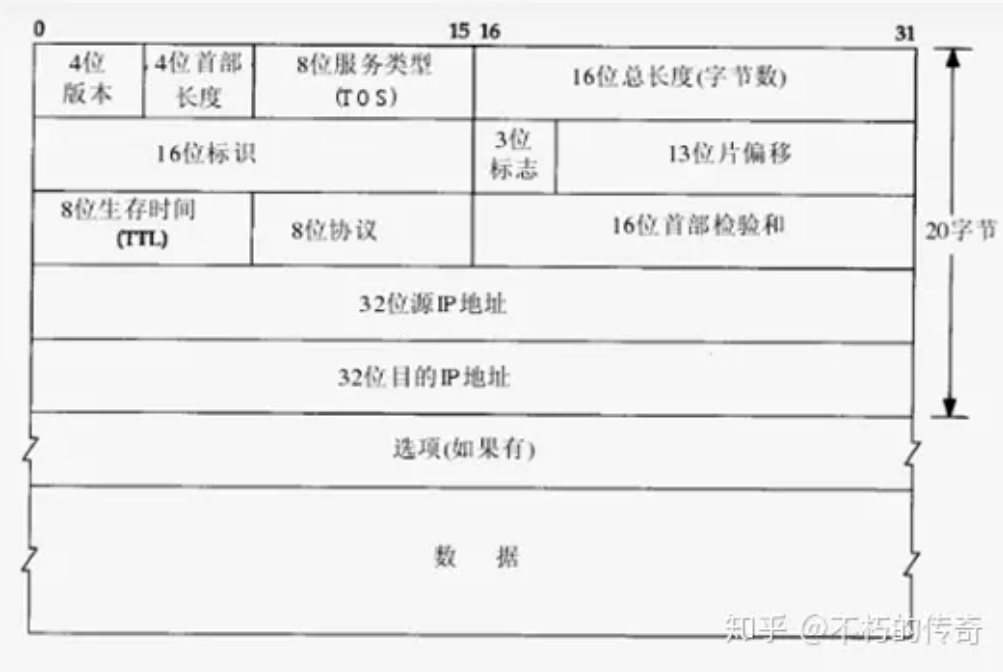
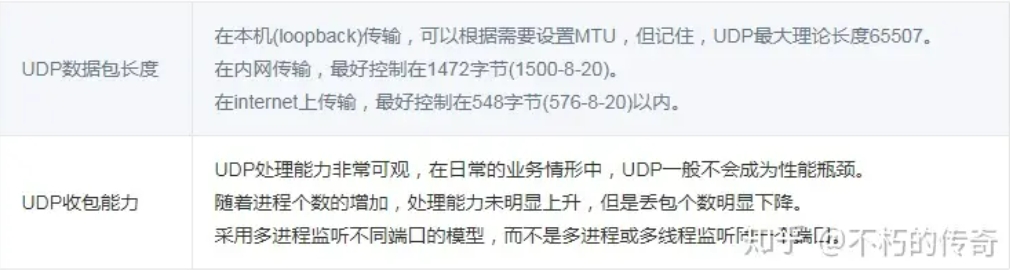
What is the theoretical length of a UDP packet, and what is an appropriate UDP packet size? According to the UDP packet header in Chapter 11 of TCP-IP Illustrated Volume 1, the maximum packet length for UDP is 216-1 bytes. Since the UDP header occupies 8 bytes, and after encapsulation at the IP layer, the IP header takes another 20 bytes, the maximum theoretical length of a UDP packet is 216-1-8-20 = 65507 bytes.

However, this is only the theoretical maximum length of a UDP packet. First, we know that TCP/IP is typically considered a four-layer protocol system, including the link layer, network layer, transport layer, and application layer. UDP belongs to the transport layer. During transmission, the entire UDP packet is carried as the data field of the lower-layer protocol. Its length is constrained by the lower IP layer and the data link layer protocol.
MTU Related Concepts
The length of an Ethernet data frame must be between 46 and 1500 bytes, which is determined by the physical characteristics of Ethernet. This 1500 bytes is called the MTU (Maximum Transmission Unit) of the link layer. The Internet Protocol allows IP fragmentation, so that a data packet can be split into fragments small enough to pass through a link whose MTU is smaller than the original size of the packet. This fragmentation process occurs at the network layer, using the MTU value of the network interface that sends the packet to the link. This MTU value is the Maximum Transmission Unit. It refers to the largest packet size (in bytes) that a certain layer of a communication protocol can pass through. This MTU parameter is usually related to the communication interface (network interface card, serial port, etc.).
In the Internet Protocol, the "path MTU" of an Internet transmission path is defined as the minimum MTU among all IP hops on the "path" from source address to destination address.
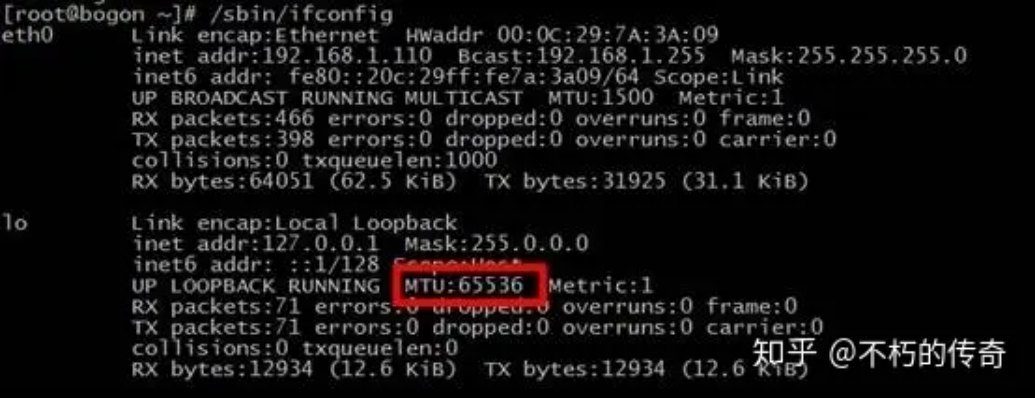
Note that the MTU of loopback is not subject to the above restrictions. Check the loopback MTU value:

[root@bogon ~]# cat /sys/class/net/lo/mtu
65536
Impact of IP Fragmentation on UDP Packet Length
As mentioned above, due to the constraints of the network interface card, the MTU length is limited to 1500 bytes. This length refers to the data area of the link layer. Packets larger than this value may be fragmented; otherwise, they cannot be sent. Packet-switched networks are unreliable and prone to packet loss. The sender of the IP protocol does not retransmit. The receiver can only reassemble all fragments and deliver them to the upper-layer protocol processing code; otherwise, from the application's perspective, these packets are considered lost.
Assuming that the probability of packet loss is equal at the same time, a larger IP datagram naturally has a higher probability of being dropped because losing just one fragment results in the entire IP datagram not being received. Packets that do not exceed the MTU are not subject to fragmentation.
The MTU value does not include the 18 bytes of the link layer header and trailer. Therefore, this 1500 bytes is the length limit for the network layer IP datagram. Since the IP datagram header is 20 bytes, the maximum length of the IP datagram data field is 1480 bytes. This 1480 bytes is used to carry either a TCP segment or a UDP datagram from the transport layer. Furthermore, since the UDP datagram header is 8 bytes, the maximum length of the UDP datagram data field is 1472 bytes. This 1472 bytes is the number of bytes we can use.

What happens when the UDP data we send is larger than 1472? That means the IP datagram is larger than 1500 bytes, exceeding the MTU. At this point, the sender's IP layer needs to perform fragmentation, splitting the datagram into multiple fragments, each smaller than the MTU. The receiver's IP layer then needs to reassemble the datagram. More seriously, due to the characteristics of UDP, if a certain fragment is lost during transmission, the receiver cannot reassemble the datagram and will discard the entire UDP datagram. Therefore, in a typical LAN environment, it is better to keep UDP data under 1472 bytes.
When programming for the Internet, the situation is different because routers on the Internet may set the MTU to different values. If we assume an MTU of 1500 and send data, but a network along the path has an MTU smaller than 1500 bytes, the system will use a series of mechanisms to adjust the MTU value so that the datagram can reach its destination successfully. Given that the standard MTU value on the Internet is 576 bytes, when programming UDP for the Internet, it is best to keep the UDP data length within 548 bytes (576-8-20).
UDP Packet Loss
UDP packet loss refers to packet loss that occurs in the Linux kernel's TCP/IP protocol stack during UDP data packet processing after the NIC receives the data. There are two main reasons:
- The UDP data packet has a format error or the checksum check fails.
- The application cannot process the UDP data packet in time.
For reason 1, UDP data packet errors themselves are rare and are not controllable by the application. This article does not discuss it.
First, introduce a common method for detecting UDP packet loss: use the netstat command with the -su parameter.
# netstat -su
Udp:
2495354 packets received
2100876 packets to unknown port received.
3596307 packet receive errors
14412863 packets sent
RcvbufErrors: 3596307
SndbufErrors: 0
From the output above, you can see a line containing "packet receive errors". If you execute netstat -su at intervals and find that the number at the beginning of the line keeps increasing, it indicates UDP packet loss.
Below are common reasons for UDP packet loss due to the application not processing in time:
1. The Linux kernel socket buffer is set too small.
# cat /proc/sys/net/core/rmem_default
# cat /proc/sys/net/core/rmem_max
You can check the default and maximum values of the socket buffer.
What size should rmem_default and rmem_max be set to? If the server is not under high performance pressure and there are no strict latency requirements, setting them to around 1M is fine. If the server is under high performance pressure or has strict latency requirements, you must carefully set rmem_default and rmem_max. Setting them too small will cause packet loss; setting them too large may lead to a snowball effect.
- The server load is too high, consuming a large amount of CPU resources, making it unable to process UDP data packets in the Linux kernel socket buffer in time, leading to packet loss.
Generally, there are two reasons for high server load: too many UDP packets received, or a performance bottleneck in the server process. If too many UDP packets are received, consider scaling out. Performance bottlenecks in the server process belong to the category of performance optimization and are not discussed in detail here.
- Disk I/O is busy.
If the server has a large number of I/O operations, it can cause the process to block, with CPUs waiting for disk I/O, thus unable to process UDP data packets in the kernel socket buffer in time. If the business itself is I/O-intensive, consider optimizing the architecture and using caching reasonably to reduce disk I/O.
There is an easily overlooked issue: many servers record logs on local disks. Due to operational misconfiguration, the log level may be set too high, or a certain error suddenly appears in large numbers, causing a large number of I/O requests to write logs to disk, making disk I/O busy and leading to UDP packet loss.
For operational misconfigurations, strengthen the management of the operational environment to prevent errors. If the business indeed needs to log a large amount of data, consider using in-memory logging or remote logging.
- Physical memory is insufficient, leading to swap usage.
Swap usage is essentially also a form of high disk I/O, but it is easily overlooked because it is special, so it is listed separately.
As long as physical memory usage is properly planned and system parameters are set reasonably, this problem can be avoided.
- Disk full, making I/O impossible.
If disk usage is not planned properly and monitoring is inadequate, the disk may become full, causing the server process to be unable to perform I/O and remain in a blocked state. The most fundamental solution is to plan disk usage properly to prevent business data or log files from filling up the disk, while also strengthening monitoring. For example, develop a general tool that continuously alerts when disk usage reaches 80%, leaving sufficient response time.
UDP Packet Reception Capability Test
Test Environment
Processor: Intel(R) Xeon(R) CPU X3440 @ 2.53GHz, 4 cores, 8 hyper-threads, Gigabit Ethernet NIC, 8GB memory
Model 1
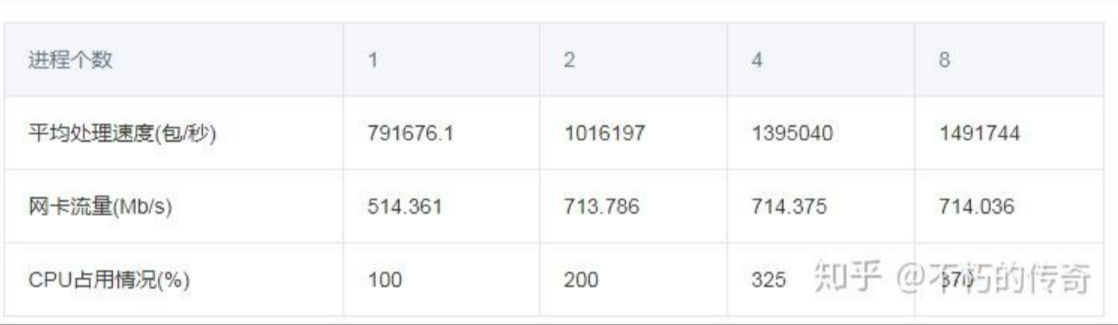
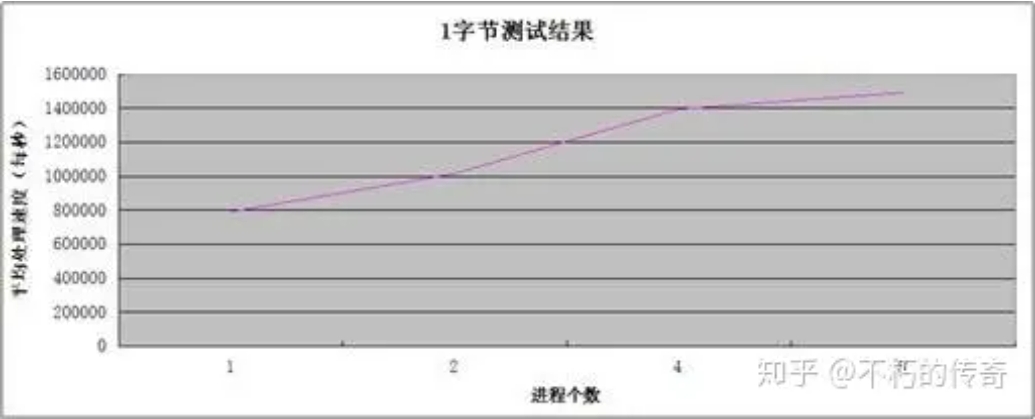
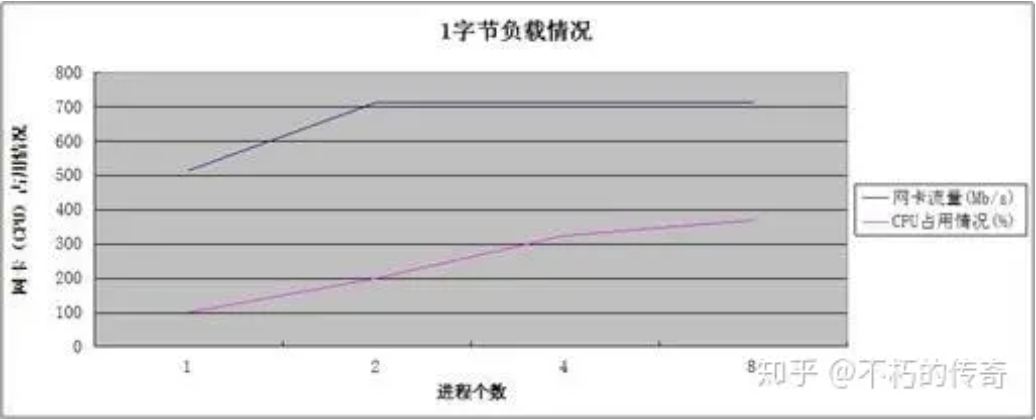
Single machine, single-thread asynchronous UDP service, no business logic, only packet reception operation, one byte of data besides the UDP header.
Test results


Observations:
- The single-machine UDP packet reception processing capability can reach about 1.5 million per second.
- The processing capability increases with the number of processes.
- When processing peaks, CPU resources are not fully exhausted.
Conclusions:
- The UDP processing capability is quite impressive.
- For observations 2 and 3, it can be seen that the performance bottleneck is the NIC, not the CPU. The increase in processing capability and the decrease in packet loss (UDP_ERROR) result from reducing the number of lost packets.
Model 2
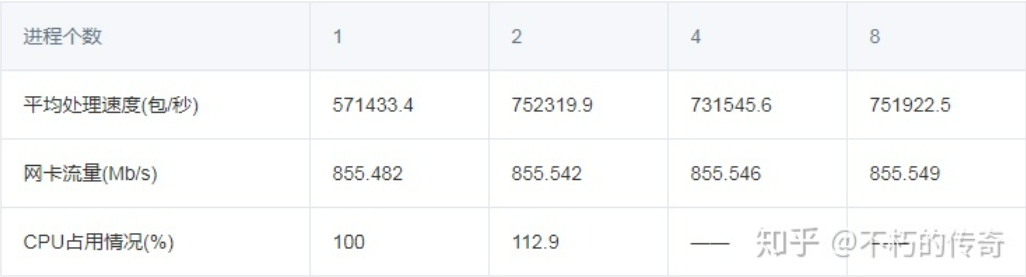
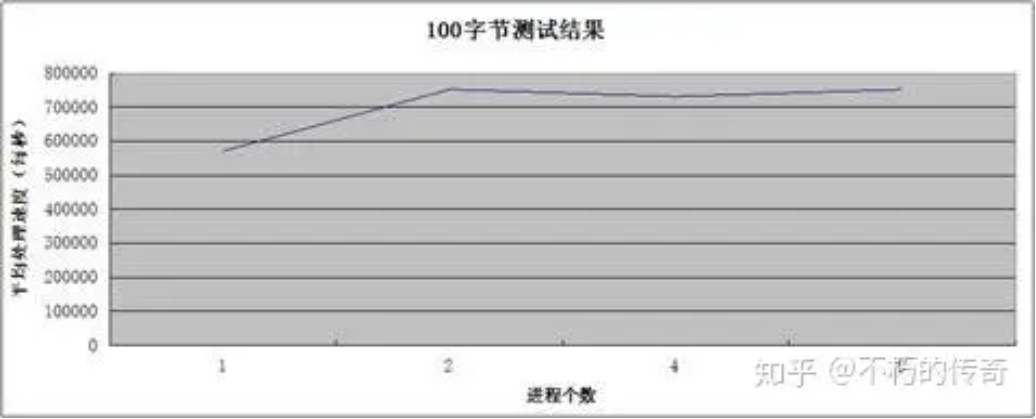
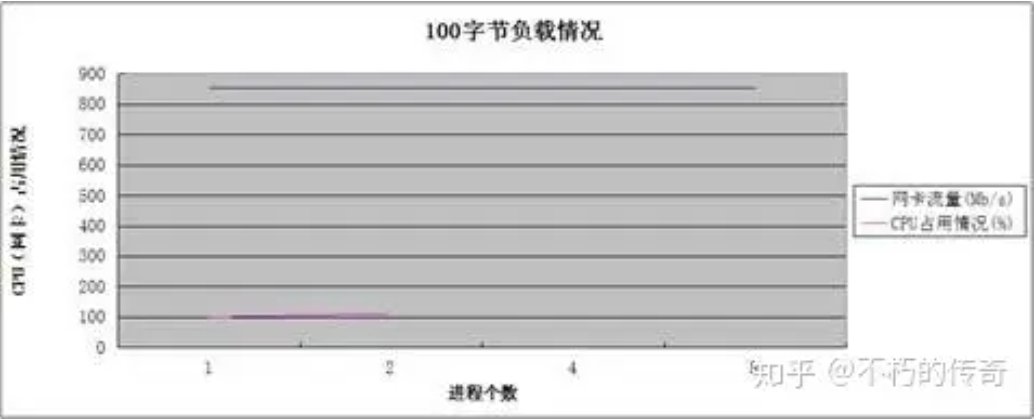
Other test conditions are the same as Model 1, but with 100 bytes of data besides the UDP header.
Test results


Observations:
- A packet size of 100 bytes is more representative of typical business scenarios.
- The UDP processing capability is still impressive, peaking at 750,000 per second on a single machine.
- At 4 and 8 processes, CPU usage was not recorded (NIC traffic was exhausted), but it is certain that the CPU was not exhausted.
- As the number of processes increases, the processing capability does not significantly improve, but the number of lost packets (UDP_ERROR) decreases significantly.
Model 3
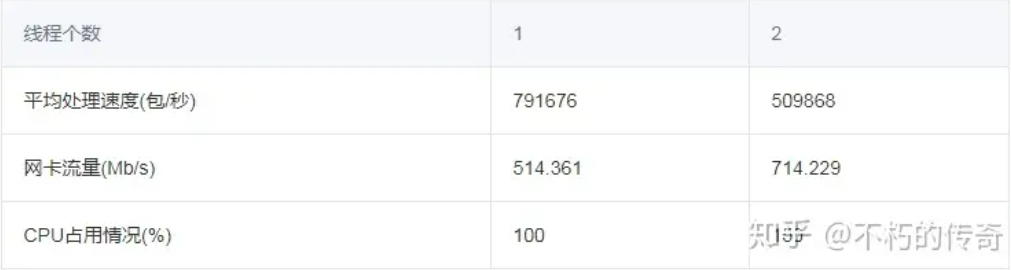
Single machine, single process, multi-threaded asynchronous UDP service, multiple threads sharing one file descriptor, no business logic, one byte of data besides the UDP header.
Test results:

Observations:
- As the number of threads increases, the processing capability decreases instead of increasing.
Conclusions:
- Multiple threads sharing one file descriptor can cause significant lock contention.
- Multiple threads sharing one file descriptor means that when a packet arrives, all threads are woken up, leading to frequent context switches.
Final Conclusions:
- The UDP processing capability is quite impressive. In typical business scenarios, UDP generally does not become a performance bottleneck.
- As the number of processes increases, the processing capability does not significantly improve, but the number of lost packets decreases significantly.
- During this test, the bottleneck was the NIC, not the CPU.
- Use a multi-process model that listens to different ports, rather than a multi-process or multi-thread model that listens to the same port.
Summary