Maui Learning Path - Introduction

Maui Learning Path - Introduction

What is .NET MAUI?

Last updated 6/23/2022 11:08 PM
轩研 Maui开发者
7 min read
Category
MAUI
Tags
.NET C# MAUI

After much thought, I decided to start with an introduction to Maui. Although this is a cliché topic, it cannot be omitted (please allow me to write a filler article).

What is .NET MAUI

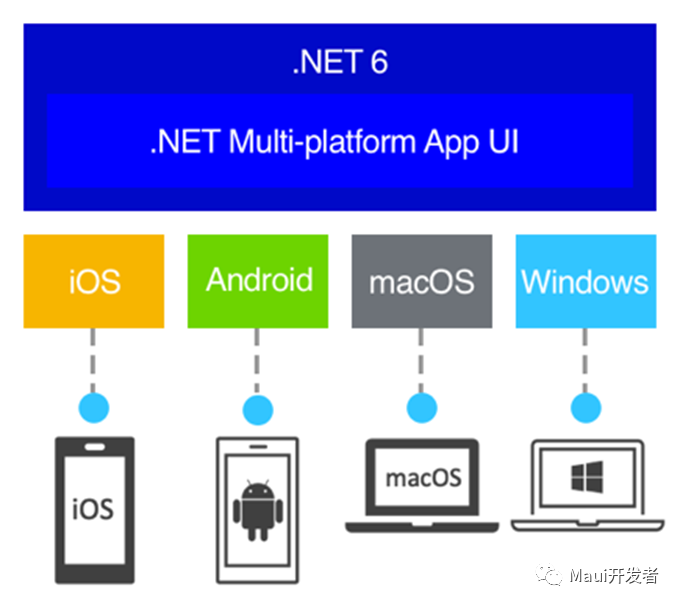
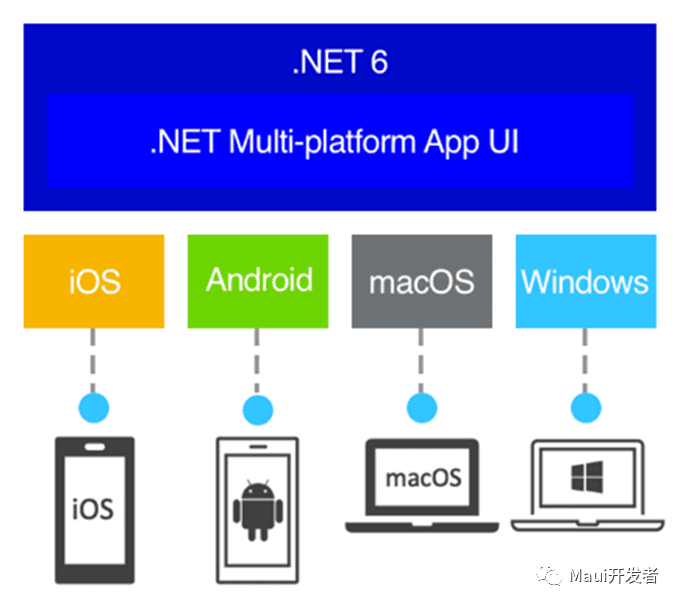
.NET MAUI is Microsoft's cross-platform framework based on .NET Multi-platform App UI (.NET MAUI), using C# and XAML to create native mobile and desktop applications. With .NET MAUI, you can develop apps that run on Android, iOS, macOS, and Windows from a single shared codebase.

.NET MAUI evolved from Xamarin.Forms. If you have experience with Xamarin.Forms, using MAUI will become very natural. With .NET MAUI, you can create multi-platform apps from a single project, but you can also add platform-specific source code and resources if needed. The main goal of .NET MAUI is to implement as much application logic and UI layout as possible in a single codebase.

Platforms Supported by .NET MAUI

  • Android 5.0 or higher (API 21)
  • iOS 10 or higher (UIKit)
  • macOS 10.13 or higher (Mac Catalyst UIKit)
  • Windows 11 and Windows 10 (1809) or higher (WinUI3 WindowsAppSdk)
  • Tizen, supported by Samsung (now integrated into project templates)
  • Linux, supported by the community

How .NET MAUI Works

.NET MAUI unifies the APIs of Android, iOS, macOS, and Windows into a single API, allowing a write-once, run-anywhere developer experience while providing deep access to all aspects of each native platform.

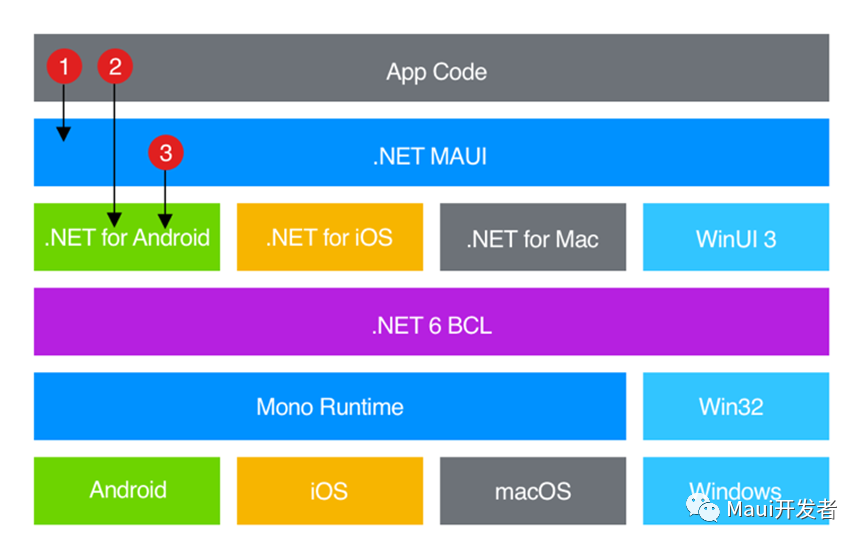
.NET 6 provides a series of platform-specific frameworks for creating apps: .NET for Android, .NET for iOS, .NET for macOS, and the Windows UI 3 (WinUI 3) library. These frameworks all have access to the same .NET 6 Base Class Library (BCL). This library abstracts the details of the underlying platform from your code. The BCL relies on the .NET runtime to provide an execution environment for the code.

For Android, iOS, and macOS, the environment is implemented by Mono, an implementation of the .NET runtime. On Windows, Win32 provides the execution environment.

Although the BCL enables apps running on different platforms to share common business logic, various platforms have different ways of defining the application's user interface and provide different models for specifying how UI elements communicate and interoperate. You can create UIs separately for each platform using .NET for Android, iOS, macOS, and WinUI 3, but this approach requires maintaining a codebase for each individual device family. .NET MAUI provides a framework for building UIs for mobile and desktop applications.

The following diagram shows a high-level view of the architecture of a .NET MAUI application:

In a .NET MAUI application, you write code that primarily interacts with the .NET MAUI API. .NET MAUI directly uses native platform APIs. Additionally, application code can directly use platform APIs when needed.

.NET MAUI applications can be written on a Windows PC or Mac (currently requires VS2022 preview) and compiled into native application packages:

  • Android: Apps compiled with .NET MAUI are compiled from C# into Intermediate Language (IL), then compiled to native assemblies at app startup (JIT).
  • iOS: Apps compiled with .NET MAUI are fully natively compiled (AOT from C# to native ARM assembly code).
  • macOS: Apps compiled with .NET MAUI use Mac Catalyst, a solution provided by Apple that brings iOS apps built with UIKit to the desktop, augmented with additional AppKit and platform APIs as needed.
  • Windows: Apps built with .NET MAUI use the Windows UI 3 (WinUI 3) library to create native applications targeting the Windows desktop.

Other Application Methods of .NET MAUI

  • Although .NET MAUI already provides wrappers for native controls on each platform, you can still use the custom drawing engine provided by MAUI (Microsoft.Maui.Graphics) to create controls that meet your own needs.
  • You can also create .NET MAUI Blazor applications to achieve a web-like experience. .NET MAUI Blazor applications require updated platform-specific WebView controls. Currently supported platforms are:
    • Android 7.0 (API 24) or higher (Chrome)
    • iOS 14 or higher (Safari)
    • Mac Catalyst macOS 11 or higher (Safari)
    • Windows 11, Windows 10 (1809) or higher (Edge WebView2)
    • Tizen (unknown)
    • Linux (unknown)

Technical Knowledge Required for .NET MAUI Development

  • Basic:
    • .NET
    • C#
    • XAML
    • MAUI
  • Extended:
    • WinUI3 API and Windows Platform API (Windows)
    • Android API (Android) (usually not needed unless accessing hardware)
    • UIKit, iOS Platform API (iOS) (usually not needed unless accessing hardware)
    • UIKit, AppKit, macOS API (Mac)
    • Blazor (not mandatory)

Advantages and Disadvantages of .NET MAUI

  • Advantages:
    • Developed with C# + .NET, easy to learn, easy to upgrade, productivity unmatched when paired with the best IDE.
    • Microsoft technologies generally share commonalities (you can easily transition to WPF).
    • Backed by a major corporation.
    • Uses platform-native controls on different platforms, ensuring native performance.
    • Can achieve a web-consistent experience when paired with Blazor.
  • Disadvantages:
    • Does not support Windows 7, and even has version requirements for Windows 10.
    • Although officially released, it is still not stable enough.
    • Because it uses C#, it may be harder to find suitable jobs compared to Java or frontend ecosystems (major companies typically use Java).
    • Microsoft tends to discontinue products.
    • Although native, this means you need to perform platform-specific adaptations (if not using custom drawing).
    • Although native, this also means you need to learn platform-specific knowledge (control behavior may also vary) (though this is required for all cross-platform frameworks).

Similar Cross-Platform Development Frameworks

  • Qt (uses C++, personally considered the true cross-platform framework, even supports embedded systems) (custom drawing)
  • Flutter (Google's cross-platform framework, uses Dart language) (custom drawing)
  • Uno Platform (C#, similar approach to MAUI)
  • Avalonia (C#, WPF-like) (custom drawing)
  • CPF (C#, domestic Chinese cross-platform UI framework, supports LoongArch) (custom drawing)
  • Electron (web technology stack direction)
Keep Exploring

Related Reading

More Articles