Hello everyone, I'm the Wolf at the End of the Desert.
After launching online mini-tools and mini-games on Dotnet9, the server feels quite stressed. Opening 25 pages uses about 170MB of memory, with CPU staying at 60-70%. It seems Server really isn’t suitable for applications with heavy interaction (server specs: 2 cores, 4GB RAM). So the site admin rushed to launch a Blazor Wasm version of the site to help everyone intuitively compare the differences between the two modes. Let me explain in detail below.
1. About Launching the Dotnet Toolbox
To facilitate future expansion of tools and games, the admin put the domain dotnetools.com purchased last year into use. This domain was bought for 10 years at once (so no worries about the site disappearing in a few years—though accidents can happen, like the admin running out of money to renew the server...). A Blazor Wasm version of the site was developed and deployed within a day, and the online mini-tools and mini-games already on Dotnet9 were migrated over. You can experience it at: https://dotnetools.com:

2. The Dotnet Toolbox Site Is Open Source
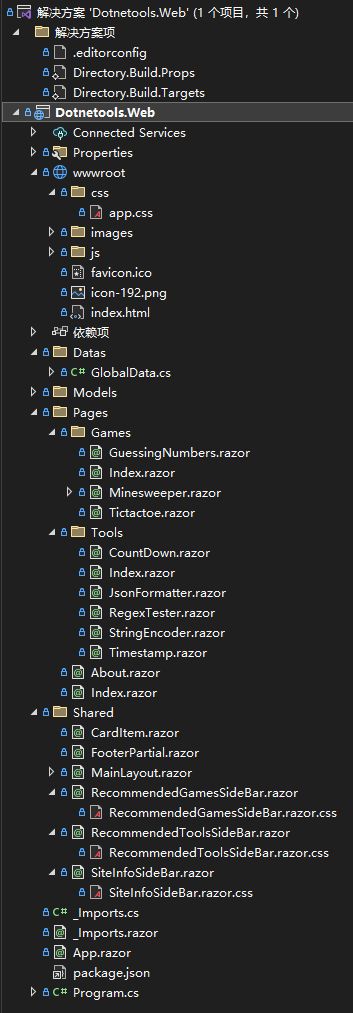
The site's source code structure is as follows. There is only one project, and to go live quickly, the code is straightforward:

The source code link is at the end of the article, so please don’t ask for the source code address again....
3. Why Is Blazor Server Unsuitable for Developing Online Tools or Games?
Blazor Server is unsuitable for developing online tools or games primarily because its working principles and characteristics impose limitations and constraints.
Real-time Limitations: Blazor Server uses SignalR for real-time communication with the server. However, since all UI updates must go through the server, users may experience noticeable latency under high network latency. This is unacceptable for applications like online tools or games that require real-time responsiveness.
Server Resource Consumption: Blazor Server runs the entire application on the server, with each user occupying a connection and some server resources. For applications like online tools or games that require many concurrent users, this can lead to excessive server resource consumption, making scaling and maintenance difficult.
Client Performance Constraints: Blazor Server renders UI on the server and pushes updates to the client via SignalR. This means client performance significantly impacts application response speed and user experience. For complex online tools or games, client performance may be insufficient.
In summary, Blazor Server is better suited for websites with low real-time requirements, small user bases, and low server resource consumption. For online tools or games needing real-time interaction and many concurrent users, Blazor WebAssembly may be more appropriate, as it deploys the entire application to the client, reducing server load and providing a better user experience.
4. Reasons for Choosing Blazor Wasm for the Tool Site
The Dotnet9 site will continue using Blazor Server because blog-type sites need SEO and search engine traffic.
Dotnet Toolbox, on the other hand, focuses on online mini-tools and mini-games, so Blazor Wasm was chosen. When talking about choosing Blazor WebAssembly, there are several exciting advantages worth mentioning:
Instant Performance: Blazor WebAssembly uses WebAssembly (Wasm) technology to compile C# code into efficient binary format that runs directly in the browser. This means you can use C#-written applications on the client without converting them to JavaScript. This direct execution capability gives Blazor WebAssembly near-native application performance, providing faster loading and a smoother user experience.
Cross-Platform: Blazor WebAssembly is a cross-platform solution that runs on various operating systems and devices, including Windows, Mac, Linux, and mobile devices. This means you can build applications for different platforms using the same codebase, reducing development and maintenance effort.
Development Efficiency: Blazor WebAssembly uses C# and the .NET framework, a widely used development ecosystem. If you're already familiar with C# and .NET, you can start developing with Blazor WebAssembly immediately, without learning a new language or framework. This efficiency can significantly accelerate project development and reduce the learning curve.
Powerful Ecosystem: Blazor WebAssembly is built on the .NET ecosystem, allowing you to leverage .NET's rich features and third-party libraries to build powerful applications. You can use various .NET tools and technologies, such as Entity Framework and ASP.NET Core, to simplify development and improve application quality and maintainability.
Security: Blazor WebAssembly applications run on the client but execute in a sandbox environment, offering higher security than native applications. This means you can perform sensitive operations on the client without worrying about security issues. Additionally, using C# allows you to leverage .NET's security features to protect applications from common vulnerabilities and attacks.
In summary, Blazor WebAssembly offers exciting advantages such as instant performance, cross-platform support, development efficiency, a powerful ecosystem, and security. These make Blazor WebAssembly an exciting technology choice, providing developers with a new way to build high-performance, cross-platform web applications.
Key Point: WASM is the future of Blazor.
5. Detailed Comparison of Blazor Server and Blazor Wasm
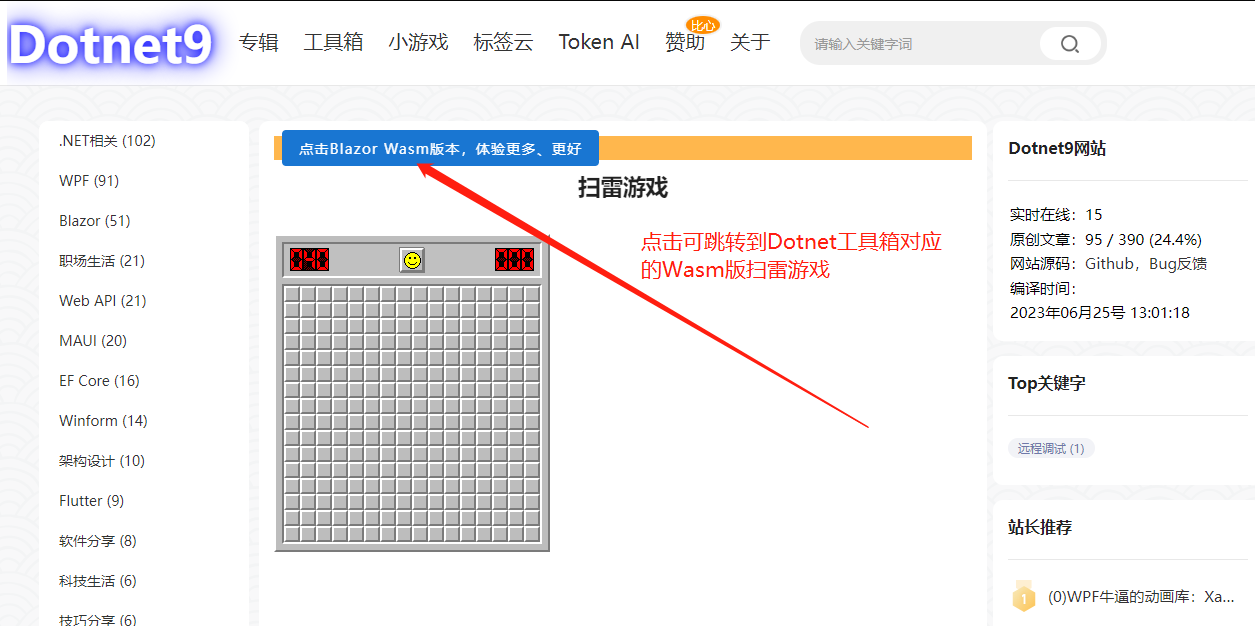
Dotnet9 uses Blazor Server. You can experience Server mode on the online tools and games pages, such as the Minesweeper game. On the game page, you can also choose to jump to the Minesweeper game on Dotnet Toolbox, which is the Wasm version. You can open the browser's developer tools (F12) to observe network requests. Below is a brief description.
On Dotnet9's Minesweeper game page, clicking the toolbar can jump to Dotnet Toolbox's Minesweeper game page:

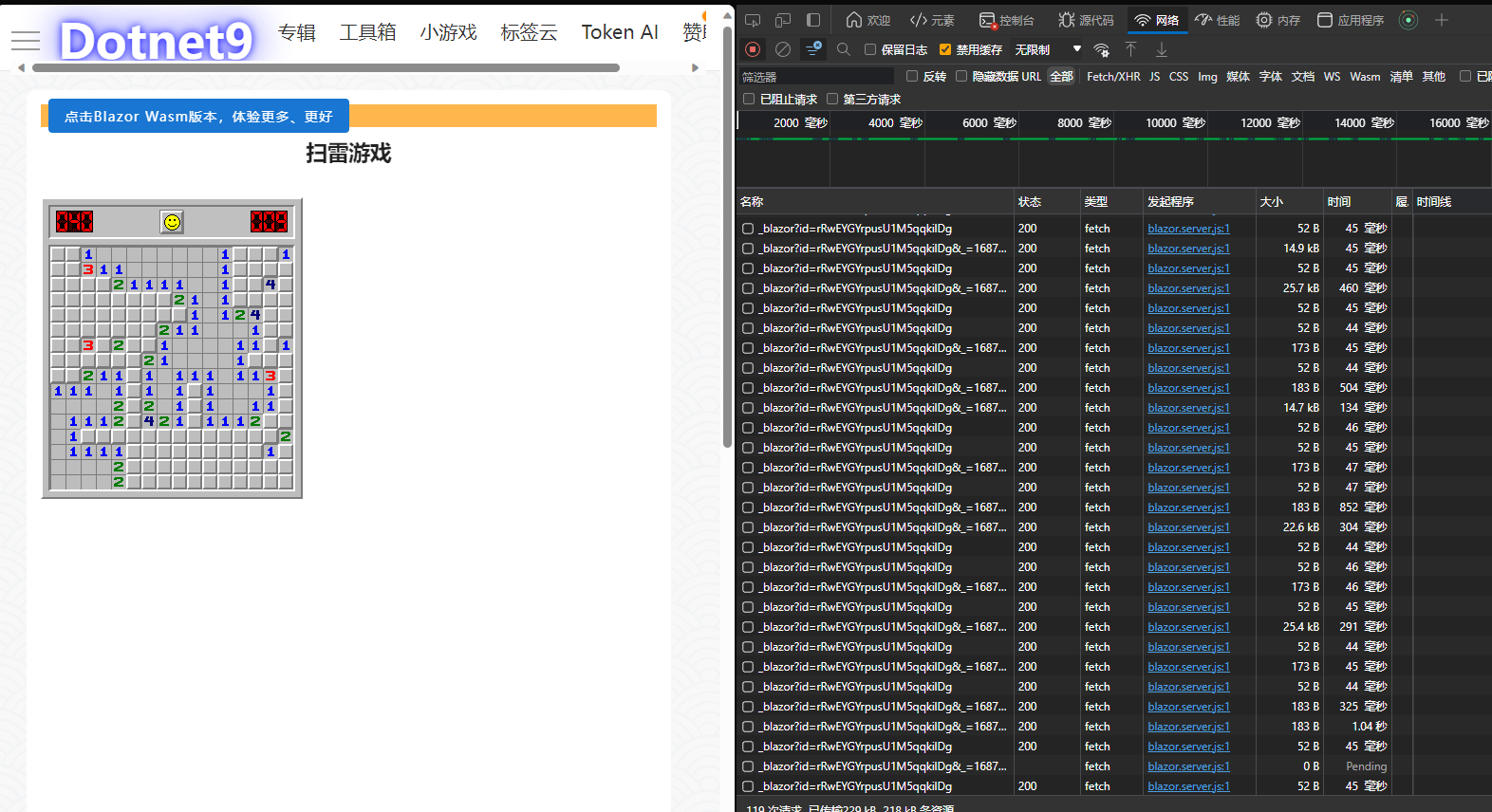
Looking at the network requests on Dotnet9's Minesweeper game page, there are almost continuous requests—absolutely outrageous and insane:

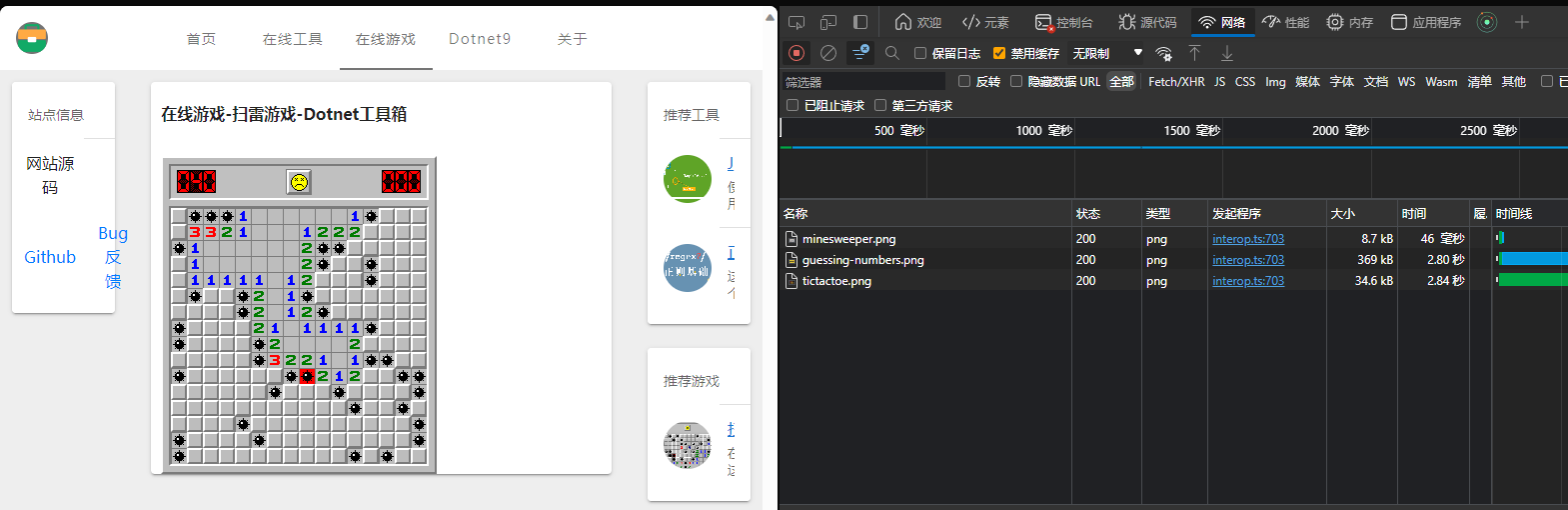
On Dotnet Toolbox's Minesweeper game page, looking at network requests, only image requests exist; there are no other requests. This is the charm of the client side (WebAssembly):

Regarding Blazor, or Blazor Server versus Blazor Wasm, many people may have only heard the names but not understand the concepts well. By asking GPT, the answers are similar to the paragraphs above. Here is a comparative list for a broader understanding:
Blazor is an open-source framework for building web applications, allowing C# and .NET to write client code. Blazor has two modes: Blazor Server and Blazor WebAssembly (Wasm). Below is a detailed comparison:
Architecture:
- Blazor Server: The UI is rendered on the server, and updates are pushed to the client via SignalR. The client maintains a persistent connection with the server to receive UI updates and handle user interactions.
- Blazor WebAssembly: The entire application code and dependencies are compiled into WebAssembly format and run on the client. The application runs independently on the client without requiring a persistent connection to the server.
Performance:
- Blazor Server: Performance depends on the server and network. Since UI rendering happens on the server, large applications or high concurrency can place significant load on the server.
- Blazor WebAssembly: Performance depends mainly on the client device. Because the application runs on the client, better response speed and lower latency are achievable.
Reliability:
- Blazor Server: Relies on server stability and availability. If the server fails or the network connection is interrupted, the application stops working.
- Blazor WebAssembly: Runs independently on the client and does not depend on server stability or availability. Even if the server is unavailable, the application can continue running.
Development Experience:
- Blazor Server: The development experience is similar to traditional server-side development, leveraging the full .NET functionality and ecosystem. However, because UI rendering is on the server, communication latency with the server must be considered when handling user interactions.
- Blazor WebAssembly: The development experience is similar to client-side development. Most C# and .NET features are available, though some may be limited. Since the application runs on the client, a more native-like user experience can be provided.
Overall, Blazor Server is suitable for applications that need rapid development and deployment, while Blazor WebAssembly is suitable for applications requiring better performance and independent operation. The choice depends on the application's requirements and priorities.
6. Final Words
In the previous two articles, some readers suggested the admin use Wasm mode. The admin has successfully deployed it. If you have any tool requirements, feel free to leave a comment. The admin will consider adding them when free, and PRs for tools and games are welcome—though limited to Blazor WASM development.
That's all for today's share. Thank you very much for reading.
- Site URL: https://dotnetools.com/
- Source Code: https://github.com/dotnet9/Dotnet9
- .NET Version: .NET 8.0.0-preview.5.23280.8
- WeChat Tech Group: Add admin WeChat (codewf), be sure to note "join group"
- QQ Tech Group: 771992300