In this article, you will see:
- Background of HTTP-based frontend authentication
- Why cookies are the most convenient storage solution and ways to manipulate cookies
- How the session scheme works and its problems
- How the token scheme works, encoding and tamper-proofing; what JWT does; the implementation and significance of refresh tokens
- Similarities and differences, pros and cons of session vs token
- What single sign-on is; implementation ideas and browser handling
1. Starting from State
1.1 HTTP Statelessness
We know that HTTP is stateless. That is, there is no way to maintain state between HTTP requests and responses; each is isolated, and it doesn't know what happened before or after.
However, in some scenarios, we need to maintain state. The most typical example is a user logging into Weibo, publishing, following, commenting – all should be under the logged-in user's state.
1.2 Marking
So what is the solution? Marking.
In school or company, from the day you enroll or join, your identity and account information are recorded, and you are issued a card. From then on, within the campus, your access control, clock-in, and purchases only require swiping this card.
1.3 Frontend Storage
This involves issuing, storing, and carrying. Issuing is easy – the login interface directly returns to the frontend. Storage requires the frontend to find a way.
The premise is that you need to carry the card with you.
There are many frontend storage methods.
- The most primitive: hanging on a global variable, but this is a "trial card" – it disappears once the page is refreshed.
- More advanced: storing in cookies, localStorage, etc. This is a "membership card" – no matter how many times you refresh, as long as the browser hasn't cleared it or it hasn't expired, you keep holding the state.
We won't expand on frontend storage here.
Once there's a place to store it, you can attach it to parameters and send it with the request.
2. Cornerstone: Cookies
But it's troublesome for the frontend to store and carry it manually. Is there a way to avoid this hassle?
Yes, cookies.
Cookies are also a form of frontend storage, but compared to other methods like localStorage, with the help of HTTP headers and browser capabilities, cookies can be seamlessly managed without frontend awareness.
The general process is:
- In the interface that provides the marker, the HTTP response's Set-Cookie header "plants" the cookie directly in the browser.
- When the browser initiates a request, it automatically carries cookies via the HTTP request's Cookie header to the interface.
2.1 Configuration: Domain / Path
You can't use a Tsinghua University campus card to enter Peking University.
Cookies restrict the "spatial scope" through two levels: Domain and Path.
The Domain attribute specifies which domains should include this Cookie when the browser sends an HTTP request. If not specified, the browser defaults to the first-level domain of the current URL, e.g., www.example.com defaults to example.com, and from then on, any subdomain of example.com will also carry this Cookie. If the server specifies a domain in the Set-Cookie field that does not belong to the current domain, the browser will reject the Cookie.
The Path attribute specifies which paths should include this Cookie when the browser sends an HTTP request. As long as the browser finds that the Path attribute is the beginning part of the HTTP request path, it will include the Cookie in the header. For example, if the PATH attribute is
/, then a request to/docswill also include the Cookie. Of course, the domain must match.
2.2 Configuration: Expires / Max-Age
Once you graduate, the card becomes invalid.
Cookies can also limit the "temporal scope" via Expires or Max-Age.
The Expires attribute specifies a specific expiration time. Once reached, the browser will no longer retain the Cookie. Its value is in UTC format. If not set or set to null, the Cookie is only valid for the current session (i.e., the browser window closes, the current session ends, and the Cookie is deleted). Also, the browser determines expiration based on local time, so it is not guaranteed that the Cookie will expire exactly at the server-specified time.
The Max-Age attribute specifies the number of seconds from now the Cookie should exist, e.g., 60 * 60 * 24 * 365 (one year). After this time, the browser will no longer retain the Cookie.
If both Expires and Max-Age are specified, Max-Age takes precedence.
If the Set-Cookie field does not specify Expires or Max-Age, the Cookie is a Session Cookie – it only exists for the current session; when the user closes the browser, the browser will no longer retain the Cookie.
2.3 Configuration: Secure / HttpOnly
Some schools require the card to be in a holder before swiping (weird rule, just imagine); some schools don't allow stickers on the card.
Cookies can limit the "usage method".
The Secure attribute specifies that the browser should only send this Cookie to the server under the encrypted HTTPS protocol. On the other hand, if the current protocol is HTTP, the browser automatically ignores the Secure attribute from the server. This attribute is just a switch; no value is needed. If the communication is over HTTPS, the switch automatically turns on.
The HttpOnly attribute specifies that the Cookie cannot be accessed via JavaScript scripts – mainly Document.cookie, XMLHttpRequest object, and Request API cannot read it. This prevents the Cookie from being read by scripts; it is only sent when the browser makes an HTTP request.
2.4 Reading/Writing Cookies via HTTP Headers
So how does HTTP write and deliver cookies and their configurations?
The HTTP response's Set-Cookie header writes "one (and only one)" cookie to the browser, in the format cookie key-value + configuration key-values. For example:
Set-Cookie: username=jimu; domain=jimu.com; path=/blog; Expires=Wed, 21 Oct 2015 07:28:00 GMT; Secure; HttpOnly
What if you want to set multiple cookies at once? Provide multiple Set-Cookie headers (duplicates are allowed in one HTTP response).
Set-Cookie: username=jimu; domain=jimu.com
Set-Cookie: height=180; domain=me.jimu.com
Set-Cookie: weight=80; domain=me.jimu.com
The HTTP request's Cookie header is used by the browser to send all cookies that meet the current "spatial, temporal, usage" conditions to the server at once. Since the browser does the filtering, configuration content does not need to be sent back; only key-value pairs are needed.
Cookie: username=jimu; height=180; weight=80
2.5 Reading/Writing Cookies on the Frontend
The frontend can create cookies itself. If the server-created cookie does not have HttpOnly, then congratulations – you can also modify the cookie it gave.
Calling document.cookie can create or modify a cookie. Like HTTP, one document.cookie operation can manipulate only one cookie at a time.
document.cookie = 'username=jimu; domain=jimu.com; path=/blog; Expires=Wed, 21 Oct 2015 07:28:00 GMT; Secure; HttpOnly';
Calling document.cookie can also read cookies. Again like HTTP, it reads all non-HttpOnly cookies.
console.log(document.cookie);
// username=jimu; height=180; weight=80
(Why do reads and writes behave differently for the same attribute? Understand get/set.)
2.6 Cookies as the Foundation for Maintaining HTTP Request State
After understanding cookies, we know that cookies are the most convenient way to maintain HTTP request state. Most frontend authentication issues are solved with cookies. Of course, other storage methods can be chosen (we'll mention them later).
Now that we have a storage tool, what's next?
3. Application Scheme: Server-Side Session
Now recall what happens when you swipe your card?
Actually, your card only stores an ID (maybe your student number). When swiped, the property system queries your information and account to decide whether you can enter or which account to deduct from for the chicken leg.
This operation, in frontend/backend authentication systems, is called session.
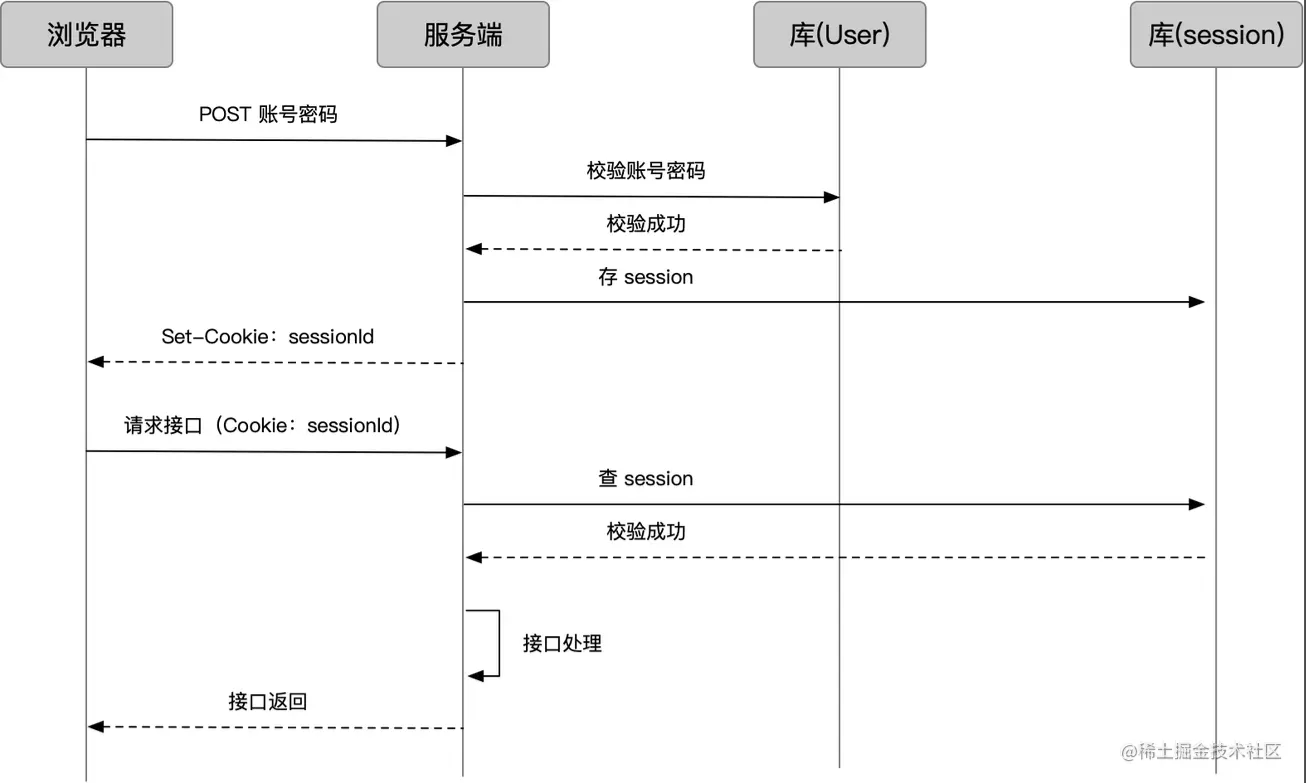
Typical session login/verification flow:

- The browser sends account and password; the server checks the user database to verify.
- The server stores the user's login state as a Session and generates a sessionId.
- Through the login interface response, the sessionId is set as a cookie.
- After that, when the browser requests business interfaces, the sessionId is carried with the cookie.
- The server checks the session by sessionId.
- On success, normal business processing is done and results are returned.
3.1 Session Storage Methods
Obviously, the server only gives the cookie a sessionId, while the session content (possibly including user info, session status, etc.) needs to be stored somewhere. The storage methods include:
- Redis (recommended): In-memory database. Key-value storage fits the sessionId-sessionData scenario, and access is fast.
- Memory: Stored in variables. Disappears when the server restarts.
- Database: Ordinary database. Performance is not high.
3.2 Session Expiration and Destruction
Simply destroy the stored session data.
3.3 Session Distribution Issues
Usually, the server is clustered, and user requests go through load balancing, which may hit different machines. If the machine that handles subsequent requests is different from the one that handled the login request, or if the login request's machine goes down, the session becomes invalid.
There are several solutions:
- From the "storage" perspective, centralize session storage. If we use an independent Redis or database, we can store all sessions in one location.
- From the "distribution" perspective, make requests from the same IP always hit the same machine under load balancing. For nginx, ip_hash configuration can achieve this.
But the first method is usually adopted because the second effectively reduces load balancing and still does not solve the "requested machine down" issue.
3.4 Session Handling in Node.js
The diagram above makes it clear: the server needs to implement reading and writing cookies and sessions, which involves a lot of work. In npm, there are packaged middleware, such as express-session - npm. Usage is omitted here.
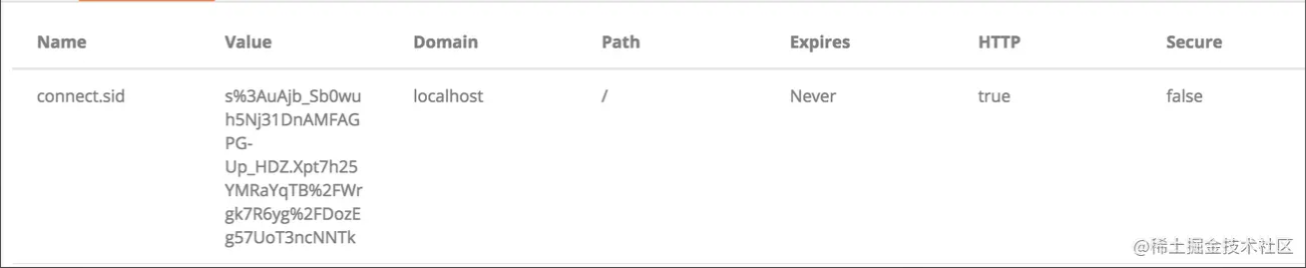
This is the cookie it sets:

express-session - npm mainly implements:
- Encapsulates cookie read/write operations and provides configuration options for fields, encryption, expiration, etc.
- Encapsulates session storage/access operations and provides configuration options for storage method (memory/redis), storage rules, etc.
- Provides a session attribute on
req, controlling set/get and responding to cookie and session storage, along with some methods onreq.session.
4. Application Scheme: Token
Maintaining sessions places a heavy burden on the server; we have to store them somewhere, consider distribution, and even set up a separate Redis cluster. Is there a better way?
I remember in school, before campus card technology, we all used "student ID cards." The security guard would compare the photo on the card with my face, verify the card's validity, grade, etc., and then let me in.
Think about it: for a login scenario, we don't necessarily need to store much in the session. Why not pack it directly into the cookie? Then the server doesn't have to store anything; it just verifies the "document" carried in the cookie. It can also carry some lightweight information.
This approach is often called token.

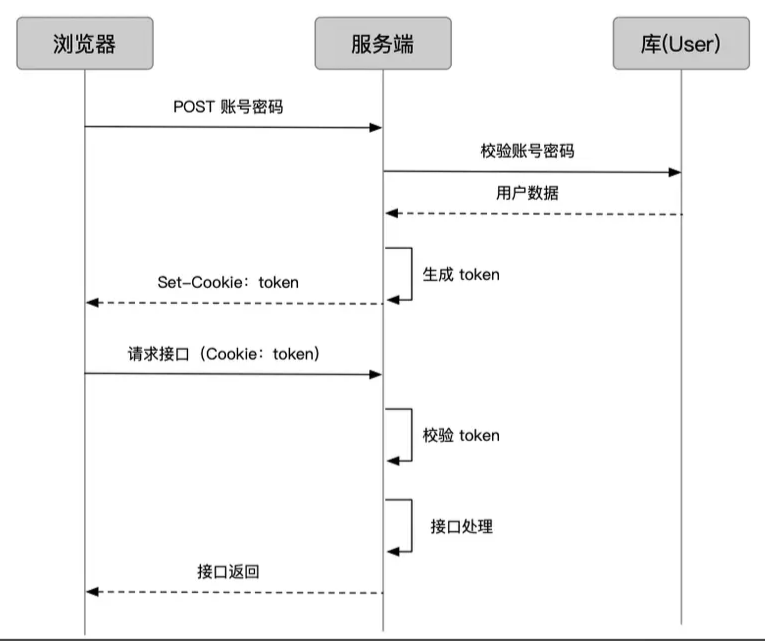
The token flow is:
- User logs in; the server verifies account and password and obtains user info.
- Encode user info and token configuration into a token, and set it as a cookie.
- After that, when the user requests business interfaces, the token is carried via the cookie.
- The interface verifies the token's validity, then processes the business request.
4.1 Client-Side Token Storage
As mentioned earlier about cookies, cookies are not the only way to store credentials on the client. Because of token's "statelessness" – expiration and usage restrictions are embedded inside the token – there is less reliance on cookie management capabilities, giving clients more freedom in storage. However, the mainstream method for web applications is still to store it in cookies, as it requires less concern.
4.2 Token Expiration
How do we control token validity? Simply embed an "expiration time" with the data; validate it when checking.
4.3 Token Encoding
Encoding methods vary.
4.3.1 Base64
For example, the Node-side library cookie-session - npm
Don't get confused by the name; it's actually a token library but maintains a usage style highly consistent with express-session - npm, storing data on the session.
In the default configuration, when I give it a userid, it stores it like this:

Here, eyJ1c2VyaWQiOiJhIn0= is just the base64 of {"userid":"a"}.
4.3.2 Tamper-Proofing
What if user cdd converts
{"userid":"a"}to base64 and manually changes his token toeyJ1c2VyaWQiOiJhIn0=? Could he then directly access a's data?
Yes. So depending on the situation, if the token involves sensitive permissions, we must prevent token tampering.
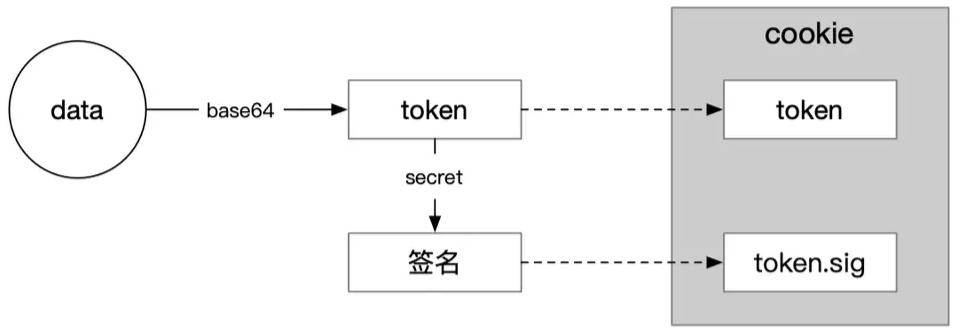
The solution is to add a signature to the token to detect if it has been tampered with. For example, in cookie-session - npm, add two configurations:
secret: 'iAmSecret',
signed: true,
This creates an additional .sig cookie, whose value is the result of computing {"userid":"a"} and iAmSecret via an encryption algorithm, commonly like HMACSHA256 Class.

Now, even if cdd can forge eyJ1c2VyaWQiOiJhIn0=, he cannot forge the sig content because he doesn't know the secret.
4.4 JWT
The above approach adds extra cookies, and the data itself lacks a standardized format. Hence, JSON Web Token Introduction - jwt.io emerged.
JSON Web Token (JWT) is an open standard that defines a compact and self-contained way for securely transmitting information between parties as a JSON object. This information can be verified and trusted because it is digitally signed.
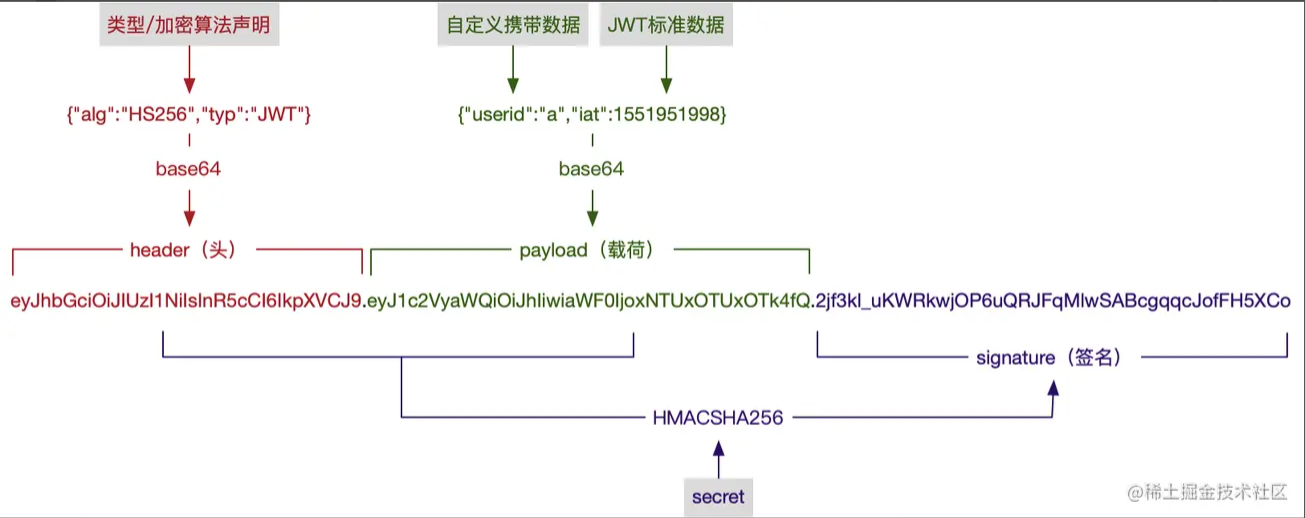
It is a mature token string generation scheme that includes data and signatures as mentioned. Let's look at what a JWT token looks like:
eyJhbGciOiJIUzI1NiIsInR5cCI6IkpXVCJ9.eyJ1c2VyaWQiOiJhIiwiaWF0IjoxNTUxOTUxOTk4fQ.2jf3kl_uKWRkwjOP6uQRJFqMlwSABcgqqcJofFH5XCo
How is this generated? See the diagram:

For options like type, encryption algorithm, and JWT standard data fields, refer to RFC 7519 - JSON Web Token (JWT).
In Node, there are related libraries: express-jwt - npm, koa-jwt - npm.
4.5 Refresh Token
As the guardian of permissions, the token's most important aspect is "security."
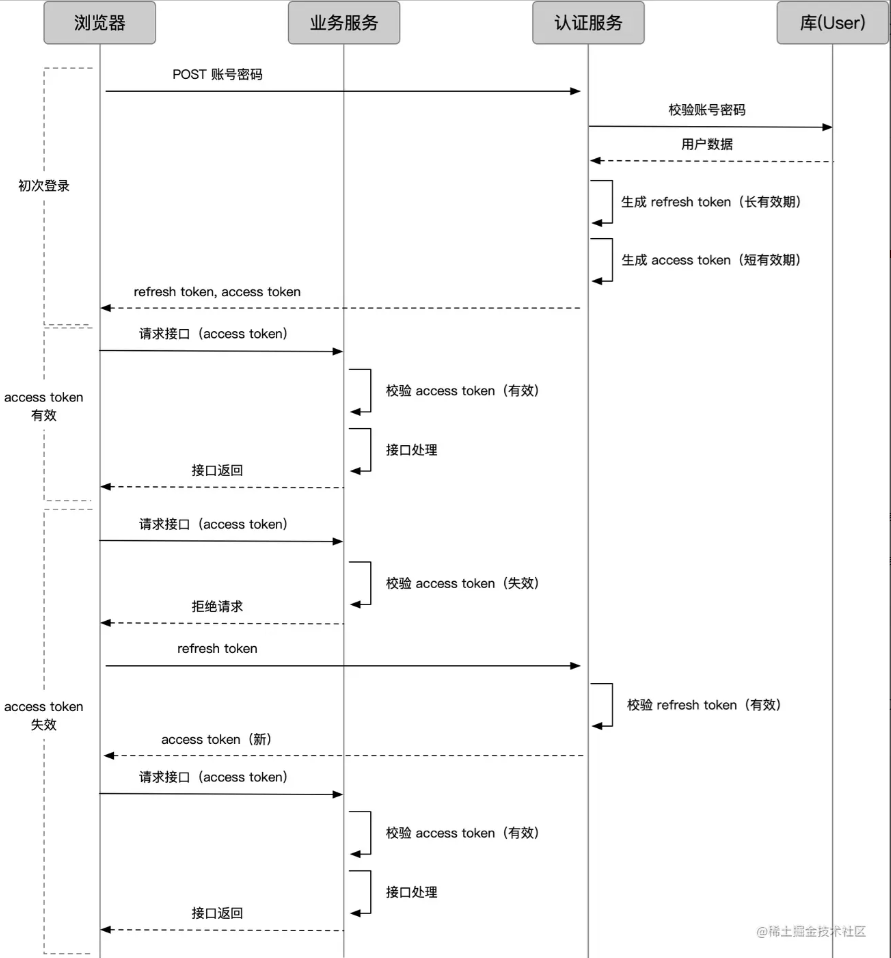
The token used to authenticate business interfaces is called the access token. The more sensitive the permissions, the shorter we want the access token's validity to be to reduce the risk of misuse. However, a very short validity leads to frequent token expiration. What to do then?
One approach is to let the user log in again to get a new token, which is not user-friendly, especially when the access token might expire in just a few minutes.
Another approach is to have another token dedicated to generating access tokens, called a refresh token.
- The access token is used to access business interfaces. Since its validity is short, the risk of misuse is lower, and we can make the request method more flexible.
- The refresh token is used to obtain new access tokens. It can have a longer validity, be handled through a separate service with stricter request methods to increase security; since it's not validated frequently, it can be handled like session.
With refresh tokens, the request flow in various situations becomes:

If the refresh token also expires, the user must log in again.
4.6 Session vs Token
Session and token are fuzzy concepts at the boundaries. As mentioned earlier, refresh tokens might also be maintained in a session-like manner.
In a narrow sense, we usually consider session as an authentication scheme where the cookie holds an ID and data is stored server-side, while token is an authentication scheme where the client can store the data anywhere (the data is embedded in the token). The comparison between session and token essentially compares "storing on client via cookie vs storing elsewhere" and "storing data on server vs not storing."
4.6 Store on Client via Cookie vs Elsewhere
Storing via cookies is convenient and worry-free, but has clear problems:
- In browsers, cookies work (and tokens often use cookies), but what about non-browser environments where cookies don't exist?
- Cookies are automatically sent by the browser under the domain, which makes them susceptible to CSRF attacks (Front-end Security Series (2): How to Prevent CSRF Attacks? - Meituan Technical Team).
Storing elsewhere can solve scenarios without cookies; manually passing via parameters can avoid CSRF attacks.
4.7 Server-Side Store Data vs Not Store Data
- Store data: The request only needs to carry an ID, which significantly shortens the authentication string and reduces request size.
- Not store data: No need for server-side comprehensive solutions and distributed handling, reducing hardware costs; avoids verification delays caused by querying the database.
5. Single Sign-On
We've already seen that within a same-domain client/server authentication system, credentials carried by the client maintain logged-in state for a period.
But as business lines increase, we may have multiple systems spread across different domains. We need the ability to "log in once, use all systems," known as "Single Sign-On" (SSO).
5.1 "Fake" SSO (Same Primary Domain)
If all business systems share the same primary domain, e.g., wenku.baidu.com, tieba.baidu.com, it's easy. You can set the cookie domain to the primary domain baidu.com. Baidu does exactly this.

5.2 "Real" SSO (Different Primary Domains)
For example, a trendy company like Didi owns domains like didichuxing.com, xiaojukeji.com, didiglobal.com. Setting cookies across these is completely impossible to bypass.
If this scenario can achieve "log in once, use all systems," that's true SSO.
In this scenario, an independent authentication service is needed, often called SSO.
Complete flow from "logging in via System A to using System B without logging in again"

- User enters System A without a login credential (ticket). System A redirects them to SSO.
- SSO hasn't logged in yet, so there's no credential under the SSO system (note: this is different from ticket A earlier). The user enters account and password to log in.
- After successful account verification, SSO does two things via the response: issue a credential under the SSO system (recording the user's login status on SSO) and issue a ticket.
- The client gets the ticket, saves it, and requests System A's interface with it.
- System A verifies the ticket, and on success, processes the business request normally.
- Now the user first enters System B, which has no login credential (ticket). System B redirects to SSO.
- SSO has already logged in (has credential under its system), so it does not require another login; it just issues a ticket.
- The client gets the ticket, saves it, and requests System B's interface with it.
5.3 Complete Version: Considering the Browser
The process above seems fine and works in many apps, but in browsers it may not be ideal.
Look here:

For the browser, how to store the data returned from the SSO domain so that it can be sent when accessing A? Browsers have strict cross-domain restrictions; methods like cookies and localStorage are domain-limited.
This requires A to provide a way to store credentials under domain A. Typically, we do this:

In the diagram, the current domain of the browser is marked by color. Pay attention to changes in the gray background explanatory text.
- Under the SSO domain, SSO does not directly return the ticket via an interface; instead, it redirects to an interface of System A using a URL with a code. This interface is usually agreed upon when A registers with SSO.
- The browser is redirected to domain A with the code, accessing A's callback interface. The callback interface exchanges the code for a ticket.
- This code is different from the ticket; it is one-time, exposed in the URL, solely for passing and converting to a ticket, then invalidated.
- After the callback interface gets the ticket, it sets a cookie under its own domain.
- In subsequent requests, the ticket from the cookie is parsed and sent to SSO for verification.
- The same happens for System B.
6. Summary
- HTTP is stateless; to maintain state across requests, the frontend needs to store markers.
- Cookies are a well-established marker method, operated via HTTP headers or JavaScript, with corresponding security policies, forming the basis of most state management schemes.
- Session is a state management scheme where the frontend stores an ID via cookie, and the backend stores data; however, the backend must handle distribution issues.
- Token is another state management scheme that does not require backend storage – data is stored entirely on the frontend, freeing the backend and providing flexibility.
- Token encoding techniques typically use base64 or add encryption algorithms for tamper-proofing; JWT is a mature encoding scheme.
- In complex systems, tokens can be split into service tokens and refresh tokens to balance security and user experience.
- The comparison between session and token essentially compares "use cookie or not" and "store data backend or not."
- Single sign-on requires different domains to achieve "log in once, use all systems," typically via an independent SSO system that records login state and issues tickets, with each business system cooperating to store and verify tickets.