
Official Explanation of Blazor
Blazor allows you to use C# instead of JavaScript to build interactive Web UI. Blazor applications are composed of reusable Web UI components implemented using C#, HTML, and CSS. Both client and server code are written in C#, allowing you to share code and libraries.
Blazor is a framework for building interactive client-side web UI with .NET:
- Use C# instead of JavaScript to create rich, interactive UI.
- Share server-side and client-side application logic written in .NET.
- Render UI as HTML and CSS to support many browsers, including mobile browsers.
- Integrate with modern hosting platforms such as Docker.
Client-side web development with .NET offers the following advantages:
- Write code in C# instead of JavaScript.
- Leverage the existing .NET library ecosystem.
- Share application logic between server and client.
- Benefit from .NET’s performance, reliability, and security.
- Stay productive on Windows, Linux, and macOS using Visual Studio.
- Build on a stable, feature-rich, and easy-to-use set of common languages, frameworks, and tools.
Seeing this, some friends might be ready to throw away their snacks – indeed, some parts are exaggerated. At least that bit about VS working efficiently on three platforms? Hmm… let’s keep eating our snacks.
Blazor Vs MVC
What is MVC
Official explanation: ASP.NET Core MVC is a rich framework for building web apps and APIs using the Model-View-Controller design pattern.
Key point: Blazor is interactive Web UI, while MVC is for web apps and APIs.
What is Interactive Web UI
After searching Google and Baidu, there is no explicit explanation – even Wikipedia is confused.
Let’s try to understand: interactive Web UI focuses on interaction. Blazor’s official explanation says it replaces JavaScript with C#. So let’s look at what JavaScript can do. I’ll grab a list from Baidu:
- Embed dynamic text in HTML pages
- Respond to browser events
- Read and write HTML elements
- Validate data before it is submitted to the server
- Detect visitor browser information, control cookies (including creation and modification)
With these basic capabilities, users no longer have to jump around between static pages – indeed, the experience is much better.
What Advantages Does Blazor Have
It provides some interactive capabilities, no longer purely static pages. Although MVC can achieve the same effect using JavaScript, you need to master JavaScript, and even learn jQuery, Angular, Vue, etc. Blazor provides these interactive capabilities using C#.
That’s the hype, but can you really go 100% C#? That’s tough – you’ll run into various issues like compatibility, performance, etc. So, can we just not use it? Wait, there’s more below.
Blazor Vs Modern Frontend (Angular, Vue, etc.)
Let’s compare a few aspects.
Debugging
- Blazor: Visual Studio + F5, VS Code/command line tools +
dotnet watch
Much faster than WebPack, roughly similar to Vite.
In non‑complex scenarios Hot Reload works, but there are too many weird issues – the outlook is good, but for now it’s Ctrl+F5 or use the command line.
VS 2022’s Ctrl+F5 already supports Hot Reload.
- Modern Frontend: Webpack/Vite
Full Ecosystem (Batteries Included)
Taking Vue as an example, the Vue ecosystem includes Vue CLI, Vue Router, Vuex.
Blazor:
- CLI: dotnet CLI
- Router: Microsoft.AspNetCore.Components.Routing.Router
- Vuex: Blazor state management – the difference is that WASM state is kept in browser memory, while Server state is kept in server memory. Moreover, Blazor’s state management is more powerful by leveraging .NET capabilities: native support for persistent storage, cross‑circuit preservation (shared server memory in Server mode), and ASP.NET Core protected browser storage (Server‑only feature).
Component Libraries
Both sides have mainstream libraries like Bootstrap, Ant Design, Material Design, etc. However, due to years of accumulation in modern frontend, there is indeed a gap in quality.
Apart from richness, Blazor allows components to be invoked and loaded by JavaScript, generating Angular or React components.
Although this seems somewhat contradictory to replacing JavaScript with C#, integrating into the broader ecosystem is still a good thing.
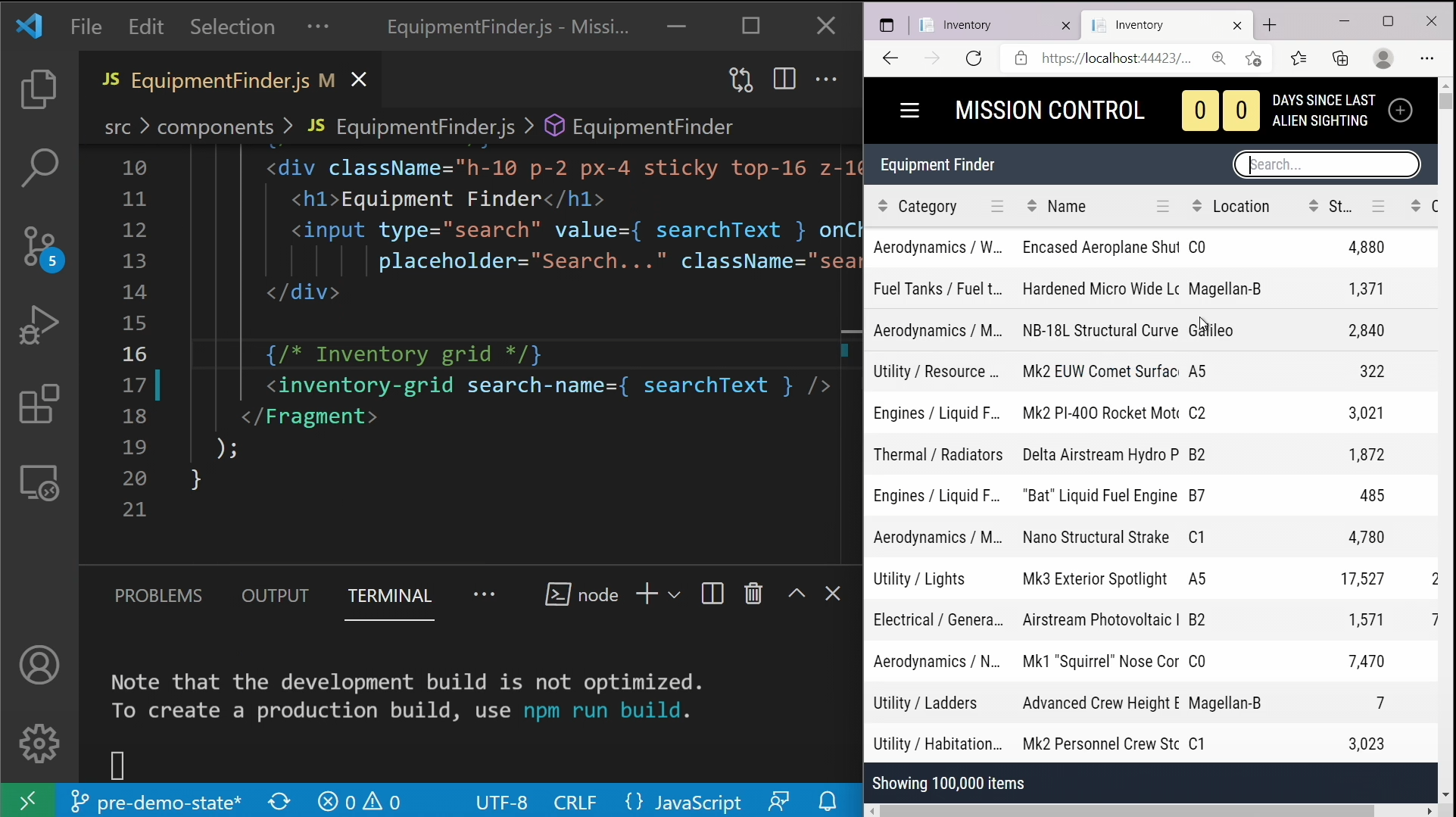
The image below shows Blazor’s inventory-grid Component being used in React (and also possible in Angular):
Even more amazing: the Blazor Component reused in React also supports Hot Reload. Let’s not discuss how good Hot Reload is right now; the direction itself is worth looking forward to for Hot Reload’s future.

It’s not just for providing reusable components to React – it also works for WPF.

Third-Party Libraries
Let’s compare a few commonly used frontend libraries.
- Networking: Modern frontend has axios, Blazor has HttpClient.
- Data manipulation: Modern frontend has Lodash, Blazor has Linq.
- Time: Modern frontend has moment.js, Day.js; Blazor has the DateTime family.
- Reactive programming: Modern frontend has rx.js, Blazor has Rx.Net (I haven’t used it – theoretically most .NET libraries work; feel free to correct me).
- Mocking: Modern frontend has Mock.js, Blazor has Moq. Besides mocking, both sides also have end‑to‑end testing tools.
In comparison, .NET actually has some advantages. Is it perfect? Of course not – let’s talk about weaknesses.
- Charts: Modern frontend has ECharts, etc. Blazor has nothing to say.
Although Blazor currently lacks a mature, free charts component library, because Blazor can interact with JS, calling ECharts is quite simple – it just requires a bit of hands‑on skill.
- Rich text editors, drag‑and‑drop…
- Blazor curses and leaves the chat…
Package Management
- Blazor: NuGet
- Modern frontend: NPM, Yarn
Performance
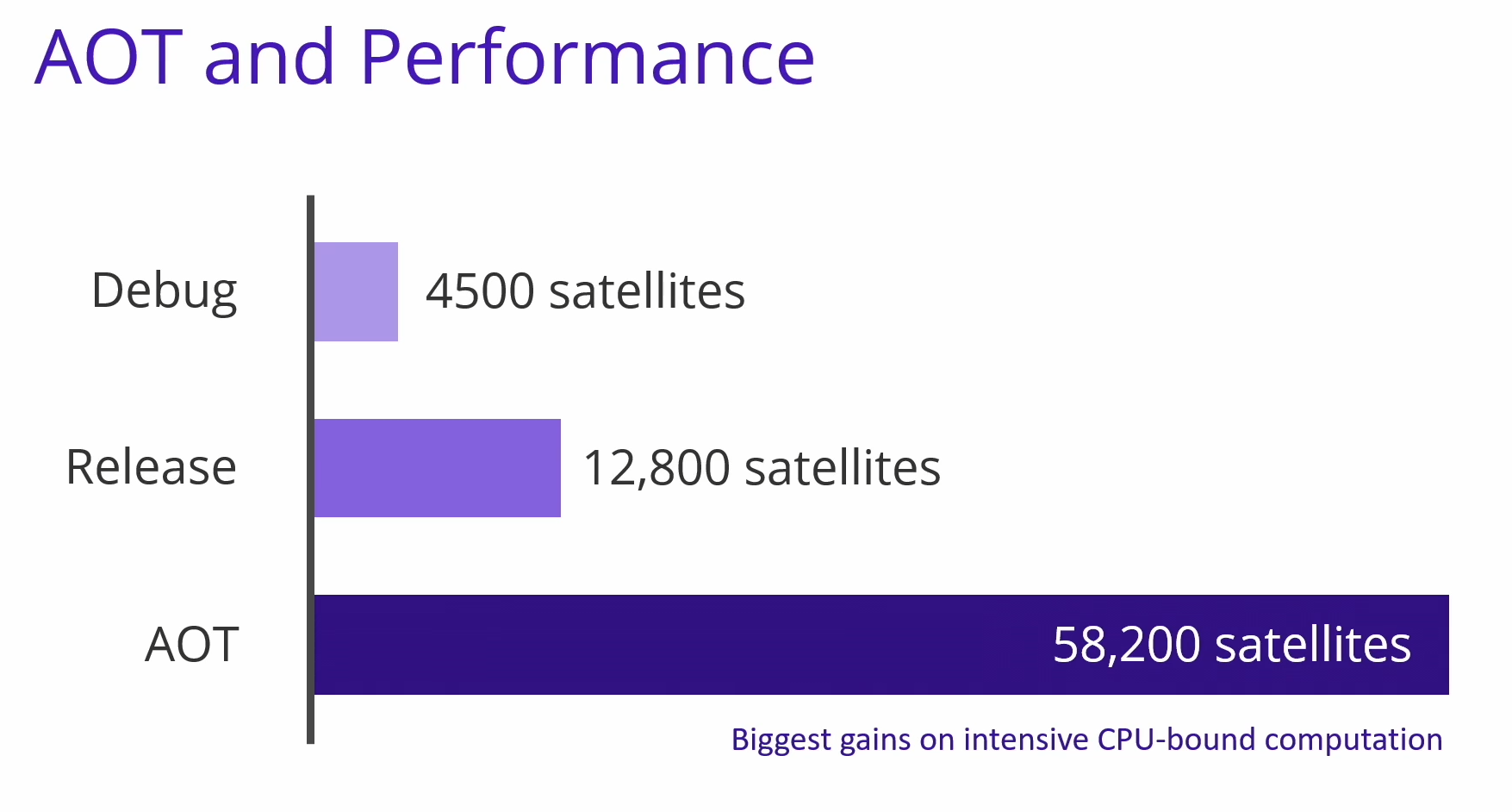
The data isn’t intuitive – let’s look at a screenshot from .NET Conf 2021:

Is there quantitative data? Yes:

Video link: https://sec.ch9.ms/ch9/daba/468d5211-982b-4c86-8b51-e1c8824edaba/dotNETConfNewBlazorWebAssembly_high.mp4
Does AOT solve everything? Not really – at least the application size increases significantly, but that doesn’t prevent AOT from solving specific problems. The point is to choose the right technology for the right scenario, not blindly.

Is That All?
Of course not – this comparison is unfair to Blazor because Blazor, standing on .NET’s shoulders, has many more highlights: native support for generics, DI, object‑oriented design (even though TS also has it), countless .NET libraries, cross‑platform applications (MAUI), etc.
Really, we shouldn’t only see Blazor’s disadvantages – it’s also exciting to see how far a frontend built on .NET can go. Isn’t that something we’re looking forward to?
At this point, some .NET veterans may bring up Silverlight. Yes, but this time WASM no longer requires downloading a plugin.
Web Assembly Vs Server (Server‑Side Rendering)
Web Assembly: WebAssembly is a new coding method that can run in modern web browsers. It is a low‑level assembly‑like language with a compact binary format that can run at near‑native performance and provides a compilation target for languages like C/C++ so they can run on the web. It is also designed to coexist with JavaScript, allowing both to work together.
Server (Server Side Render - SSR): Render components into HTML strings on the server, send them directly to the browser, and finally “activate” those static markers into fully interactive applications on the client.
Why Use SSR
The main advantages of server‑side rendering (SSR) are:
- Better SEO – because search engine crawlers can directly view fully rendered pages.
- Faster time‑to‑content.
When to Use SSR
Using server‑side rendering (SSR) also involves some trade‑offs:
- Development constraints: browser‑specific code can only be used in certain lifecycle hooks; some external libraries may require special handling to run in a server‑rendered application.
- Higher requirements for build setup and deployment: unlike fully static single‑page applications (SPA) that can be deployed to any static file server, server‑rendered applications need a runtime server environment.
- Higher server load.
Server‑Side Rendering vs Prerendering (SSR vs Prerendering)
If you’re looking into SSR only to improve SEO for a few marketing pages (e.g., /, /about, /contact), you might consider prerendering. Instead of using a web server to dynamically compile HTML in real time, prerendering simply generates static HTML files for specific routes at build time. Its advantage is simpler setup and the ability to treat your frontend as a completely static site.
Blazor Server supports prerendering.
Should You Choose Web Assembly or Server for Blazor?
Take a look at this slide from .NET Conf 2021:

Summary:
- Server requires persistent long connections and has higher UI latency.
- Web Assembly has larger download size and slower runtime performance.
What Are We Doing
This is another clichéd question: .NET covers such a wide range that it’s hard to solve every problem. After weighing the pros and cons, can we contribute a small part to the .NET ecosystem?
Open‑Source Component Library
Back to component libraries – there are already quite a few on the market. Why do we need to jump into this mud pit?
Anyone who has developed component libraries or contributed source code knows how complex writing a single component can be. Also, everyone has a different aesthetic for design. What if you like a design but no implementation exists? Starting from scratch is too tiring – so we tried something else.
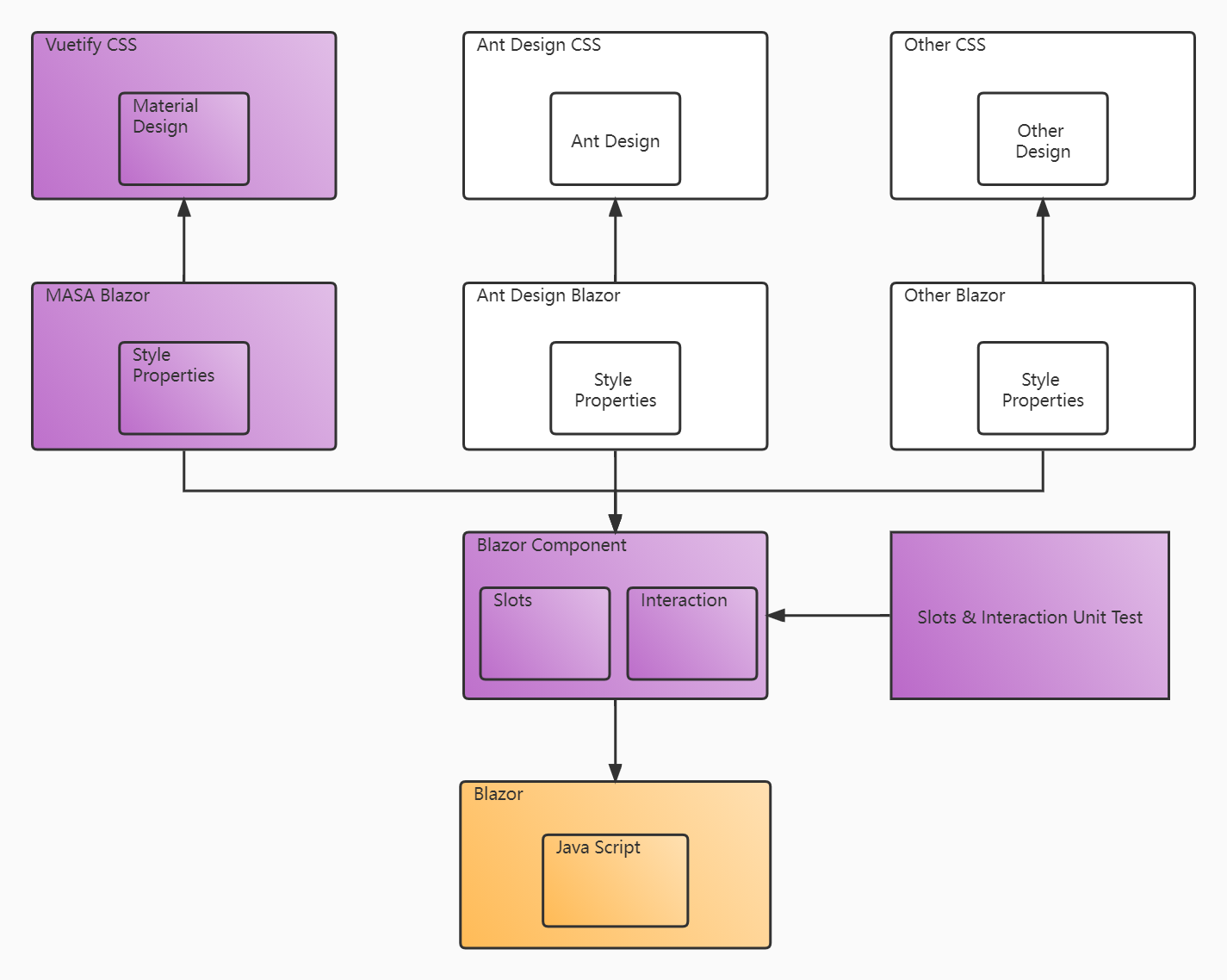
First, let’s look at the general idea:

A simple breakdown:
- Build a new component library called Blazor Component on top of Blazor.
What are its features?
- Provides only interaction, no styling.
- Standardizes DOM structure.
- Opens almost all customizable slots (concept borrowed from Vue) – allows you to replace the DOM of slots.
Unit tests for slots and interactions (currently 38%, short‑term target 80%, long‑term 90%+).
A sample project based on Material Design (style from Vuetify) that is production‑ready (our own company uses it, and it’s also used by Fortune 500 companies).
Quickly implement a new component library – just base it on a certain Design + style control attributes + special interactions.
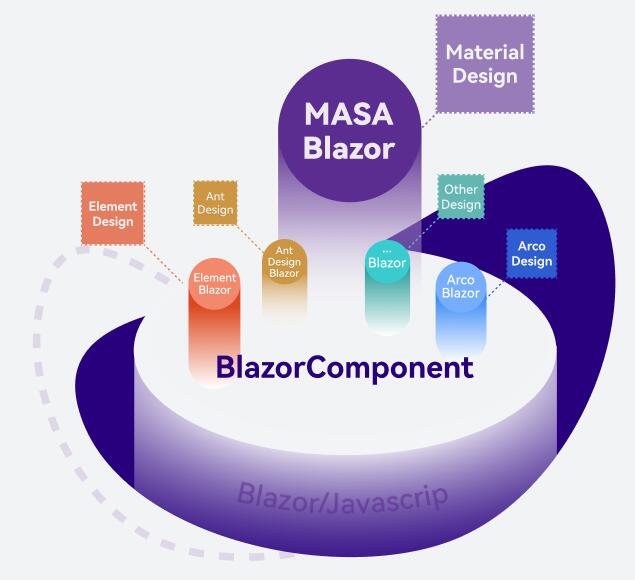
The future is worth envisioning – we hope it looks like this:
Embarrassed, I’m riding on Bytedance’s popularity.

MASA Blazor
A Blazor component library based on Blazor Component and Material Design.
- As of now, 68 basic components, with more to come.
- Pre‑built components that deeply integrate with .NET features and common composite components, such as URL + breadcrumb + menu triple linkage, advanced search, i18n, etc.
- MASA Blazor Pro provides preset layouts for various common scenarios.
- Full‑time team maintenance, quick issue response.
- Used by well‑known enterprises; the future MASA Stack product line will keep using it, continually adding new features.
- Free and open source.
We also plan to support one‑click theme switching (code switching already available), preset layouts, data display components, workflow components, etc.
MASA Blazor Pro
An admin template based on MASA Blazor. Here are a few design drafts – source code will be released together with MASA Blazor.


MASA EShop
An EShopOnDapr built with MASA Framework, using MASA Blazor Pro to provide a complete frontend/backend example.

Open source address: https://github.com/masalabs/MASA.EShop
Conclusion
In the end, no technology is perfect. After weighing the pros and cons, using it in the right scenario is what suits you best.
Whether it’s spring or winter doesn’t matter – the important thing is whether it solves your pain points right now.
Finally, a little advertisement:
MASA Blazor is coming soon – stay tuned. If you’re interested in our component library – whether contributing code, using it, or raising issues – feel free to contact us.

References
- https://dotnet.microsoft.com/apps/aspnet/web-apps/blazor
- https://docs.microsoft.com/en-us/aspnet/core/blazor/state-management?view=aspnetcore-6.0&pivots=server#persist-state-across-circuits
- https://sec.ch9.ms/ch9/daba/468d5211-982b-4c86-8b51-e1c8824edaba/dotNETConfNewBlazorWebAssembly_high.mp4
- https://developer.mozilla.org/en-US/docs/WebAssembly
- https://ssr.vuejs.org/
Welcome to join the technical communication group: MASA Stack